
1. Introduction
Thank you for choosing the SANODESK FL2 L-Shaped Height Adjustable Standing Desk. This manual provides essential information for the safe assembly, operation, and maintenance of your new desk. Please read it thoroughly before use and retain it for future reference.
2. Safety Information
To ensure safe operation and prevent damage, please observe the following:
- Do not exceed the weight limit of the desk (220 Pounds).
- Ensure proper assembly for stability.
- Use the child lock function to prevent unexpected movement.
- Keep children and pets away from the desk during operation.
- Avoid placing liquids directly on the control panel or near electrical components.
- Regularly check all screws and bolts to ensure they are tightened.
3. Package Contents
Your SANODESK FL2 L-Shaped Standing Desk package includes:
- Height-adjustable desk components (frame, desktop sections)
- Control panel and power adapter
- 4 drawers
- Side headphone hooks
- Monitor stand/shelf components
- Instruction manual
- All necessary assembly tools
4. Setup and Assembly
The desk is designed for easy assembly, with all necessary tools included. It is recommended that two people assemble the desk due to its size and weight (220 Pounds).
Assembly Options: The L-shaped desktop can be configured for either a left or right orientation to best suit your workspace. Decide on your preferred orientation before beginning assembly.
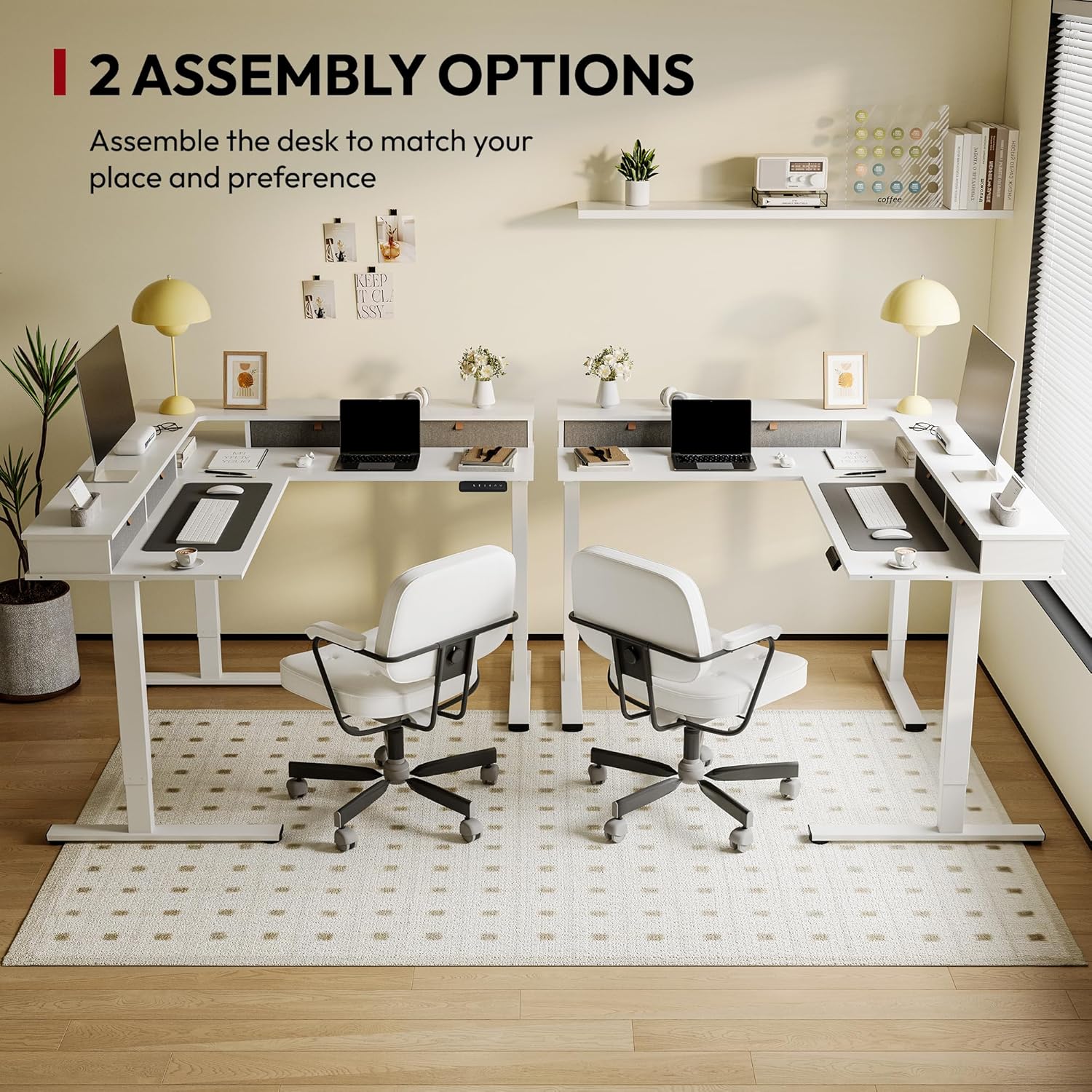
The desk can be assembled in two orientations, allowing for a left or right L-shape to fit various room layouts.
Refer to the detailed instruction manual provided in the package for step-by-step assembly guidance.
Assembly Video Guide
Official product video showcasing the assembly process and various features of the SANODESK L-Shaped Standing Desk, including its adjustable height and robust design.
5. Operating Instructions
Your SANODESK FL2 features an electric lifting mechanism for seamless height adjustment.
5.1. Height Adjustment
The desk height can be adjusted from a minimum of 28.3 inches to a maximum of 45.9 inches. Use the up and down arrows on the control panel to manually adjust the desk to your desired height.
5.2. Smart Control Panel

The intuitive control panel features a digital display, up/down arrows, and four memory preset buttons for customized height settings. It also includes sedentary reminder and anti-collision functions.
The control panel is located conveniently under the desktop and includes:
- Digital Display: Shows the current desk height.
- Up/Down Arrows: For manual height adjustment.
- Memory Presets (1, 2, 3, 4): Store up to four preferred height settings.
- Sedentary Reminder: Prompts you to change positions to promote healthier work habits.
- Child Lock: Prevents accidental adjustments.
- Anti-Collision Function: Automatically stops and slightly reverses the desk's movement if it encounters an obstacle during adjustment.
5.3. Setting Memory Presets
- Adjust the desk to your desired height using the up/down arrows.
- Press and hold one of the memory preset buttons (1, 2, 3, or 4) until the display flashes or beeps, indicating the height has been saved.
- To use a preset, simply press the corresponding button, and the desk will automatically move to the saved height.
5.4. Sedentary Reminder and Child Lock
Consult the full instruction manual for detailed steps on activating and customizing the sedentary reminder and child lock features.
Operating Video Guide
Official product video demonstrating the height adjustment, storage drawers, and overall functionality of the SANODESK L-Shaped Standing Desk with shelf and drawers.
6. Features
The SANODESK FL2 is designed with several features to enhance your productivity and comfort.
6.1. Ample Storage Space

The desk includes four spacious drawers for organizing desktop essentials, keeping your workspace tidy.
The desk boasts 4 large drawers, providing convenient storage for your office supplies and keeping your desktop organized.
6.2. All-Around Shelf Design
The integrated shelf is designed to elevate your monitors, reducing neck and shoulder strain from prolonged computer use. This improves posture and creates additional usable desk space.
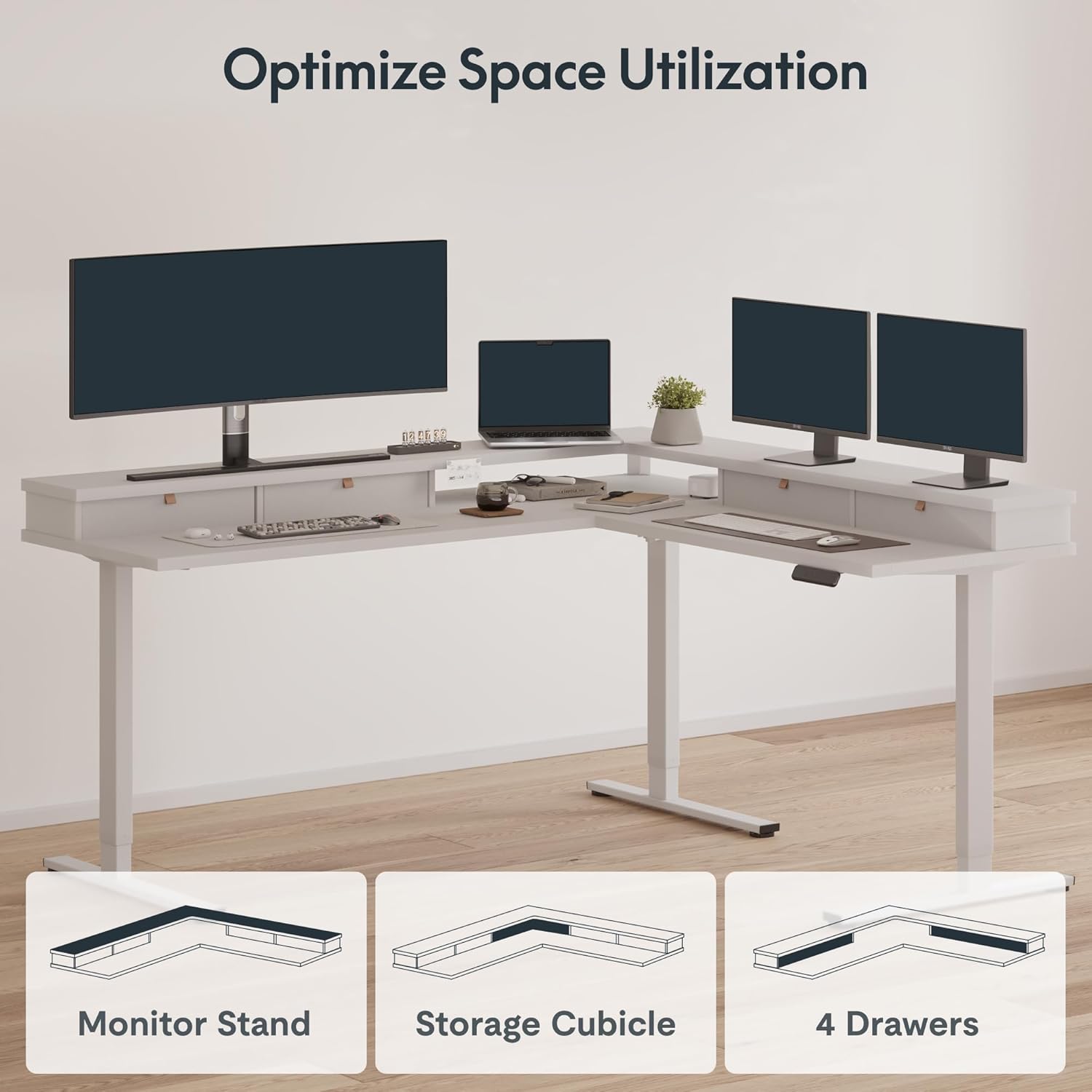
The versatile design allows for optimized space utilization with integrated monitor stands, storage cubicles, and drawers.
6.3. Side Headphone Hooks
Conveniently located side headphone hooks keep your headphones within reach and off your desk surface.
6.4. USB Charging Port
A built-in USB charging port provides easy access to power for your devices, reducing cable clutter.
7. Maintenance
To maintain the appearance and functionality of your SANODESK FL2, follow these simple guidelines:
- Cleaning: Wipe the desk surfaces with a damp cloth. Avoid harsh chemicals or abrasive cleaners.
- Inspection: Periodically check all connections and moving parts for any signs of wear or looseness. Tighten screws as needed.
- Cable Management: Ensure cables are properly managed to prevent interference with the desk's movement.
8. Troubleshooting
If you encounter any issues with your SANODESK FL2, please refer to the following common troubleshooting tips:
- Desk not moving: Check all power connections. Ensure the power cable is securely plugged into both the desk and the wall outlet.
- Uneven movement: Verify that the desk is not overloaded and that all feet are properly adjusted on an even surface.
- Error codes on display: Consult the detailed troubleshooting section in the full instruction manual for specific error code meanings and solutions.
- Anti-collision activation: If the desk stops unexpectedly, check for any obstructions in its path. Remove obstacles and try adjusting the height again.
If the problem persists, please contact SANODESK customer support.
9. Specifications
| Feature | Detail |
|---|---|
| Brand | SANODESK |
| Model Number | FL2 |
| Shape | L-Shape |
| Desk Design | Standing Desk |
| Product Dimensions | 63"D x 71"W x 29"H (Overall) |
| Color | White |
| Style | Modern |
| Base Material | Carbon Steel |
| Top Material Type | Engineered Wood |
| Special Features | Adjustable Height, Electric, Ergonomic, Rust Resistant, Scratch Resistant, Sedentary Reminder, Child Lock, Anti-Collision |
| Number of Drawers | 4 |
| Item Weight | 220 Pounds |
| Tabletop Thickness | 0.63 Inches |
| Minimum Height | 28.7 Inches |
| Maximum Height | 45.9 Inches |
| Lifting Mechanism | Electric |
| Required Assembly | Yes |
| Recommended Number of People for Assembly | 2 |
| Includes All Assembly Tools | Yes |
10. Warranty and Support
The SANODESK FL2 L-Shaped Height Adjustable Standing Desk comes with a Limited Warranty. For specific details regarding warranty coverage, please refer to the warranty card included in your package or visit the official SANODESK website.
For any questions, technical support, or warranty claims, please contact SANODESK customer service through their official channels. You can find contact information on the SANODESK website or in your product documentation.
