
1. Introduction
Thank you for choosing the INNOREL P324C Carbon Fiber Tripod. This professional-grade tripod is engineered for stability and versatility, featuring 10-layer carbon fiber legs, a 360° rotating ball head, and an Arca Swiss dovetail mount. Designed for photographers and outdoor enthusiasts, it supports a maximum load of 55lb/25kg and offers a maximum tube diameter of 32.5mm for enhanced stability. This manual provides detailed instructions for setup, operation, maintenance, and troubleshooting to ensure optimal performance and longevity of your tripod.

Figure 1.1: The INNOREL P324C Carbon Fiber Tripod with a camera and lens attached, showcasing its robust design.
2. Package Contents
Please verify that all items listed below are included in your package. If any items are missing or damaged, please contact customer support.
- P324C Tripod x 1
- Extra Quick Release Plate x 1
- Tripod Bag x 1
- Allen Key x 3
- Stainless Steel Spike x 3

Figure 2.1: Visual representation of all items included in the INNOREL P324C tripod package.
3. Specifications
Below are the key technical specifications for the INNOREL P324C Carbon Fiber Tripod:
| Feature | Specification |
|---|---|
| Model | P324C |
| Material | 10-layer Carbon Fiber (legs), Aluminum Alloy (body) |
| Max Load Capacity | 55 lb / 25 kg |
| Net Weight | 4.2 lb / 1.9 kg |
| Max Height | 65.6 in / 166.5 cm |
| Min Height | 6.9 in / 17.5 cm |
| Folded Length | 24.2 in / 61.5 cm |
| Leg Sections | 4 |
| Max Leg Tube Diameter | 32.5 mm |
| Ball Head Diameter | 1.73 in / 44 mm |
| Ball Head Tilt Angle | ±45 degrees |
| Quick Release Plate | Arca Swiss compatible |

Figure 3.1: Overview of the INNOREL P324C tripod's key specifications and features.

Figure 3.2: Illustration of the 10-layer carbon fiber tube construction and leg diameter measurements.
4. Setup
4.1. Extending and Adjusting Legs
- Unlock Leg Sections: Rotate the twist locks on each leg counter-clockwise to loosen the leg sections.
- Extend Legs: Pull out the leg sections to the desired length. The tripod features 4 sections for flexible height adjustment.
- Lock Leg Sections: Rotate the twist locks clockwise to securely fasten the leg sections. Ensure all sections are firmly locked before mounting equipment.
- Adjust Leg Angles: Press the angle adjustment button at the top of each leg to change the leg angle. The tripod offers three adjustable angles: 21°, 60°, and 82° for various shooting conditions and stability requirements.
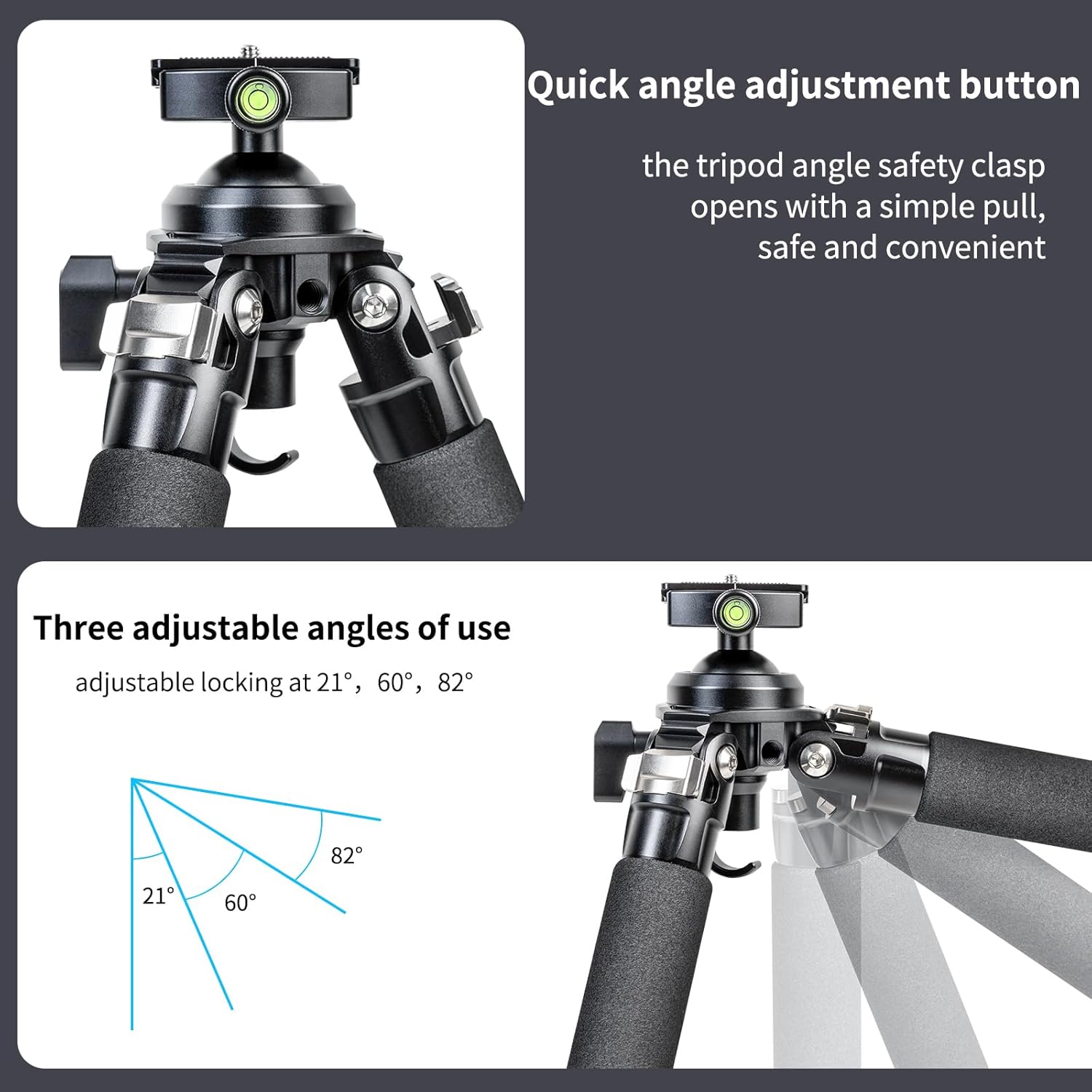
Figure 4.1: The quick angle adjustment button and the three available leg angles (21°, 60°, 82°).

Figure 4.2: Examples of the tripod's working height at low (6.9in/17.5cm), middle (15.0in/38.0cm), and high (22.8in/58.0cm) positions, and fully extended (65.6in/166.5cm).
4.2. Interchangeable Feet
The P324C tripod comes with interchangeable rubber feet and stainless steel spikes, allowing you to adapt to different terrains.
- Remove Rubber Feet: Unscrew the existing rubber feet by rotating them counter-clockwise.
- Install Spikes: Screw in the stainless steel spikes clockwise until secure. Use the provided Allen key to tighten if necessary.
- Reinstall Rubber Feet: For indoor or delicate surfaces, screw the rubber feet back on.

Figure 4.3: Demonstrates how to install the stainless steel spikes for enhanced grip on soft or uneven ground.
5. Operating Instructions
5.1. Mounting Equipment with Arca Swiss System
The tripod's quick release plate is compatible with the Arca Swiss dovetail system, ensuring secure and fast attachment of your camera or other equipment.
- Attach Quick Release Plate: Secure the quick release plate to the bottom of your camera or lens collar using the 1/4" or 3/8" screw.
- Open Clamp: Rotate the quick adjustment locking knob on the ball head's clamp counter-clockwise to open the clamp.
- Insert Plate: Slide the quick release plate (with your equipment attached) into the clamp. The unique safety stop function prevents accidental drops.
- Secure Clamp: Rotate the quick adjustment locking knob clockwise to tighten the clamp and secure your equipment. Ensure it is firmly attached before use.

Figure 5.1: The Arca Swiss standard quick release plate and the quick adjustment locking knob on the ball head.
5.2. Using the 360° Rotating Ball Head
The integrated 44mm ball head provides smooth and precise adjustments for your camera's position.
- Unlock Ball Head: Rotate the main locking knob on the ball head counter-clockwise to loosen the ball.
- Adjust Angle: Tilt and pan your camera to the desired angle. The ball head allows for ±45 degrees of tilting and 360 degrees of panoramic rotation.
- Lock Ball Head: Rotate the main locking knob clockwise to secure the ball head in position.
- Panoramic Rotation: To rotate the camera horizontally without affecting the tilt, loosen the separate panoramic base lock knob (usually located at the base of the ball head clamp) and rotate the clamp, then tighten.
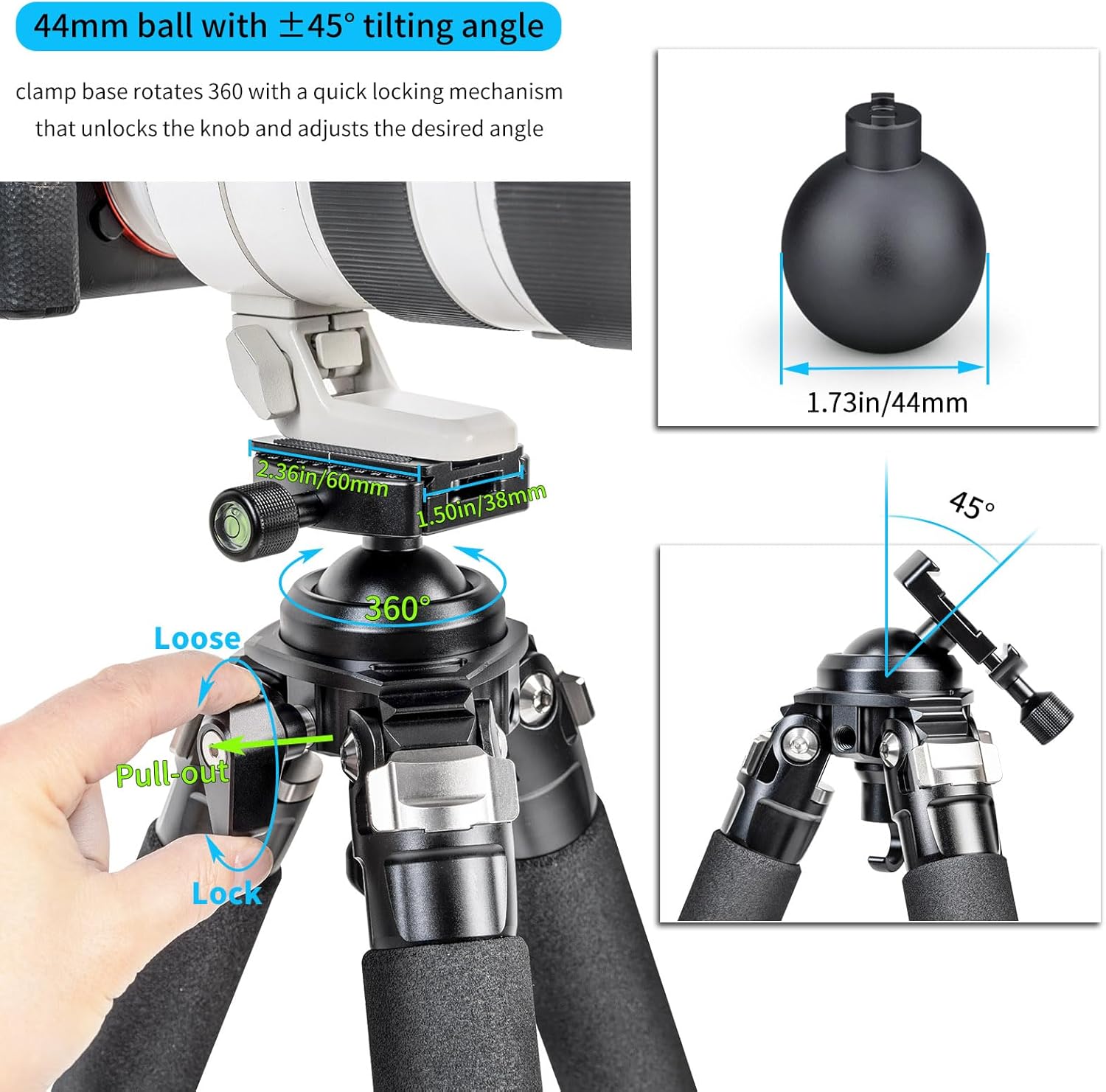
Figure 5.2: The 44mm ball head demonstrating its 360° rotation and ±45° tilting capabilities.
5.3. Using the Load-Bearing Hook
For added stability, especially in windy conditions or when using heavy equipment, you can hang a counterweight (e.g., a camera bag) from the load-bearing hook located at the bottom of the center column.

Figure 5.3: A camera bag attached to the load-bearing hook for increased stability.
6. Maintenance
Proper maintenance will extend the life and performance of your INNOREL P324C tripod.
- Cleaning: After use, especially in dusty, sandy, or wet environments, wipe down the tripod with a clean, damp cloth. For carbon fiber legs, avoid harsh chemicals that could damage the finish.
- Lubrication: Periodically check the twist locks and ball head for smooth operation. If they feel stiff, apply a small amount of silicone-based lubricant to the moving parts. Avoid over-lubricating.
- Inspection: Regularly inspect all screws, bolts, and connections for tightness. Use the provided Allen keys to tighten any loose components.
- Storage: Store the tripod in its protective bag in a dry, cool place away from direct sunlight and extreme temperatures.
7. Troubleshooting
If you encounter issues with your tripod, refer to the following common problems and solutions:
- Legs not locking securely:
Ensure the twist locks are fully tightened clockwise. Clean any dirt or debris from inside the leg sections that might prevent proper locking. - Ball head movement is stiff or loose:
Adjust the main locking knob on the ball head. If stiff, a small amount of silicone lubricant may be applied. If it remains loose after tightening, ensure no debris is obstructing the mechanism. - Tripod unstable:
Ensure all leg sections are fully extended and locked. Verify that the leg angles are set appropriately for the terrain. Use the load-bearing hook with a counterweight for added stability. Check that the quick release plate is securely fastened to both the camera and the ball head. - Quick release plate difficult to insert/remove:
Ensure the quick adjustment locking knob is fully loosened. Check for any obstructions in the clamp or on the plate.
If these steps do not resolve your issue, please contact INNOREL customer support.
8. Warranty and Support
The INNOREL P324C Carbon Fiber Tripod comes with a 2-year warranty service from the date of purchase. This warranty covers manufacturing defects and workmanship under normal use.
For warranty claims, technical support, or any inquiries regarding your product, please contact INNOREL customer support through the retailer's platform or the official INNOREL website. Please have your purchase receipt and product model number (P324C) ready when contacting support.

