
WAIKIL RQ-8870
WAIKIL Multifunctional 7-Head Electric Shaver User Manual
Model: RQ-8870
Introduction
Thank you for choosing the WAIKIL Multifunctional 7-Head Electric Shaver. This comprehensive grooming kit is designed to provide a comfortable and efficient shaving experience for various needs, including bald shaving, beard trimming, and facial cleansing. Please read this manual thoroughly before first use to ensure proper operation, maintenance, and safety.
Package Contents
Upon opening the package, please verify that all components are present and in good condition:
- 1 x Main Shaver Unit (with 7-Head Rotary Shaver attachment)
- 1 x Facial Massage Brush attachment
- 1 x Cleaning Brush attachment
- 1 x Nose Hair Trimmer attachment
- 1 x Sideburns Trimmer attachment (Hair Clipper)
- 4 x Limit Combs (for Sideburns Trimmer)
- 1 x Charging Base
- 1 x USB Type-C Charging Cable
- 1 x Cleaning Brush (small)
- 1 x User Manual

Image: The WAIKIL Multifunctional 7-Head Electric Shaver main unit, along with its various interchangeable heads including the facial massage brush, cleaning brush, nose hair trimmer, sideburns trimmer, and four limit combs. The charging base and a small cleaning brush are also shown.
Safety Information
For your safety and to ensure the longevity of your device, please adhere to the following precautions:
- Always keep the shaver away from water when charging. Do not use while charging.
- Avoid direct contact of the charging pins with water or other liquids.
- Clean the shaver after each use to prevent bacterial growth and maintain hygiene.
- Always unplug the shaver and allow it to cool before storing.
- Do not use the shaver on irritated, broken, or infected skin. Consult a dermatologist if you have skin conditions.
- Keep out of reach of children.
- Do not disassemble or attempt to repair the shaver yourself. Contact customer support for assistance.
- Use only the provided charging cable and base.
Setup and Charging
Initial Charge
Before first use, fully charge the shaver. The LED display will show the battery percentage.
- Connect the USB Type-C charging cable to the charging base.
- Plug the other end of the USB cable into a compatible USB power source (e.g., power bank, adapter, laptop USB port).
- Place the shaver onto the charging base. Ensure the charging contacts align.
- The LED display on the shaver will illuminate, indicating charging progress. A full charge takes approximately 2 hours and provides up to 90 minutes of working time.

Image: The WAIKIL electric shaver resting on its charging base. The shaver's LED display clearly shows the battery percentage, indicating charging status. Icons for power bank, adapter, and laptop illustrate compatible charging methods.
Attaching/Detaching Heads
The shaver comes with multiple interchangeable heads. To switch between them:
- Hold the main shaver unit firmly.
- To remove an attachment, gently pull it upwards from the main unit.
- To attach a new head, align the head with the main unit and push it down until it clicks into place.
Operating Instructions
General Operation
- Press the power button to turn the shaver ON or OFF.
- The LED display will show the current battery percentage.
Using the 7-Head Rotary Shaver
This attachment is ideal for bald head shaving and large areas of facial hair.
- Dry Shave: Ensure your skin is clean and dry. Move the shaver in small, circular motions over the area to be shaved.
- Wet Shave: Apply shaving cream, gel, or foam to your skin. Move the shaver in small, circular motions. Rinse the shaver head under running water during and after use for optimal performance.
- The 7 floating heads adapt to the contours of your head and face for a close shave.

Image: A detailed view of the 7D Floating Head system. It illustrates the 360-degree floating cutter heads, the double-ring knife net for efficient cutting, and the precision steel blades designed for a close and smooth shave.
Using Other Attachments
- Sideburns Trimmer (Hair Clipper): Attach the trimmer head. Use with or without the provided limit combs (3mm, 6mm, 9mm, 12mm) to trim sideburns, beards, or hair to desired lengths. Move the trimmer against the direction of hair growth.
- Nose Hair Trimmer: Insert the trimmer tip gently into your nostril or ear canal. Move it slowly to trim unwanted hair. Do not insert too deeply.
- Facial Cleansing Brush: Attach the brush head. Apply your favorite facial cleanser to your face or the brush. Gently move the brush in circular motions across your face to cleanse and exfoliate.
- Facial Massage Brush: Attach the massage head. Use it to gently massage your face, promoting blood circulation and relaxation. Can be used with or without skincare products.
Maintenance and Cleaning
Regular cleaning ensures optimal performance and hygiene of your shaver.
Cleaning the Shaver Heads
The shaver is IPX5 waterproof, allowing for full body washable cleaning.
- Turn off the shaver and detach the head you wish to clean.
- For the 7-Head Rotary Shaver:
- Open the net knife upwards in turn for each individual head.
- Turn counter-clockwise to open the center knife net.
- Take out the center knife net upwards.
- Rinse the shaver heads and the main unit under running water.
- Use the small cleaning brush to remove any stubborn hair debris.
- For other attachments (Trimmer, Brushes): Rinse them under running water.
- Shake off excess water and allow all parts to air dry completely before reassembling or storing.
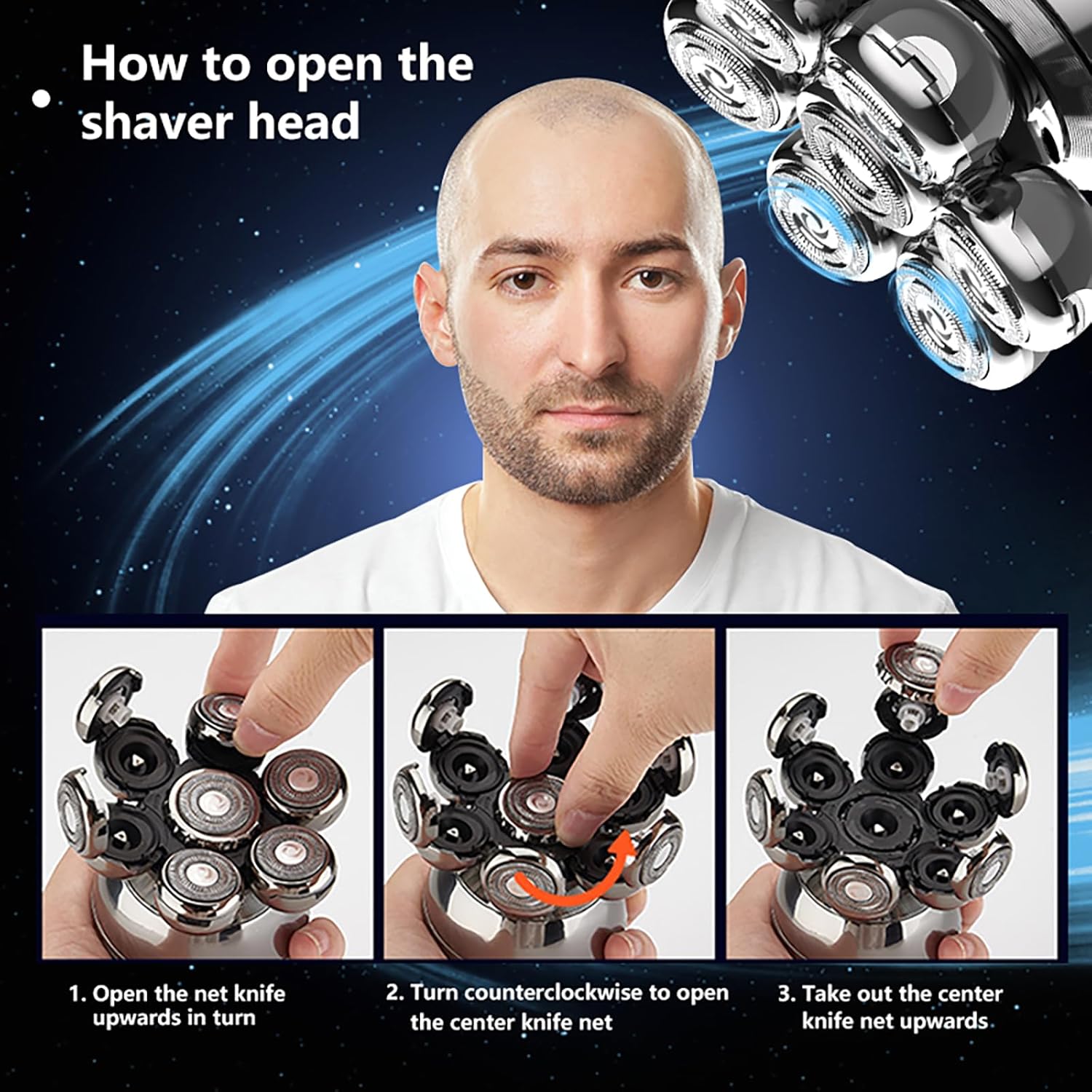
Image: The WAIKIL electric shaver being cleaned under a stream of water, illustrating its IPX5 waterproof rating which allows for full body washing and easy cleaning.

Image: A three-step visual guide demonstrating how to open the shaver head for thorough cleaning. Step 1 shows opening the net knife upwards, Step 2 shows turning counter-clockwise to open the center knife net, and Step 3 shows taking out the center knife net upwards.
Storage
Store the shaver and its attachments in a dry, cool place, away from direct sunlight and extreme temperatures. Ensure the shaver is fully dry before storing.
Troubleshooting
| Problem | Possible Cause | Solution |
|---|---|---|
| Shaver does not turn on. | Low battery. | Charge the shaver fully. |
| Shaver not charging. | Improper connection; faulty cable/adapter. | Ensure cable is securely connected to shaver and power source. Try a different USB port or adapter. Check charging base for debris. |
| Poor shaving performance. | Shaver heads are dirty or clogged with hair. | Clean the shaver heads thoroughly as per maintenance instructions. |
| Shaver pulls hair. | Shaver heads are dull or damaged; low battery. | Ensure shaver is fully charged. If problem persists, shaver heads may need replacement. |
| Attachments do not fit securely. | Incorrect alignment. | Ensure the attachment is correctly aligned with the main unit and pushed down until it clicks. |
Specifications
| Feature | Detail |
|---|---|
| Model Number | RQ-8870 |
| Power Source | Battery Powered (1 Lithium Polymer battery included) |
| Charging Time | Approx. 2 hours |
| Working Time | Approx. 90 minutes |
| Waterproof Rating | IPX5 (Full body washable) |
| Special Features | Battery Indicator, Cordless, Detachable Head, Ergonomic Design, Fast Charging, LED Display |
| Recommended Uses | Beard, Face, Nose Hair, Scalp |
| Package Dimensions | 8 x 4 x 1.5 inches |
| Item Weight | 8.8 ounces |
Warranty and Support
WAIKIL products are manufactured with high-quality standards. For any issues or inquiries regarding your product, please contact the seller directly through your purchase platform. Please refer to your purchase receipt for specific warranty terms and conditions.
For general product support or questions, you may also visit the WAIKIL brand page on Amazon: WAIKIL Brand Store
Ask a question about this manual
Ask about setup, troubleshooting, compatibility, parts, safety, or missing instructions. Manuals+ will review the question and use this page’s manual context to help answer it.