
Introduction
The UCOCARE 4G LTE Mini Security Camera (Model CA-5100C-R) provides seamless remote surveillance through a 4G LTE network, eliminating the need for Wi-Fi connectivity. This portable, battery-powered camera is designed for easy installation and reliable monitoring in various indoor and outdoor environments, including vehicles, remote cabins, and camping sites. Its compact size and robust features make it suitable for recording daily life or professional activities.
This manual will guide you through the setup, operation, maintenance, and troubleshooting of your UCOCARE security camera to ensure optimal performance and security.

Image: UCOCARE 4G LTE Mini Security Camera and its components, including a SIM card and a smartphone displaying live footage.
Package Contents
Please verify that all items are present in your package:
- UCOCARE 4G LTE Mini Security Camera
- 4G SIM Card (includes 300MB free trial data)
- Mounting Bracket
- Screw Pack
- User Manual (this document)
- USB Type-C Charging Cable (not explicitly listed but implied for charging)

Image: Key features of the UCOCARE 4G LTE Mini Security Camera, highlighting 4G LTE connectivity, 5200mAh battery, portability, 1080P HD resolution, 10m night vision, remote viewing, motion detection, adjustable sensitivity, local/cloud storage, and multi-user access.
Setup Guide
1. Charging the Camera
Before initial use, fully charge the camera using the provided USB Type-C cable. The camera features a 5200mAh rechargeable battery designed for extended operation with advanced low-power technology.
2. SIM Card Installation
- Locate the SIM card slot on the camera.
- Insert the provided 4G SIM card into the slot. Ensure it is inserted correctly according to the diagram in the quick start guide.
- After insertion, a blue indicator light will illuminate, signifying a successful connection to the 4G network. If the light does not turn blue after a few minutes, refer to the Troubleshooting section.
3. App Download and Device Pairing
- Download the 'UBox' application from your smartphone's app store (iOS or Android).
- Create an account and log in.
- Follow the in-app instructions to add your new camera. This typically involves scanning a QR code on the camera or manually entering its ID.
- Once paired, you will be able to view the live feed and configure settings through the app.
4. Mounting the Camera
The camera offers flexible mounting options:
- Wall/Ceiling Mount: Use the included mounting bracket and screw pack to securely attach the camera to a wall or ceiling.
- Tabletop/Adhesive Mount: For temporary or non-invasive placement, use the 3M adhesive sticker on the base of the bracket to place the camera on a flat surface or cabinet.
Installation is designed to be quick and easy, typically taking about one minute without requiring professional assistance or wiring.

Image: Demonstration of the UCOCARE 4G LTE Mini Security Camera's compact size and ease of portability, showing it being held in a hand, placed in a pocket, and mounted on a wall and ceiling.
Operating Instructions
1. Live View
Open the UBox app on your smartphone. Select your camera from the device list to access the live 1080P HD video feed. You can monitor your property in real-time from anywhere with 4G LTE coverage.
2. Motion Detection and Alerts
The camera utilizes smart AI to detect people, vehicles, and pets, reducing false alarms. When motion is detected, you will receive instant alerts on your smartphone. Event recordings are saved to your chosen storage option. You can customize alert sensitivity levels and time schedules within the app to avoid unnecessary interruptions.

Image: Depiction of the UCOCARE 4G LTE Mini Security Camera's accurate motion detection and instant alert system, showing a detected intruder and a smartphone notification.
3. Two-Way Audio
Engage in real-time two-way communication through the camera using the UBox app. This feature allows you to speak to and hear from anyone near the camera, regardless of your distance.

Image: Illustration of the two-way audio feature of the UCOCARE 4G LTE Mini Security Camera, showing a person communicating through a smartphone app with the camera.
4. Recording and Storage
The camera supports two storage methods:
- Local Storage: Insert a TF (Micro SD) card (not included, up to 128GB) into the camera's slot. Recordings will be stored locally.
- Cloud Storage: A 30-day free trial of cloud storage is available. After the trial, subscription plans are offered through the app.
When storage is full, the camera automatically overwrites the oldest recordings, so manual deletion is not required.

Image: Overview of the secure and flexible storage options for the UCOCARE 4G LTE Mini Security Camera, including local SD card storage (up to 128GB, not included) and cloud storage (with a 30-day free trial), with automatic overwriting of old recordings.
5. Night Vision
Equipped with enhanced IR LEDs, the camera provides clear night vision up to 10 meters, ensuring reliable surveillance even in complete darkness.
6. Digital Zoom and Wide Angle
The camera features a 160° ultra-wide-angle lens and 10x digital zoom, allowing for broad coverage and the ability to focus on specific details within the frame. Advanced image processing technology ensures sharp 1080P HD images up to 40 meters.
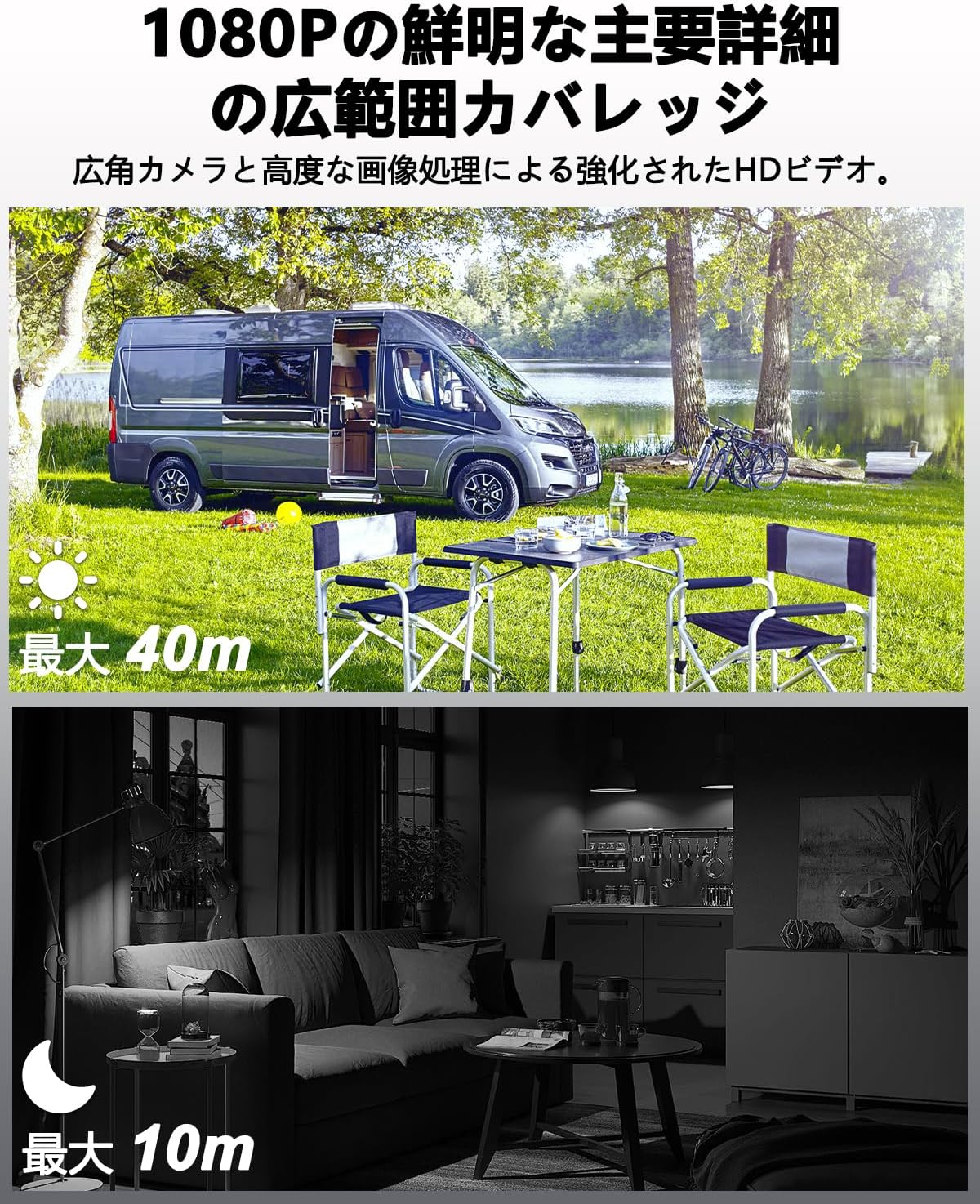
Image: Visual representation of the UCOCARE 4G LTE Mini Security Camera's 1080P HD video quality, showing clear daytime footage with a 40m visible range and effective 10m night vision in a dark environment.
Maintenance
1. Battery Care
- To maximize battery life, avoid extreme temperatures.
- Charge the camera regularly, especially if it will be stored for an extended period.
- Use only the provided charging cable or a certified USB Type-C cable.

Image: Illustration of the UCOCARE 4G LTE Mini Security Camera's powerful 5200mAh rechargeable battery, emphasizing its low power consumption technology for extended use.
2. Cleaning
- Gently wipe the camera lens with a soft, lint-free cloth to ensure clear image quality.
- Clean the camera body with a dry or slightly damp cloth. Avoid using harsh chemicals or abrasive materials.
3. Storage
When not in use, store the camera in a cool, dry place away from direct sunlight and extreme temperatures.
Troubleshooting
1. Camera Not Connecting to 4G Network (Blue Light Not On)
- Ensure the SIM card is correctly inserted. Remove and reinsert it firmly.
- Check if the SIM card has active data. The included SIM card comes with 300MB trial data.
- Verify 4G LTE signal strength in the camera's location. Move the camera to an area with better signal if necessary.
- Perform a device reset. Refer to the quick start guide for the reset button location and procedure.
- If using your own SIM card, ensure it is compatible with 4G LTE networks and properly configured (APN settings may be required, refer to your SIM provider's instructions).
2. App Connection Issues
- Ensure your smartphone has a stable internet connection (Wi-Fi or mobile data).
- Restart the UBox app.
- If the camera is offline, check its battery level and 4G connection.
3. SD Card Not Recording or Recognized
- Ensure the TF (Micro SD) card is inserted correctly and fully.
- Check if the SD card is formatted to a compatible file system (e.g., FAT32). Format it if necessary (this can usually be done via the app or a computer).
- Verify that the SD card is not full. The camera supports automatic overwriting, but a faulty card might prevent this.
- Use a high-quality TF card (Class 10 or higher) up to 128GB.
4. Poor Image Quality
- Clean the camera lens to remove any dust or smudges.
- Ensure adequate lighting during the day. For night vision, confirm the IR LEDs are active.
- Check the camera's position to avoid direct glare or reflections.

Image: Various application scenarios for the UCOCARE 4G LTE Mini Security Camera, such as in a vehicle, remote cabin, motorhome, and camping site, demonstrating its versatility in environments without Wi-Fi.
Specifications
| Feature | Detail |
|---|---|
| Model Name | CA-5100C-R |
| Connectivity Technology | Wireless (4G LTE) |
| Video Capture Resolution | 1080p |
| Effective Video Resolution | 1080 |
| Field of View | 160 degrees |
| Night Vision Range | 10 meters |
| Frame Rate | 15 fps |
| Battery Capacity | 5200 mAh |
| Power Source | Battery Powered |
| Voltage | 5 Volts |
| Mounting Type | Wall Mount, Ceiling Mount, Tabletop Mount |
| Installation Type | Screw-in, Freestanding, Adhesive |
| Material | Plastic |
| Product Dimensions (LxWxH) | 5.5 x 4.2 x 3.8 cm |
| Product Weight | 230 g |
| Recommended Uses | Baby Monitor, Pet Monitor, Indoor Security, Outdoor Security, Vehicle Monitoring, Wildlife Monitoring |
| Special Features | Two-way audio, HD high quality resolution, 40 meter visible range, 160 degree wide field of view, 10x digital zoom, image sensor, motion detection, event recording, instant alert, manual recording, 10 meter night vision, wireless portable |
| Indoor/Outdoor Use | Indoor, Outdoor |
| Compatible Devices | Smartphone |
| Controller Type | UBox App |
Warranty Information
UCOCARE provides a 3-year quality guarantee for this product. This warranty covers manufacturing defects and ensures the product meets its specified performance standards under normal use.
Customer Support
For any questions or assistance regarding your UCOCARE 4G LTE Mini Security Camera, please do not hesitate to contact our customer support team. We offer 24-hour support via Amazon messaging and email. Multi-language support is available.
Contact us through your Amazon order page or the contact information provided in the product packaging.


