
1. Introduction
Thank you for choosing the LEDVANCE Endura Flood Split Solar Sensor LED Outdoor Light. This product is designed to provide efficient and flexible outdoor illumination using solar power. It features a separate floodlight and solar panel, a PIR motion sensor, a daylight sensor, and a remote control for convenient operation. Please read this manual carefully before installation and use to ensure proper function and safety.
2. Safety Information
- Ensure all components are securely mounted to prevent falling.
- Do not attempt to open or modify the product. This may void the warranty and pose a safety risk.
- Keep the solar panel clean and free from obstructions to ensure optimal charging.
- Avoid direct eye exposure to the LED light when it is operating.
- This product is designed for outdoor use. Ensure it is installed in a location protected from extreme weather conditions if possible.
- Dispose of the product and its components responsibly according to local regulations at the end of its lifespan.
3. Package Contents
Verify that all components are present in the package:
- 1 x LEDVANCE Endura Flood Split Solar Sensor LED Outdoor Light (Floodlight unit)
- 1 x Solar Panel with 5m connection cable
- 1 x Remote Control
- Mounting accessories (screws, wall plugs)
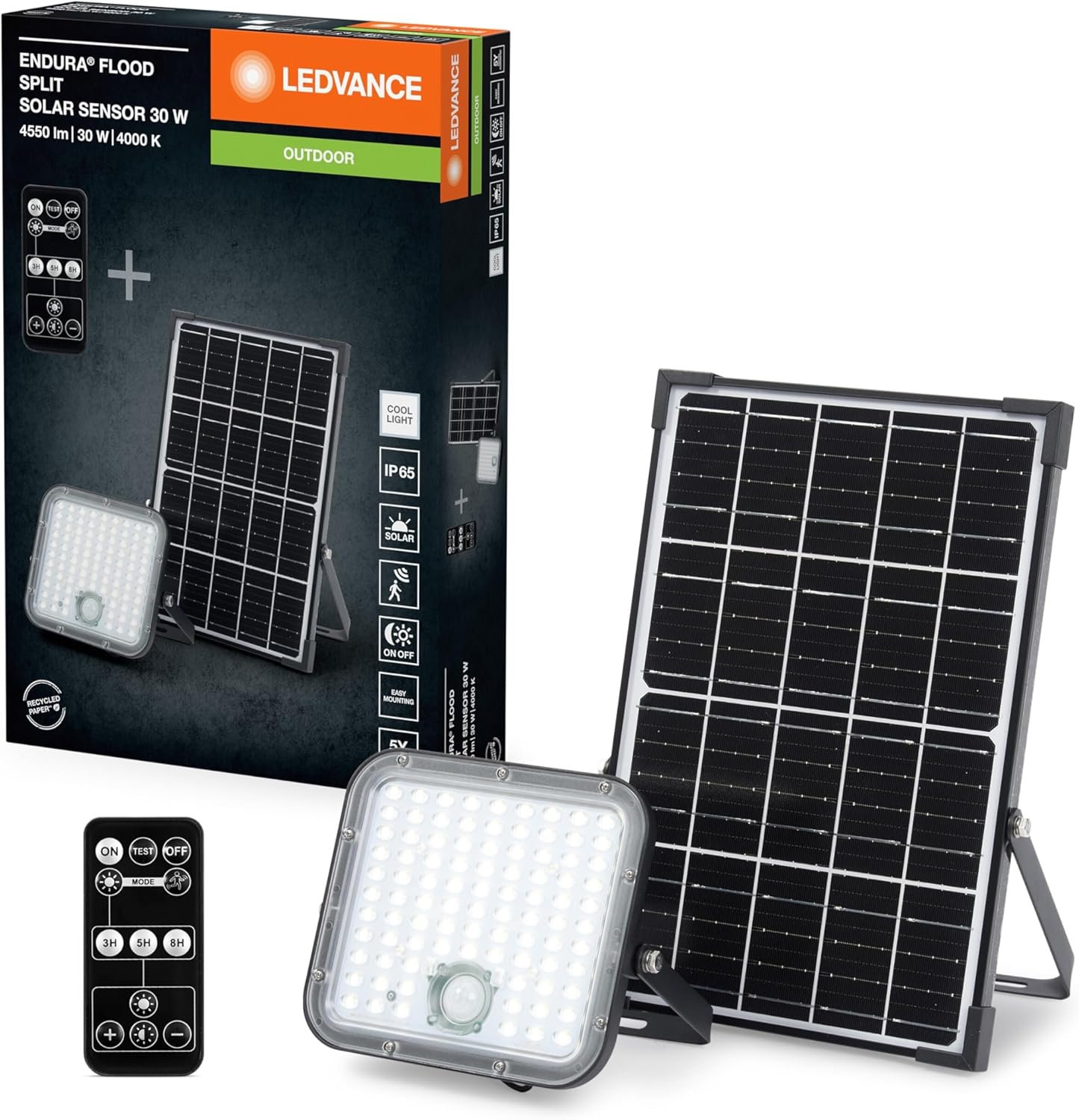
Image 1: Product packaging showing the floodlight, solar panel, and remote control.
4. Product Overview
The LEDVANCE Endura Flood Split Solar Sensor LED Outdoor Light consists of two main units: the LED floodlight and the solar panel, connected by a 5-meter cable. It also includes a remote control for adjusting settings.
- LED Floodlight: Contains the LED light source, PIR motion sensor, and daylight sensor.
- Solar Panel: Charges the internal battery during daylight hours.
- 5m Connection Cable: Allows flexible placement of the solar panel away from the floodlight.
- Remote Control: Used to configure operating modes, brightness, and timer settings.

Image 2: The LED floodlight unit and the separate solar panel.
5. Setup and Installation
This product is designed for wall mounting. No complex assembly is required, but careful placement is crucial for optimal performance.
5.1 Solar Panel Placement
- Choose a location for the solar panel that receives maximum direct sunlight throughout the day. Avoid shaded areas from trees, buildings, or other obstructions.
- The solar panel can be mounted separately from the floodlight using the provided 5-meter cable, offering flexibility.
- Angle the solar panel towards the sun for best charging efficiency.
5.2 Floodlight Installation
- Mount the floodlight unit on a wall or suitable surface using the provided mounting accessories.
- Ensure the PIR motion sensor and daylight sensor on the floodlight are not obstructed and face the desired detection area.
- Connect the 5-meter cable from the solar panel to the floodlight unit. Ensure the connection is secure.
6. Operating Instructions
The LEDVANCE Endura Flood Light operates automatically based on light conditions and motion detection, with additional control via the remote.
6.1 Initial Operation
- After installation, allow the solar panel to charge the battery for at least 24 hours in direct sunlight before first use.
- The light will automatically turn on at dusk when motion is detected and turn off at dawn or after a set duration.
6.2 Remote Control Functions
Use the remote control to adjust the light's settings:
- ON/OFF: Manually turn the light on or off.
- TEST: Activates the light for a short period to test functionality and sensor range.
- MODE: Cycles through different operating modes (e.g., motion-activated, constant low light + motion). Refer to the remote's specific icons for details.
- 3H/5H/8H: Sets the duration for which the light stays on after activation or in constant mode.
- Brightness Adjustment (+/-): Increases or decreases the light output.
6.3 PIR Motion Sensor and Daylight Sensor
- The PIR sensor detects movement within its range, triggering the light.
- The daylight sensor ensures the light only operates when ambient light levels are low enough (e.g., at dusk or night).
7. Maintenance
- Cleaning: Periodically wipe the solar panel and the floodlight lens with a soft, damp cloth to remove dust, dirt, or debris. A clean solar panel ensures efficient charging.
- Obstructions: Ensure no new obstructions (e.g., growing foliage) block the solar panel's exposure to sunlight or the motion sensor's field of view.
- Battery: The internal battery is designed for long-term use. Do not attempt to replace it yourself.
8. Troubleshooting
- Light does not turn on:
- Ensure the solar panel is receiving sufficient direct sunlight for charging.
- Check the connection cable between the solar panel and the floodlight.
- Verify that the daylight sensor is not detecting too much ambient light.
- Ensure the remote control has not set the light to 'OFF' or an incorrect mode.
- Light stays on constantly or flashes:
- Check for continuous motion within the PIR sensor's range.
- Ensure the remote control settings are correct for your desired operation mode.
- Light is dim or runs for a short period:
- The battery may not be fully charged. Ensure the solar panel is clean and receives adequate sunlight.
- Reduce the brightness setting via the remote control to extend operating time.
9. Specifications
| Feature | Detail |
|---|---|
| Brand | LEDVANCE |
| Model Number | 4099854276699 |
| Product Dimensions (L x W x H) | 20 x 4.9 x 19.1 cm |
| Weight | 1.96 kg |
| Finish Type | Black |
| Assembly Required | No |
| Batteries Required | No (Internal rechargeable battery) |
| Components Included | 1 LEDVANCE Endura FL Split Sol SEN 30W 840 RC LED unit |
| Fixture Shape | Floodlight |
| Room Type | Outdoor |
| Indoor/Outdoor Usage | Outdoor |
| Power Source | Solar Powered |
| Installation Type | Wall Mount |
| Special Feature | Energy Efficient |
| Cable Length | 5 meters (between floodlight and solar panel) |
10. Warranty and Support
LEDVANCE products are manufactured to high-quality standards. For warranty information, please refer to the warranty card included with your purchase or visit the official LEDVANCE website. If you encounter any issues or require technical assistance, please contact LEDVANCE customer support through their official channels.


