
Yoidesu Yoidesuagh3d8ic7k
Yoidesu Dash Cam User Manual
Model: Yoidesuagh3d8ic7k
1. Introduction
Thank you for choosing the Yoidesu Dash Cam. This device is designed to provide comprehensive video surveillance for your vehicle, offering front, rear, and interior recording capabilities. Equipped with advanced features such as Wide Dynamic Range (WDR), G-Sensor, loop recording, and 24-hour parking monitoring, it ensures reliable evidence collection and enhanced driving safety. Please read this manual carefully before operation to ensure proper use and maintenance.
2. Safety Information
- Do not operate the dash cam while driving. Adjust settings only when the vehicle is safely parked.
- Ensure the dash cam is securely mounted and does not obstruct the driver's view or airbag deployment.
- Use only the provided power adapter and cables to prevent damage or fire.
- Avoid exposing the device to extreme temperatures, direct sunlight for prolonged periods, or high humidity.
- Do not attempt to disassemble or repair the device yourself. Contact customer support for assistance.
- Regularly check that the dash cam is recording correctly, especially before long journeys.
3. Package Contents
Please check the package for the following items:
- Dash Camera (Main Unit)
- Charger (Car Power Adapter)
- Rear Camera
- Bracket (Suction Cup Mount)
- Double Sided Sticker
- Screws (for rear camera installation)
- Instruction Manual

Image: Contents of the Yoidesu Dash Cam package, showing the main dash camera unit, the rear camera, car charger, suction cup mount, and small accessories like screws and double-sided tape.
4. Product Overview
The Yoidesu Dash Cam features a compact design with multiple cameras for comprehensive coverage. It includes a front-facing lens, an interior-facing lens, and a separate rear camera.

Image: The Yoidesu Dash Cam main unit, showing its front and interior lenses, along with the separate rear camera and car power adapter. This illustrates the multi-channel recording capability.
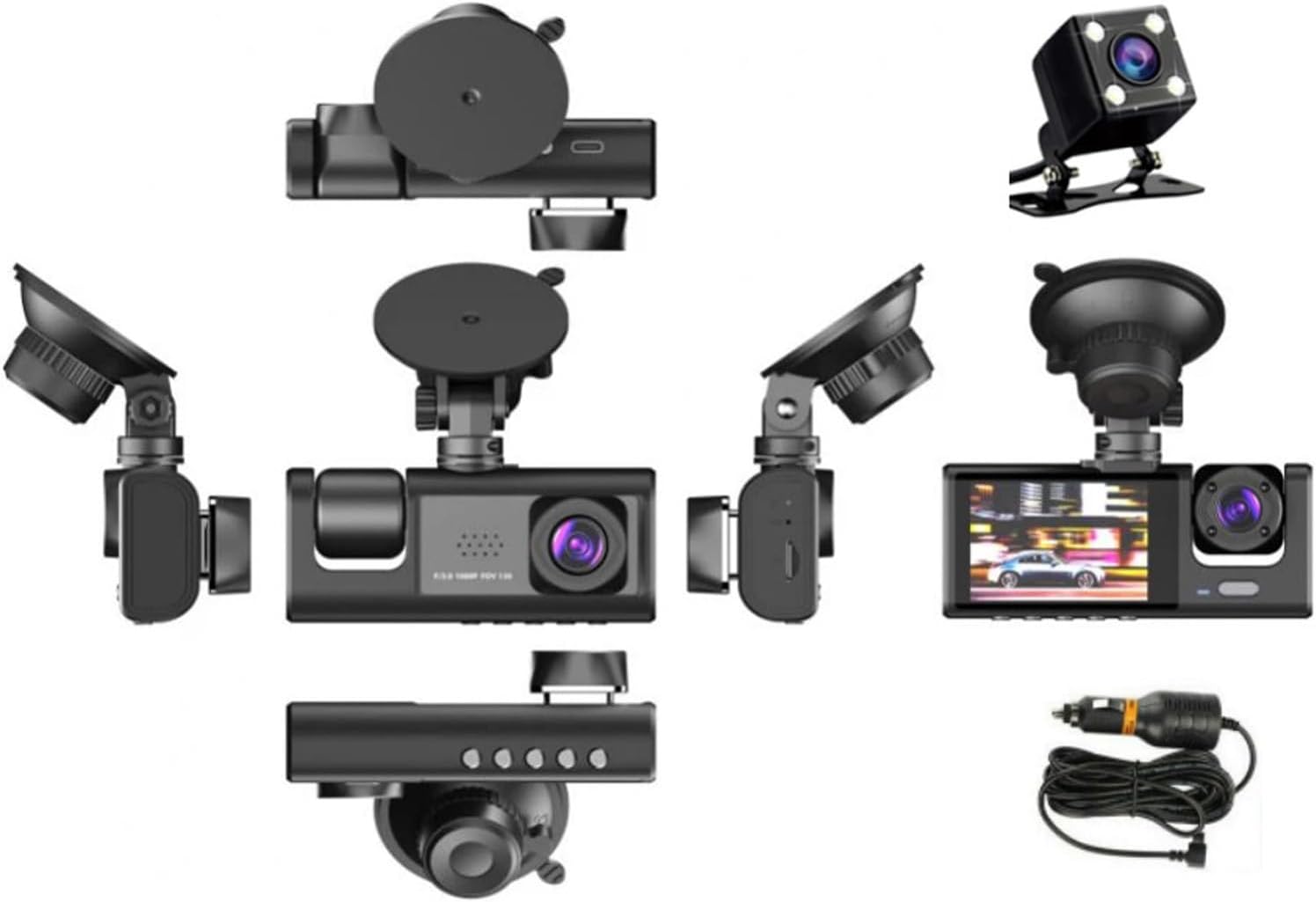
Image: Various perspectives of the Yoidesu Dash Cam, highlighting its compact form factor and the placement of its lenses, screen, and ports. The separate rear camera is also shown.
5. Setup and Installation
5.1 Main Unit Installation
- Clean the windshield area where you intend to mount the dash cam.
- Attach the suction cup mount to the main unit.
- Press the suction cup firmly against the windshield and lock it into place. Position the camera so it does not obstruct your view and the front lens has a clear view of the road.
- Connect the car charger to the dash cam's power input and plug the other end into your vehicle's cigarette lighter socket. Route the cable neatly along the windshield trim to avoid interference.
5.2 Rear Camera Installation
- Identify a suitable location on your rear windshield or license plate area for the rear camera. Ensure it has a clear view.
- Use the provided screws or double-sided sticker to securely mount the rear camera.
- Connect the rear camera cable to the main dash cam unit. Route the cable carefully, tucking it under interior trim panels to keep it out of sight and prevent damage.

Image: The Yoidesu Dash Cam main unit attached to a windshield via its suction cup mount, alongside the separate rear camera and car charger, illustrating the components involved in installation.
6. Operating Instructions
6.1 Power On/Off
The dash cam will automatically power on and begin recording when connected to vehicle power and the ignition is turned on. It will power off automatically when the ignition is turned off.
6.2 Recording Modes
The Yoidesu Dash Cam supports three-channel recording: front, interior, and rear. You can view different camera feeds on the display screen, including picture-in-picture modes.
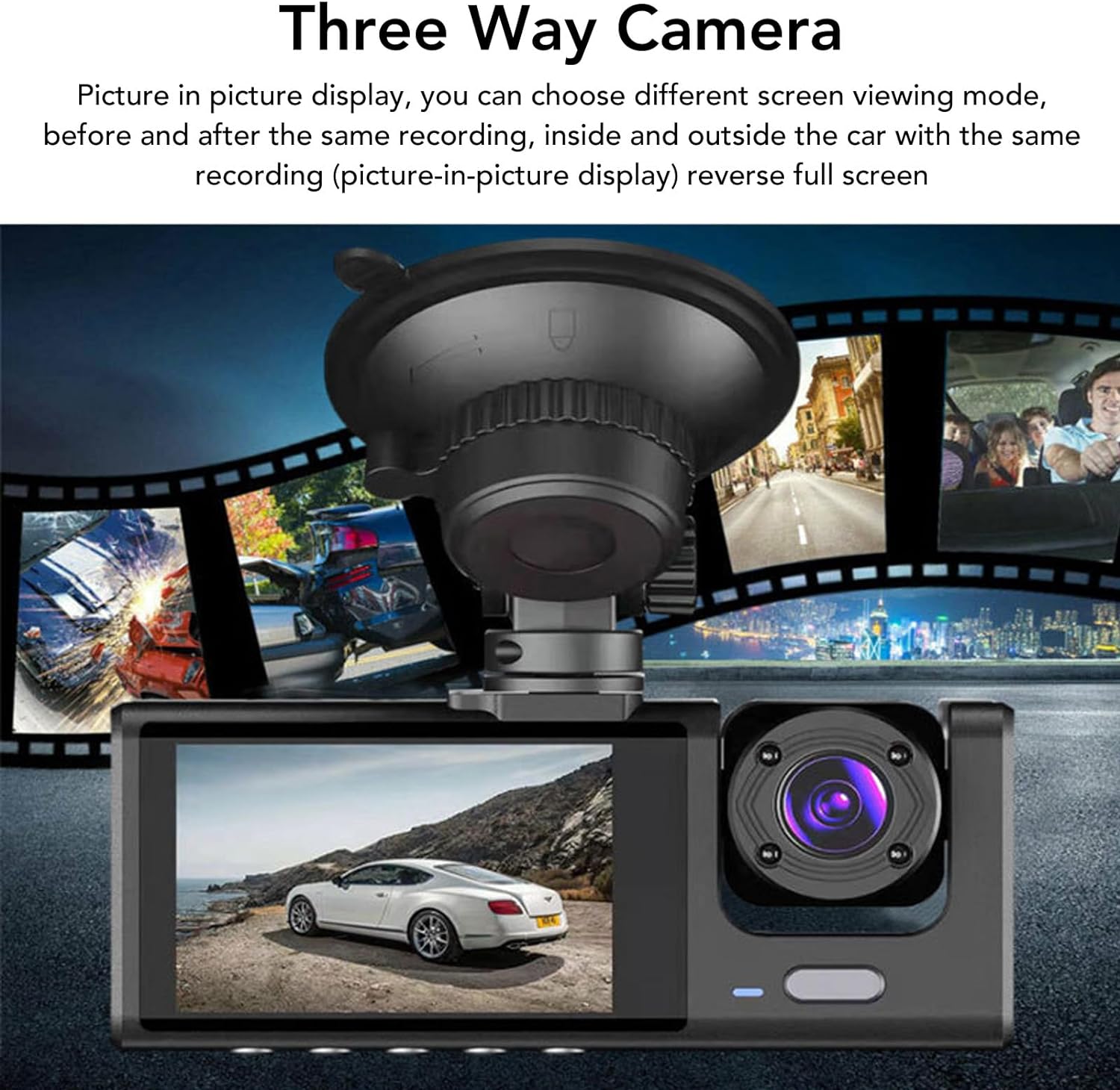
Image: The dash cam's screen displaying a picture-in-picture view, demonstrating its ability to record and show footage from multiple cameras simultaneously, such as front and interior views.

Image: A visual representation of the wide-angle coverage provided by the dash cam's lenses, specifically a 170-degree front lens and a 120-degree interior lens, ensuring broad capture of events.
6.3 Loop Recording
The dash cam records video in continuous loops. When the memory card is full, the oldest unlocked files will be overwritten automatically to make space for new recordings. This ensures continuous recording without manual intervention.
6.4 G-Sensor (Emergency Recording)
The built-in G-Sensor detects sudden impacts or collisions. When triggered, it automatically locks the current video segment, preventing it from being overwritten by loop recording. These locked files are stored in a separate folder.
6.5 Parking Monitor (24-Hour Recording)
With the parking monitor feature enabled, the dash cam can continue to monitor your vehicle even when parked. If an impact is detected while parked, the camera will automatically turn on and record a short video, providing surveillance for 24 hours (requires continuous power supply, often through a hardwire kit, not included).
7. Maintenance
- Clean Lenses: Regularly wipe the camera lenses with a soft, lint-free cloth to ensure clear video quality.
- Memory Card: Format the memory card periodically (e.g., once a month) within the dash cam's settings to maintain optimal performance and prevent data corruption. Use a high-speed (Class 10 or higher) microSD card.
- Firmware Updates: Check the manufacturer's website for any available firmware updates to improve performance and add new features.
- Storage: When not in use for extended periods, store the dash cam in a cool, dry place away from direct sunlight.
8. Troubleshooting
| Problem | Possible Cause | Solution |
|---|---|---|
| Dash cam does not power on. | No power supply; faulty charger; loose connection. | Check car charger connection; try another power source; ensure vehicle ignition is on. |
| Recording stops or freezes. | Memory card full or corrupted; slow memory card; firmware issue. | Format the memory card; use a high-speed (Class 10 or higher) microSD card; update firmware. |
| Poor video quality. | Dirty lens; protective film still on lens; low resolution setting. | Clean the lens; remove any protective film; check video resolution settings. |
| G-Sensor too sensitive/not sensitive enough. | G-Sensor sensitivity setting. | Adjust G-Sensor sensitivity in the settings menu. |
| Rear camera not working. | Loose connection; faulty cable/camera. | Check the connection between the main unit and rear camera; try a different cable if available. |
9. Specifications
- Model Name: Yoidesuagh3d8ic7k
- Product Dimensions: 5.91 x 4.33 x 2.76 inches
- Item Weight: 11.6 ounces
- Battery: Lithium battery (320mAH) (built-in)
- Voltage: 12 to 24V
- Video Capture Resolution: 720p (Note: Product title states 1080P FHD, but specifications list 720p. Please refer to product packaging for exact resolution.)
- Special Feature: Adjustable
- Connectivity Technology: Ethernet (as per specifications, typically refers to internal data transfer, not external network connectivity)
- Mounting Type: Wall (as per specifications, typically refers to suction cup or adhesive mount for vehicle interior)
- First Available Date: July 9, 2024
10. Warranty and Support
For warranty information and technical support, please refer to the warranty card included in your package or visit the official Yoidesu website. If you encounter any issues not covered in this manual, please contact Yoidesu customer service for assistance.
Manufacturer: Yoidesu
Ask a question about this manual
Ask about setup, troubleshooting, compatibility, parts, safety, or missing instructions. Manuals+ will review the question and use this page’s manual context to help answer it.