
1. Introduction
Thank you for choosing the AWESAFE 10.25 inch Android 13 Car Radio. This advanced multimedia system is designed to enhance your driving experience with its powerful features, including Android 13 operating system, 8GB RAM, 128GB ROM, wireless CarPlay, Android Auto, GPS navigation, Bluetooth, and 4G connectivity. This manual provides essential information for proper installation, operation, and maintenance of your new car radio. Please read it thoroughly before use.
2. Safety Information
- Professional Installation Recommended: Due to the complexity of car electrical systems, professional installation is highly recommended to prevent damage to the unit or your vehicle.
- Power Supply: Ensure the car radio is connected to a 12V DC power supply with negative grounding. Incorrect voltage can cause damage.
- Driving Safety: Do not operate the device in a way that distracts you from driving. Always prioritize road safety.
- Temperature: Avoid exposing the unit to extreme temperatures or direct sunlight for prolonged periods.
- Moisture: Keep the unit away from water and excessive moisture to prevent electrical hazards.
- Ventilation: Ensure proper ventilation around the unit to prevent overheating.
3. Package Contents
Verify that all items listed below are included in your package:

Image: Overview of the AWESAFE car radio and its included accessories, such as cables, modules, and tools.
- AWESAFE 10.25 inch Car Radio Unit
- F20 EVO Base Support
- 4G Module
- GPS Module
- AUX Cable
- Power Cable
- Prying Tools
- Screwdriver
- 4G SIM Card Cable
- USB Cable
4. Compatibility
This car radio is specifically designed for:
- BMW 2 Series F45 (2018-2019)
- Only compatible with EVO System.
Before purchasing, please provide a photo of your car's dashboard for compatibility confirmation if you have any doubts.
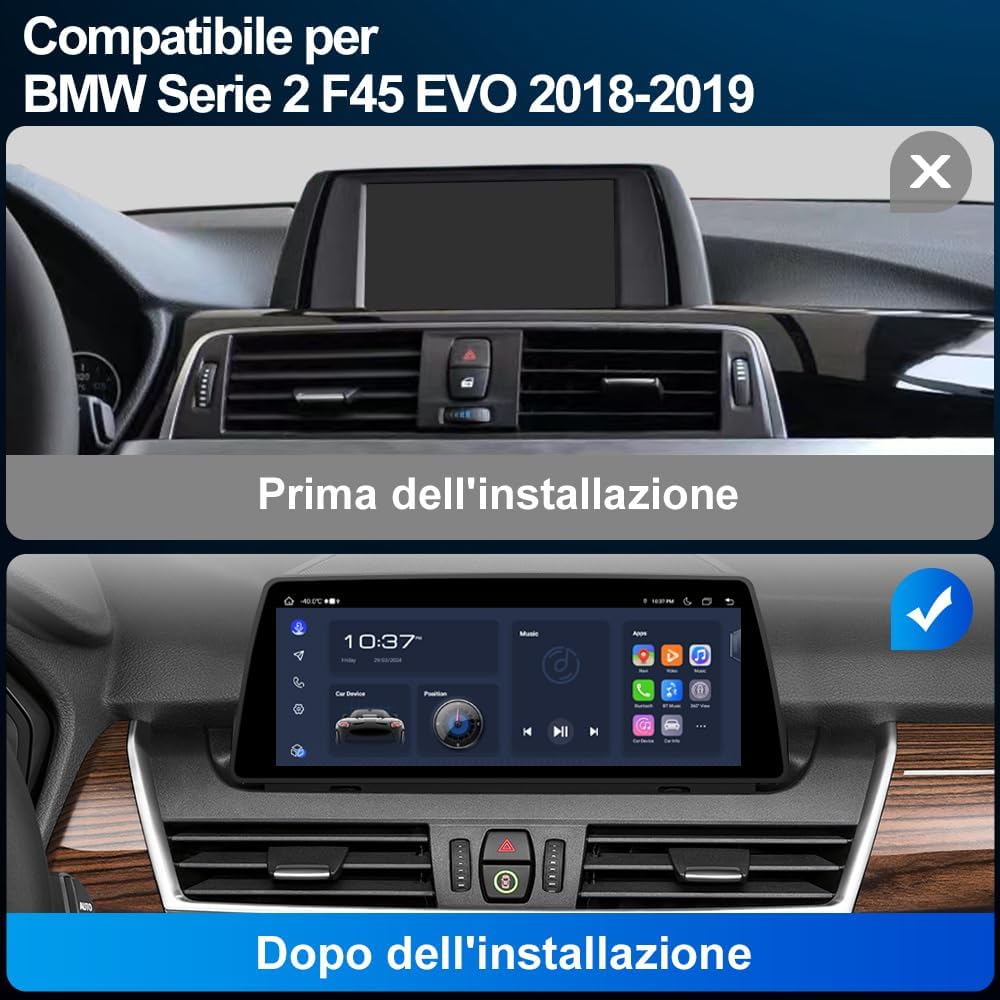
Image: A visual comparison showing the car's dashboard before and after the installation of the AWESAFE 10.25 inch car radio, highlighting the seamless integration.

Image: Details on applicable car models and years (BMW F45 EVO 2018-2019), showing the LVDS 6-pin connector, iDrive controller, and the EVO interface for system identification.

Image: Illustrates different BMW car system interfaces (CCC, CIC, NBT, EVO) to help users identify their vehicle's system for compatibility.
5. Setup and Installation
Installation of the AWESAFE car radio requires careful attention to detail and knowledge of car electronics. It is highly recommended to have the unit installed by a qualified professional.
Pre-Installation Check:
- Confirm your vehicle is a BMW 2 Series F45 (2018-2019) with an EVO system.
- Ensure the vehicle's battery is disconnected before starting installation.
- Gather all necessary tools, including those provided in the package.
General Installation Steps (Consult a professional for detailed instructions):
- Carefully remove the original car display and trim panels using the prying tools.
- Disconnect the original cables from the display unit.
- Connect the new AWESAFE car radio's power cable and other necessary cables (AUX, USB, GPS, 4G modules) according to the wiring diagram (not provided in this manual, typically included with the product or available online).
- Install the new display unit into the dashboard, ensuring all connections are secure.
- Reconnect the vehicle's battery and test the unit's functionality.
- Reassemble the trim panels.
6. Operating Instructions
6.1. Android 13 System and Dual System Functionality
The car radio operates on Android 13, offering a modern and intuitive user interface. It features 8GB RAM and 128GB ROM for smooth performance and ample storage.

Image: A visual representation of the Android 13 system highlighting its 8GB RAM and 128GB ROM specifications.
This unit supports a dual-system operation, allowing you to switch between the original BMW system interface and the new Android 13 system at any time. This ensures that all original car functions and settings are preserved.

Image: Demonstrates how the car radio maintains the original system, including the original CD player, steering wheel controls, speaker, rearview camera, and iDrive controls.
6.2. CarPlay and Android Auto
The multimedia system supports both wired and wireless CarPlay and Android Auto. This allows seamless integration with your smartphone for navigation, music, calls, and messaging.
- Wireless Connection: Connect your smartphone via Bluetooth and Wi-Fi for a wireless CarPlay or Android Auto experience.
- Wired Connection: Use a USB cable to connect your smartphone for a stable wired connection.

Image: The car radio display showing the CarPlay and Android Auto interfaces, with smartphone screens below illustrating the connection.

Image: Illustrates the wireless and wired connection options for CarPlay and Android Auto, showing Bluetooth and USB cable connections.
6.3. GPS Navigation
The unit supports online GPS navigation. Once connected to Wi-Fi or a 4G SIM, you can access various navigation applications directly from the Android system. For optimal GPS signal reception, it is recommended to position the GPS module near the windshield.

Image: The car radio display showing a map for GPS navigation, with location pins and a route highlighted.
6.4. Bluetooth Connectivity
Utilize the built-in Bluetooth for hands-free calling and audio streaming. This feature enhances driving safety by allowing you to make and receive calls without holding your phone, and enjoy your favorite music wirelessly.
- Bluetooth Calling: Pair your phone to make and receive calls directly from the car radio interface.
- Bluetooth Music Playback: Stream audio from your phone to the car's speakers.

Image: The car radio display showing Bluetooth call interface and music playback, with an incoming call notification on a smartphone.
6.5. 4G SIM Connectivity
The car radio includes a SIM card slot and an integrated 4G antenna, allowing for direct 4G connectivity. This enables online features, app downloads, and real-time navigation without relying on a Wi-Fi hotspot from your phone.
6.6. Split Screen Function
The split-screen function allows you to run two applications simultaneously on the display. For example, you can have navigation on one side and music playback on the other, enhancing convenience and entertainment during your drive.

Image: The car radio display demonstrating the split-screen feature, showing a navigation map on one side and a music player on the other.
6.7. Wi-Fi Connectivity
Connect the car radio to a Wi-Fi network (e.g., from your smartphone's hotspot) to access online content, download applications from the app store, and browse the internet. This provides a larger and safer screen experience compared to using a smartphone while driving.

Image: Illustrates Wi-Fi and phone hotspot connectivity options, showing the car radio display browsing online content and apps.
6.8. Rearview Camera Function
The unit supports rearview camera input (camera not included). When a compatible rearview camera is connected via the Camera IN cable, the display will automatically switch to the camera view when reversing. It also supports parking assistance lines for easier maneuvering.

Image: The car radio display showing a rearview camera feed with parking assistance lines, illustrating the reversing function.
6.9. Maintaining Original Car Information Systems
The AWESAFE car radio is designed to integrate seamlessly while preserving the functionality of your original BMW car systems. This includes:
- Original System Interface: You can switch back to the original BMW interface at any time.
- Original CD Player: The functionality of your car's original CD player is retained.
- Steering Wheel Controls: Original steering wheel controls remain fully functional.
- Original Speaker: The car's original speaker system is supported.
- Original iDrive Controls: The iDrive controller maintains its functionality for both original and Android systems.
- Car Information Display: Important vehicle information such as speed, parking brake status, seatbelt warnings, and oil level can still be accessed.

Image: The car radio display showing various car information systems, including speed, parking brake, seatbelt, general car information, and oil level.
7. Maintenance
- Cleaning: Use a soft, dry cloth to clean the screen and exterior of the unit. Avoid abrasive cleaners or solvents.
- Software Updates: Periodically check for software updates to ensure optimal performance and access to new features. Updates can usually be performed via Wi-Fi.
- Cable Connections: Ensure all cables are securely connected. Loose connections can lead to intermittent issues.
8. Troubleshooting
If you encounter any issues, please refer to the following common problems and solutions:
| Problem | Possible Cause | Solution |
|---|---|---|
| No power | Loose power cable, blown fuse, incorrect wiring. | Check power cable connections. Inspect vehicle fuses. Verify wiring with a professional. |
| No sound | Volume too low, mute activated, loose audio cables, incorrect audio source. | Increase volume. Check mute settings. Ensure AUX/audio cables are connected. Select correct audio source. |
| GPS signal weak/lost | GPS antenna placement, environmental interference. | Ensure GPS module is placed in an open area (e.g., near windshield). Avoid areas with high buildings or tunnels. |
| CarPlay/Android Auto not connecting | Bluetooth/Wi-Fi off, incorrect phone settings, faulty USB cable. | Ensure Bluetooth and Wi-Fi are enabled on both devices. Check phone settings for CarPlay/Android Auto. Try a different USB cable for wired connection. |
| Touch screen unresponsive | Software glitch, screen protector interference. | Restart the unit. Remove and reapply screen protector if applicable. |
If the problem persists after trying these solutions, please contact AWESAFE customer support for further assistance.
9. Specifications
| Feature | Specification |
|---|---|
| Brand | AWESAFE |
| Model Number | 0d3c4775-641c-43d1-a559-c2e5a609a7ff |
| Operating System | Android 13 |
| RAM | 8 GB |
| ROM | 128 GB |
| Screen Size | 10.25 inches |
| Connectivity Technology | Bluetooth, Wi-Fi, 4G SIM |
| Special Features | Android Auto, Apple CarPlay, GPS Navigation, Split Screen, Rearview Camera Support |
| Compatible Devices | BMW F45 2018-2019 EVO System |
| Audio Output Mode | Stereo |
| Surround Sound Channel Configuration | 5.1 |
| Video Encoding | H.264, H.265/HEVC, MPEG-4, etc. |
| Control Method | App, Touch |
| Format | 4K |
| UPC | 759973852672 |
| Country of Origin | China |
10. Warranty and Support
This AWESAFE car radio comes with a 1-year warranty from the date of purchase. This warranty covers manufacturing defects and malfunctions under normal use.
What the Warranty Does Not Cover:
- Damage caused by improper installation or unauthorized repairs.
- Damage caused by accidents, misuse, abuse, neglect, or external causes.
- Cosmetic damage, including but not limited to scratches, dents, and broken plastic on ports.
- Damage caused by operating the product outside the permitted or intended uses described by AWESAFE.
Customer Support:
For technical support, warranty claims, or any questions regarding your AWESAFE car radio, please contact the seller or AWESAFE customer service through the platform where you purchased the product. Please have your purchase receipt and product model number ready when contacting support.


