
1. Introduction
This manual provides detailed instructions for the installation, operation, and maintenance of your COOLLEO BL360 Digital Display White ARGB 360mm All-in-One (AIO) CPU Liquid Cooler. Please read this manual thoroughly before installation to ensure proper setup and optimal performance.
2. Product Overview and Components
The COOLLEO BL360 is a high-performance liquid CPU cooler designed for efficient heat dissipation. It features a digital display, ARGB lighting, and a robust pump and fan system.
2.1. What's in the Box
- COOLLEO BL360 Digital Display White ARGB 360mm AIO CPU Cooler Kit
- Mounting plates and fasteners for AMD and Intel platforms
- Thermal paste
- User manual (this document)

3. Key Features
3.1. Digital Display and Temperature Monitoring
The integrated smart digital display provides real-time visualization of CPU temperature and usage data. This information can be displayed via software or set to alternate at fixed intervals. The system includes a temperature alarm design:
- Yellow Warning: Activates when CPU temperature reaches or exceeds 60°C.
- Red Warning: Activates when CPU temperature reaches or exceeds 80°C.

3.2. Advanced Pump Technology
The cooler features a three-phase, nine-stage motor pump designed for efficient and stable operation. This design contributes to lower noise, reduced vibration, and extended lifespan. The pump operates at 3000 RPM ± 10%.

3.3. High-Performance Fans
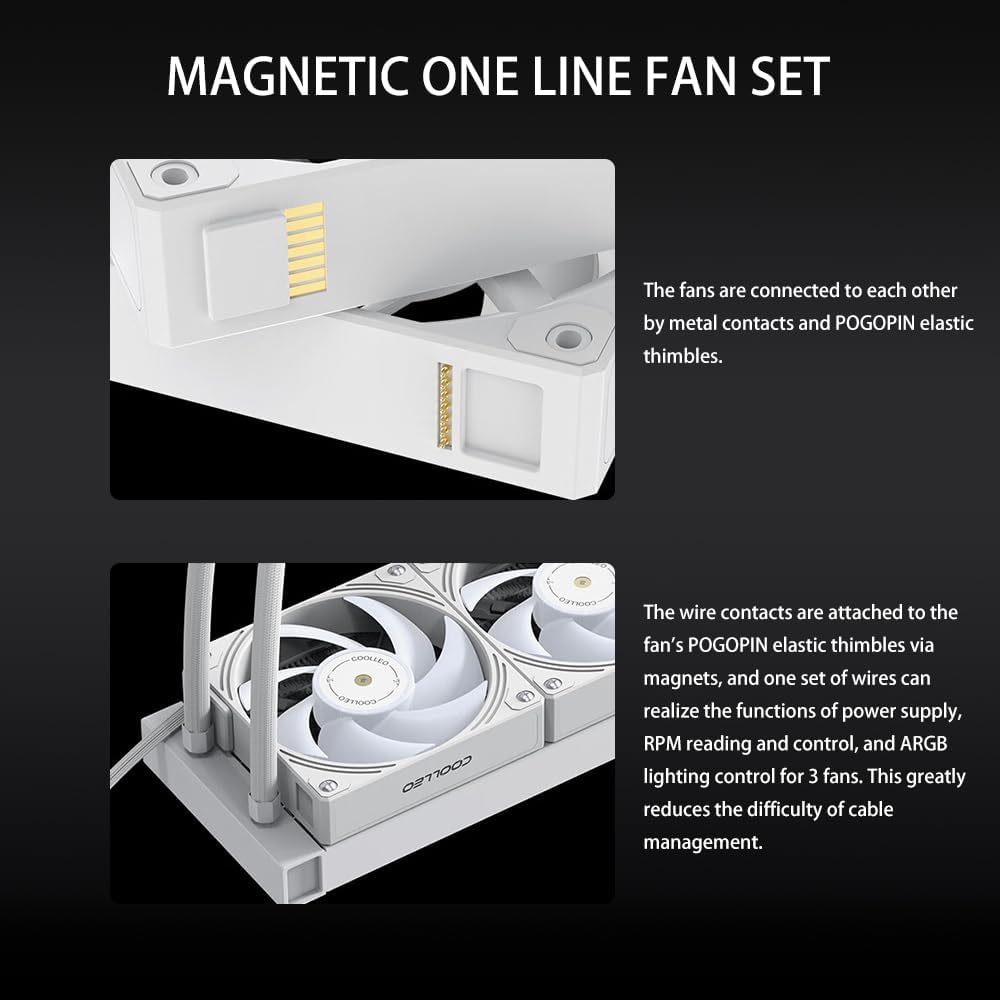
Equipped with three Hurricane T28 magnetic 28mm thick PWM fans, constructed from industrial-strength PA66 nylon and PC material. These fans feature double ball bearings for durability and are designed for high airflow (80 CFM ± 5%) and high air pressure (2.9 mm/H2O ± 5%). The fans connect via a magnetic one-line fan set, simplifying cable management.

3.4. Durable Construction
The pump head features an ARGB magic halo with a 2.5D hardened curved glass cover, enhancing both aesthetics and durability.

4. Installation Guide
The COOLLEO BL360 AIO liquid CPU cooler is designed for convenient installation across multiple platforms. Refer to the included installation kits for specific fasteners and plates.
4.1. Compatibility
This cooler supports the following CPU socket platforms:
- AMD: AM4, AM5
- Intel: LGA 115X, LGA 1200, LGA 1700
4.2. Pre-Installation
- Ensure your system is powered off and unplugged.
- Remove your existing CPU cooler. Clean any residual thermal paste from the CPU surface.
- Identify the correct mounting hardware for your CPU socket from the installation kit.
4.3. Mounting the Water Block
- Attach the appropriate backplate (if required for your socket) to the motherboard.
- Secure the standoffs onto the backplate or directly into the motherboard's CPU cooler mounting holes.
- Apply a small amount of thermal paste to the center of your CPU's integrated heat spreader (IHS).
- Carefully place the water block onto the CPU, aligning the mounting holes.
- Secure the water block with the provided screws, tightening them in a diagonal pattern until snug. Avoid over-tightening.
4.4. Radiator and Fan Installation
- Determine the optimal mounting location for the 360mm radiator within your PC case (e.g., top, front).
- Mount the radiator to your chosen location using the provided screws. Ensure proper airflow direction (intake or exhaust) for your system.
- Connect the fans to the radiator. The magnetic one-line fan set simplifies this process; connect the fans to each other, then connect the main fan cable to the motherboard's PWM fan header.
- Connect the pump's power cable to an appropriate header on your motherboard (e.g., AIO_PUMP or CPU_FAN).
- Connect the ARGB cable from the pump head and fans to a compatible 5V ARGB header on your motherboard.

4.5. Software Installation
To utilize the intelligent digital display and monitor CPU data, install the latest English version of the software. The software package can be downloaded from the following link: Download Software.
5. Operating Instructions
5.1. Digital Display Operation
Once the cooler is installed and the software is running, the digital display on the pump head will show real-time CPU temperature and usage. You can configure the display settings within the software to show specific data or cycle through information at set intervals.
5.2. Temperature Alerts
The digital display provides visual temperature warnings:
- The display will show a yellow warning when the CPU temperature reaches or exceeds 60°C.
- The display will show a red warning when the CPU temperature reaches or exceeds 80°C.
These warnings are designed to help you monitor your CPU's thermal status and ensure stable operation.
6. Maintenance
Regular maintenance helps ensure the longevity and optimal performance of your COOLLEO BL360 AIO CPU Cooler.
- Dust Cleaning: Periodically clean dust from the radiator fins and fan blades using compressed air. Ensure fans are not spinning during cleaning.
- Fan Inspection: Check fan blades for any obstructions or damage. Ensure fans are securely mounted.
- Tubing Inspection: Inspect the water tubes for any kinks, leaks, or damage.
- Thermal Paste: While not frequently required, if you ever remove the water block, reapply fresh thermal paste before reinstallation.
7. Troubleshooting
If you encounter issues with your COOLLEO BL360 cooler, refer to the following common troubleshooting steps:
- No Power/Lights: Ensure all power cables (pump, fans, ARGB) are securely connected to the motherboard and power supply. Check motherboard headers for proper configuration in BIOS/UEFI.
- High CPU Temperatures:
- Verify that the water block is properly seated on the CPU and tightened evenly.
- Confirm that thermal paste was applied correctly.
- Check fan orientation for proper airflow (e.g., pushing air through the radiator).
- Ensure pump is running (listen for a faint hum or check software monitoring).
- Clean any dust buildup on the radiator fins.
- Fans Not Spinning/ARGB Not Working:
- Check fan and ARGB cable connections.
- Ensure the 5V ARGB header on your motherboard is enabled and configured correctly via motherboard software.
- Verify that the COOLLEO software is installed and running.
- Digital Display Not Working: Ensure the cooler's software is installed and running. Check the display's connection to the motherboard.
8. Technical Specifications
| Feature | Specification |
|---|---|
| Model | BL360 |
| Color | White |
| Cooling Method | Liquid (Water) |
| Radiator Dimensions (L x W x H) | 397mm x 120mm x 27mm |
| Pump Dimensions (L x W x H) | 75mm x 75mm x 58mm |
| Water Pipe Length | 380mm |
| Water Pipe Material | EPDM + IIR |
| Fan Dimensions (L x W x H) | 120mm x 120mm x 28mm |
| Fan Type | Hurricane T28Mag PWM Fan |
| Fan Speed | 2050 RPM |
| Fan Airflow | 80 CFM ± 5% |
| Fan Air Pressure | 2.9 mm/H2O ± 5% |
| Fan Noise Level | ≤25.4 dBA ± 2dBA |
| Pump Speed | 3000 RPM ± 10% |
| Pump Noise Level | ≤28 dBA ± 2dBA |
| Pump Life Expectancy | 40,000 hours |
| Input Voltage | 12V |
| Input Current (Pump) | 0.28A ± 10% |
| Input Current (Fan) | 0.18A ± 10% |
| Power Connector Type | 4-Pin |
| Compatible Devices | Desktop |
| Supported Sockets | AMD AM4/AM5, Intel LGA 115X/1200/1700 |
| TDP Support | Up to 300W |

9. Warranty and Support
The COOLLEO BL360 Digital Display White ARGB 360mm AIO CPU Cooler comes with a reliable 5-year manufacturer's warranty. For technical support, warranty claims, or further assistance, please refer to the contact information provided with your product packaging or visit the official COOLLEO website.
