
1. Important Safety Instructions
Always read and understand all safety warnings and instructions before operating this bandsaw. Failure to follow the warnings and instructions may result in electric shock, fire, and/or serious injury.
- Work Area Safety: Keep your work area clean and well-lit. Cluttered or dark areas invite accidents. Do not operate power tools in explosive atmospheres, such as in the presence of flammable liquids, gases, or dust.
- Electrical Safety: Avoid body contact with earthed or grounded surfaces. Do not expose power tools to rain or wet conditions. Never abuse the cord.
- Personal Safety: Always wear eye protection, hearing protection, and appropriate respiratory protection. Do not overreach. Maintain proper footing and balance at all times.
- Tool Use and Care: Do not force the power tool. Use the correct power tool for your application. Disconnect the plug from the power source and/or remove the safety key before making any adjustments, changing accessories, or storing power tools.
- Bandsaw Specific Safety: Ensure the blade is properly tensioned and aligned before operation. Always use the blade guard. Keep hands clear of the blade path. The double safety switch requires deliberate action to operate, and the removable safety key should be removed when not in use to prevent accidental startup.
2. Product Overview
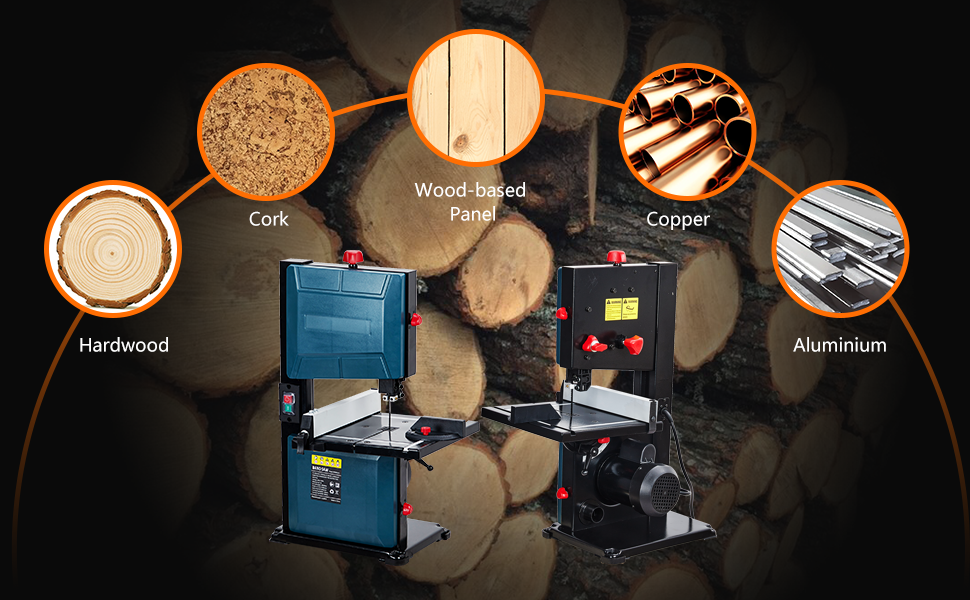
The Towallmark 3-Amp & 8-Inch Benchtop Bandsaw is designed for precise cutting of various materials, including wood, wood-based panels, cork, copper, and aluminum. It features a powerful 3A pure copper motor, a tilting table, and essential safety mechanisms.


3. Specifications
| Feature | Specification |
|---|---|
| Brand | Towallmark |
| Model Number | 198723109473 |
| Color | Blue and Black |
| Power Source | Corded Electric |
| Voltage | 127 Volts |
| Wattage | 1800 Watts |
| Motor Speed (No-Load) | 1800 RPM |
| Blade Length | 55-5/16 inches (1400mm) |
| Blade Width | 1/5 inch |
| Max Cutting Height (90°) | 3-1/2 inches (80mm) |
| Max Cutting Height (45°) | 50mm |
| Max Cutting Width | 8 inches |
| Tilting Range | 0-45 Degrees |
| Product Dimensions (L x W x H) | 27.95" x 15.55" x 11.61" |
| Item Weight | 38.5 Pounds |
| Dust Exhaust Port | 2 inches |
4. Setup and Assembly
Before beginning assembly, ensure all components are present and undamaged. Refer to the packing list included with your bandsaw.
- Unpacking: Carefully remove the bandsaw and all accessories from the packaging. Retain packaging for future transport or storage.
- Base and Table Assembly: Secure the bandsaw unit to a stable workbench or stand. Attach the work table, ensuring it is level and securely fastened.
- Blade Installation/Tensioning: Open the blade covers. Carefully install the blade, ensuring the teeth are pointing downwards towards the table. Adjust the blade tension using the tension knob (refer to Figure 2.2) until the blade is taut but not overly stressed. Ensure the blade guides are properly adjusted to support the blade without binding.
- Fence and Miter Gauge Installation: Install the rip fence onto the work table, ensuring it slides smoothly and locks securely. Insert the miter gauge into its slot on the table.
- Power Connection: Connect the bandsaw to a grounded 127V power outlet. Ensure the safety key is inserted into the safety switch before attempting to power on.
5. Operating Instructions
Familiarize yourself with the controls and practice on scrap material before making critical cuts.
5.1 Powering On/Off
- To turn on the bandsaw, ensure the safety key is inserted, then press the green 'ON' button on the double safety switch.
- To turn off, press the red 'OFF' button. Always remove the safety key when the bandsaw is not in use or unattended.
5.2 Adjusting Table Angle
The work table can be tilted from 0 to 45 degrees for bevel cuts.
- Loosen the table locking knob located beneath the table.
- Carefully tilt the table to the desired angle, using the angle scale for precision (refer to Figure 2.4).
- Tighten the table locking knob securely to fix the angle.
5.3 Using the Rip Fence and Miter Gauge
- Rip Fence: Use the rip fence for making straight, parallel cuts. Position the fence at the desired distance from the blade and lock it in place.
- Miter Gauge: The miter gauge is used for making accurate cross-cuts and angled cuts. Adjust the miter gauge to the desired angle and slide it in the table slot.
5.4 Cutting Techniques
Always feed material slowly and steadily into the blade. Do not force the material.
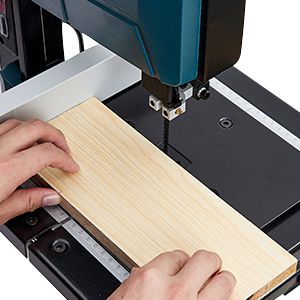
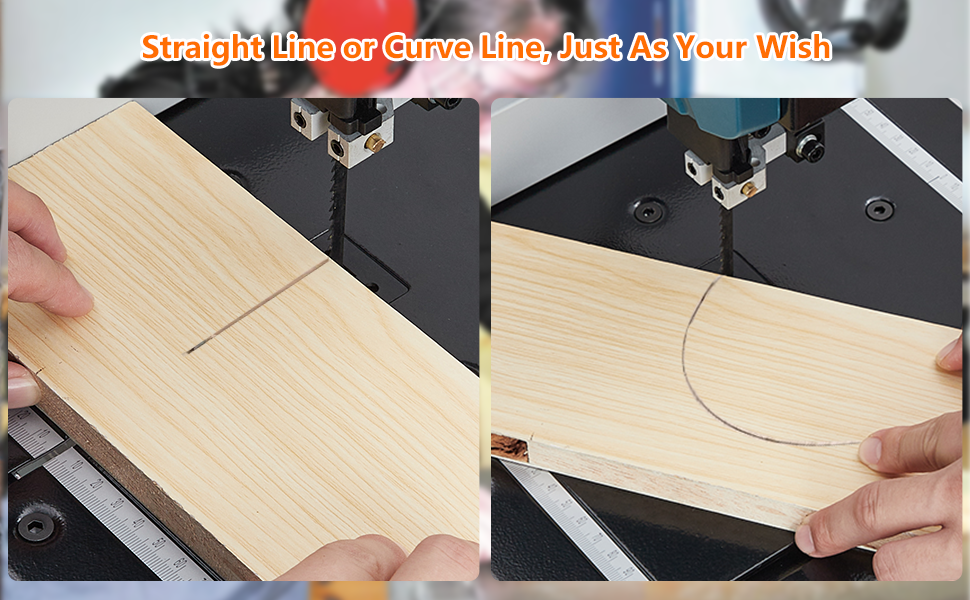
- Straight Cuts: Use the rip fence for long, straight cuts. Ensure the material is flat against the table and fence.
- Curved Cuts: For curved cuts, slowly guide the material freehand or with a template, allowing the blade to follow the curve. Avoid sharp turns that could bind or break the blade.
- Material Compatibility: This bandsaw is suitable for cutting wood, wood-based panels, cork, copper, and aluminum. Do not attempt to cut ferrous metals or excessively hard materials.
6. Maintenance
Regular maintenance ensures the longevity and safe operation of your bandsaw. Always disconnect power before performing any maintenance.
6.1 Cleaning
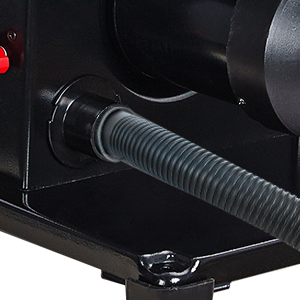
- Dust Management: The bandsaw features a 2-inch dust exhaust port and a dust brush on the saw wheel to minimize debris. Connect a shop vacuum or dust collection system to the dust port for optimal dust removal (refer to Figure 6.1).
- Regularly clean sawdust and debris from the work table, blade guides, and inside the blade covers. Use a brush or compressed air.
6.2 Blade Care and Replacement
- Inspect the blade regularly for dullness, damage, or missing teeth. A dull blade can lead to poor cuts and increased motor strain.
- Replace dull or damaged blades promptly. Refer to Section 4 for blade installation instructions. Ensure replacement blades match the specified length (55-5/16 inches) and width (1/5 inch).
6.3 General Inspection
- Check all nuts, bolts, and screws for tightness.
- Inspect the power cord for any damage.
- Ensure all moving parts operate smoothly.
7. Troubleshooting
This section addresses common issues you might encounter with your bandsaw.
| Problem | Possible Cause | Solution |
|---|---|---|
| Bandsaw does not start | No power; Safety key not inserted; Overload protection tripped | Check power connection; Insert safety key fully; Reset circuit breaker/allow motor to cool |
| Blade breaks frequently | Incorrect blade tension; Blade guides misaligned; Forcing material; Wrong blade type | Adjust blade tension; Adjust blade guides; Reduce feed rate; Use appropriate blade for material |
| Inaccurate or rough cuts | Dull or damaged blade; Incorrect blade tension; Table or fence not square; Blade guides worn | Replace blade; Adjust blade tension; Square table/fence; Inspect and adjust/replace blade guides |
| Excessive vibration or noise | Loose components; Unbalanced blade; Worn bearings | Check and tighten all fasteners; Replace blade; Contact customer support if bearings are suspected |
| Dust collection ineffective | Dust port clogged; Dust collection system inadequate | Clear dust port; Ensure dust collection system is properly connected and has sufficient suction |
8. Warranty and Support
Towallmark stands behind the quality of its products. For warranty information, technical support, or to order replacement parts, please contact Towallmark customer service. Keep your purchase receipt as proof of purchase.
For the most up-to-date contact information, please visit the official Towallmark website or refer to the contact details provided with your product packaging.