
DEMICEA X6
User Manual for DEMICEA Open Ear Sport Headphones
Model: X6
Introduction
The DEMICEA Open Ear Sport Headphones (Model X6) are designed for active lifestyles, offering bone conduction technology for open-ear comfort, a built-in 32GB MP3 player, IP68 waterproof rating, and Bluetooth 5.3 connectivity. These headphones allow you to enjoy music while remaining aware of your surroundings, making them ideal for running, workouts, swimming, and other outdoor activities.

Image: The DEMICEA Open Ear Sport Headphones, showcasing their water-resistant design.
What's in the Box
- 1x LibreSwim X6 Headphones
- 1x Magnetic Data & Charging Cable
- User Manual
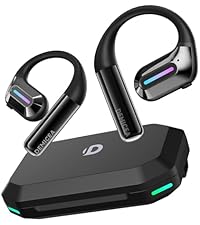
Image: Contents of the product packaging, including the headphones, charging cable, and user manual.
Setup
Charging the Headphones
Before first use, fully charge your headphones. Use the provided magnetic data & charging cable. Connect the magnetic end to the charging port on the headphones and the USB-A end to a compatible USB power source (e.g., computer USB port, wall adapter). A full charge takes approximately 2 hours and provides up to 8 hours of music playback. A quick 5-minute charge can provide 30 minutes of playback.

Image: The magnetic charging cable connecting to the headphone's charging port.
Transferring Music (MP3 Mode)
The headphones feature 32GB of built-in storage, capable of storing over 4000 high-quality songs. To transfer music:
- Connect the magnetic data & charging cable to the headphones and then to your computer's USB port.
- The headphones will appear as a removable USB drive on your computer.
- Drag and drop your music files (MP3 format recommended) into the headphone's storage.
- Safely eject the USB drive from your computer before disconnecting the cable.
- To switch to MP3 mode, press the power button twice quickly.

Image: Visual guide for connecting the headphones to a computer to transfer music files.
Bluetooth Pairing
The headphones utilize advanced Bluetooth 5.3 technology for stable and efficient connection.
- Ensure the headphones are powered on.
- If not already in Bluetooth mode, press the power button twice quickly to switch from MP3 mode.
- On your device (smartphone, tablet, laptop), enable Bluetooth and search for "LibreRun X6" or "DEMICEA X6".
- Select the headphones from the list to pair. A voice prompt will confirm successful connection.
Operating Instructions
Wearing the Headphones
Place the headphones with the transducers resting on your cheekbones, just in front of your ears. The band should rest comfortably behind your head. The open-ear design ensures comfort and situational awareness.

Image: Proper wearing of the headphones for secure fit during activities like swimming.
Controls
The headphones feature button controls for easy operation:
- Power Button: Press and hold to power on/off. Double-press to switch between Bluetooth and MP3 modes.
- Volume Up/Next Track: Short press for volume up. Long press for next track.
- Volume Down/Previous Track: Short press for volume down. Long press for previous track.
- Play/Pause/Call: Single press to play/pause music or answer/end calls. Double-press to activate voice assistant.

Image: Detailed view of the control buttons on the headphone unit.
Waterproof Usage (IP68)
With an IP68 waterproof rating, these headphones are suitable for swimming and other water sports. They can be submerged in water up to 2 meters deep for up to 2 hours without damage. For optimal performance underwater, it is recommended to use the built-in 32GB MP3 mode, as Bluetooth connectivity may be limited or interrupted by water.

Image: The headphones being used during swimming, demonstrating their IP68 waterproof capability.
Maintenance
- After using the headphones in water, wipe the charging port dry to prevent corrosion and ensure proper charging.
- Clean the headphones regularly with a soft, damp cloth. Avoid using harsh chemicals or abrasive materials.
- Store the headphones in a cool, dry place away from direct sunlight and extreme temperatures.
- Avoid bending or twisting the flexible band excessively to maintain its shape and integrity.
Troubleshooting
- No Power: Ensure the headphones are fully charged.
- Cannot Pair Bluetooth: Ensure the headphones are in Bluetooth mode and within range of your device. Turn Bluetooth off and on again on your device.
- No Sound: Check volume levels on both the headphones and your connected device. Ensure the correct mode (Bluetooth or MP3) is selected.
- Poor Sound Quality: For bone conduction headphones, sound quality can be affected by external noise. Ensure proper placement on cheekbones.
- MP3 Mode Issues: Ensure music files are in a compatible format (e.g., MP3) and have been transferred correctly.
Specifications
| Model Name | LibreRun X6 |
| Connectivity Technology | Bluetooth, Bone Conduction, Wireless |
| Bluetooth Version | 5.3 |
| Bluetooth Range | 10 Meters |
| Internal Storage | 32 GB |
| Water Resistance Level | IP68 (Waterproof) |
| Battery Life | Up to 8 Hours |
| Charging Time | 2 Hours |
| Item Weight | 26 Grams (0.917 ounces) |
| Dimensions | 5.12 x 3.94 x 1.97 inches |
| Audio Driver Type | Bone Conduction Driver (16mm) |
| Frequency Range | 20 Hz - 20,000 Hz |
| Material | ABS, Metal, Silicone |
Warranty and Support
DEMICEA products come with a standard manufacturer's warranty. For detailed warranty information, product support, or to inquire about replacement parts, please refer to the official DEMICEA website or contact their customer service directly. Keep your purchase receipt for warranty claims.
You can visit the DEMICEA Store on Amazon for more information.
Environmental Responsibility
DEMICEA is committed to promoting a balance between technological development and environmental protection. This product is part of the Climate Pledge Friendly initiative, reflecting efforts towards sustainability.
- Biodegradable Raw Materials: Use of biodegradable materials such as silicone.
- Low-Power Mode: Significantly reduced energy consumption when not in use.
- Responsible Packaging: Over 70% of the packaging is recyclable.

Image: Visual representation of DEMICEA's commitment to eco-conscious practices.
Ask a question about this manual
Ask about setup, troubleshooting, compatibility, parts, safety, or missing instructions. Manuals+ will review the question and use this page’s manual context to help answer it.