
Kidzone 12V Battery/ PP Tire Grey
Kidzone 2 Seater Kids Ride On Truck Instruction Manual
Model: 12V Battery/ PP Tire Grey

This image shows the Kidzone 2 Seater Kids Large Ride On Truck in gray, highlighting its robust design and large wheels.
Introduction
Welcome to the instruction manual for your new Kidzone 2 Seater Kids Large Ride On Truck. This electric vehicle is designed to provide a realistic and fun driving experience for children, featuring both manual and parental remote control options. Please read this manual thoroughly before assembly and operation to ensure safe and proper use of the product.

The Kidzone ride-on truck is suitable for both indoor and outdoor use, offering versatile play environments.
Safety Information
Your child's safety is paramount. This ride-on truck is equipped with several features to ensure a secure play experience. Always supervise children during operation.
- Adjustable Seat Belt: The extra-wide seat includes an adjustable seat belt to secure your child and prevent accidental falls. Always ensure the seat belt is properly fastened before use.
- Lockable Doors: Sturdy, lockable doors provide additional protection during rides.
- Parental Remote Control: Parents can override manual controls using the remote for enhanced safety and guidance, especially for younger children.
- Gradual Acceleration: The soft-start feature ensures smooth, gradual acceleration for safer operation.
- Recommended Age: Suitable for children aged 3 to 8 years.
- Weight Capacity: Maximum weight capacity is 77 lbs.

Always ensure the adjustable seat belt is securely fastened for your child's safety.
Components Overview
Familiarize yourself with the main components of your Kidzone Ride On Truck:
- Vehicle Body: Main chassis, seating area, and dashboard.
- Wheels: Four 14-inch off-road tires with spring suspension for a smooth ride.
- Steering Wheel: For manual control by the child.
- Dashboard: Features controls for music, lights, and power.
- Parental Remote Control: Allows adult supervision and control.
- 12V9AH Rechargeable Battery: Powers the vehicle.
- Charger: For recharging the vehicle's battery.
- LED Lights: Headlights and floodlights for realistic appeal.
- Adjustable Seat Belt: Integrated into the seat for safety.
- DIY License Plate Stickers: For personalization.
- Retractable Handle: For easy maneuvering when not in use.

The dashboard features various controls including music, Bluetooth connectivity, radio, LED light controls, and a USB port.

An overview of the truck's key features, including power steering, DIY customization, safety belt, 12V battery, two-speed options, and rugged tires.

The retractable handle allows for easy maneuvering and transport of the vehicle when not in use.

Personalize your ride-on truck with the included DIY license plate stickers.
Setup and Assembly
Assembly of the Kidzone Ride On Truck requires attention to detail. Please follow the included assembly instructions carefully. While the process is straightforward, some users may find it takes a bit of time. Ensure all components are securely fastened before initial use.
- Unpacking: Carefully remove all components from the packaging. Verify all parts are present against the packing list.
- Wheel Installation: Attach the 14-inch off-road tires to the axles, ensuring they are properly secured.
- Steering Column & Dashboard: Install the steering column and connect the dashboard components as per the diagrams.
- Battery Connection: Connect the 12V9AH battery. Ensure correct polarity.
- Seat & Safety Belt: Install the seat and ensure the adjustable seat belt mechanism is functional.
- Lights & Accessories: Attach headlights, floodlights, and mirrors.
- Initial Charge: Before first use, fully charge the battery for the recommended duration (typically 8-12 hours). Do not overcharge.
For detailed visual guidance, refer to the assembly video provided by the manufacturer if available. Patience during assembly will ensure a robust and safe vehicle.
Operating Instructions
The Kidzone Ride On Truck offers multiple modes of operation for varied play experiences.
Manual Driving Mode (Child Operated)
For independent driving, children can use the steering wheel and foot pedal. The vehicle features two speed options for different skill levels.
- Power On: Press the power button on the dashboard.
- Select Speed: Use the speed selector on the dashboard to choose between gentle or accelerated speeds (1.8-2.2 mph).
- Steering: Turn the steering wheel to control direction.
- Acceleration: Press the foot pedal to move forward. Release to brake.

The truck's dashboard is designed with easy-to-use controls for children to operate independently.
Parental Remote Control Mode
Parents can take full control of the vehicle using the included remote control. This feature is ideal for younger children or for guiding the vehicle in challenging areas. The remote control overrides the child's manual inputs for safety.
- Pairing: Follow the remote control's instructions to pair it with the vehicle.
- Directional Control: Use the joysticks/buttons on the remote to control forward, reverse, left, and right movements.
- Speed Adjustment: The remote also allows for speed adjustments.
- Emergency Stop: Most remotes include an emergency stop button for immediate halting of the vehicle.

The ride-on truck offers both independent driving for children and parental remote control for supervision and safety.

Parents can easily take control of the vehicle using the intuitive remote control.
Bluetooth Music Connectivity
Enhance the driving experience by connecting your smartphone via Bluetooth to play music through the vehicle's speakers.
- Activate Bluetooth: Press the Bluetooth button on the dashboard.
- Pair Device: On your smartphone, search for "Kidzone" or a similar device name and pair.
- Play Music: Once paired, play your desired audio from your phone.
- Adjust Volume: Use the volume controls on the dashboard or your phone to adjust the sound level.

The truck features a built-in Bluetooth speaker for playing music during rides.
Official Product Video
This video provides a product display of the Kidzone Ride On Truck, showcasing its features and operation in action.
Maintenance
Regular maintenance ensures the longevity and optimal performance of your ride-on truck.
- Battery Charging:
- Charge the battery fully after each use.
- Do not leave the battery completely discharged for extended periods.
- If storing for a long time, charge the battery every 30 days to maintain its life.
- Use only the provided charger.
- Cleaning: Wipe the vehicle with a damp cloth. Avoid using harsh chemicals or abrasive cleaners. Do not hose down the vehicle.
- Storage: Store the vehicle in a dry, cool place away from direct sunlight and moisture.
- Tire Inspection: Periodically check the tires for wear and tear.
- General Inspection: Regularly check all screws, bolts, and connections to ensure they are tight and secure.
Troubleshooting
Here are some common issues and their potential solutions:
| Problem | Possible Cause | Solution |
|---|---|---|
| Vehicle does not move | Battery is low or dead; Loose battery connection; Blown fuse; Motor issue. | Charge the battery; Check and secure battery terminals; Replace fuse; Contact customer support. |
| Vehicle moves slowly | Low battery; Overloaded vehicle; Driving on uneven terrain. | Recharge battery; Reduce weight; Drive on smoother surfaces. |
| Remote control not working | Remote batteries dead; Not paired correctly; Interference. | Replace remote batteries; Re-pair remote with vehicle; Move away from other electronic devices. |
| Lights not working | Loose connection; Damaged LED. | Check wiring connections; Contact customer support for replacement parts. |
Specifications
| Feature | Detail |
|---|---|
| Product Dimensions | 48.4 x 34.6 x 31.5 inches (L x W x H) |
| Item Weight | 47 pounds |
| Weight Capacity | 77 lbs |
| Recommended Age | 3 - 8 years |
| Battery | 12V9AH Lead-acid |
| Motors | Two 35W motors |
| Speed | 1.8-2.2 mph |
| Tire Size | 14-inch off-road tires |
| Manufacturer | Kidzone |
| Country of Origin | China |
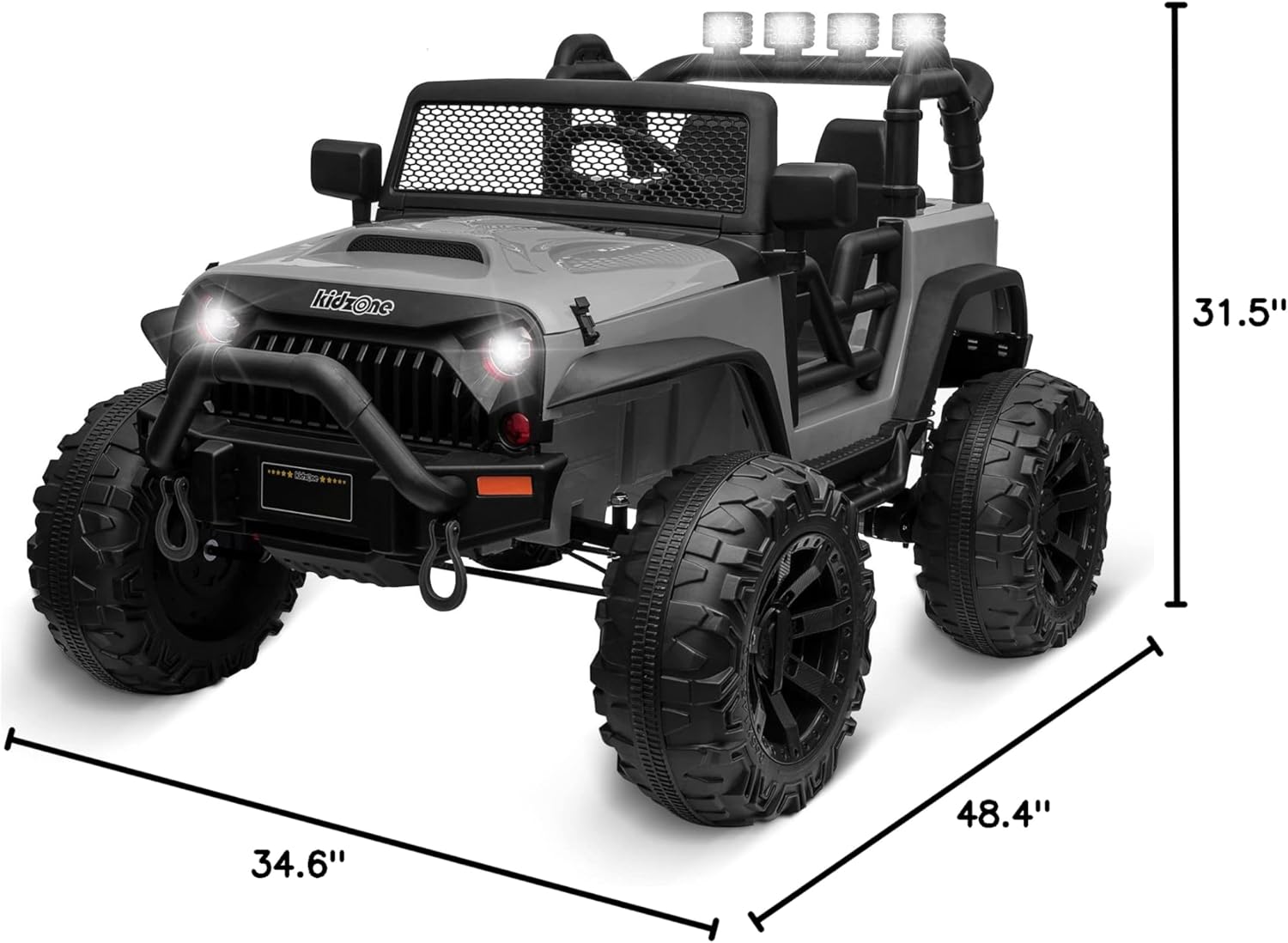
Detailed dimensions of the Kidzone 2 Seater Kids Large Ride On Truck.

This image illustrates the recommended age range (37 months to 8 years) and weight capacity (77 lbs) for the ride-on truck.
Warranty and Support
For warranty information, technical support, or to order replacement parts, please contact Kidzone customer service directly. Refer to the product packaging or the official Kidzone website for contact details.
Note: Specific warranty terms and conditions may vary. Please retain your proof of purchase.