
AMIR WA150KM
AMIR Wireless Refrigerator Thermometer User Manual
Model: WA150KM
Introduction
The AMIR Wireless Refrigerator Thermometer provides accurate temperature monitoring for your refrigerator and freezer compartments. This digital device features a large LCD screen, dual sensors, and an alarm system to help maintain optimal food storage conditions and prevent spoilage. It is designed for ease of use and flexible installation in various kitchen setups.

Image: The main display unit and two remote sensors of the AMIR Wireless Refrigerator Thermometer.
Package Contents
Please check the package to ensure all items are present:
- 1 x Main Unit
- 2 x Transmitters
- 1 x User Manual
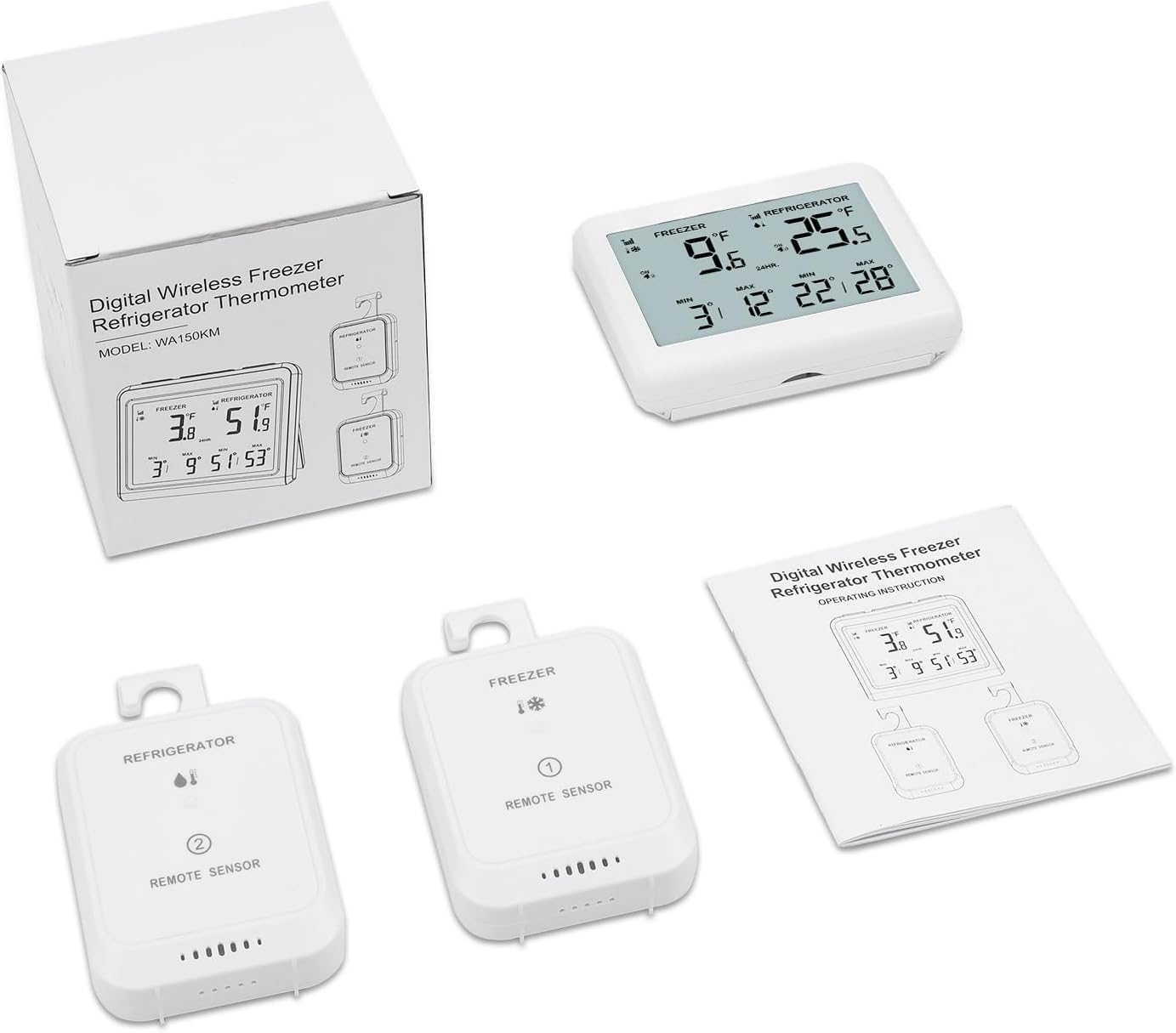
Image: The complete package contents, including the main unit, two remote sensors, and the user manual.
Product Overview
The AMIR Wireless Refrigerator Thermometer system consists of a main display unit and two remote sensors. Key features include:
- High-Definition LCD Screen: A 3.7-inch screen displays temperatures for both refrigerator and freezer, along with maximum and minimum values. Supports °C/°F conversion.
- Dual-Location Alarm System: Set upper and lower temperature limits for each transmitter. Alerts include icon flashing and an audible alarm lasting 2 minutes.
- Convenient Alarm Management: Easily view and adjust alarm settings. Features a delay alarm to prevent false alerts from temporary temperature changes (e.g., opening the door).
- Historical Temperature Tracking: Records 24-hour and all-time maximum and minimum temperatures, which can be cleared as needed.
- User-Friendly Design: Backlit display turns off automatically after 10 seconds to save energy. The main unit can be hung or placed upright, and transmitters have hooks for easy mounting.

Image: Visual representation of the thermometer's features, including dual-channel monitoring, temperature alarm, MAX/MIN record, 10-second backlight, delay alarms, and detachable hooks.

Image: A detailed view of the main display unit, highlighting freezer temperature, freezer alarm icon, freezer MAX/MIN values, refrigerator temperature, refrigerator alarm icon, and refrigerator MAX/MIN values for easy reading.
Setup
Follow these steps to set up your AMIR Wireless Refrigerator Thermometer:
- Install Transmitter Batteries: Open the battery compartment on each transmitter. Insert two AAA batteries into each transmitter.
- Install Main Unit Batteries: Open the battery compartment on the main unit. Insert three AAA batteries into the main unit. The freezer/refrigerator signal icons will blink, indicating a signal search.
- Pair Transmitters: Press the "TX" button on the back of each transmitter to quickly match the signal with the main unit.
Note: It is also possible to pair without pressing the "TX" button; simply wait for approximately 30 seconds for the signal to transmit.

Image: Instructions for installing 3xAAA batteries in the main unit (with hang hole and stand) and 2xAAA batteries in the transmitters (with detachable hook), showing placement examples in a refrigerator.
Video: A step-by-step guide on how to install the AMIR Wireless Refrigerator Thermometer, including battery insertion for both the main unit and the remote sensors, and the pairing process.
Operating Instructions
Temperature Display and Units
The 3.7-inch HD LCD screen displays current temperatures for both freezer and refrigerator, along with their respective minimum and maximum recorded values. You can switch between Celsius (°C) and Fahrenheit (°F) by pressing the "C/F" button on the main unit.

Image: The backlit LCD display of the thermometer, showing how it automatically turns off after 10 seconds to conserve energy.
Alarm System
The thermometer features a dual-location alarm system for both freezer and refrigerator. When temperatures exceed the set upper or lower limits, the current temperature, MAX/MIN icons, and alarm icon will flash, and an audible alarm will sound for 2 minutes.
- Setting Alarms: Refer to the detailed instructions in the included user manual for setting specific upper and lower temperature limits for each sensor.
- Delay Alarm: The delay alarm function helps prevent unnecessary alerts caused by temporary temperature fluctuations, such as when the refrigerator door is opened.

Image: The thermometer display indicating an upper limit alarm, with a visual of fresh food and meat in a refrigerator, emphasizing the importance of temperature monitoring.

Image: A visual explaining the programmable alarm ranges for the freezer (-40°C to 0°C / -40°F to 32°F) and refrigerator (0°C to 15°C / 32°F to 59°F), highlighting the 2-minute delay alarm feature.
Historical Data Tracking
The device stores 24-hour and all-time maximum and minimum temperature records. These records can be cleared as needed to monitor new temperature cycles.
Features
- Dual-Channel Monitoring: Independently monitor temperatures in two separate locations (e.g., freezer and refrigerator).
- Wireless Range: Offers a wireless range of up to 80 meters (262 feet) in open areas, allowing flexible placement of the main unit.
- Versatile Placement: The main unit can be hung on a wall or placed upright using its built-in stand. The transmitters include hooks for easy hanging inside compartments.

Image: A visual demonstrating the dual-channel capability, allowing separate temperature checks for the freezer and refrigerator compartments.

Image: Illustration of the thermometer's wireless range, showing the main unit placed in a living area receiving signals from remote sensors up to 80 meters away.

Image: Examples of flexible placement options, including hanging and standing for both the main unit and the remote transmitters inside the refrigerator.
Video: A demonstration of the key features of the AMIR Refrigerator Thermometer, including its dual-channel monitoring, temperature range, and installation flexibility.
Maintenance
- Cleaning: Wipe clean with a soft, damp cloth. Do not immerse the units in water.
- Battery Replacement: Replace batteries when the low battery indicator appears on the display. Ensure correct polarity.
- Storage: If storing for an extended period, remove all batteries to prevent leakage.
Troubleshooting
| Problem | Possible Cause | Solution |
|---|---|---|
| No temperature reading on display. | Batteries are dead or incorrectly installed. Transmitters are out of range or not paired. | Check and replace batteries. Move transmitters closer to the main unit. Re-pair the transmitters following the setup instructions. |
| Inaccurate temperature readings. | Sensors not placed optimally. Initial stabilization period not complete. | Ensure sensors are placed away from direct airflow or heat sources. Allow at least 1 hour for initial temperature stabilization, especially for first use. |
| Alarm not sounding or stopping. | Alarm settings incorrect. Alarm was manually stopped and not reactivated. | Verify alarm threshold settings. If an alarm stops, you may need to reactivate it manually after the condition is resolved. |
| Signal loss or intermittent connection. | Obstructions between units. Distance too great. Interference. | Reduce distance between main unit and transmitters. Minimize obstructions (e.g., thick walls, metal objects). Try moving units to a different location. |
Video: Instructions on how to manually reconnect the thermometer units if you encounter signal issues or exceptions, ensuring continuous monitoring.
Specifications
| Feature | Detail |
|---|---|
| Brand | AMIR |
| Model Name | Refrigerator Thermometer (WA150KM) |
| Display Type | Digital LCD (3.7 inch) |
| Connectivity Technology | Wireless (Bluetooth mentioned in specs, but likely RF for range) |
| Power Source | Battery Powered (Main Unit: 3xAAA, Transmitters: 2xAAA each) |
| Outer Material | Acrylonitrile Butadiene Styrene |
| Temperature Range (Freezer) | -40°C to 0°C (-40°F to 32°F) |
| Temperature Range (Refrigerator) | 0°C to 15°C (32°F to 59°F) |
| Wireless Range | Up to 80m (262ft) in open area |
| Response Time | 2 minutes (for temperature updates) |
| Item Weight | 8.4 ounces |
| Special Features | Large Display, Backlit, Freezer Safe, Wipe Clean, High Accuracy |
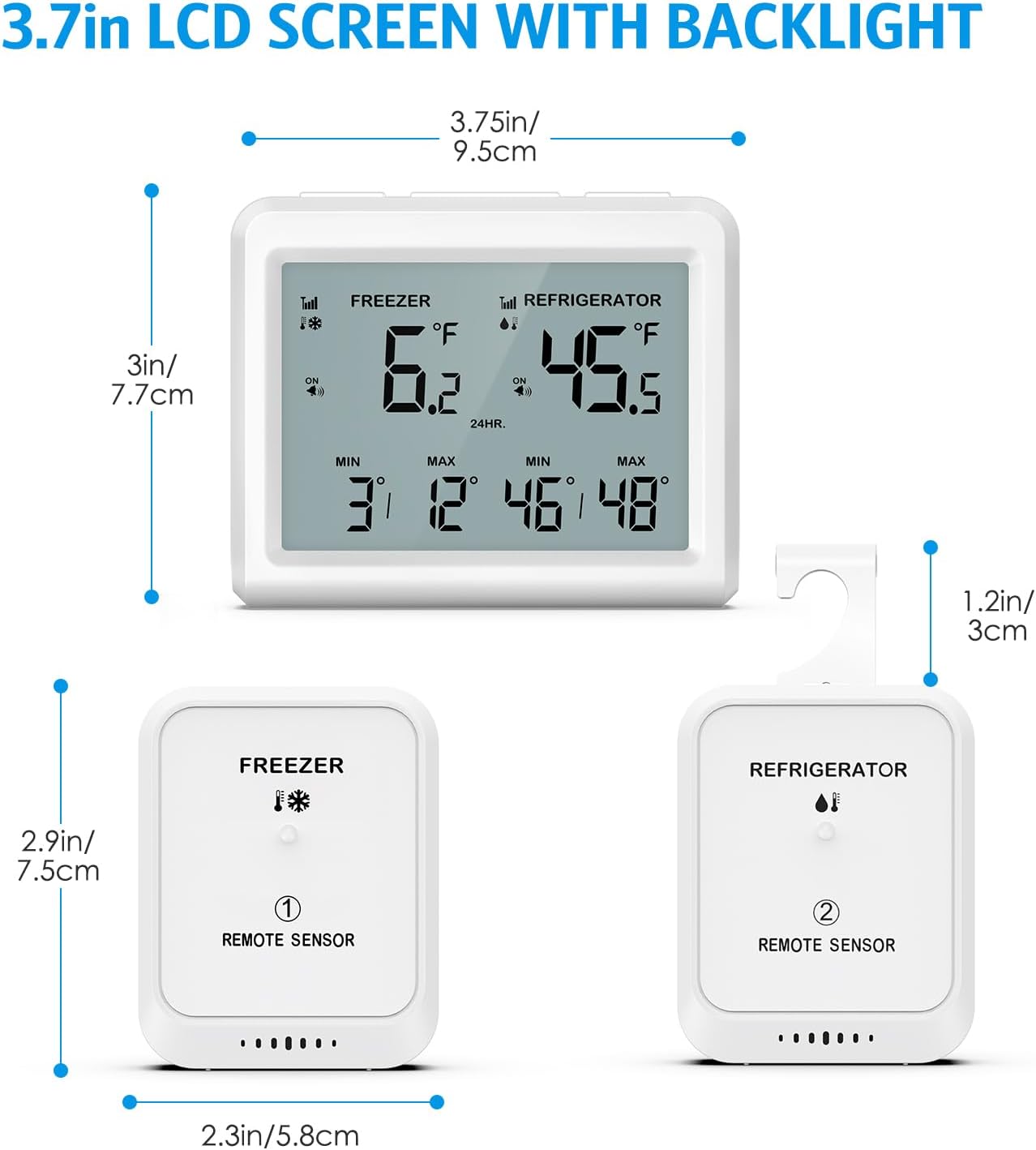
Image: Detailed dimensions of the 3.7-inch LCD screen main unit and the two remote sensors, showing their height, width, and depth.
Warranty and Support
For warranty information, technical support, or any inquiries regarding your AMIR Wireless Refrigerator Thermometer, please refer to the contact details provided in the original product packaging or visit the official AMIR website. Keep your purchase receipt for warranty claims.
Related documentsWA150KM


Ask a question about this manual
Ask about setup, troubleshooting, compatibility, parts, safety, or missing instructions. Manuals+ will review the question and use this page’s manual context to help answer it.