1. Safety Information
Please read all instructions carefully before using your Dyson Ball UP13 Multi Floor Bagless Upright Vacuum. Retain this manual for future reference.
- Always unplug the vacuum cleaner from the electrical outlet before cleaning or performing any maintenance.
- Do not use the vacuum cleaner outdoors or on wet surfaces.
- Do not allow children to operate the vacuum cleaner. Close supervision is necessary when used near children.
- Do not pick up flammable or combustible liquids, such as gasoline, or use in areas where they may be present.
- Do not pick up anything that is burning or smoking, such as cigarettes, matches, or hot ashes.
- Inspect the power cord and plug for damage before each use. Do not use if damaged.
2. Product Overview
The Dyson Ball UP13 Multi Floor Bagless Upright Vacuum is engineered for powerful cleaning across various floor types, from carpets to hard floors. Its unique Ball™ technology allows for easy maneuverability around furniture and obstacles.
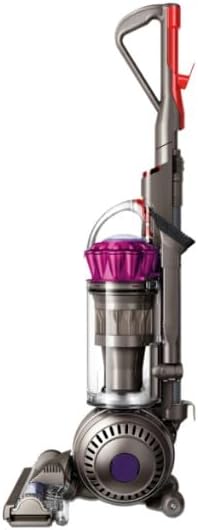
Image 1: Front view of the Dyson Ball UP13 Multi Floor Bagless Upright Vacuum, showcasing its distinctive ball design and clear dust bin.
Key Features:
- Ball™ Technology: For easy steering and navigation.
- Bagless Design: Features a 0.5 Kilogram capacity cyclonic filter dust bin for convenient emptying.
- Multi-Floor Cleaning: Optimized for effective cleaning on both carpet and hard floor surfaces.
- Corded Operation: Provides consistent power without battery limitations.
- Compact Dimensions: Approximately 15.4"L x 13.4"W x 42.4"H, weighing 17.3 pounds.
3. Setup
Your Dyson Ball UP13 vacuum requires minimal assembly before first use.
- Carefully remove all components from the packaging.
- Attach the handle to the main body of the vacuum until it clicks securely into place.
- Ensure the dust bin is correctly seated and locked onto the main unit.
- Unwind the power cord completely before plugging into a suitable electrical outlet.

Image 2: The Dyson Ball UP13 vacuum being operated on a hard floor, demonstrating its maneuverability.
4. Operating Instructions
Operating your Dyson Ball UP13 is straightforward. Follow these steps for effective cleaning:
- Power On/Off: Locate the power button, typically on the main body or handle, and press to turn the vacuum on or off.
- Reclining the Vacuum: To begin vacuuming, place your foot on the cleaner head and pull the handle back to recline the machine.
- Floor Type Adjustment: The Dyson Ball UP13 automatically adjusts to different floor types. For optimal performance, ensure the brush bar is engaged for carpets and disengaged for delicate hard floors if a manual control is present (refer to specific model features).
- Maneuvering: Utilize the Ball™ technology to steer around obstacles with a simple twist of the wrist.
- Using Attachments: If your model includes a wand or other attachments, detach the hose from the main body and connect the desired tool for above-floor cleaning, crevices, or upholstery.
Note: No official seller videos were available for embedding. For visual guides, please refer to the official Dyson support website.
5. Maintenance
Regular maintenance ensures your Dyson Ball UP13 continues to perform optimally.
Emptying the Dust Bin:
- Unplug the vacuum cleaner.
- Press the bin release button to detach the clear dust bin from the main body.
- Position the bin over a trash can and press the red bin release button to open the bottom flap and empty debris.
- Close the bin flap securely and reattach the bin to the vacuum until it clicks.
Filter Cleaning:
Your vacuum features a cyclonic filter. Refer to your specific model's instructions for filter location and cleaning frequency. Most Dyson filters are washable and should be air-dried completely for at least 24 hours before reinstallation.
Brush Bar Maintenance:
Periodically check the brush bar for tangled hair or debris. Unplug the vacuum, then use scissors to carefully cut away any tangled material. Avoid pulling hair forcefully to prevent damage to the bristles.
6. Troubleshooting
If you encounter issues with your Dyson Ball UP13, consult the following common troubleshooting tips:
| Problem | Possible Cause | Solution |
|---|---|---|
| Loss of Suction | Full dust bin, blocked airways, dirty filter. | Empty dust bin. Check hose, wand, and cleaner head for blockages. Clean or replace filter. |
| Vacuum Overheats / Shuts Off | Blockage, dirty filter, motor overload. | Unplug and allow to cool for 30-60 minutes. Check for and clear any blockages. Clean filter. |
| Brush Bar Not Spinning | Tangled debris, brush bar obstruction, belt issue. | Unplug and remove tangled hair/debris from brush bar. Check for obstructions in the cleaner head. |
| Poor Performance on Carpet | Brush bar disengaged, suction too high for thick carpet. | Ensure brush bar is engaged. Some Dyson models may have high suction; adjust settings if available or consider alternative methods for very thick pile carpets. |
7. Specifications
| Attribute | Detail |
|---|---|
| Brand | Dyson |
| Model Name | 208234-02 (UP13 Series) |
| Special Feature | Corded |
| Filter Type | Cyclonic Filter |
| Included Components | Canister |
| Is Cordless? | No |
| Capacity | 0.5 Kilograms |
| Recommended Uses | Home, Carpet, Hard Floor |
| Form Factor | Upright |
| Color | Fuschia |
| Product Dimensions | 15.4"L x 13.4"W x 42.4"H |
| Item Weight | 17.3 pounds |
| Controller Type | Push Button |
| Control Method | Touch |
| Portable | No |
| Number of Handles | 1 |
| Number of Power Levels | 3 |
| Indoor/Outdoor Usage | Indoor |
| Finish Type | Glossy |
| UPC | 885609006840 |
| ASIN | B0D8265CDW |
| Batteries required | No |
8. Warranty and Support
This product is listed as 'Renewed'. Warranty coverage for renewed products may differ from new products. Please refer to the specific warranty terms provided by the seller, 'FIRST CHOICE WAREHOUSE', or contact Dyson directly for information regarding their renewed product policies.
For additional support, troubleshooting, or to purchase genuine Dyson parts and accessories, please visit the official Dyson website or contact their customer service.
Protection plans are available for purchase separately and are managed by third-party providers. Details on these plans can be found where the product was purchased.


