
Introduction
Thanks for purchasing our car smart digital meter. This product connects to your car's OBD2 interface via an OBD cable, displaying essential driving data such as vehicle speed, engine RPM, water temperature, fuel consumption, and voltage. It is designed to keep the driver's eyes on the road, enhancing safety by eliminating the need to look down at the dashboard. This device does not alter any car ECU data.
The BY-J Heads Up Display (Model HUD-P8) features a dual system (OBD2 and GPS) for broad compatibility. After powering on, you can select your preferred language and system (OBD or GPS). The device will automatically enter the last selected system after 5 seconds of inactivity.
Package Contents
Please verify that all items listed below are included in your package:
- 1x Host Unit (BY-J Heads Up Display)
- 1x OBD Cable
- 1x USB Cable
- 1x User Manual
- 1x 3M Adhesive Pad
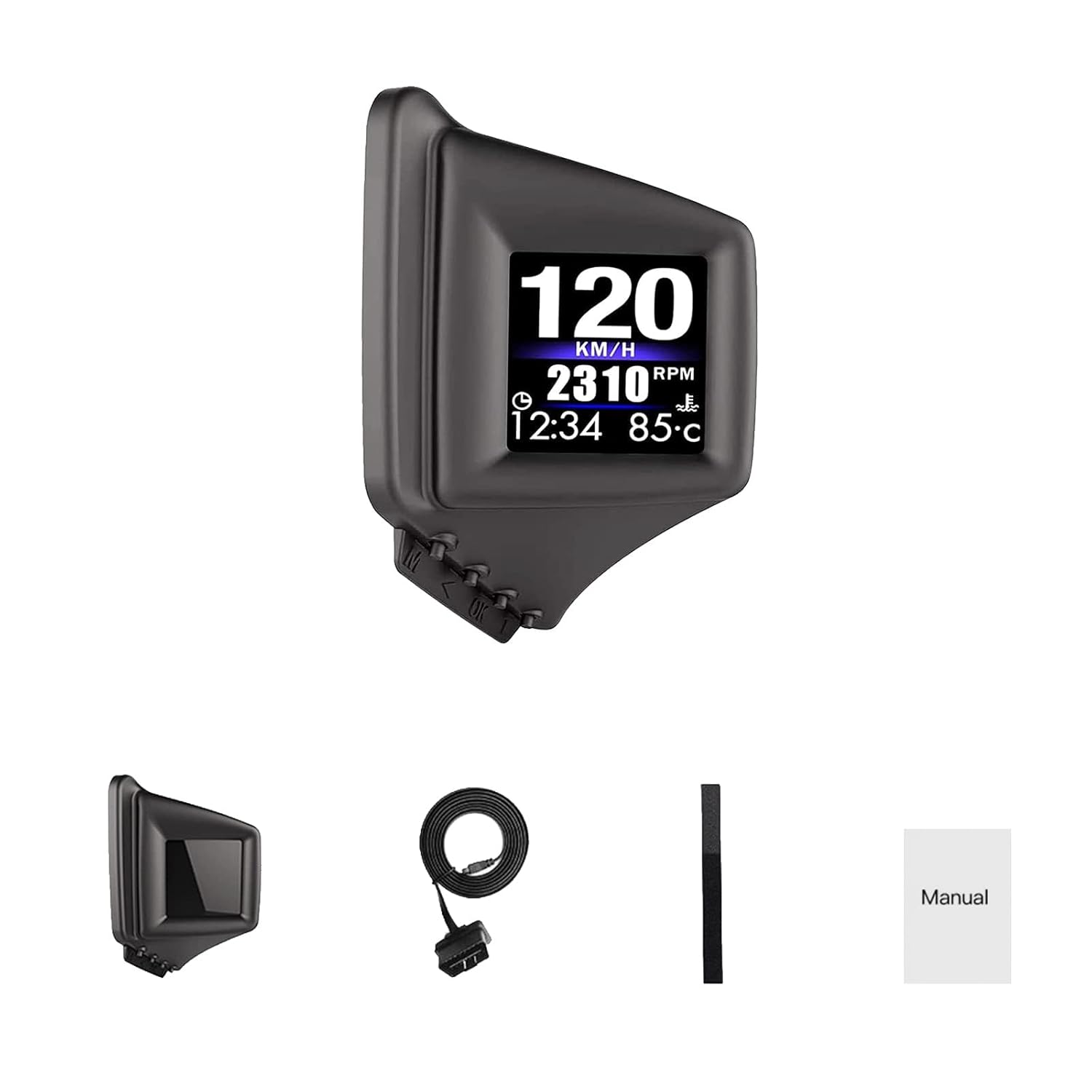 Image: Contents of the BY-J Heads Up Display package. It shows the main display unit, an OBD cable, a USB cable, a 3M adhesive pad, and the user manual.
Product Specifications
| Feature | Detail |
|---|---|
| Screen Size | 3 Inches |
| Product Dimensions (L x W x H) | 115 x 35 x 75 mm (4.53 x 1.38 x 2.95 inches) |
| Product Weight | 191 g (0.42 lbs) |
| Material | Acrylonitrile Butadiene Styrene (ABS) |
| OBD2 Mode Working Voltage | 11V~18V DC (12V DC/200mA) |
| GPS Mode Power Source | USB cable (required if voltage is higher than 24V) |
| Dual System | OBD2 and GPS |
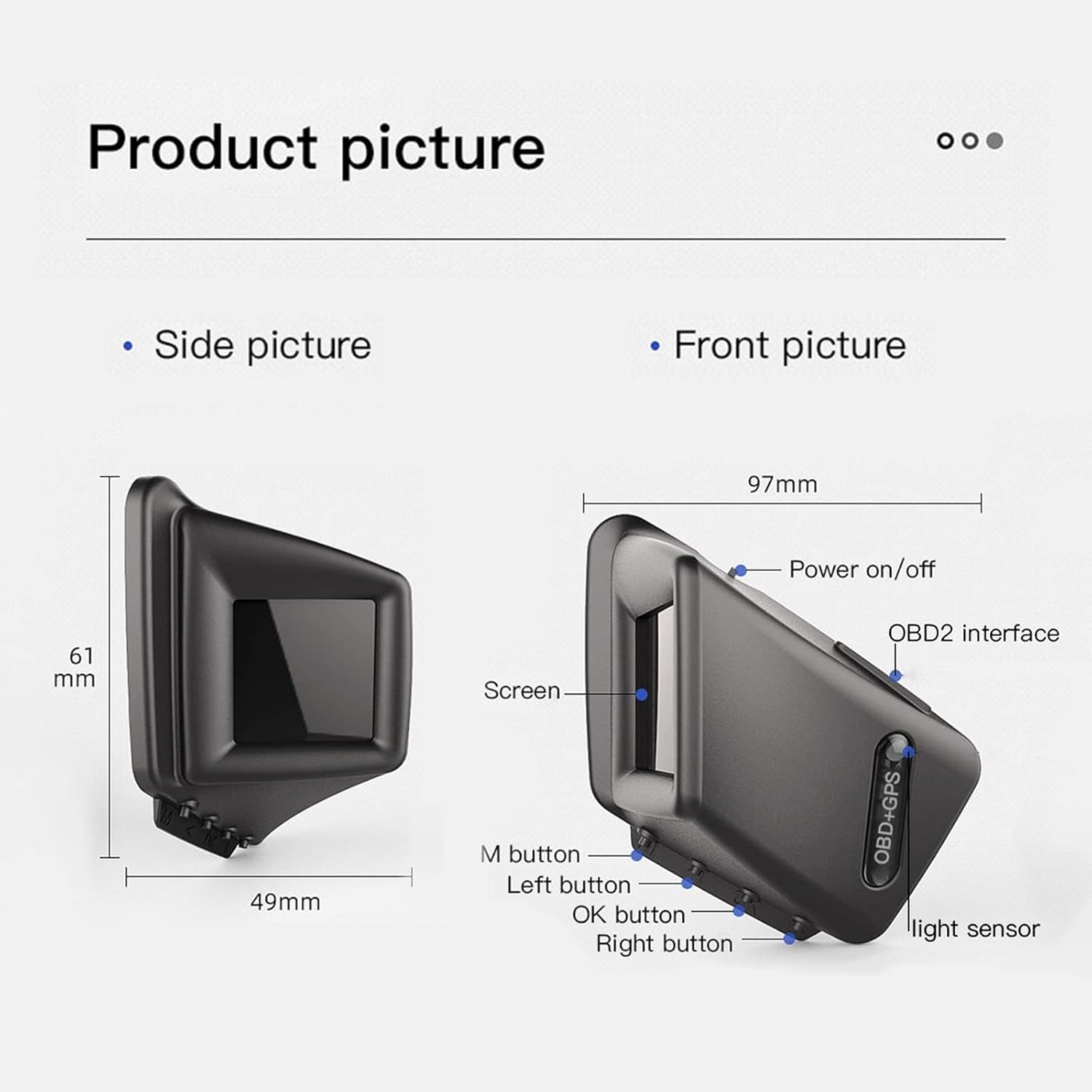 Image: Detailed product dimensions and views. The image illustrates the side view with a height of 61mm and depth of 49mm, and a front view with a width of 97mm. Key components like the screen, power on/off button, OBD2 interface, M button, Left button, OK button, Right button, and light sensor are labeled.
Installation
Compatibility
- OBD2 Mode: Applicable to most vehicles produced in the United States in 2004 and later, and in other regions after 2008. Before using OBD2 mode, verify if your vehicle has an OBD2 protocol.
- GPS Mode: Suitable for all vehicles. Use GPS mode if your car is not compatible with OBD2.
Installation Methods
The BY-J Heads Up Display offers two primary installation options for optimal viewing and convenience:
- On the A-pillar Trim: This method positions the display directly in your line of sight, reducing the need to look down.
- On the Dashboard: A common installation method, allowing for flexible placement on your vehicle's dashboard.
 Image: Illustration of the two installation methods. One image shows the display mounted on the A-pillar trim, and the other shows it placed on the dashboard. Both methods aim to provide an easy-to-view display.
Connection Steps
- Locate your vehicle's OBD2 port, typically found under the dashboard on the driver's side.
- Connect the provided OBD cable to the OBD2 port and to the display unit.
- Alternatively, for GPS mode or if vehicle voltage exceeds 24V, connect the display unit using the provided USB cable to a USB power source in your vehicle.
- Secure the display unit using the 3M adhesive pad in your desired location (A-pillar trim or dashboard).
Operation
Initial Power On and System Selection
Upon initial power-on, the device will prompt you to select a language and system (OBD or GPS). Use the '>' key to navigate and select your preferred system. If no selection is made within 5 seconds, the device will automatically enter the last selected system.
Display Functions and Modes
The BY-J Heads Up Display supports both OBD2 and GPS modes, offering a comprehensive range of data displays. The default mode is OBD2.
 Image: Overview of functions in OBD mode and GPS mode. OBD mode functions include Speed, Clock, RPM, Water temperature, Voltage, Brake test, Clear fault code, Fuel consumption, Driving time, Driving distance, Turbo pressure, Acceleration test, and Oil temperature. GPS mode functions include Speed, Clock, Driving time, Satellite number, Altitude, Driving direction, and Driving distance.
OBD2 Mode Functions:
- Vehicle Speed
- Engine RPM
- Water Temperature
- Voltage
- Fuel Consumption
- Clock
- Single Travel Distance
- Single Travel Time
- Oil Temperature
- Turbine Pressure
- Acceleration Test
- Brake Test
- Overspeed Alarm
- Engine Failure Alarm
- Fault Code Exclusion
- Water Temperature Alarm
- Speed Alarm
- Voltage Alarm
- Mileage Switch
- Fatigue Driving Reminder
- Automatic and Manual Brightness Adjustment
GPS Mode Functions:
- Vehicle Speed
- Voltage
- Satellite Time
- Altitude
- Number of Satellites
- Driving Direction
- Single Mileage
- Driving Time
- Acceleration Test
- Brake Test
- Overspeed Alarm
- Low Voltage Alarm
Navigating Display Interfaces
The device allows you to switch between different display interfaces to view various data points. A short press of the 'M' button will cycle through the available display screens.
 Image: Operational guide for the display. It shows that upon startup, the voltage is displayed for 3 seconds. The default interface shows speed and RPM. Pressing the 'M' button allows switching between various display interfaces, including detailed speed, RPM, water temperature, time, distance, acceleration test, brake test, and diagnostic information.
Brightness Adjustment
The display features both automatic and manual brightness adjustment modes to ensure optimal visibility without glare. The device automatically turns on and off with the vehicle's ignition, helping to protect the car battery. A manual switching mode is also available for user control.
Troubleshooting
Common Issues and Solutions
- Device does not power on:
- Ensure the OBD cable or USB cable is securely connected to both the device and the power source/OBD2 port.
- Check your vehicle's OBD2 port for power.
- If using OBD2 mode, confirm your vehicle's voltage is within the 11V~18V DC range. If higher than 24V, use the USB cable for GPS mode.
- No data displayed in OBD2 mode:
- Verify your vehicle is OBD2 compliant (US vehicles 2004+, other regions 2008+).
- Ensure the OBD cable connection is firm.
- Try restarting the vehicle and the device.
- If OBD2 mode is not compatible, switch to GPS mode.
- Inaccurate speed reading:
- In GPS mode, ensure the device has a clear view of the sky for satellite acquisition.
- Refer to the user manual for calibration steps if available (not detailed in provided info, but a common HUD feature).
- Alarms (Overspeed, Voltage, Water Temperature) triggering frequently:
- Check your vehicle's actual parameters to ensure they are within normal operating ranges.
- Adjust alarm thresholds in the device settings if they are too sensitive (refer to device menu for options).
Fault Code Exclusion
The OBD2 mode includes a "Fault Code Exclusion" function. This allows the device to read and clear certain engine fault codes. Consult your vehicle's service manual or a qualified mechanic for persistent or critical fault codes.
Maintenance
- Cleaning: Use a soft, dry cloth to clean the display screen and device body. Avoid abrasive cleaners or solvents that may damage the surface.
- Storage: When not in use for extended periods, store the device in a cool, dry place away from direct sunlight and extreme temperatures.
- Cable Care: Handle the OBD and USB cables carefully. Avoid sharp bends or kinks that could damage the internal wiring.
Warranty and Support
For warranty information or technical support, please refer to the contact details provided with your purchase documentation or visit the official BY-J website. Keep your purchase receipt as proof of purchase for warranty claims.