
Introduction
This manual provides detailed instructions for the installation, operation, and maintenance of your AWESAFE 1 DIN Universal Android 13 Car Radio. Please read this manual thoroughly before using the product to ensure proper functionality and safety. Keep this manual for future reference.
Product Features
- Android 13 System: The new Android 13 system, combined with 2GB ROM and 64GB RAM, ensures smooth radio performance for a seamless and fast user experience. The easily accessible interface allows for safe operation, enabling drivers to focus on the road without sacrificing convenience.
- Navigation: The radio supports both offline and online maps. Integrated offline maps of Europe with multiple language options are pre-installed. After connecting the radio to Wi-Fi, you can also use online maps.
- Carplay and Android Auto: The radio features wired and wireless Carplay and Android Auto functionality, facilitating access to apps, calls, messages, and music. With voice command support, users can operate the car radio for safer driving.
- Steering Wheel Control: Important functions such as volume, station changes, or music playback can be controlled quickly and directly without navigating complex menus. Drivers can manage key functions while maintaining focus on driving.
- Bluetooth: The car radio's Bluetooth function allows for wireless audio and music streaming and playback from a Bluetooth device. Additionally, the Bluetooth function enables hands-free calling without needing to hold your smartphone.
Package Contents
Verify that all items are present in the package before installation.

Image: Overview of included accessories, including the car radio, connection cables, RCA cable, GPS antenna, microphone, USB cables (4-pin & 6-pin), brackets, rear view camera cable, pry tool, and user manual.
- AWESAFE Car Radio (10.1-inch display)
- Connection Cable
- RCA Cable
- GPS Antenna
- Microphone
- USB Cables (2x: 4-pin & 6-pin)
- Brackets
- Rear View Camera Cable (Pry Tool)
- User Manual
Setup and Installation
The car radio is designed to fit most vehicles, but some cables may need to be connected separately. If you are unsure about the wiring, please contact us for assistance.

Image: Detailed wiring diagram for the AWESAFE car radio, showing connections for GPS antenna, radio antenna, amplifier, power, USB, RCA, camera signal, and steering wheel control. Includes a pinout diagram for the main connector.
Wiring Connections
- Power Connection: Connect the main power cable according to your vehicle's wiring diagram. Ensure correct polarity for GND (Ground), ACC (Accessory), and B+ (Battery Positive).
- GPS Antenna: Connect the GPS antenna to the designated port on the back of the radio. Position the antenna in a location with a clear view of the sky for optimal signal reception.
- Radio Antenna: Connect your vehicle's radio antenna to the radio.
- USB Connections: Connect the provided 4-pin and 6-pin USB cables to the corresponding ports. These are used for data transfer, charging, and Carplay/Android Auto functionality.
- RCA Cables: Use the RCA cables for external audio/video input/output, such as connecting an amplifier or external display.
- Rear View Camera: If installing a rear view camera (not included), connect its video signal cable to the 'Camera signal' input and its power to the reverse light circuit.
- Steering Wheel Control: For steering wheel control functionality, connect the white 8-pin plug of the power cable to the interface on the back of the radio. Refer to your vehicle's specific wiring for SWC (Steering Wheel Control) connections (KEY1, KEY2).
Note: If your vehicle uses a CANbus system for steering wheel control, you may need an additional CANbus decoder (not included) or specific wiring adjustments. Consult a professional if unsure.
Operating Instructions
Display Rotation
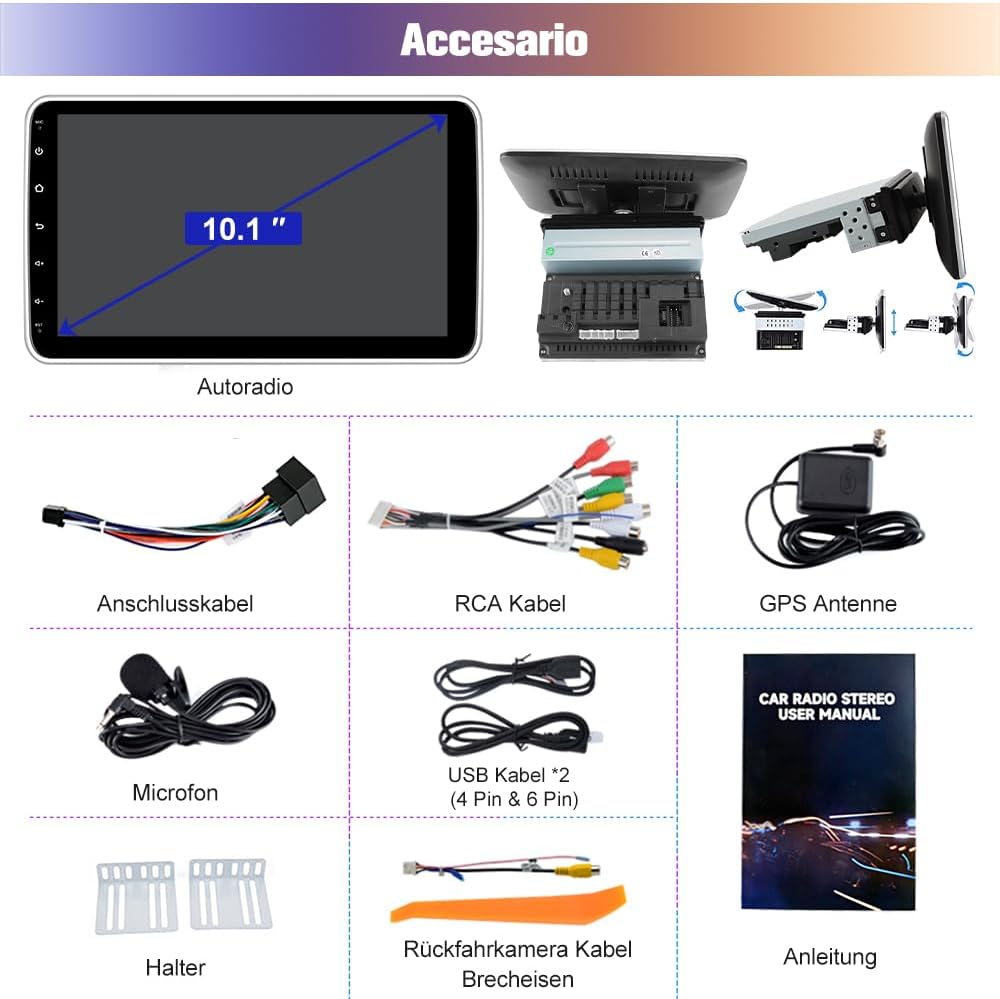
Image: Demonstrates the 10.1-inch screen rotating manually by 90 degrees from horizontal to vertical orientation. The screen is firmly installed and requires some force to rotate.
The 10.1-inch screen can be manually rotated by 90 degrees to switch between horizontal and vertical orientations. The screen is designed to be firmly installed, so some force may be required when rotating it.
Android 13 System
The car radio operates on the Android 13 system, providing a familiar and intuitive user interface. Navigate through apps and settings using the touchscreen. The 2GB RAM and 64GB ROM ensure smooth performance for various applications.
Navigation

Image: Shows the car radio display with GPS navigation active, displaying a map route. Also shows the Wi-Fi connectivity feature, indicating the radio supports both online and offline maps.
The radio supports both offline and online navigation. Offline maps for Europe are pre-installed. To use online maps, connect the radio to a Wi-Fi network (e.g., via a mobile hotspot).
CarPlay and Android Auto
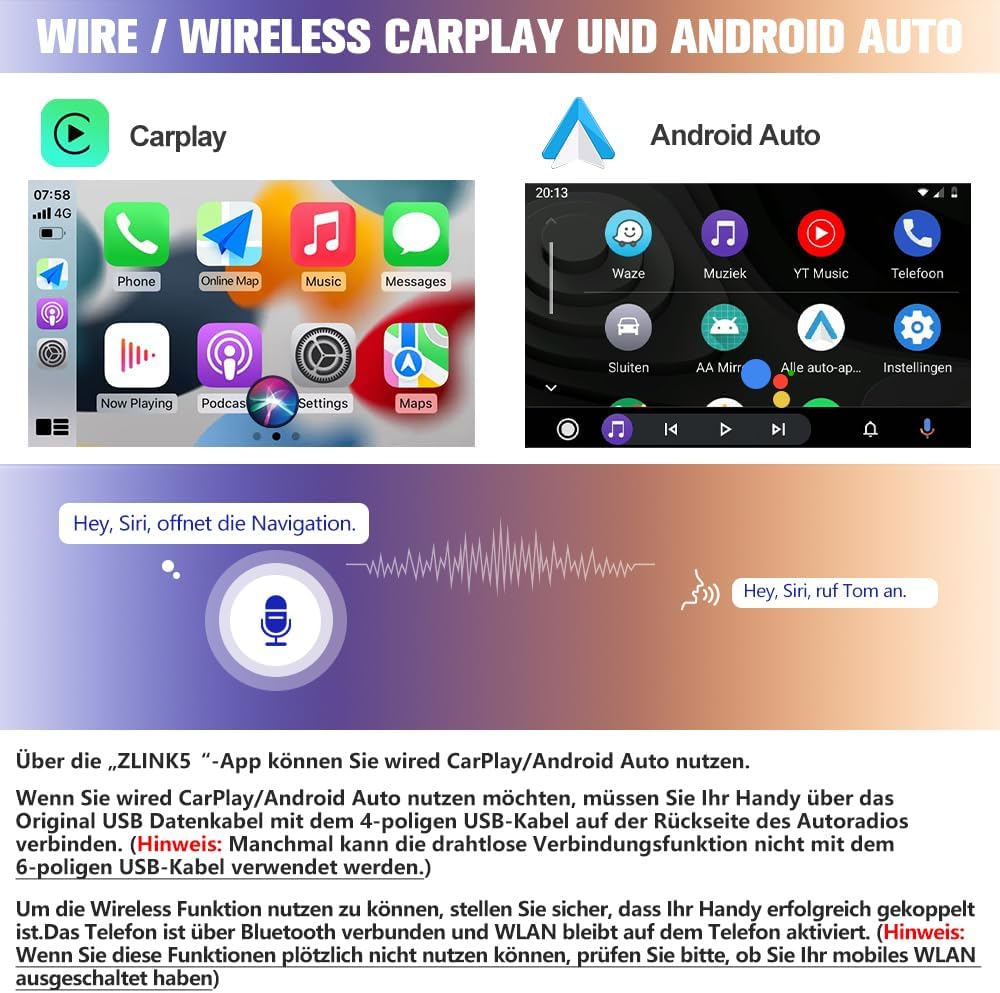
Image: Displays the user interfaces for Apple CarPlay and Android Auto on the car radio screen, showing app icons and voice command examples like "Hey Siri, open navigation" and "Hey Siri, call Tom."
The radio supports both wired and wireless CarPlay and Android Auto. Use the 'ZLINK5' app on the radio to access these features.
- Wired Connection: Connect your mobile phone to the 4-pin USB cable on the back of the car radio using your phone's original USB data cable.
- Wireless Connection: Ensure your mobile phone is successfully paired via Bluetooth and that Wi-Fi remains active on your phone. If wireless functions suddenly stop working, check if your mobile Wi-Fi has been turned off.
Bluetooth

Image: Shows four different screen views: Bluetooth dialer, FM radio interface, Digital Sound Processor (DSP) settings, and a selection of diverse themes for the user interface.
Pair your Bluetooth-enabled device with the car radio to stream audio, play music, and make hands-free calls. Access the Bluetooth menu on the radio to manage connections.
Radio (FM/DAB+)
The radio supports FM radio and DAB+ (Digital Audio Broadcasting Plus). Use the radio interface to scan for stations, save presets, and adjust settings. The DAB+ feature provides access to a wider range of digital radio stations with improved audio quality.
Steering Wheel Control

Image: Illustrates the steering wheel control functionality, showing on-screen buttons for power, home, back, volume, and mute. Also depicts the display showing a rear view camera feed, noting that the camera is not included.
Once properly connected, you can control essential functions like volume, track skipping, and mode selection directly from your vehicle's steering wheel buttons. This allows for safer operation by keeping your hands on the wheel.
Rear View Camera Support
The radio supports a rear view camera (not included). When a compatible camera is connected and the vehicle is in reverse gear, the radio display will automatically switch to the camera feed, assisting with parking and maneuvering.
Maintenance
- Cleaning: Use a soft, dry cloth to clean the screen and exterior of the unit. Avoid using abrasive cleaners or solvents.
- Software Updates: Periodically check for available software updates to ensure optimal performance and access to new features. Updates can typically be downloaded via Wi-Fi.
- Environmental Conditions: Avoid exposing the unit to extreme temperatures, direct sunlight for prolonged periods, or excessive moisture.
Troubleshooting
- No Power: Check all power connections (GND, ACC, B+). Ensure the vehicle's fuse for the radio is intact.
- No Sound: Verify speaker connections. Check volume levels and audio output settings. Ensure no cables are loose.
- GPS Signal Issues: Ensure the GPS antenna is properly connected and placed in a location with a clear view of the sky.
- CarPlay/Android Auto Not Connecting: For wired connections, ensure you are using an original USB data cable. For wireless, verify Bluetooth pairing and active Wi-Fi on your phone. Check the 'ZLINK5' app settings.
- Steering Wheel Controls Not Working: Confirm the 8-pin plug for steering wheel control is correctly connected. Check the radio's settings for steering wheel control mapping.
- Touchscreen Unresponsive: Try restarting the unit. If the issue persists, a factory reset might be necessary (note: this will erase all user data).
For persistent issues, please contact AWESAFE customer support.
Specifications
| Brand | AWESAFE |
| Model Number | B0D7VBR83F |
| Operating System | Android 13 |
| Memory Storage Capacity | 64 GB |
| Screen Size | 10 Inch |
| Display Type | LCD |
| Touchscreen Type | Capacitive |
| User Interface Input | Touchscreen |
| Connectivity Technology | Bluetooth, USB, Wi-Fi |
| Connection Protocol | Bluetooth |
| Supported Satellite Navigation System | GPS |
| Map Type | Europe (pre-installed offline) |
| Audio Output Mode | Stereo |
| Mounting Type | Dashboard Mount |
| Compatible Vehicle Type | Car |
| Special Features | Touchscreen, Vertical Rotatable Display, Carplay, Android Auto |
| Package Dimensions | 30.6 x 20 x 12.7 cm |
| Package Weight | 2.15 kg |
Warranty and Support
AWESAFE products are designed for reliability and performance. For warranty information, please refer to the documentation included with your purchase or visit the official AWESAFE website.
If you encounter any issues or have questions regarding your AWESAFE car radio, please contact our customer support team. Have your model number (B0D7VBR83F) and purchase details ready for faster service.


