
Introduction
This manual provides essential instructions for the safe and effective operation, maintenance, and troubleshooting of your VIHELM HT113C Digital Multimeter Tester. Please read this manual thoroughly before use and retain it for future reference.
Safety Information
WARNING: To avoid potential electric shock, fire, or personal injury, please read all safety information before using this product.
- Do not exceed the maximum voltage rating (600V).
- Ensure test leads are properly connected and in good condition before each use.
- Do not use the meter if it is damaged or operating abnormally.
- Always turn off the power to the circuit under test before connecting or disconnecting test leads.
- Adhere to safety standard EN61010-2-030 EN61010-2-33 CAT III 600V.
- Replace batteries promptly when the low battery indicator appears.
For detailed safety guidelines, refer to relevant electrical safety standards.
Product Overview
The VIHELM HT113C is a compact digital multimeter designed for measuring AC/DC voltage, AC/DC current, resistance, continuity, diode, capacitance, frequency, and features NCV (Non-Contact Voltage) detection, Live Wire Test, Data Hold, Backlight, Flashlight, True RMS, and Max measurement capabilities.
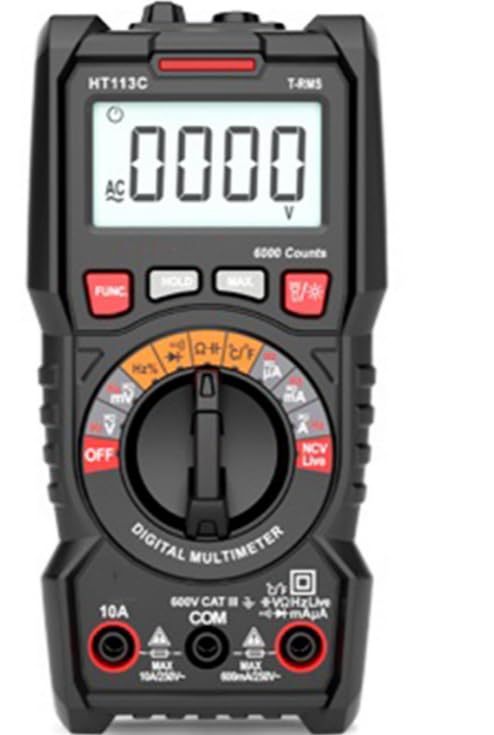
Figure 1: Front view of the VIHELM HT113C Digital Multimeter, showing the display, rotary dial, function buttons, and input jacks.

Figure 2: Angled view highlighting the digital display and control buttons of the HT113C.
Key Components:
- LCD Display: Shows measurement readings, units, and indicators.
- Function Buttons: FUNC, HOLD, MAX, Backlight/Flashlight.
- Rotary Dial: Selects measurement functions (Voltage, Current, Resistance, etc.).
- Input Jacks:
- COM: Common jack for negative test lead.
- VΩHzLive: Input for voltage, resistance, frequency, diode, continuity, capacitance, and live wire detection.
- 10A: Input for 10A AC/DC current measurement.
- mAµA: Input for milliampere/microampere AC/DC current measurement.
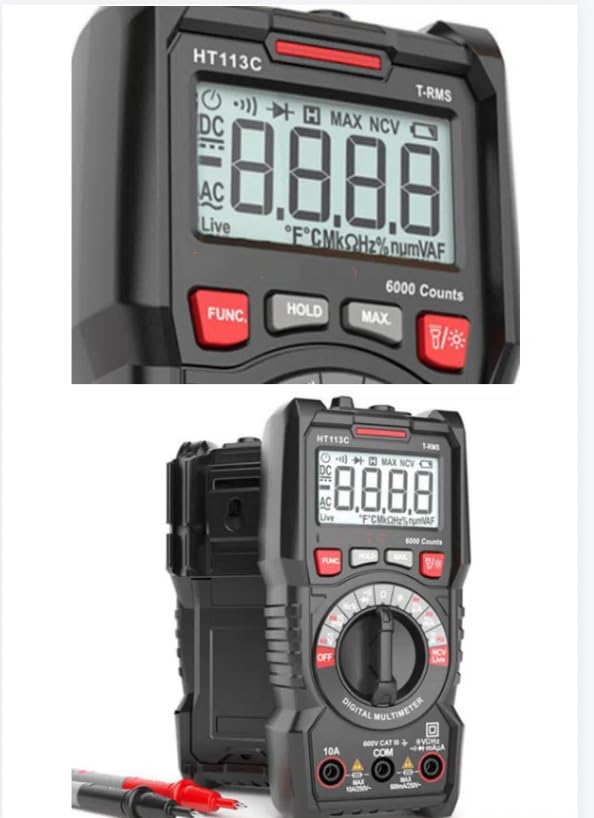
Figure 3: Close-up view of the HT113C's LCD display and function buttons.
Setup
Battery Installation:
The VIHELM HT113C requires 2 x 1.5V AAA batteries (not included).
- Ensure the multimeter is turned OFF.
- Locate the battery compartment cover on the back of the device.
- Use a screwdriver to open the battery compartment.
- Insert two AAA batteries, observing correct polarity (+ and -).
- Replace the battery compartment cover and secure it.
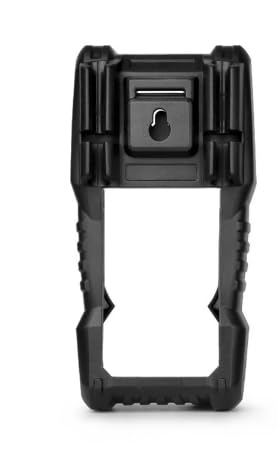
Figure 4: Back view of the HT113C, indicating the battery compartment location and integrated hanging hook.
Operating Instructions
Always connect the black test lead to the COM jack and the red test lead to the appropriate input jack for the desired measurement.
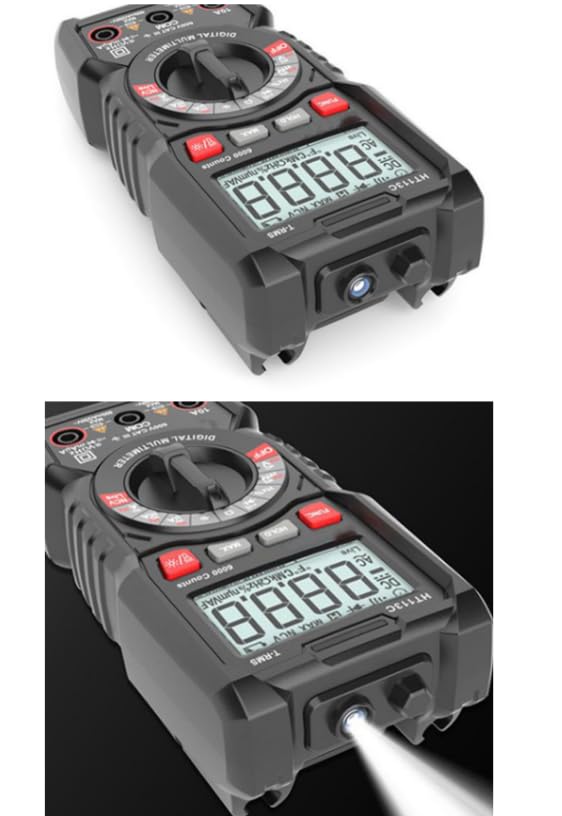
Figure 5: The HT113C Digital Multimeter with its red and black test leads properly connected to the input jacks.
General Operation:
- Turn the rotary dial to the desired measurement function.
- Connect the test leads to the circuit or component under test.
- Read the measurement value on the LCD display.
- Use the FUNC button to switch between different measurement modes within a single dial position (e.g., AC/DC voltage, diode/continuity).
Specific Functions:
- Voltage Measurement (AC/DC): Select V~ (AC) or V- (DC) on the dial. Connect leads in parallel to the circuit.
- Current Measurement (AC/DC): Select A~ (AC) or A- (DC) on the dial. Connect leads in series with the circuit. Ensure correct input jack (10A or mAµA).
- Resistance Measurement (Ω): Select Ω on the dial. Connect leads across the component.
- Continuity Test: Select Ω on the dial and press FUNC until the continuity symbol appears. A beep indicates continuity.
- Diode Test: Select Ω on the dial and press FUNC until the diode symbol appears. Connect leads across the diode.
- Capacitance Measurement (F): Select F on the dial. Connect leads across the capacitor.
- Frequency Measurement (Hz): Select Hz on the dial.
- NCV (Non-Contact Voltage) Detection: Select NCV on the dial. Bring the top of the meter near an AC voltage source. The meter will beep and flash if voltage is detected.
- Live Wire Test: Select Live on the dial. Insert the red probe into the live wire.
- Data Hold (HOLD): Press the HOLD button to freeze the current reading on the display. Press again to release.
- Maximum Value (MAX): Press the MAX button to capture and display the maximum measured value.
- Backlight/Flashlight: Press the Backlight/Flashlight button to turn on the display backlight or the integrated flashlight.

Figure 6: The HT113C Digital Multimeter demonstrating its integrated flashlight function.
Maintenance
Cleaning:
Wipe the meter with a damp cloth and mild detergent. Do not use abrasives or solvents.
Battery Replacement:
When the low battery indicator appears on the display, replace the batteries as described in the "Setup" section.
Storage:
If the meter is not used for an extended period, remove the batteries to prevent leakage. Store in a cool, dry place.
Troubleshooting
- No Display/Faint Display: Check battery installation and charge. Replace batteries if necessary.
- Incorrect Readings: Ensure correct function selection, proper test lead connection, and that the circuit is within the meter's measurement range.
- No Continuity Beep: Check if continuity mode is selected. Ensure the circuit is not open.
- Meter Does Not Turn On: Verify batteries are correctly installed and charged.
If problems persist, contact customer support.
Specifications
The VIHELM HT113C features 6000 counts and auto-ranging capabilities.
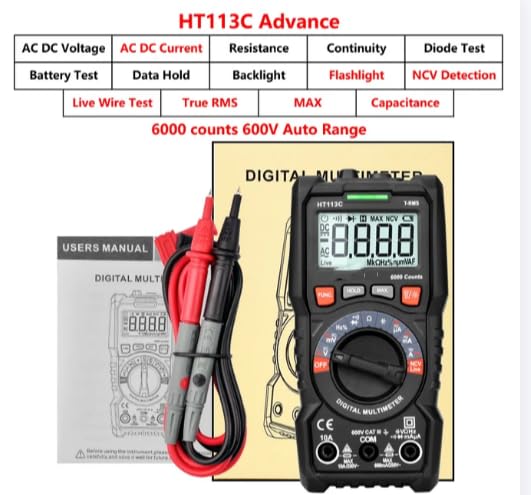
Figure 7: Overview of key features and capabilities of the HT113C model.
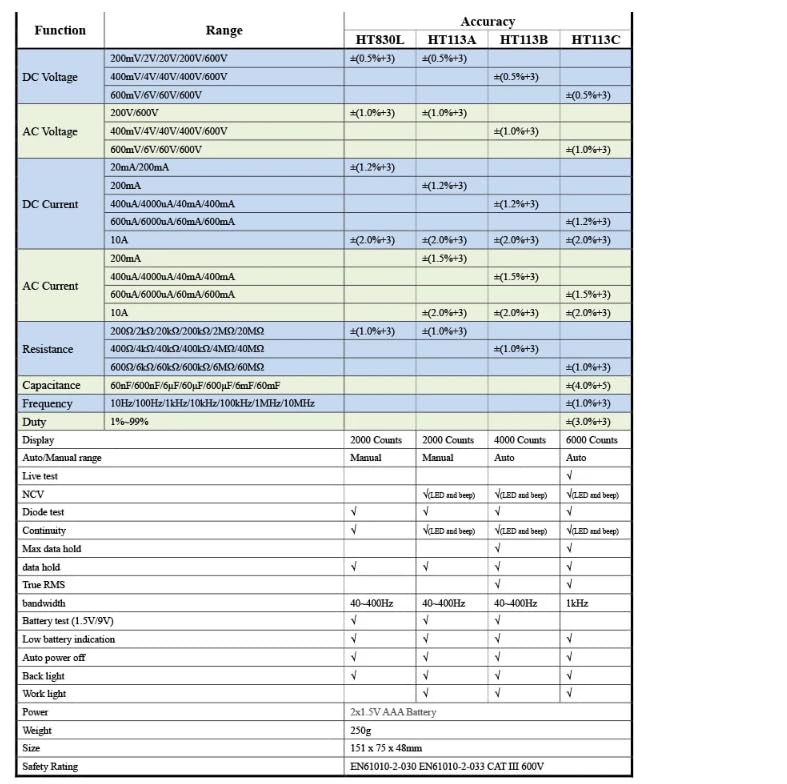
Figure 8: Comprehensive technical specifications including measurement ranges and accuracy for the HT113C.
General Specifications:
- Display: Digital, 6000 Counts
- Operating Mode: Auto Range
- Operating Temperature: 0 - 40 Celsius
- Safety Level: EN61010-2-030 EN61010-2-33 CAT III 600V
- Power Source: 2 x 1.5V AAA Battery
- Dimensions: 151mm x 75mm x 48mm
- Weight: Approximately 250g
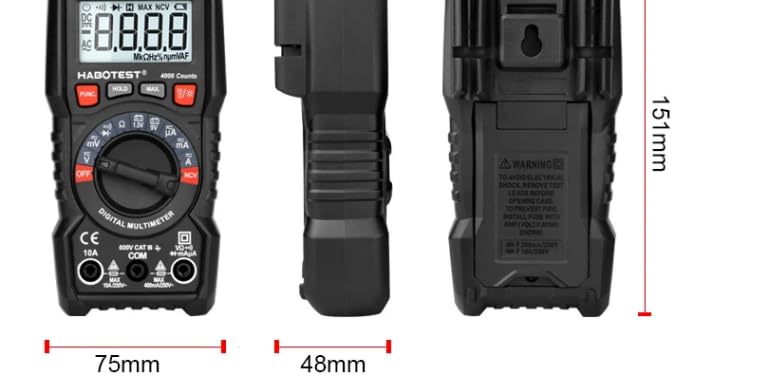
Figure 9: Physical dimensions of the HT113C Digital Multimeter.
What's in the Box
- 1 x VIHELM HT113C Digital Multimeter
- 1 x Pair of Test Leads
- 1 x User Manual (this document)
Note: Batteries are not included.
Warranty and Support
For warranty information or technical support, please contact your retailer or the manufacturer, VIHELM. Keep your purchase receipt for proof of purchase.