
SEDETA 3518_2-grey-LSJ
SEDETA 69" L Shaped Desk User Manual
Model: 3518_2-grey-LSJ
1. Introduction
Thank you for choosing the SEDETA 69" L Shaped Desk. This manual provides essential information for the assembly, operation, and maintenance of your new desk. Please read it thoroughly before beginning assembly or use to ensure proper setup and longevity of your product.
This L-shaped computer desk is designed to provide ample workspace and storage solutions for your home office, featuring a farmhouse design with integrated power outlets and multiple storage options.
2. Product Features
- Spacious Workspace: The desk offers a large desktop area (59"L x 21.6"W and 69"L x 21.6"W) suitable for multiple monitors, laptops, and other office equipment.
- Integrated Power Outlets: Equipped with 4 AC outlets and 2 USB charging ports for convenient power access for your devices. A dedicated power switch allows for easy control.
- Ample Storage: Features 4 drawers and a storage cabinet. One file drawer supports letter or A4 size hanging files, while three additional drawers provide general storage. The storage cabinet includes an adjustable shelf.
- Durable Construction: Crafted from high-quality engineered wood with a thickened tabletop (1.5 inches) for enhanced durability and stability.
- Farmhouse Design: Incorporates classic style elements and a bevel cutting design, finished on all sides for versatile placement.
3. Assembly Instructions
Assembly is required for this desk. Please follow the detailed instructions provided in the included assembly manual. All necessary tools are typically included. It is recommended to assemble the desk in the room where it will be used, as its L-shape configuration is not designed for easy disassembly and reassembly.
- Unpacking: Carefully unpack all components and verify against the parts list in the assembly manual.
- Preparation: Ensure you have sufficient space for assembly. A clean, flat surface is recommended to prevent scratches.
- Step-by-Step Assembly: Follow the numbered diagrams and instructions precisely. Pay close attention to the orientation of parts.
- Secure Fasteners: Ensure all screws, bolts, and cam locks are tightened securely to maintain the desk's stability.
- Power Outlet Installation: Integrate the power strip according to the manual's instructions, ensuring proper cable management.
Important Safety Note: Always assemble the desk according to the provided instructions. Ensure all screws are tightened securely, especially at the tabletop, to maintain stability and prevent accidents.

Figure 3.1: Product Dimensions and Load Capacity. This diagram illustrates the overall size of the desk and its individual components, along with the maximum weight it can support.
4. Operating Instructions
4.1 General Use
The SEDETA L Shaped Desk is designed for general office and home use, providing a stable and organized workspace. Place your computer, monitors, and other peripherals on the spacious desktop. Utilize the drawers and cabinet for storing documents, office supplies, and personal items.

Figure 4.1: Large Storage Space. This image demonstrates the various storage options available, including multiple drawers and a cabinet, designed to keep your workspace tidy.
4.2 Power Outlet Usage
The integrated power strip provides convenient access to electrical outlets and USB charging ports. To use, ensure the desk is properly assembled and the power strip is connected to a wall outlet.
- AC Outlets: Plug in your computer, monitor, printer, or other AC-powered devices into the 4 AC outlets (125V/12A).
- USB Ports: Connect your smartphones, tablets, or other USB-powered devices to the 2 USB charging ports (5V/2A).
- Power Switch: Use the red ON/OFF switch on the power strip to control power to all connected devices. This allows you to easily turn off power without unplugging individual appliances.
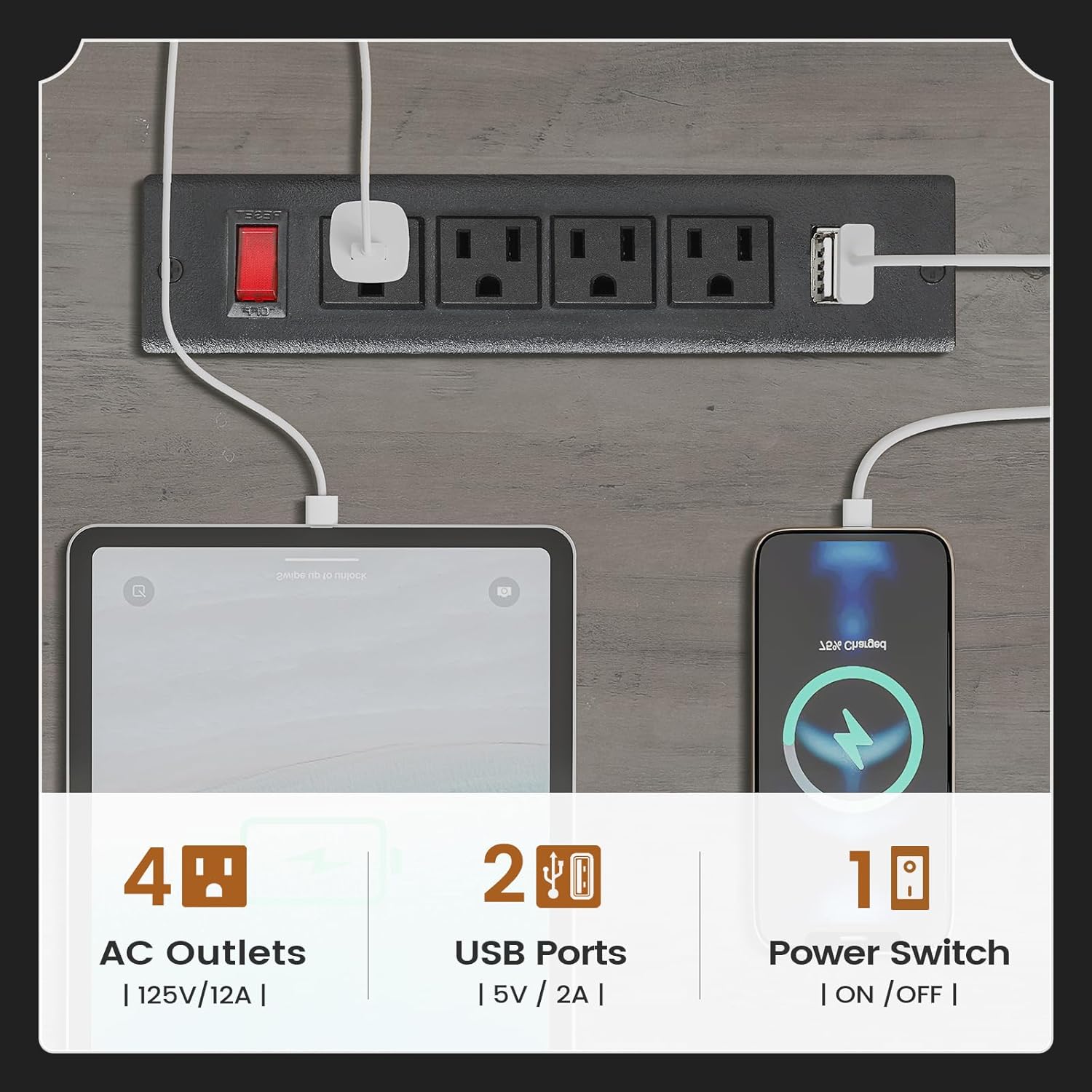
Figure 4.2: Integrated Power Outlets. This image details the built-in power strip, highlighting its AC outlets, USB ports, and master power switch for convenient device charging.
5. Maintenance
Regular maintenance will help preserve the appearance and functionality of your SEDETA desk.
- Cleaning: Wipe the desk surface with a soft, damp cloth. Avoid harsh chemicals or abrasive cleaners that could damage the finish. For spills, wipe immediately.
- Dusting: Regularly dust the desk with a dry, soft cloth to prevent dust buildup.
- Hardware Check: Periodically check all screws and fasteners to ensure they remain tight. Tighten if necessary to maintain stability.
- Avoid Excessive Weight: Do not exceed the stated load capacity of 300 lbs to prevent damage to the desk structure.
- Protect Surface: Use coasters for drinks and desk mats for heavy equipment or writing to protect the tabletop from scratches and stains.
6. Troubleshooting
This section addresses common issues you might encounter with your desk.
| Problem | Possible Cause | Solution |
|---|---|---|
| Desk feels wobbly or unstable. | Loose fasteners or uneven floor. | Check and tighten all assembly screws. Ensure the desk is on a level surface; use shims if necessary. |
| Drawers do not slide smoothly. | Obstruction in the drawer slides or misaligned rails. | Clear any debris from the drawer slides. Verify that the drawer rails are correctly installed and aligned according to the assembly instructions. |
| Power outlets are not working. | Power strip not plugged in, power switch off, or circuit overload. | Ensure the power strip's main plug is securely connected to a wall outlet. Check if the red power switch on the strip is in the 'ON' position. If overloaded, unplug some devices and reset the circuit breaker if applicable. |
7. Specifications
| Attribute | Detail |
|---|---|
| Brand | SEDETA |
| Model Number | 3518_2-grey-LSJ |
| Product Dimensions (D x W x H) | 21.7"D x 69"W x 30"H |
| Color | Grey |
| Style | Farmhouse |
| Base Material | Engineered Wood |
| Finish Type | Powder Coated |
| Special Feature | Built-In USB Outlet |
| Recommended Uses | Working, Writing |
| Mounting Type | Freestanding |
| Number of Drawers | 4 |
| Number of Cabinets | 1 |
| Item Weight | 145 Pounds |
| Tabletop Thickness | 1.5 Inches |
| Assembly Required | Yes |
| Assembly Tools Included | Yes |
8. Warranty and Support
The SEDETA 69" L Shaped Desk comes with a Limited Warranty. For specific details regarding the warranty period and coverage, please refer to the warranty information provided with your purchase or contact SEDETA customer service.
If your item arrives damaged, scratched, or with missing parts, please contact SEDETA customer service immediately for assistance. We will arrange for free replacement parts or offer a partial refund as appropriate.
For further support, questions, or to report issues, please visit the official SEDETA store or contact their customer support channels.
SEDETA Customer Support: Visit SEDETA Store on Amazon
Related documents3518_2-grey-LSJ

Ask a question about this manual
Ask about setup, troubleshooting, compatibility, parts, safety, or missing instructions. Manuals+ will review the question and use this page’s manual context to help answer it.