
Introduction
This manual provides detailed instructions for the safe and effective use of your VGR V-941 Professional Digital Display Turbo Function Rechargeable Cordless Hair Clipper. Please read this manual thoroughly before first use and retain it for future reference.
Product Overview
The VGR V-941 is a versatile hair clipper designed for precise grooming. It features a digital display, turbo function, and a rechargeable battery for cordless operation.
Components
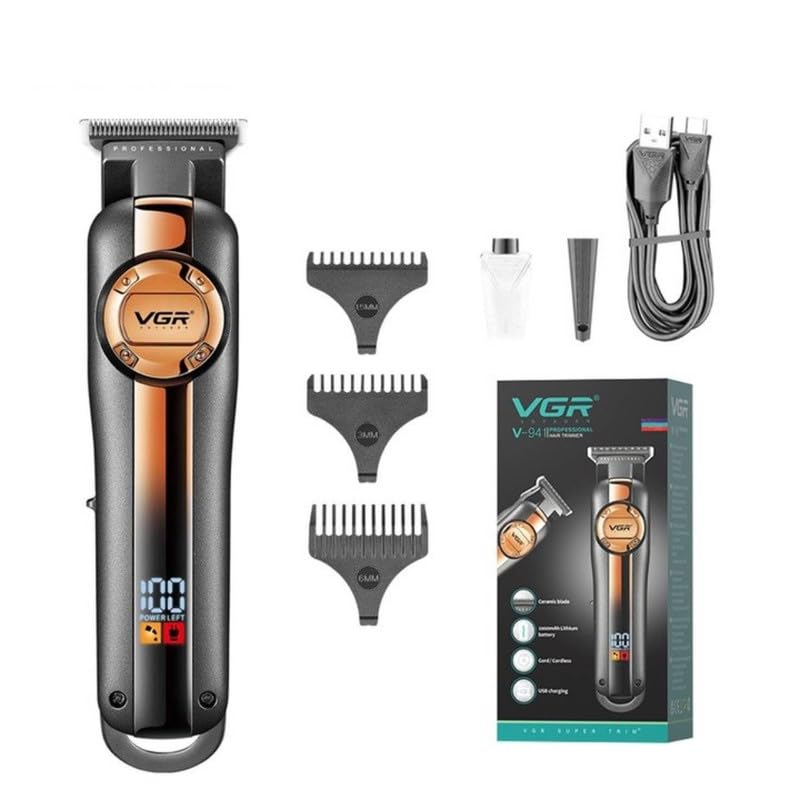
Image: VGR V-941 Hair Clipper with included accessories: three guide combs, USB charging cable, lubricating oil, and cleaning brush. The product packaging is also visible.
- Hair Clipper Unit
- 3 Guide Combs (1.5mm, 3mm, 6mm)
- USB Type-C Charging Cable
- Cleaning Brush
- Lubricating Oil
- Protective Cover
Key Features

Image: Diagram highlighting the ON/OFF switch for easy operation, USB charging capability, extended work time from a 2000mAh Li-ion battery, and an LED display indicating power status.
- Pro Li Outliner Grooming: Designed for various hairstyles.
- Turbo Power Function: Provides additional power when required.
- Precise & Sharp Blades: Self-sharpening stainless steel and ceramic blades for smooth cutting.
- LED Digital Display: Shows remaining battery charge and indicates when oiling is needed. Includes over-charge protection.
- Cordless Operation: Up to 250 minutes run time on a 3-hour charge.
- Multiple Cutting Lengths: 3 attachment combs (1.5mm, 3mm, 6mm) for various trimming ranges (0mm to 6mm).
- Low Noise: High-performance motor with reduced operational noise.
Setup
1. Initial Charging

Image: The VGR V-941 hair clipper connected to a USB charging cable. The LED display shows "POWER LEFT" and a battery icon, indicating the charging status. Text overlays show "3 Hours Charge Time" and "250 Mins Work Time".
- Before first use, fully charge the clipper for approximately 3 hours.
- Connect the USB Type-C charging cable to the clipper's charging port.
- Plug the other end of the USB cable into a compatible USB power adapter (not included) or a computer USB port.
- The LED digital display will show the charging status. A full charge provides up to 250 minutes of cordless operation.
2. Attaching Guide Combs

Image: Three guide combs with lengths 1.5mm, 3mm, and 6mm are displayed alongside the VGR V-941 hair clipper, illustrating how they are attached to the blade for different cutting lengths.
- Ensure the clipper is turned off.
- Select the desired guide comb (1.5mm, 3mm, or 6mm).
- Align the comb with the clipper blade and push it firmly until it clicks into place.
- To remove, gently pull the comb away from the blade.
Operating Instructions
1. Basic Operation
- Ensure the clipper is charged and a guide comb is attached if desired.
- Press the ON/OFF switch to power on the clipper. The LED display will illuminate.
- For a close trim (0mm), operate the clipper without any guide comb.
- Move the clipper against the direction of hair growth for effective cutting.
- Press the ON/OFF switch again to turn off the clipper after use.
2. Turbo Function
The clipper is equipped with a Turbo function for increased power when cutting thicker or denser hair.
- While the clipper is on, press the Turbo button (if available, or refer to specific button on your model) to activate the enhanced power mode.
- The clipper will operate at a higher speed.
- Press the Turbo button again to return to standard operating mode.
Maintenance
1. Cleaning the Blades
- Turn off the clipper and disconnect it from the power source.
- Remove any attached guide comb.
- Use the provided cleaning brush to remove loose hairs from the blades.
- For thorough cleaning, the blades can be rinsed under running water. Ensure the clipper body does not get wet if it is not waterproof. Dry the blades completely before reattaching or storing.
2. Oiling the Blades
Regular oiling ensures optimal performance and extends blade life. The LED display may indicate when oiling is needed.
- After cleaning, apply a few drops of the provided lubricating oil onto the blades.
- Turn on the clipper for a few seconds to allow the oil to distribute evenly.
- Wipe off any excess oil with a soft cloth.
Troubleshooting
| Problem | Possible Cause | Solution |
|---|---|---|
| Clipper does not turn on. | Battery is depleted. | Charge the clipper fully. |
| Clipper pulls hair or cuts poorly. | Blades are dull or clogged with hair. Blades need oiling. | Clean the blades thoroughly. Apply lubricating oil to the blades. |
| Clipper makes unusual noise. | Blades are not properly aligned or need oiling. | Check blade alignment. Apply lubricating oil. If problem persists, contact support. |
| LED display not working. | Unit malfunction. | Ensure unit is charged. If problem persists, contact support. |
Specifications
| Feature | Detail |
|---|---|
| Model Number | V-941 |
| Blade Material | Stainless Steel & Ceramic |
| Battery Type | Lithium Ion (2000 mAh) |
| Charging Time | Approximately 3 hours |
| Operating Time | Up to 250 minutes |
| Cutting Lengths | 0mm (without comb), 1.5mm, 3mm, 6mm (with guide combs) |
| Power Source | Battery Powered (USB Charging) |
| Product Dimensions | 20 x 9.7 x 6.7 cm |
| Item Weight | 460 g |
| Country of Origin | China |
Warranty and Support
The VGR V-941 Hair Clipper comes with a 12-month quality warranty. For any issues or support, please contact customer service.
Contact Information: Refer to your purchase documentation or the official VGR website for specific contact details.
