
VGR V-990
VGR V-990 Professional Hair Trimmer User Manual
Model: V-990
1. Introduction
Thank you for choosing the VGR V-990 Professional Hair Trimmer. This manual provides essential information for the safe and effective use of your new device. Please read it thoroughly before first use and retain it for future reference.
2. Safety Instructions
To reduce the risk of electric shock, injury, or fire, always follow these basic safety precautions:
- Keep the appliance dry. Do not use it near water or in wet conditions.
- Do not immerse the trimmer in water or any other liquid.
- Always unplug the trimmer from the power outlet immediately after charging and before cleaning.
- Do not use the trimmer if it has a damaged cord or plug, or if it is not working properly.
- Keep the trimmer out of reach of children.
- Use only the charging cable provided by the manufacturer.
- Avoid using the trimmer on irritated skin or open wounds.
- Do not disassemble the trimmer. For service, contact authorized personnel.
3. Package Contents
Verify that all items are present in the package:
- VGR V-990 Hair Trimmer
- USB Charging Cable (Type-C)
- 4 Guide Combs (1.5mm, 3mm, 4.5mm, and one additional)
- Blade Oil
- Cleaning Brush
- Instructions Manual (this document)

Image 1: VGR V-990 Trimmer, charging cable, guide combs, oil, and cleaning brush.
4. Product Overview
Familiarize yourself with the components of your VGR V-990 trimmer:
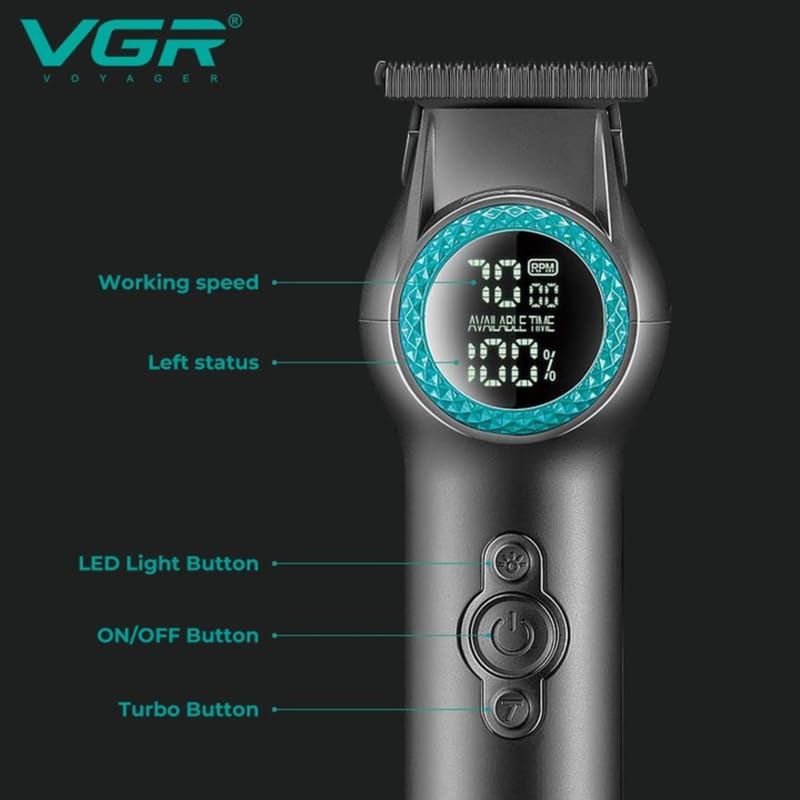
Image 2: Close-up view of the VGR V-990 trimmer highlighting the digital display, LED light button, ON/OFF button, and Turbo button.
- Ceramic & Powder Metallurgic Blade: Precision-engineered for sharp, efficient cutting.
- Digital Display: Shows working speed (RPM) and remaining battery charge percentage.
- LED Light Button: Activates the integrated LED light for improved visibility during trimming.
- ON/OFF Button: Powers the trimmer on or off.
- Turbo Button: Engages higher speed mode (8000 RPM) for thicker hair.
- USB Type-C Charging Port: For convenient charging.
5. Charging the Trimmer
Before first use, fully charge the trimmer for optimal performance.
- Ensure the trimmer is switched off.
- Insert the Type-C end of the USB charging cable into the trimmer's charging port.
- Connect the USB-A end of the cable to a compatible USB power adapter (not included) or a computer USB port.
- The digital display will indicate charging status. A full charge takes approximately 2.5 hours.
- Once fully charged, the display will show 100%. Disconnect the charging cable.
A full charge provides approximately 200 minutes of cordless operation.

Image 3: Illustration of charging time (2.5 hours) and working time (200 minutes).
6. Setup and Preparation
6.1 Attaching Guide Combs
The VGR V-990 comes with 4 guide combs for various cutting lengths (1.5mm, 3mm, 4.5mm, and one additional). To attach a comb:
- Ensure the trimmer is switched off.
- Align the desired guide comb with the trimmer blade.
- Gently push the comb onto the blade until it clicks securely into place.
6.2 Removing Guide Combs
To remove a comb, gently pull it upwards and away from the blade.
7. Operating Instructions
7.1 Basic Operation
- Ensure the trimmer is charged.
- Press the ON/OFF button to turn on the trimmer. The digital display will illuminate, showing the current RPM and battery level.
- To adjust the speed, press the Turbo Button. The trimmer operates at 7000 RPM by default and can be boosted to 8000 RPM.
- If needed, press the LED Light Button to activate the front light for better visibility in dimly lit areas.
- Begin trimming hair, moving the trimmer against the direction of hair growth for best results.
- After use, press the ON/OFF button to turn off the trimmer.

Image 4: A person demonstrating the use of the VGR V-990 trimmer for hair cutting.
7.2 Trimming Tips
- For an even cut, always move the trimmer at a consistent speed.
- Start with a longer guide comb and gradually switch to shorter ones if a closer cut is desired.
- For a zero-gapped trim (0mm), remove all guide combs and carefully use the bare blade. Exercise caution to avoid skin irritation.
- The R-shaped round blade design helps prevent accidental damage to the skin surface.
8. Maintenance
Regular cleaning and maintenance ensure the longevity and performance of your trimmer.
8.1 Cleaning the Blades
- Ensure the trimmer is switched off and unplugged.
- Use the provided cleaning brush to remove loose hair from the blades and the trimmer head.
- For a more thorough cleaning, the blade assembly can be carefully detached. Refer to the diagram in Section 4 for blade removal.
- Clean the blades under running water if they are detachable and specified as washable. Ensure they are completely dry before reattaching.
8.2 Oiling the Blades
After every few uses, or if the trimmer feels sluggish, apply a drop of the included blade oil to the blades.
- Ensure the trimmer is clean and dry.
- Apply 1-2 drops of blade oil evenly across the top of the blades.
- Turn on the trimmer for a few seconds to distribute the oil.
- Wipe off any excess oil with a soft cloth.
9. Troubleshooting
If you encounter issues with your VGR V-990 trimmer, refer to the following common problems and solutions:
| Problem | Possible Cause | Solution |
|---|---|---|
| Trimmer does not turn on. | Battery is depleted. | Charge the trimmer fully. |
| Blades pull hair or cut poorly. | Blades are dirty or not oiled. | Clean and oil the blades as per maintenance instructions. |
| Trimmer makes unusual noise. | Blades are not properly aligned or need oiling. | Check blade alignment and apply blade oil. If issue persists, contact support. |
| Charging indicator not working. | Faulty cable or power source. | Try a different USB cable or power adapter. |
10. Specifications
| Feature | Detail |
|---|---|
| Model Number | V-990 |
| Blade Material | Powder Metallurgy Fixed Blade, Ceramic Moving Blade |
| Motor Speed | 7000-8000 RPM (2 Speeds) |
| Battery Type | Lithium Ion |
| Battery Capacity | 2000 mAh |
| Charging Time | Approx. 2.5 hours |
| Operating Time | Approx. 200 minutes |
| Charging Interface | USB Type-C |
| Cutting Lengths | 0mm (without comb), 1.5mm, 3mm, 4.5mm (with guide combs) |
| Dimensions (LxWxH) | 20.2 x 9.7 x 6.6 cm |
| Weight | 450 g |
| Special Features | Digital Display, LED Light, Cord/Cordless Operation |
11. Warranty and Support
The VGR V-990 Professional Hair Trimmer comes with a 12-month quality warranty from the date of purchase.
This warranty covers manufacturing defects and material faults under normal use. It does not cover damage caused by misuse, accident, unauthorized modification, or failure to follow the instructions in this manual.
For warranty claims, technical support, or any inquiries, please contact VGR customer service through your retailer or the official VGR website. Please have your purchase receipt and product model number (V-990) ready when contacting support.
Related documentsV-990


Ask a question about this manual
Ask about setup, troubleshooting, compatibility, parts, safety, or missing instructions. Manuals+ will review the question and use this page’s manual context to help answer it.