
Woodpecker U600
Woodpecker U600 Ultrasonic Scaler
Auto Water Supply Smart Touch System
Model: U600 | Brand: Woodpecker
1. Introduction
The Woodpecker U600 Ultrasonic Scaler is an advanced dental device designed for efficient and comfortable scaling procedures. It integrates multiple functionalities including supragingival scaling, subgingival scaling, implant maintenance, and root canal therapy. Featuring a smart touch system and automatic frequency tracking, the U600 ensures stable and precise operation for professional dental applications.

The Woodpecker U600 Ultrasonic Scaler, showcasing its compact design with the main unit, integrated water tank, and handpiece.
Key Features:
- Comfortable Scaling: Engineered for patient comfort during procedures.
- High Efficiency: Designed for easy operation and enhanced scaling efficiency.
- Multi-functional: Supports scaling, perio, and endo functions.
- Autoclavable Handpiece: Detachable handpiece can be sterilized at 134°C and 0.22Mpa.
- Automatic Frequency Tracking: Maintains optimal operating frequency for stable performance.
- Smart Touch System: Clear control panel with ultrasensitive, waterproof touch controls.
- Intelligent Power Output: Provides precise power delivery for painless treatment.
- Intelligent Degenerative Feedback: Automatically adjusts power based on tooth surface for effective scaling.
- Sine Wave Drive: Ensures smooth operation by avoiding instantaneous current output.
- Automatic Water Supply System: Easy to change water, compatible with various solutions like hydrogen peroxide, sodium hypochlorite, and chlorhexidine. Features a 50ml scale mark for liquid formulation.
2. Safety Information
Please read all instructions carefully before operating the Woodpecker U600 Ultrasonic Scaler. Failure to follow safety guidelines may result in injury or damage to the device.
- This device is intended for use by qualified dental professionals only.
- Always wear appropriate personal protective equipment (PPE), including gloves, masks, and eye protection, during operation.
- Ensure the device is connected to a properly grounded power outlet.
- Do not immerse the main unit in water or other liquids.
- Only use original Woodpecker accessories and scaler tips.
- Sterilize the handpiece and tips according to the recommended procedures before each use.
- Keep the device away from direct sunlight, high temperatures, and corrosive substances.
- Disconnect power before cleaning or performing any maintenance.
3. Components Overview
The Woodpecker U600 package includes the following components:

All included components: main unit, handpiece, power cord, foot pedal, water tank, scaler tips, and accessories.
- U600 Main Unit with Integrated Water Tank
- Detachable Handpiece
- Power Cord
- Foot Pedal
- Scaler Tips (7 included)
- Torque Wrench for Tips
- O-rings and other small accessories
4. Setup
Follow these steps for the initial setup of your Woodpecker U600 Ultrasonic Scaler:
- Unpacking: Carefully remove all components from the packaging and inspect for any damage.
- Placement: Place the main unit on a stable, flat surface, ensuring adequate ventilation.
- Water Tank Preparation:

Rear view of the U600, highlighting the water tank and connection points.
The U600 features an automatic water supply system. Fill the integrated water tank with distilled water or a suitable dental solution (e.g., hydrogen peroxide, sodium hypochlorite, chlorhexidine). The tank has a clear 50ml scale mark for precise liquid formulation. Ensure the tank is securely seated.
- Handpiece Connection: Connect the handpiece cable to the designated port on the main unit. Ensure a secure connection.

The U600 with the handpiece cable properly connected.
- Foot Pedal Connection: Plug the foot pedal cable into its corresponding port on the main unit.
- Power Connection: Connect the power cord to the main unit and then to a grounded electrical outlet. Ensure the power switch on the back of the unit is in the OFF position before plugging in.

Side view of the U600, showing the power switch and other controls.
- Tip Installation: Select the appropriate scaler tip for the procedure. Use the provided torque wrench to securely attach the tip to the handpiece. Do not overtighten.
5. Operation
The Woodpecker U600 features a smart touch system for intuitive control.
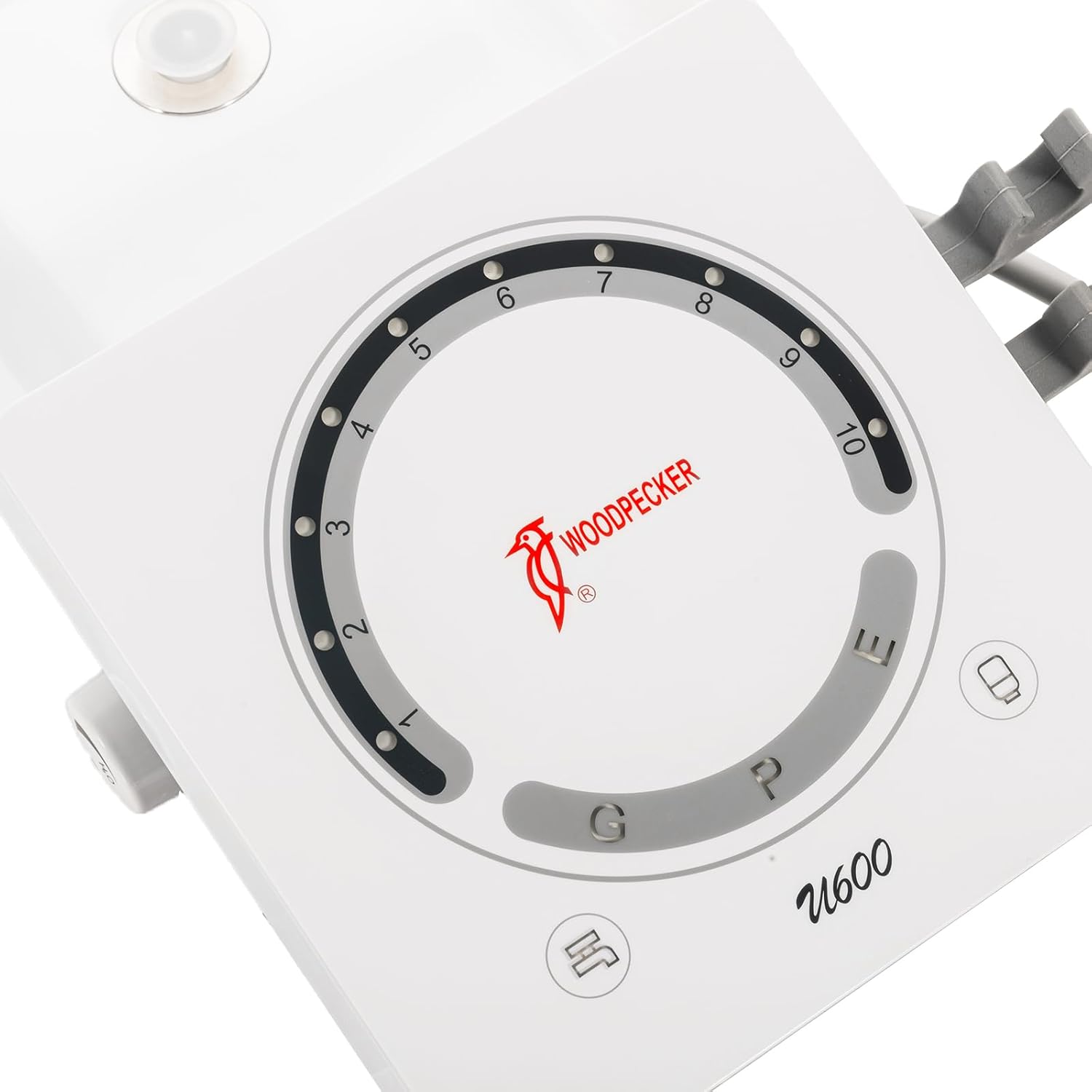
Close-up of the U600's smart touch control panel.
- Power On: Flip the power switch on the back of the unit to the ON position. The control panel will illuminate.
- Mode Selection: The U600 offers three primary functions, indicated by touch buttons on the control panel:
- G (General Scaling): For supragingival scaling.
- P (Perio): For periodontal treatment and subgingival scaling.
- E (Endo): For endodontic procedures.
Touch the desired mode button to select it. The selected mode will be highlighted.
- Power Adjustment: The circular indicator on the control panel displays the power level, ranging from 1 to 10. Use the '+' and '-' touch buttons (or the intuitive touch ring, if applicable) to adjust the power output according to the procedure and patient comfort. The intelligent power output and degenerative feedback system will help maintain consistent performance.

The intelligent power output system ensures a comfortable experience.
- Operation: Once the mode and power are set, press the foot pedal to activate the ultrasonic vibrations and water flow. Release the foot pedal to stop.
- Automatic Frequency Tracking: The U600 automatically tracks and adjusts its frequency to ensure optimal performance and stability during operation.
- Sine Wave Drive: The device utilizes a sine wave drive to prevent sudden current outputs, contributing to a smoother and more comfortable treatment experience.
6. Maintenance
Proper maintenance ensures the longevity and optimal performance of your Woodpecker U600.
6.1 Handpiece and Tips Sterilization
The detachable handpiece and scaler tips are autoclavable. Sterilize them after each use according to standard dental sterilization protocols.
- Clean the handpiece and tips thoroughly to remove any debris.
- Place them in a sterilization pouch.
- Autoclave at 134°C (273°F) and 0.22Mpa (32 psi) for the recommended cycle time.
- Allow to cool before handling.
6.2 Main Unit Cleaning
Clean the exterior of the main unit with a soft cloth dampened with a mild disinfectant. Do not use abrasive cleaners or immerse the unit in water.
6.3 Water Tank Maintenance
Regularly empty and clean the water tank to prevent bacterial growth and mineral buildup. Use distilled water to minimize scale formation.
7. Troubleshooting
If you encounter issues with your Woodpecker U600, refer to the following common problems and solutions:
| Problem | Possible Cause | Solution |
|---|---|---|
| No power | Power cord disconnected; Power switch off; Outlet malfunction | Check power cord connection; Ensure power switch is ON; Test outlet with another device |
| No water flow | Water tank empty; Water tube kinked; Clogged tip | Refill water tank; Straighten water tube; Clean or replace tip |
| Weak vibration/scaling | Incorrect power setting; Loose tip; Worn tip | Increase power level; Re-tighten tip with torque wrench; Replace worn tip |
| Handpiece overheating | Prolonged continuous use; Insufficient water flow | Allow handpiece to cool; Check water supply and flow |
If the problem persists after attempting these solutions, please contact customer support.
8. Specifications
| Attribute | Detail |
|---|---|
| Product Dimensions | 14.2 x 14.1 x 6 inches |
| Weight | 8.4 Pounds |
| Item Model Number | U600 |
| Manufacturer | Woodpecker |
| Country of Origin | China |
| Handpiece Sterilization | Autoclavable (134°C, 0.22Mpa) |
| Functions | Scaling (G), Perio (P), Endo (E) |
| Water Supply | Automatic, Integrated Tank (50ml scale) |
9. Warranty and Support
For warranty information, technical support, or service inquiries, please contact your authorized Woodpecker distributor or visit the official Woodpecker website.
Official Website: www.glwoodpecker.com
Please have your model number (U600) and purchase date available when contacting support.
Related documentsU600


Ask a question about this manual
Ask about setup, troubleshooting, compatibility, parts, safety, or missing instructions. Manuals+ will review the question and use this page’s manual context to help answer it.