
1. Introduction
This manual provides detailed instructions for the operation and maintenance of your LIGE Smart Watch, model BW1846M. Please read this manual thoroughly before using the device to ensure proper function and longevity.
2. Product Overview
The LIGE Smart Watch BW1846M is a robust and feature-rich device designed for daily use and active lifestyles. It includes a 1.39-inch HD round screen, Bluetooth calling, comprehensive health monitoring, and multiple sports modes.
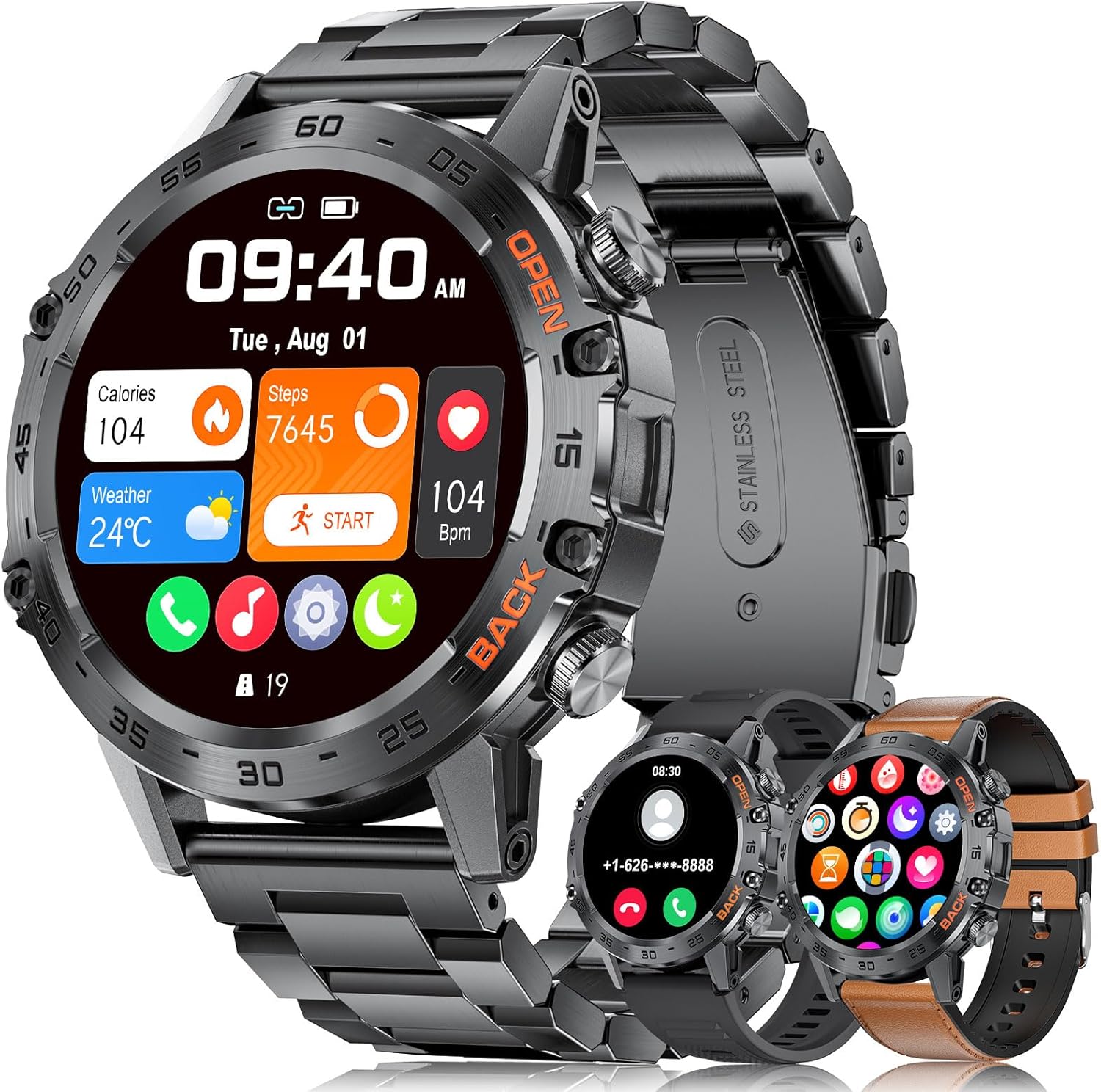
Figure 2.1: LIGE Smart Watch BW1846M with various display options and strap types.
2.1 Package Contents
- LIGE Smart Watch BW1846M
- Charging Cable
- Silicone Strap
- Leather Strap
- Steel Band
- Instruction Manual
3. Setup
3.1 Charging the Device
Before initial use, fully charge your LIGE Smart Watch. Connect the magnetic charging cable to the charging contacts on the back of the watch and plug the USB end into a power adapter (not included) or a computer USB port.
- Battery Capacity: 400 mAh
- Charging Time: Approximately 2 hours
- Battery Life: Up to 7 days in regular use, 15-20 days in standby mode.
Note: If the smartwatch has not been charged for an extended period, the battery may enter a self-protection state. In this case, it may require a longer charging duration to power on.

Figure 3.1: Battery capacity and charging information.
3.2 App Installation and Pairing
To unlock the full functionality of your LIGE Smart Watch, download and install the FitCloudPro application on your smartphone. The app is compatible with both iOS and Android devices.
- Enable Bluetooth: Ensure Bluetooth is enabled on your smartphone.
- Download App: Search for "FitCloudPro" in your phone's app store (Google Play Store for Android or Apple App Store for iOS) and install it.
- Add Device: Open the FitCloudPro app, navigate to the 'Device' section, and select 'Add Device'.
- Find and Connect: The app will scan for available devices. Select "1846" from the list to initiate pairing.
- Confirm Pairing: A pairing request will appear on your phone. Confirm by tapping 'Pair'.
- Grant Permissions: Allow necessary permissions for contacts and call notifications when prompted.
- Enable Call Audio: On the watch, ensure 'Call Audio' is enabled for Bluetooth calling functionality.

Figure 3.2: Connection process for the LIGE Smart Watch.
4. Operating Instructions
4.1 Basic Navigation
- Touch Screen: Swipe left/right, up/down to navigate through menus and features. Tap to select.
- Side Buttons: The watch features two metal function buttons. Refer to the on-screen prompts for specific button functions within different interfaces.
4.2 Customizing the Dial
The 1.39-inch HD round screen offers a vibrant display. You can personalize your watch face:
- Pre-installed Dials: Switch between various pre-installed watch faces directly on the device.
- App Dials: Access a wide selection of additional dials through the FitCloudPro app.
- Custom Dials: Upload your own photos via the app to create personalized watch face backgrounds.

Figure 4.1: Custom watch face display.
4.3 Bluetooth Call and Message Notifications
Once paired with your smartphone, the watch allows for convenient communication:
- Make/Receive Calls: Use the built-in speaker and microphone to make and receive calls directly from your wrist.
- Message Alerts: Receive synchronized notifications for messages from various apps (e.g., SMS, WhatsApp, social media) with vibration alerts. You can view message content on the watch screen.
- Reject Calls: Easily reject incoming calls from the watch interface.

Figure 4.2: Bluetooth call and message notification features.
4.4 Voice Assistant
Activate the voice assistant feature to control your phone or access information hands-free. Simply tap the voice assistant icon on your watch and speak your command.

Figure 4.3: Voice assistant functionality.
5. Health Monitoring
The LIGE Smart Watch provides comprehensive health tracking features to help you monitor your well-being. These measurements are for reference and should not be used for medical diagnosis.
- Heart Rate Monitoring: Tracks your heart rate throughout the day, providing real-time data and historical trends.
- Blood Pressure Monitoring: Measures your blood pressure for general health insights.
- Blood Oxygen Monitoring: Monitors your blood oxygen saturation levels.
- Sleep Tracking: Analyzes your sleep patterns, including deep sleep, light sleep, and awake times, to help improve sleep quality.

Figure 5.1: Health monitoring features.
6. Sports Modes
The smartwatch supports a wide range of sports activities to help you track your fitness progress.
- Built-in Modes: The watch includes 21 built-in sports modes such as walking, running, cycling, badminton, golf, rugby, baseball, jump rope, basketball, football, and swimming.
- Extended Modes: Over 100 additional sports modes are available through the FitCloudPro app. You can push desired training modes to your watch for detailed data monitoring.
- Data Tracking: Records exercise data including duration, calories burned, steps, and heart rate. You can view detailed exercise routes and statistics within the app.

Figure 6.1: Sports modes and activity tracking.
7. Other Features
The LIGE Smart Watch offers several practical functions to enhance your daily life:
- Weather Forecast: Get real-time weather updates directly on your watch.
- Water Reminder: Set reminders to ensure adequate hydration throughout the day.
- Remote Photo Control: Use your watch as a remote shutter for your smartphone camera.
- Music Control: Control music playback on your smartphone (play, pause, skip tracks) from your watch.
- Timer & Stopwatch: Access timing functions for various activities.
- Sedentary Reminder: Receive alerts to move after periods of inactivity.
- Breathing Training: Guided breathing exercises for relaxation.
- Find Phone: Locate your misplaced smartphone by triggering an alarm from your watch.
- Alarm Clock: Set alarms directly on the watch.

Figure 7.1: Additional practical functions.
8. Maintenance
8.1 Cleaning and Care
To maintain the performance and appearance of your watch:
- Wipe the watch and straps regularly with a soft, dry cloth.
- Avoid using harsh chemicals or abrasive materials for cleaning.
- Ensure the charging contacts are clean and dry before charging.
8.2 Water Resistance and Durability
The LIGE Smart Watch BW1846M is built to a military-grade standard for enhanced durability.
- Water Resistance: IP68 and 5ATM rated, meaning it is resistant to dust and can withstand immersion in water up to 50 meters. It is suitable for swimming, showering (cold water), rain, and handwashing. Do not use in hot water, saunas, or for diving.
- Durability: Features include anti-impact, dustproof design, resistance to harsh conditions (-40°C to 70°C), and anti-fluid corrosion.

Figure 8.1: Military-grade durability features.
9. Troubleshooting
If you encounter issues with your LIGE Smart Watch, refer to the following common solutions:
- Watch Not Turning On: If the watch has been stored for a long time without charge, the battery may enter a self-protection state. Connect it to the charger for an extended period (e.g., 30 minutes to an hour) before attempting to power it on.
- Connectivity Issues: Ensure Bluetooth is enabled on both your phone and watch. Restart both devices and try pairing again. Verify that the FitCloudPro app has all necessary permissions.
- Inaccurate Health Data: Health monitoring data is for reference only and should not be used for medical purposes. Ensure the watch is worn snugly on your wrist, not too tight or too loose, for optimal readings.
- Notifications Not Appearing: Check app permissions on your phone to ensure FitCloudPro can access notifications. Verify that notification settings are enabled within the FitCloudPro app for specific applications.
- Short Battery Life: Reduce screen brightness, disable unnecessary features (e.g., continuous heart rate monitoring if not needed), and limit frequent screen wake-ups to extend battery life.
For further assistance, please contact customer support.
10. Specifications
| Feature | Specification |
|---|---|
| Model | BW1846M |
| Brand | LIGE |
| Screen Size | 1.39 Inches |
| Display Type | LED |
| Battery Capacity | 400 mAh |
| Battery Life (Typical) | 7 days |
| Charging Time | 2 Hours |
| Water Resistance | IP68, 5ATM |
| Connectivity | Bluetooth |
| Compatible OS | Android, iOS |
| Special Features | Activity Tracker, Alarm Clock, Notifications, Bluetooth Call, Voice Assistant, Health Monitoring, Sports Modes |
| Mounting Hardware | Charger, Instruction manual, Silicone strap, leather strap, steel band, Smartwatch |
11. Warranty and Support
LIGE is committed to providing quality products and customer satisfaction.
- Warranty: This product comes with a 2-year guarantee from the date of purchase.
- Returns Service: A 6-month returns service is available.
- Online Support: 24-hour online customer service is provided for any inquiries or issues you may have.
For support, please refer to the contact information provided with your purchase or visit the official LIGE website.

Figure 11.1: LIGE Customer Service Commitments.