1. Introduction and Overview
The SEDSEY K65-bk is a rugged 1.43-inch AMOLED Ultra Military Smart Watch designed for durability and extensive functionality. It features call answering and dialing capabilities, over 100 sports modes, 5ATM waterproofing, a large 530mAh battery for extended standby, and an integrated LED flashlight. This manual provides detailed instructions to help you get the most out of your smartwatch, covering setup, operation, and maintenance.

Figure 1.1: Front view of the SEDSEY K65-bk Smart Watch, highlighting its vibrant AMOLED display and robust design.
2. What's in the Box
Upon unboxing your SEDSEY K65-bk Smart Watch, please ensure all the following items are present:
- Smartwatch Unit (K65-bk)
- Watch Band
- Charging Cable
- User Manual (this document)
3. Setup Guide
3.1. App Installation
To fully utilize your smartwatch's features, download and install the FitCloudPro APP on your smartphone. The app is compatible with Android 4.4+ and iOS 8.0+ devices. Search for "FitCloudPro" in your device's app store (Google Play Store for Android or Apple App Store for iOS).
3.2. Initial Pairing
- Ensure your smartwatch is sufficiently charged.
- Enable Bluetooth on your smartphone.
- Open the FitCloudPro APP and follow the on-screen instructions to add a new device.
- Select "K65PRO" or the corresponding device name from the list of available Bluetooth devices.
- Confirm the pairing request on both your smartphone and the smartwatch.
- Once paired, the app will guide you through setting up personal information and preferences.
The FitCloudPro app provides a comprehensive overview of your health and activity data, as demonstrated in the video below.
Video 3.1: Detailed demonstration of the K65-bk Smart Watch's interface, features, and the accompanying FitCloudPro mobile application.
4. Operating Instructions and Key Features
4.1. Display and Interface
The K65-bk features a 1.43-inch AMOLED HD display (460*460 resolution) that offers clear visibility even under direct sunlight. You can customize watch faces to suit your style. The watch is equipped with a power button and a back button for easy navigation.

Figure 4.1: The 1.43-inch AMOLED HD display offers crisp visuals and supports various customizable watch faces.
4.2. Communication Features
The smartwatch supports Bluetooth calling, allowing you to dial, receive, and reject calls directly from your wrist using its built-in high-quality speaker. It also provides smart notifications for messages from various applications like Twitter, Facebook, Skype, and WhatsApp, ensuring you stay connected without needing to check your phone constantly.

Figure 4.2: Bluetooth call and smart notification functions on the K65-bk Smart Watch.
4.3. Health Monitoring
Equipped with upgraded sensors, the K65-bk provides 24-hour health monitoring, including real-time heart rate, SpO2 (blood oxygen), blood pressure, and comprehensive sleep monitoring. The data is synchronized with the FitCloudPro APP, offering insights into your physical condition and helping you maintain a healthy lifestyle.

Figure 4.3: The watch provides detailed heart rate and sleep monitoring data for health tracking.
4.4. Sports Modes and Activity Tracking
The smartwatch supports over 100 sports modes, including walking, running, hiking, cycling, and more. It accurately records daily activity data such as steps, calories burned, distance covered, and activity time. You can select and manage your preferred sports modes through the FitCloudPro APP.
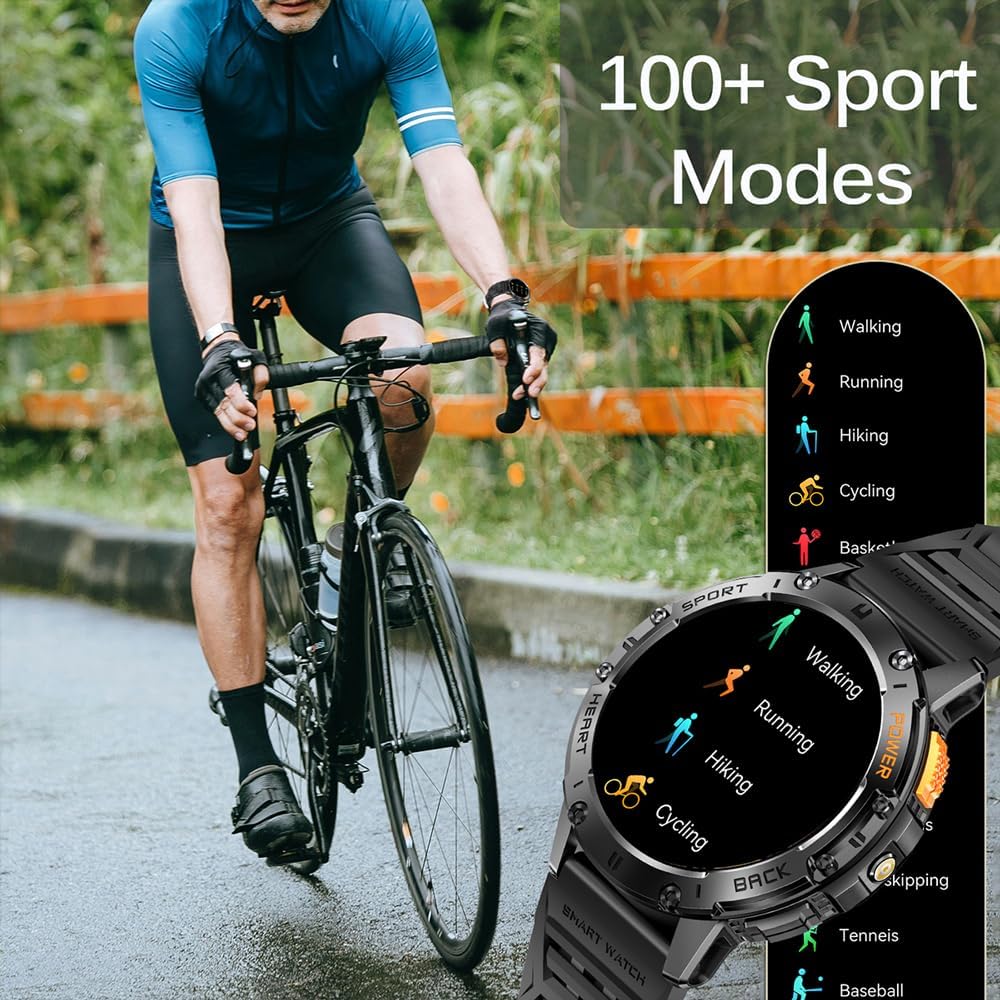
Figure 4.4: A selection of the 100+ sports modes available on the K65-bk Smart Watch.
Video 4.1: Demonstration of the K65-bk Smart Watch's features during outdoor activities, including Bluetooth calling, flashlight, and IP68 waterproofing.
4.5. Battery Life and LED Flashlight
With a 530mAh large capacity battery and low power consumption chipset, the K65-bk offers impressive battery life: up to 15 days of working time and 30 days of standby time on a 2-hour charge. The watch also features a bright LED flashlight on the side, useful for outdoor adventures, night running, or short-term home lighting.

Figure 4.5: The K65-bk Smart Watch features a powerful LED flashlight and extended battery life.
4.6. Waterproof Rating
The K65-bk Smart Watch boasts an IP68 waterproof rating, meaning it can withstand splashes, hand washing, and rain. However, it is not recommended for use during diving, sauna, or showering to prevent potential damage.

Figure 4.6: The IP68 waterproof rating allows for everyday water exposure, such as swimming.
5. Specifications
Below are the detailed technical specifications for the SEDSEY K65-bk Smart Watch:
| Feature | Specification |
|---|---|
| Model Number | k65 |
| Display Size | 1.43 Inches AMOLED |
| Display Resolution | 460*460 HD |
| Battery Capacity | 530 mAh (Lithium Polymer) |
| Working Time | Up to 15 days |
| Standby Time | Up to 30 days |
| Waterproof Rating | IP68 |
| Operating System | Android, iOS |
| Connectivity | Bluetooth |
| Memory Storage Capacity | 128 MB |
| RAM Memory Installed Size | 256 MB |
| Item Weight | 120 Grams (4.2 ounces) |
| Package Dimensions | 6.7 x 4.3 x 0.98 inches |
| Manufacturer | SEDSEY |
| Special Features | Big screen, Flashlight, Military-grade standard, Bluetooth dial & answer calls, Ultra-long battery life, Multiple sport modes, Heart rate monitoring, Sleep tracking, Weather, Calculator, Sedentary reminder, Message notification, Voice assistant, Alarm clock, Stopwatch |

Figure 5.1: Detailed product dimensions and wrist strap size for proper fit.
6. Troubleshooting
If you encounter any issues with your SEDSEY K65-bk Smart Watch, please refer to the following common troubleshooting steps:
- Cannot Pair with Phone: Ensure Bluetooth is enabled on your phone and the watch is within range. Restart both devices and try pairing again. Check if the FitCloudPro app is updated.
- Notifications Not Received: Verify that push notifications are enabled in the FitCloudPro app settings for the desired applications (e.g., Call, SMS, Email, WhatsApp). Also, check your phone's system settings to ensure the app has notification permissions.
- Inaccurate Health Data: Ensure the watch is worn snugly on your wrist, not too tight or too loose. Clean the sensor area regularly. For best results, remain still during measurements.
- Short Battery Life: Reduce screen brightness, disable unnecessary features like continuous heart rate monitoring if not needed, and ensure the watch is fully charged using the provided cable.
- Screen Unresponsive: Try restarting the watch by pressing and holding the power button. If the issue persists, ensure the screen is clean and dry.
For persistent issues not resolved by these steps, please contact customer support.
7. Maintenance and Care
To ensure the longevity and optimal performance of your SEDSEY K65-bk Smart Watch, follow these maintenance guidelines:
- Cleaning: Regularly wipe the watch screen and body with a soft, lint-free cloth. For the sensor area on the back, use a slightly damp cloth and dry thoroughly. Avoid harsh chemicals or abrasive materials.
- Charging: Use only the original charging cable provided with your watch. Ensure the charging contacts on both the watch and the cable are clean and dry before charging.
- Storage: When not in use for extended periods, store the watch in a cool, dry place away from direct sunlight and extreme temperatures.
- Water Exposure: While IP68 waterproof, avoid prolonged submersion in water, hot water, or exposure to steam (e.g., sauna, hot showers) as this can compromise the seals. Dry the watch thoroughly after exposure to water.
8. Warranty and Support
SEDSEY is committed to providing trusted service and value to its customers. Your K65-bk Smart Watch comes with a manufacturer's warranty covering defects in materials and workmanship under normal use. Please refer to the warranty card included in your packaging for specific terms and conditions.
For any questions, technical assistance, or warranty claims, please do not hesitate to contact SEDSEY customer support. We are available 24/7 to provide satisfactory service.
Contact Information:
Please refer to the contact details provided on the product packaging or the official SEDSEY website for the most up-to-date support channels.


