1. Introduction
The iSpring RCC7AK-BLK is a 6-stage 75 GPD (Gallons Per Day) Alkaline Reverse Osmosis (RO) water filtration system designed to provide clean, healthy drinking water. This system effectively removes up to 99% of over 1,000 contaminants, including lead, arsenic, chlorine, fluoride, and more. The integrated Alkaline Remineralization filter restores beneficial minerals and natural alkalinity to the water, improving taste and pH balance. This manual provides essential information for the installation, operation, maintenance, and troubleshooting of your iSpring RCC7AK-BLK system.
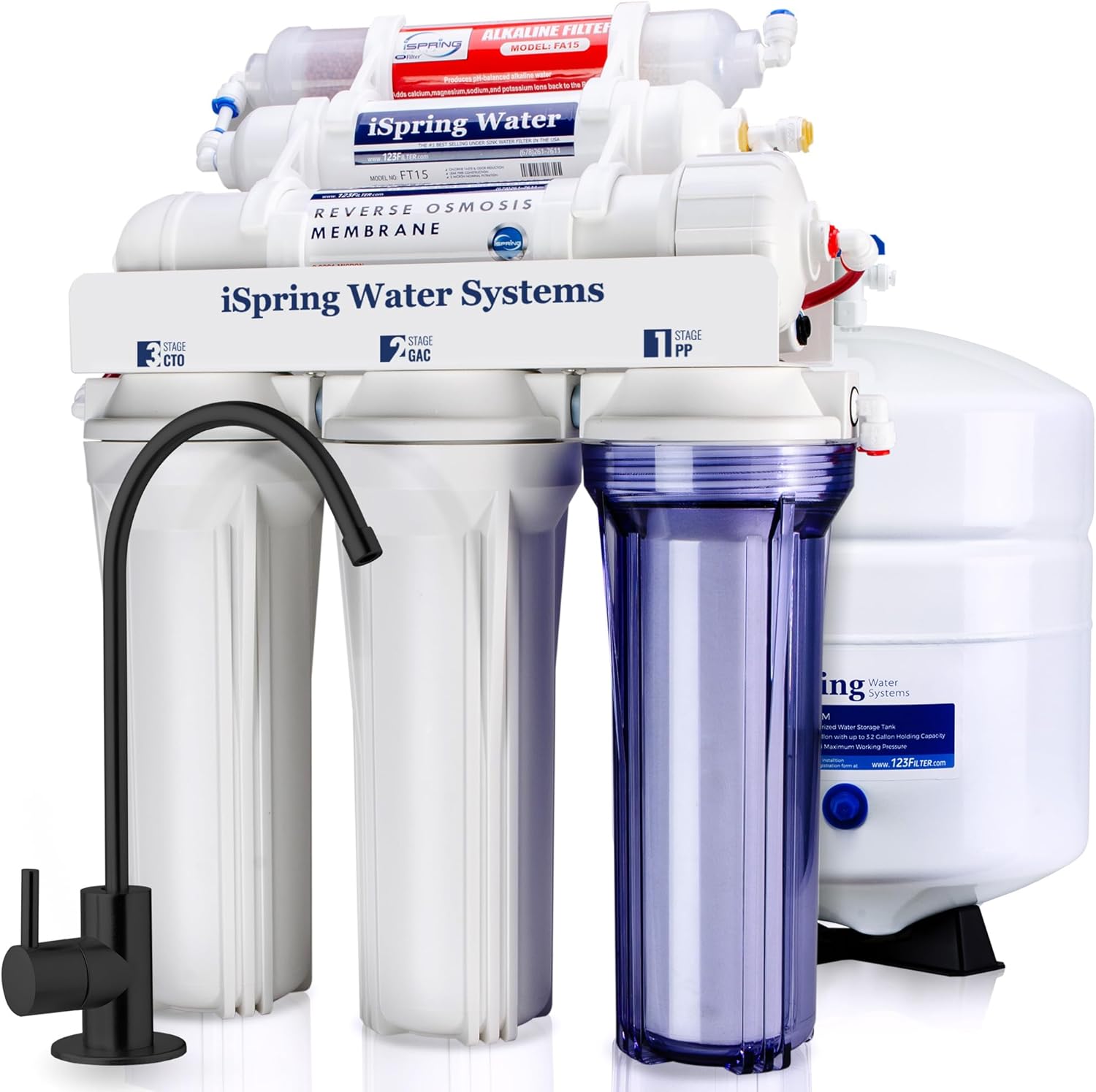
Figure 1: iSpring RCC7AK-BLK 6-Stage Alkaline Reverse Osmosis System.
Filtration Stages Overview
The RCC7AK-BLK system utilizes a comprehensive 6-stage filtration process:
- 1st Stage: PP Sediment Filter (5 micron) - Removes dust, particles, and rust.
- 2nd Stage: GAC Carbon Filter - Removes chlorine, tastes, odors, and cloudiness.
- 3rd Stage: CTO Carbon Block Filter - Further removes chlorine, tastes, and odors, protecting the RO membrane.
- 4th Stage: Reverse Osmosis (RO) Membrane (75 GPD) - Removes up to 99% of contaminants including lead, arsenic, fluoride, and more.
- 5th Stage: Post Carbon Filter - Provides final polishing for taste and odor removal.
- 6th Stage: Alkaline Remineralization Filter - Restores healthy minerals and natural alkalinity.

Figure 2: 6-Stage Filtration Process and Contaminant Removal.
Benefits of Alkaline Water
The Alkaline Remineralization filter adds beneficial minerals back into the water, which can help protect pancreatic beta cells, replenish lost water, improve water taste, and contribute to a balanced alkalinity. This process ensures that while harmful contaminants are removed, the water retains healthy properties.

Figure 3: Benefits of Alkaline Water.
2. Setup and Installation
The iSpring RCC7AK-BLK system is designed for DIY under-sink installation, featuring quick-fitting connectors for a secure and leak-free setup. While detailed step-by-step instructions are typically provided in a separate installation guide included with the product, this section outlines general considerations.
General Installation Steps:
- Unpack Components: Carefully remove all parts from the packaging and verify against the packing list.
- Prepare Location: Choose a suitable under-sink location with access to a cold water line, drain, and sufficient space for the system and storage tank.
- Install Feed Water Adapter: Connect the feed water adapter to your cold water supply line.
- Install Drain Saddle: Secure the drain saddle to the drain pipe under your sink.
- Install Faucet: Drill a hole (if necessary) and install the dedicated RO faucet on your sink or countertop.
- Connect Tubing: Use the quick-fitting connectors to connect the various components (filters, membrane housing, storage tank, faucet, drain line) according to the system diagram. Ensure all connections are firm.
- Mount System: Secure the main filter housing unit to the cabinet wall using the provided mounting bracket.
- Leak Check: Slowly turn on the cold water supply and check all connections for leaks. Tighten any leaking connections.
Important: Refer to the dedicated installation manual provided with your system for detailed, step-by-step instructions and safety warnings.
3. Operating Instructions
Initial System Flush:
Before consuming water from your new RO system, it is crucial to perform an initial flush to remove any carbon fines or air from the system.
- Ensure all connections are secure and the cold water supply is open.
- Open the RO faucet and allow water to flow until it stops. This indicates the storage tank is empty.
- Close the RO faucet and allow the storage tank to refill completely. This may take 2-4 hours depending on water pressure.
- Once the tank is full, open the RO faucet again and drain the tank completely.
- Repeat this process 2-3 times. This ensures the system is thoroughly flushed and ready for use.
Daily Operation:
Once flushed, your iSpring RCC7AK-BLK system operates automatically. When you open the RO faucet, purified water from the storage tank will be dispensed. As water is drawn, the system will automatically produce more RO water to refill the tank.
- For optimal performance, avoid leaving the RO faucet open for extended periods if the tank is empty, as this can reduce system efficiency.
- The system is designed for continuous use.
4. Maintenance and Filter Replacement
Regular maintenance, primarily filter replacement, is essential to ensure the continued high performance and longevity of your iSpring RCC7AK-BLK system. This bundle includes a 3-year supply of replacement filters.

Figure 4: 3-Year Replacement Filter Supply for iSpring RCC7AK-BLK.
Filter Replacement Schedule:
The following is a general guideline. Actual replacement frequency may vary based on local water quality and usage.
- Stages 1, 2, 3 (PP Sediment, GAC, CTO): Replace every 6-12 months. The transparent 1st stage housing allows for visual inspection of the sediment filter to gauge its condition.
- Stage 4 (RO Membrane): Replace every 2-3 years.
- Stage 5 (Post Carbon Filter): Replace every 12 months.
- Stage 6 (Alkaline Remineralization Filter): Replace every 12 months.
Replacement Procedure (General Steps):
- Shut Off Water: Turn off the cold water supply to the RO system and close the valve on top of the RO storage tank.
- Depressurize System: Open the RO faucet to release pressure from the system. Leave it open.
- Remove Old Filters:
- For Stages 1-3 (pre-filters): Use the filter wrench to unscrew the housings. Remove old filters and discard.
- For Stages 4-6 (inline filters/membrane): Disconnect the quick-connect fittings and remove the old filters/membrane housing.
- Clean Housings: Wash filter housings with warm, soapy water and rinse thoroughly.
- Install New Filters:
- Insert new pre-filters into their respective housings, ensuring O-rings are properly seated. Hand-tighten housings, then use the wrench for a snug fit (do not overtighten).
- Connect new inline filters/membrane housing, ensuring correct flow direction.
- Restore Water & Flush: Slowly turn on the cold water supply and the tank valve. Check for leaks. Perform an initial system flush as described in the "Operating Instructions" section to remove air and carbon fines.

Figure 5: PP Sediment and GAC Filter Details.

Figure 6: CTO and Post Carbon Filter Details.
5. Troubleshooting
This section addresses common issues you might encounter with your iSpring RCC7AK-BLK system.
| Problem | Possible Cause | Solution |
|---|---|---|
| No Water from Faucet / Very Slow Flow |
|
|
| Water Has Bad Taste or Odor |
|
|
| Leaks |
|
|
| System Runs Constantly / Excessive Drain Water |
|
|
For more detailed troubleshooting or issues not listed here, please refer to the comprehensive troubleshooting guide in your product's full manual or contact iSpring customer support.
6. Specifications
| Model Name | RCC7AK-BLK |
| Purification Method | Reverse Osmosis (RO) with Alkaline Remineralization |
| Installation Type | Under Sink |
| Capacity | 75 Gallons Per Day (GPD) |
| Included Components | Filter System, Storage Tank, Faucet, Installation Kit, 3-Year Filter Supply |
| Special Feature | Chlorine Reduction, Alkaline Remineralization |
| Item Package Quantity | 1 |
7. Warranty and Support
iSpring is committed to providing high-quality products and customer satisfaction. Your iSpring RCC7AK-BLK system comes with dedicated lifetime technical support.
- Lifetime Technical Support: iSpring offers ongoing technical assistance for the lifetime of your product. This provides peace of mind for any questions or issues you may encounter.
- Contact Information: For support, warranty claims, or to purchase replacement parts, please refer to the contact information provided in your product packaging or visit the official iSpring website.


