
Fujifilm Instax Square SQ6
Fujifilm Instax Square SQ6 Instant Film Camera User Manual
Model: Instax Square SQ6
1. Introduction
The Fujifilm Instax Square SQ6 is an instant film camera designed to capture and print square format photos. This manual provides essential information for setting up, operating, and maintaining your camera to ensure optimal performance and enjoyment.
The Instax Square SQ6 features a 1:1 square format, producing prints 1.3 times larger than Instax Mini prints. It includes a Fujinon 65.75mm f/12.6 lens for clear images and offers various shooting modes to enhance your photography experience.
2. Package Contents
Verify that all items are present in your package:
- Fujifilm Instax Square SQ6 Instant Film Camera (Ruby Red)
- 3x Fujifilm Instax Square Instant Film (60 Exposures total)
- Xpix Polyester Camera Strap
- Cleaning Kit (includes lens cleaner, microfiber cloth, air blower brush)
- Creative Wall Decor Hanging Frame
- 2 CR2 batteries (pre-installed or separate)

Image 2.1: The Fujifilm Instax Square SQ6 camera shown with its included accessories, such as film packs, batteries, strap, and cleaning kit.
3. Camera Parts and Controls
Familiarize yourself with the main components of your Instax Square SQ6 camera:

Image 3.1: Front view of the Instax Square SQ6, showing the lens, flash, and selfie mirror.
- Lens: Fujinon 65.75mm f/12.6 lens.
- Flash: Built-in flash for illumination.
- Selfie Mirror: Located next to the lens for framing self-portraits.
- Optical Viewfinder: For composing your shots.
- Shutter Button: To capture photos.
- Power Button: To turn the camera on/off.
- Mode Button: To cycle through shooting modes.
- Light/Dark Button: To adjust exposure compensation.
- Film Ejection Slot: Where printed photos emerge.
- Battery Compartment: For CR2 batteries.
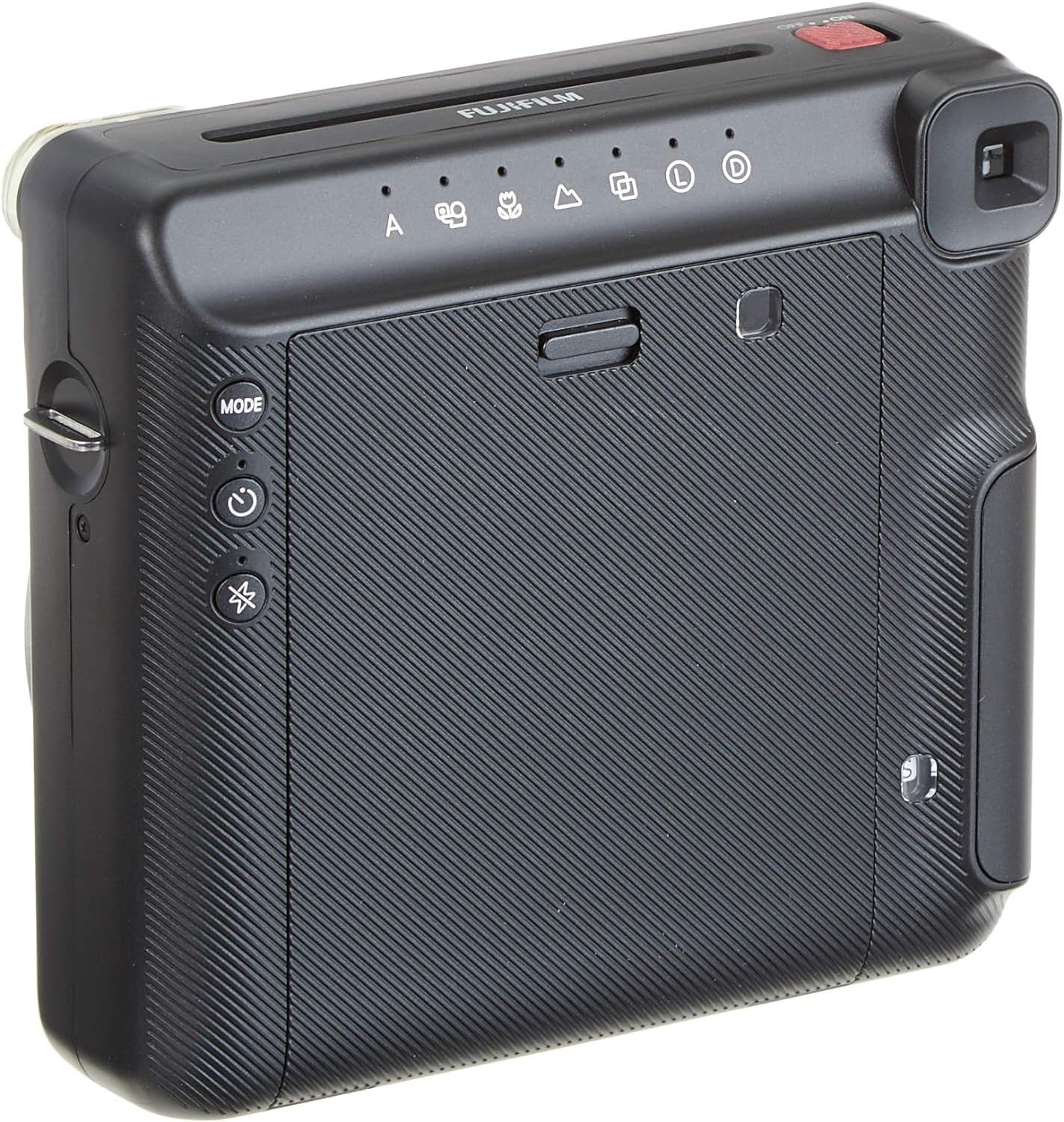
Image 3.2: Rear view of the Instax Square SQ6, highlighting the mode buttons and film counter.
4. Setup
4.1. Installing Batteries
- Locate the battery compartment cover on the side or bottom of the camera.
- Open the cover and insert two CR2 lithium batteries, ensuring correct polarity (+/-).
- Close the battery compartment cover securely.
4.2. Loading Instax Square Film
- Press the film compartment latch to open the film cover on the back of the camera.
- Align the yellow mark on the film pack with the yellow mark inside the camera's film compartment.
- Insert the film pack straight into the compartment. Do not press down on the film pack.
- Close the film compartment cover firmly until it clicks. The camera will automatically eject the black film cover sheet.
- The film counter on the back of the camera will display the number of remaining exposures.

Image 4.1: The Instax Square SQ6 with its film compartment open, ready for film loading.
5. Operating the Camera
5.1. Powering On/Off
Press the ON/OFF button to turn the camera on or off. When powered on, the lens will extend.
5.2. Basic Shooting
- Turn on the camera.
- Look through the optical viewfinder to compose your shot.
- Press the shutter button to take a picture. The photo will be ejected from the film slot.
5.3. Shooting Modes
Press the MODE button to cycle through the available shooting modes:
- Auto Mode: Standard mode for general photography. The camera automatically adjusts exposure.
- Selfie Mode: Optimizes brightness and focal length for self-portraits. Use the selfie mirror for framing.
- Macro Mode: For close-up shots from 11.8 to 19.7 inches (30cm-50cm).
- Landscape Mode: For distant subjects (2m to infinity).
- Double Exposure Mode: Allows you to superimpose two images onto a single film frame. Press the shutter button twice.
- Light/Dark Mode: Adjusts exposure compensation by +/- 2/3-stop. Press the Light/Dark button to select.
5.4. Using Flash Gels
The camera includes orange, purple, and green flash gels. These can be attached to the built-in flash to add a color tint to your photos.
6. Maintenance
6.1. Cleaning the Camera
- Use the provided microfiber cloth to gently wipe the camera body.
- For the lens, use the air blower brush to remove dust, then gently clean with the lens cleaner and microfiber cloth. Avoid touching the lens directly with your fingers.
- Do not use organic solvents or harsh chemicals to clean the camera.
6.2. Film Storage
Store unused Instax Square film packs in a cool, dry place, away from direct sunlight and high temperatures. Once opened, use the film within the recommended timeframe for best results.
7. Troubleshooting
- Camera does not power on: Check if the batteries are correctly inserted and fully charged. Replace if necessary.
- Film does not eject: Ensure a film pack is loaded correctly and that the film counter is not showing '0'.
- Photos are too dark/light: Adjust using the Light/Dark mode or ensure the flash is enabled in low-light conditions.
- Blurred images: Ensure the correct shooting mode (e.g., Macro for close-ups, Landscape for distant) is selected and hold the camera steady when pressing the shutter.
- Film counter shows 'S' or 'E': 'S' indicates no film is loaded or the black cover sheet has not been ejected. 'E' indicates an error or end of film.
8. Specifications
| Feature | Detail |
|---|---|
| Film | Fujifilm Instax Square Instant Film |
| Picture Size | 62 mm x 62 mm |
| Lens | Retractable lens, 2 components, 2 elements, f = 65.75 mm, 1:12.6 |
| Viewfinder | Inverted Galileo finder, 0.4 x, with target spot |
| Focusing | Motor-driven 3-range switching (0.3 m - 0.5 m / 0.5 m - 2 m / 2 m - infinity), Macro Mode (0.3 m - 0.5 m), Normal Mode (0.5 m - 2 m), Landscape Mode (2 m - infinity) |
| Shutter Release | Programmed electronic shutter release, 1.6 sec - 1/400 sec. |
| Exposure Control | Automatic, Interlocking range (ISO 800): LV 5 - LV 15.5, Exposure compensation: ±2/3 EV |
| Film Ejection | Automatic |
| Flash | Built-in, automatic electronic flash (with brightness adjustment function), Forced flash mode (with brightness adjustment function), Flash off mode, Red eye reduction mode |
| Power Supply | Two CR2/DL CR2 lithium batteries |
| Dimensions | 118.7 mm x 128.1 mm x 58.1 mm (excluding protrusions) |
| Weight | 395 g (without batteries, strap, and film pack) |
| Color | Ruby Red |
9. Warranty and Support
For warranty information and customer support, please refer to the documentation included with your purchase or visit the official Fujifilm website. Keep your proof of purchase for warranty claims.
For further assistance, you may contact Fujifilm customer service directly.
Related documentsInstax Square SQ6


Ask a question about this manual
Ask about setup, troubleshooting, compatibility, parts, safety, or missing instructions. Manuals+ will review the question and use this page’s manual context to help answer it.