
DLYFULL B2-Black+B4
Dlyfull B2 Black & B4 Universal Battery Tester User Manual
Models: B2-Black, B4
1. Product Overview
The Dlyfull B2 Black Battery Tester and B4 Universal Battery Tester are designed to accurately assess the health and remaining charge of a wide variety of battery types. This manual provides comprehensive instructions for the safe and effective use of both devices, ensuring optimal performance and longevity.

Image: Dlyfull B2 Black and B4 Universal Battery Testers shown with included AAA batteries.
2. Safety Information
- Always handle batteries with care. Do not short-circuit batteries.
- Do not attempt to test damaged or leaking batteries.
- Ensure correct polarity when inserting batteries into the testers. Incorrect polarity can damage the device or the battery.
- The Dlyfull B2 tester is not powered by rechargeable batteries and should not be used to test rechargeable batteries.
- Keep the testers away from water, high temperatures, and direct sunlight.
- This product is not a toy. Keep out of reach of children.
3. Package Contents
Upon opening your package, please verify that all the following items are included:
- 1 x Dlyfull B2 Black Battery Tester
- 1 x Dlyfull B4 Universal Battery Health Tester & Checker
- 3 x Alkaline 1.5V AAA Batteries
- 1 x Welcome Guide (this manual)
4. Setup
4.1. Dlyfull B4 Universal Battery Tester Battery Installation
The Dlyfull B4 tester requires 3 AAA batteries for operation (included). The Dlyfull B2 tester does not require internal batteries for testing.
- Locate the battery compartment on the back of the Dlyfull B4 tester.
- Slide open the battery compartment cover.
- Insert 3 AAA batteries, ensuring correct polarity (+ and -) as indicated inside the compartment.
- Close the battery compartment cover securely.
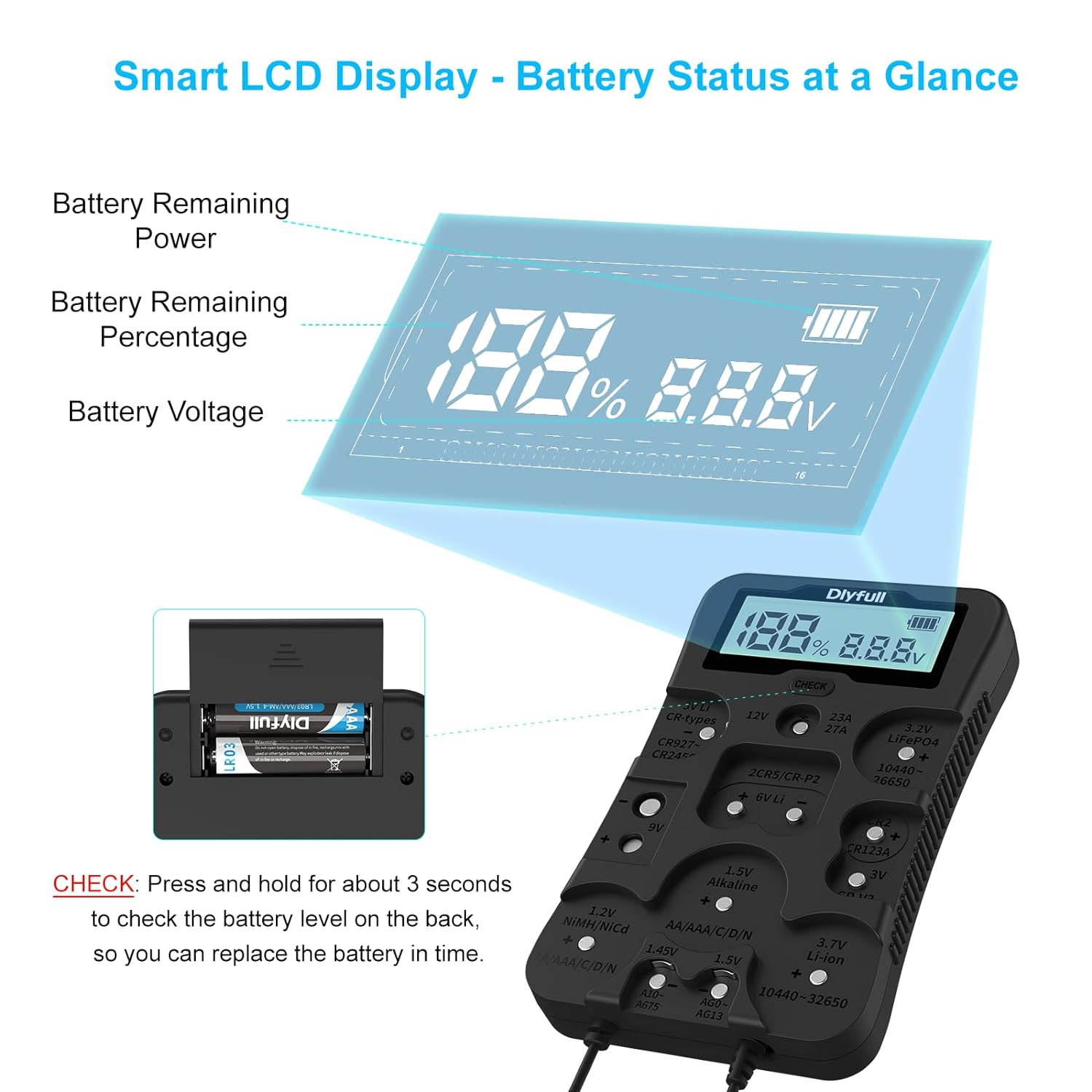
Image: The Dlyfull B4 tester's smart LCD display and the battery compartment for AAA batteries.
5. Operating Instructions
5.1. Dlyfull B4 Universal Battery Tester Operation
The B4 tester features a sophisticated LCD display that shows battery voltage and level. The battery level is presented as a percentage and a battery level bar.

Image: Demonstrations of testing various battery types using the Dlyfull B4 tester, including cylindrical, 9V, and button cell batteries.
Testing Procedure for B4:
- Identify the correct slot or contact point for your battery type on the B4 tester. The tester supports 12 battery types including 1.2V Ni-MH, 1.45V Zinc Air, 1.5V Alkaline, 3.0V Lithium Manganese, 3.2V LiFePO4, 3.7V Li-ion, 6.0V, 9.0V, and 12.0V Alkaline packs. It supports AAA, AA, C, SC, D, N sizes, button cells, CR123A, CR-V3, 2CR5, 23A, 27A, and more.
- Insert the battery, ensuring correct polarity. The tester is equipped with polarity markings for easy and accurate insertion.
- The LCD display will automatically show the voltage and remaining battery level.

Image: The Dlyfull B4 tester highlighting its polarity guidance indicators for correct battery insertion.
5.2. Dlyfull B2 Black Battery Tester Operation
The B2 tester provides quick results using a bar display to indicate battery health (Poor, Weak, Good).

Image: The Dlyfull B2 tester's easy-to-read LCD screen, displaying battery health categories: Poor, Weak, and Good.
Testing Procedure for B2:
- Identify the appropriate slot or contact point for your battery type on the B2 tester. It is suitable for AA, AAA, C, CR123A, D, 9V, N, CR2, CRV3, 2CR5, CR-P2 cylindrical battery testing, and various button cell batteries.
- Place the battery into the designated slot or make contact with the probes.
- The display will quickly show the status of your battery's health using the bar indicators.

Image: Examples of testing different battery types (9V, button cell, cylindrical) using the Dlyfull B2 tester.
6. Maintenance
- Clean the testers regularly with a soft, dry cloth. Do not use abrasive cleaners or solvents.
- Ensure the battery contacts are free from dirt or corrosion for accurate readings.
- When not in use for extended periods, remove the AAA batteries from the Dlyfull B4 tester to prevent leakage.
- Store the testers in a cool, dry place, away from extreme temperatures and humidity.
7. Troubleshooting
7.1. Dlyfull B4 Tester: No Display or Faint Display
- Check if the AAA batteries are inserted correctly with the right polarity.
- Replace the AAA batteries with new ones if they are depleted.
- Ensure the battery compartment cover is securely closed.
7.2. Inaccurate Readings
- Ensure the battery being tested is clean and free of corrosion on its terminals.
- Verify that the battery is correctly seated in the tester's slot or that the probes make firm contact.
- Confirm that you are using the correct testing method/slot for the specific battery type.
- Remember that the B2 tester is not designed for rechargeable batteries.
7.3. Tester Not Responding
- For the B4 tester, try removing and reinserting the AAA batteries.
- If the issue persists, contact DLYFULL customer service.
8. Specifications
8.1. Dlyfull B2 Black Battery Tester
- Compatibility: AA, AAA, C, CR123A, D, 9V, N, CR2, CRV3, 2CR5, CR-P2 cylindrical batteries, and various button cell batteries.
- Display: Bar indicators (Poor, Weak, Good).
- Power Source: Battery under test (does not require internal batteries for testing).
8.2. Dlyfull B4 Universal Battery Tester
- Compatibility: 12 battery types including 1.2V Ni-MH, 1.45V Zinc Air, 1.5V Alkaline, 3.0V Lithium Manganese, 3.2V LiFePO4, 3.7V Li-ion, 6.0V, 9.0V, and 12.0V Alkaline packs. Supports AAA, AA, C, SC, D, N sizes, button cells, CR123A, CR-V3, 2CR5, 23A, 27A, and more.
- Display: Smart LCD display showing voltage and battery level (percentage and bar).
- Power Source: 3 x AAA Alkaline batteries (included).
8.3. General Specifications
- Brand: DLYFULL
- Color: Black
- Measurement Type: Voltmeter
9. Warranty and Support
DLYFULL provides an 18-Month Warranty for your Dlyfull B2 Black and B4 Universal Battery Testers. We also offer Lifetime 24-Hour Friendly Customer Service.
For any questions, technical support, or warranty claims, please contact DLYFULL customer service through the retailer's platform or visit the official DLYFULL website for contact information.
Ask a question about this manual
Ask about setup, troubleshooting, compatibility, parts, safety, or missing instructions. Manuals+ will review the question and use this page’s manual context to help answer it.