
M5Stack K016-H2
M5Stack M5StickC PLUS2 ESP32 Mini IoT Development Kit User Manual
Brand: M5Stack | Model: K016-H2
1. Product Overview
The M5StickC PLUS2 is an iterative version of the M5StickC PLUS, designed as a compact and versatile IoT development tool. It features the ESP32-PICO-V3-02 chip with built-in WiFi functionality. This device integrates various hardware resources including infrared, RTC, microphone, LED, IMU, buttons, and a buzzer. It is equipped with a 1.14-inch TFT screen (135x240 resolution, ST7789V2 driver) and an increased battery capacity of 200mAh. The interface supports HAT and Unit series products, offering extensive creative possibilities for development.

Image: The M5Stack M5StickC PLUS2 development kit, a compact yellow device with a screen, shown alongside its accessories including a watch band, wall mount, and USB-C cable.
2. Package Contents
Verify that all items listed below are included in your package:
- 1x M5StickC PLUS2 device
- 1x Plastic Building Block Compatible Adapter
- 1x Wall/1515 Mounting Accessory
- 1x Watch band
- 1x Type-C USB Cable (50cm)

Image: A clear view of the M5StickC PLUS2 device and its included accessories: the main unit, watch belt, USB-C cable, wall mount, and brick adapter.

Image: The retail packaging for the M5-Watch StickC PLUS2, illustrating the device and its primary accessories.
3. Getting Started
3.1 Initial Setup
Before first use, it is recommended to fully charge the M5StickC PLUS2. Connect the provided USB Type-C cable to the device's USB-C port and the other end to a standard USB power adapter or a computer's USB port. The device's screen may indicate charging status.
3.2 Connecting to a Computer
To program or interact with the M5StickC PLUS2, connect it to your computer using the supplied USB Type-C cable. The device will appear as a serial port. You may need to install appropriate drivers (e.g., CP210X or CH9102 drivers, depending on the specific USB-to-serial chip) for your operating system to recognize the device. Refer to the M5Stack official documentation for driver installation guides and development environment setup (e.g., Arduino IDE, ESP-IDF).
3.3 Attaching Accessories
The M5StickC PLUS2 comes with various accessories for different applications:
- Watch Band: Slide the M5StickC PLUS2 into the designated slots on the watch band adapter to wear it as a smartwatch.
- Plastic Building Block Compatible Adapter: This adapter allows you to integrate the M5StickC PLUS2 with building block systems. Align the adapter with the back of the M5StickC PLUS2 and snap it into place.
- Wall/1515 Mounting Accessory: Use this accessory to mount the device to a wall or a 1515 profile. Attach the accessory to the back of the M5StickC PLUS2, then secure it to your desired surface.
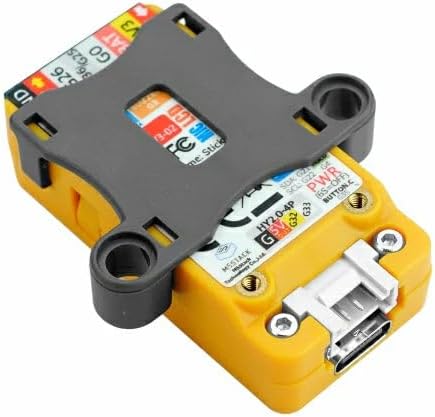
Image: The M5StickC PLUS2 device with the plastic building block compatible adapter attached to its rear, demonstrating how accessories connect.
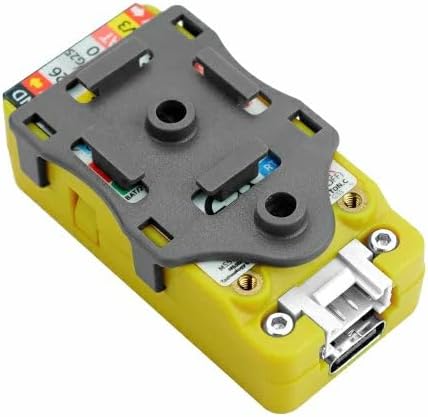
Image: The M5StickC PLUS2 device with the wall/1515 mounting accessory attached, ready for fixed installations.
4. Operation Guide
4.1 Basic Functions
The M5StickC PLUS2 features multiple integrated components for various functionalities:
- Power On/Off: Press and hold Button C (Power Switch) for approximately 6 seconds to power the device on or off.
- Display: The 1.14-inch TFT screen displays information based on the loaded application.
- Buttons: Buttons A and B are programmable inputs for user interaction. Button C also serves as the power switch.
- IMU (6-Axis): Provides motion sensing capabilities (accelerometer and gyroscope).
- Infrared (IR): Can be used for IR remote control applications.
- Microphone: For audio input and sound detection.
- Buzzer: For audio feedback or alerts.
- LED: A programmable green LED for visual indicators.

Image: A detailed diagram of the M5StickC PLUS2, highlighting the location of Button A, Button B, Button C (Power Switch), USB-C port, IR transmitter, LED, Microphone, Buzzer, and external 8-pin connector.
4.2 Wearable Use
When used with the watch band, the M5StickC PLUS2 can function as a wearable device. Custom applications can be developed to display time, sensor data, notifications, or control other IoT devices from your wrist.

Image: The M5StickC PLUS2 device attached to its orange watch band and worn on a wrist, displaying time on its screen.

Image: A full view of the M5StickC PLUS2 device on its orange watch band, worn on a wrist, showcasing its compact size and wearable form factor.
5. Care and Maintenance
- Cleaning: Use a soft, dry cloth to clean the device. Avoid using harsh chemicals or abrasive materials.
- Water Resistance: The M5StickC PLUS2 is not waterproof. Avoid exposure to water or high humidity.
- Temperature: Operate and store the device within recommended temperature ranges (typically 0°C to 40°C). Extreme temperatures can affect battery life and component performance.
- Battery Care: To prolong battery life, avoid fully discharging the device frequently. If storing for extended periods, charge the battery to about 50% and store in a cool, dry place.
- Handling: Handle the device with care to prevent physical damage. Avoid dropping or subjecting it to strong impacts.
6. Troubleshooting Common Issues
| Problem | Possible Cause | Solution |
|---|---|---|
| Device does not power on. | Low battery; Power button not held long enough; Hardware malfunction. | Charge the device for at least 30 minutes. Ensure Button C is held for 6 seconds. If issue persists, contact support. |
| Computer does not recognize the device. | Missing USB drivers; Faulty USB cable/port. | Install the correct USB-to-serial drivers (e.g., CP210X, CH9102). Try a different USB cable or port. |
| Screen is blank or unresponsive. | Device is off; Software error; Display malfunction. | Ensure the device is powered on. Try resetting the device (if applicable). Re-flash the firmware. |
| Wi-Fi connectivity issues. | Incorrect Wi-Fi credentials; Out of range; Firmware issue. | Verify Wi-Fi SSID and password in your code. Ensure device is within Wi-Fi range. Update or re-flash firmware. |
7. Technical Specifications
| Feature | Specification |
|---|---|
| Main Controller | ESP32-PICO-V3-02 |
| Flash Memory | 8 MB |
| PSRAM | 2 MB |
| Display | 1.14-inch TFT LCD, 135*240 resolution, ST7789V2 driver |
| Battery Capacity | 200mAh Lithium Polymer |
| Connectivity | Wi-Fi (802.11bgn), Bluetooth, Infrared, USB Type-C, GROVE (I2C+I/O+UART) |
| Sensors/Peripherals | 6-Axis IMU (MPU6886), RTC (BM8563), Microphone (SPM1423-PDM), LED, Buzzer, 3x Custom Buttons |
| Operating System | Linux (compatible) |
| Dimensions | Approx. 2 x 1 x 0.5 inches |
| Weight | Approx. 3.2 ounces |

Image: The back panel of the M5StickC PLUS2, showing printed technical specifications including the ESP32-PICO-V3-02 chip, 8MB Flash, 2MB PSRAM, 1.14 TFT display, 200mAh battery, and various sensor details.
8. Warranty and Support
M5Stack products typically come with a standard manufacturer's warranty covering defects in materials and workmanship. For specific warranty terms and duration, please refer to the official M5Stack website or the documentation included with your purchase.
For technical support, firmware updates, development resources, and community forums, please visit the official M5Stack website. Many common questions and issues can be resolved by consulting their extensive online documentation and community support channels.
If you require further assistance, please contact M5Stack customer service directly through their official support channels.
Related documentsK016-H2


Ask a question about this manual
Ask about setup, troubleshooting, compatibility, parts, safety, or missing instructions. Manuals+ will review the question and use this page’s manual context to help answer it.