
LIGE EF1+EF2
LIGE Smart Watches (EF1+EF2) User Manual
Model: EF1+EF2
1. Product Overview
The LIGE EF1+EF2 Smart Watches are designed for men, offering comprehensive features including call answering/making, fitness tracking, and health monitoring. These military-grade smartwatches are built for durability and are compatible with both iOS and Android smartphones.
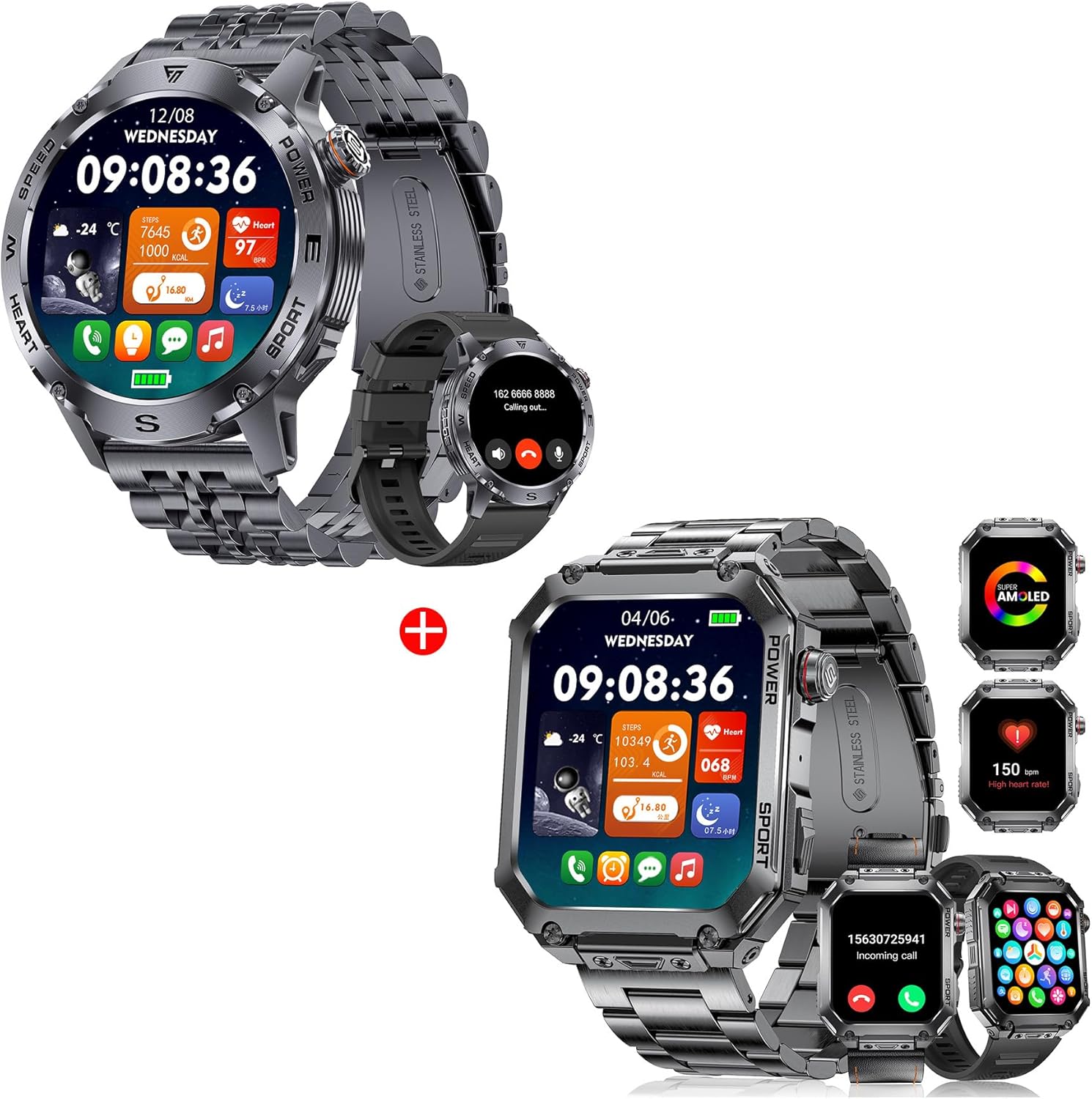
Figure 1.1: LIGE EF1 (round) and EF2 (square) Smart Watches. Both models feature a robust design with metallic bands and clear digital displays, indicating time, date, and various health and activity metrics.
2. Getting Started: Setup
2.1 Initial Charging
Before first use, fully charge your LIGE Smart Watch. Connect the magnetic charging cable to the charging points on the back of the watch and plug the USB end into a standard USB power adapter (not included). A full charge typically takes approximately 2.5 hours.

Figure 2.1: The LIGE Smart Watch connected to its magnetic charging cable, illustrating the charging process. The display shows the battery capacity of 460 mAh, indicating its long battery life capabilities.
2.2 App Installation and Pairing
To unlock the full functionality of your LIGE Smart Watch, you need to download and install the companion application on your smartphone. The app is compatible with Android 4.4+ and iOS 9.0+ devices.
- Download the App: Scan the QR code provided in the watch's packaging or search for the official LIGE Smart Watch app in your phone's app store (Google Play Store for Android, Apple App Store for iOS).
- Enable Bluetooth: Ensure Bluetooth is enabled on your smartphone.
- Open the App: Launch the LIGE Smart Watch app and follow the on-screen instructions to create an account or log in.
- Pair the Watch: Within the app, navigate to the device pairing section. The app will search for available devices. Select your LIGE Smart Watch from the list (it may appear as "EF1" or "EF2" or a similar device ID). Confirm the pairing request on both your phone and the watch if prompted.
- Sync Data: Once paired, the watch will automatically sync time, date, and other settings with your phone.
Note: For optimal performance, keep the app updated to the latest version.
3. Operating Your Smart Watch
3.1 Basic Navigation
The LIGE Smart Watch features a 1.43" AMOLED touchscreen with 466*466 resolution for clear display and smooth operation. Navigate the watch by swiping across the screen and pressing the physical buttons.
- Swipe Up/Down: Access quick settings or notifications.
- Swipe Left/Right: Cycle through various widgets like activity data, heart rate, weather, etc.
- Tap: Select an icon or option.
- Press Side Buttons: Typically used for power on/off, returning to the home screen, or accessing the main menu.

Figure 3.1: Detailed view of the LIGE Smart Watch's 1.43" AMOLED touchscreen. The image emphasizes the display's high resolution, ultra-wide viewing angle, and color accuracy, along with the "Always On Display Clock" feature.
3.2 Calls and Notifications
The watch allows you to make and receive calls directly from your wrist, thanks to its built-in microphone and speaker. It also provides real-time notifications for messages and social media alerts.
- Answering Calls: When an incoming call is received, the watch will vibrate and display the caller ID. Tap the green phone icon to answer.
- Making Calls: Access the dialer or contact list on the watch to initiate a call.
- Notifications: The watch vibrates and displays notifications from your paired smartphone. Swipe down from the watch face to view recent notifications.

Figure 3.2: The LIGE Smart Watch's HD Bluetooth Voice Call capability. The watch screen displays an incoming call, while the phone screen shows the call interface. Notifications from social media apps like Facebook are also visible, demonstrating the watch's communication features.
3.3 Customizing Watch Faces
Personalize your watch with over 200 built-in watch faces. You can change the watch face directly from the watch or through the companion app.
- On Watch: Long-press the current watch face, then swipe left or right to browse available faces. Tap to select.
- Via App: Open the app, navigate to the watch face section, and choose from a wider selection, including customizable options.
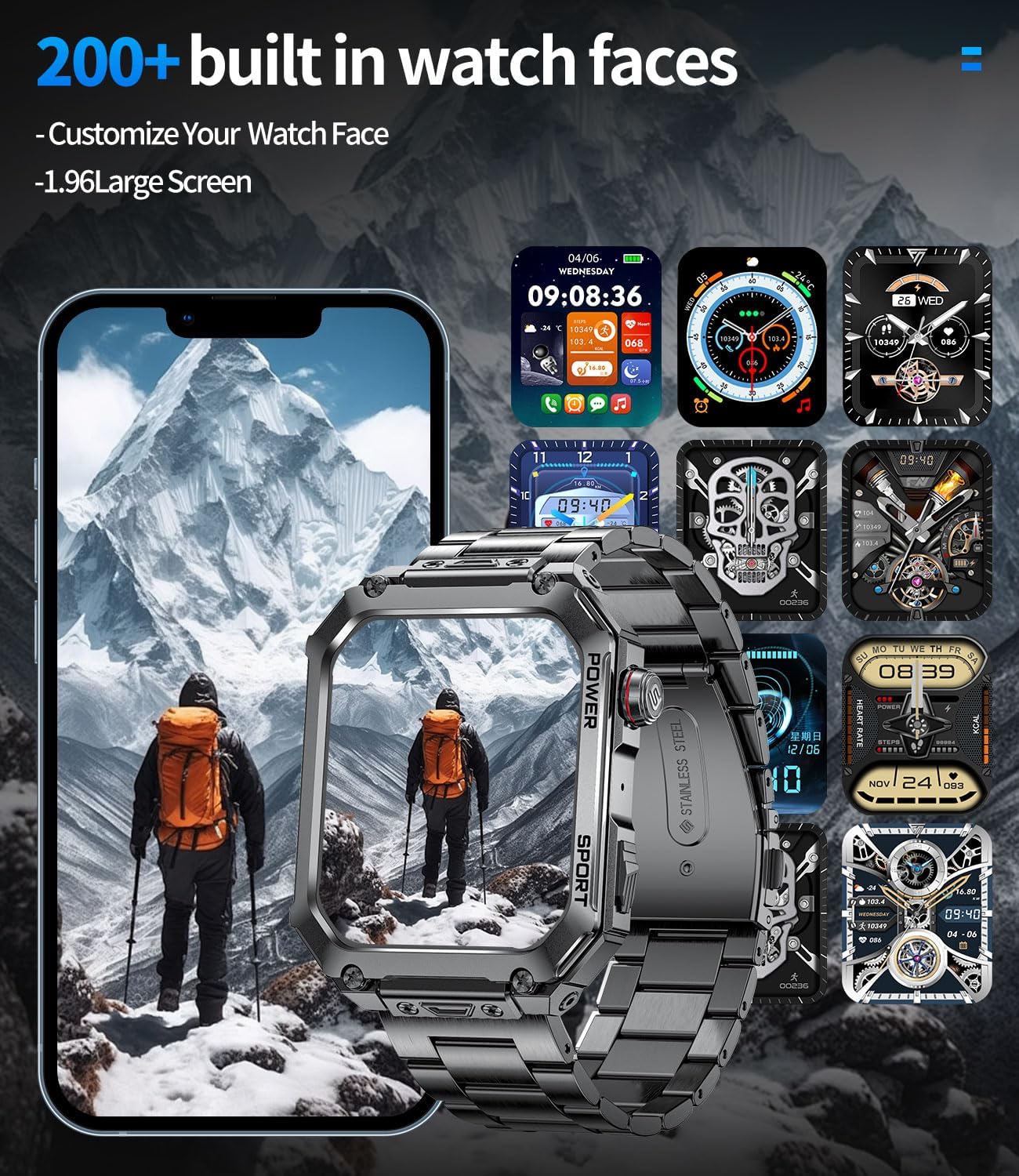
Figure 3.3: A selection of over 200 built-in watch faces for the LIGE Smart Watch. The image showcases diverse designs, from classic analog styles to modern digital displays with integrated health metrics, allowing for extensive personalization.
3.4 Additional Smart Functions
Your LIGE Smart Watch offers a range of convenient features to enhance your daily life:
- Music Control: Control music playback on your phone (play, pause, skip tracks) directly from your watch.
- Voice Assistant: Activate your phone's voice assistant (e.g., Siri, Google Assistant) to perform tasks hands-free.
- Weather Forecast: Get real-time weather updates for your location.
- Drinking Reminders: Set reminders to ensure you stay hydrated throughout the day.
- Camera Control: Use your watch as a remote shutter for your phone's camera.
- Alarm Clock: Set alarms that vibrate on your wrist.

Figure 3.4: Overview of the LIGE Smart Watch's multi-functional capabilities. This includes controlling music playback, interacting with a voice assistant, viewing weather forecasts, receiving hydration reminders, remotely controlling a smartphone camera, and setting alarm clocks.
4. Health and Fitness Tracking
4.1 24-Hour Health Monitoring
The LIGE Smart Watch continuously monitors key health metrics throughout the day:
- Heart Rate: Real-time heart rate tracking.
- SpO2 (Blood Oxygen): Measures blood oxygen saturation levels.
- Sleep Analysis: Monitors sleep patterns, including deep sleep, light sleep, and awake times, providing insights into sleep quality.
Important Note: The fitness watches for men are not a substitute for medical devices and cannot be used for medical purposes. Health data is for reference only.

Figure 4.1: The LIGE Smart Watch's comprehensive health tracking. The top panel illustrates 24-hour heart rate monitoring with detailed graphs, while the bottom panel shows advanced sleep analysis, including total sleep duration and breakdown of sleep stages.
4.2 Rich Sports Modes
With over 100 built-in sports modes, the watch helps you track your workouts and progress. It records data such as steps, calories burned, distance covered, and activity duration.
- Common Modes: Running, Cycling, Walking, Ball Sports, and many more.
- Activity Tracking: Monitor your daily steps, distance, and calories burned even outside of dedicated sports modes.

Figure 4.2: The LIGE Smart Watch supporting over 100 sports modes. The image features active individuals participating in various sports such as climbing, ATV riding, and surfing, with key fitness metrics like heart rate, steps, distance, and calories prominently displayed.
5. Durability and Battery Life
5.1 Military-Grade Durability
Crafted from corrosion-resistant 304 stainless steel, the LIGE Smart Watch is designed to withstand extreme environments. It is MIL-STD 810H U.S. military drop-tested, ensuring high resistance to:
- 5ATM Waterproof: Suitable for swimming and showering, but not for diving or hot water activities.
- Anti-impact: Resists shocks and drops.
- Extreme-Temperature Resistance: Operates reliably in varying temperatures.
- Dust-proof: Protected against dust ingress.
- Stress Resistance: Built to endure daily wear and tear.

Figure 5.1: Demonstrating the LIGE Smart Watch's robust military-grade construction. The panels show the watch submerged in ice, enduring a drill impact, in a desert environment, and submerged in water, highlighting its resistance to water, impact, extreme temperatures, and dust.
5.2 Battery Performance
The watch is equipped with a large-capacity battery, providing extended usage times:
- Working Time: 7-10 days of typical usage.
- Standby Time: Up to 30 days.
- Charging Time: Approximately 2.5 hours for a full charge.
6. Maintenance
6.1 Cleaning Your Watch
To maintain the appearance and functionality of your LIGE Smart Watch:
- Wipe the screen and watch body with a soft, lint-free cloth.
- For stubborn dirt, slightly dampen the cloth with water. Avoid using harsh chemicals or abrasive materials.
- Ensure the charging contacts are clean and dry before charging.
6.2 Storage
When not in use for extended periods, store your watch in a cool, dry place away from direct sunlight and extreme temperatures. It is recommended to charge the watch periodically to prevent deep discharge of the battery.
7. Troubleshooting
If you encounter issues with your LIGE Smart Watch, refer to the following common solutions:
| Problem | Solution |
|---|---|
| Watch not turning on/charging | Ensure the charging cable is securely connected to both the watch and a working USB power source. Check if the charging contacts on the watch are clean. Allow the watch to charge for at least 30 minutes before attempting to turn it on. |
| Unable to pair with phone | Make sure Bluetooth is enabled on your phone and the watch is within range. Restart both your phone and the watch. Try unpairing and re-pairing the device through the app. Ensure the app has necessary permissions. |
| Notifications not appearing | Check if notifications are enabled in the LIGE app settings and in your phone's system settings for the app. Ensure the watch is connected via Bluetooth. Some phone models require specific notification access permissions for the app. |
| Call audio automatically syncing to watch | On the watch, swipe down from the watch face, tap 'Settings', find "Sound and Vibration", and turn off the "Phone Audio" button. This will prevent call audio from automatically routing to the watch. |
| Inaccurate health data | Ensure the watch is worn snugly on your wrist, about one finger's width above the wrist bone. Avoid excessive movement during measurements. Remember that health data is for reference and not for medical diagnosis. |
8. Specifications
| Feature | Detail |
|---|---|
| Model | EF1+EF2 Smart watches for men |
| Brand | LIGE |
| Display | 1.43" AMOLED Touchscreen (466*466 resolution) |
| Connectivity | Bluetooth |
| Battery Type | Lithium Polymer (included) |
| Battery Life | Up to 10 days (typical usage), 30 days (standby) |
| Water Resistance Level | 5ATM Waterproof |
| Case Material | 304 Stainless Steel |
| Special Features | Heart Rate Monitor, SpO2, Sleep Analysis, Call Answering/Making, Rich Sports Modes, Voice Assistant, Camera Control |
| Compatible Devices | Smartphones (Android 4.4+, iOS 9.0+) |
9. Warranty and Support
All LIGE men's smart watches come with a 2-year after-sales warranty. If you encounter any problems or have questions regarding your product, please contact LIGE customer service through the official channels or the retailer from whom you purchased the watch. Please have your purchase details and model number ready when contacting support.
Related documentsEF1+EF2


Ask a question about this manual
Ask about setup, troubleshooting, compatibility, parts, safety, or missing instructions. Manuals+ will review the question and use this page’s manual context to help answer it.