
Introduction
This manual provides detailed instructions for the setup, operation, and maintenance of your ZEBRONICS PIXAPLAY 55 Smart Projector. Please read this manual thoroughly before using the product to ensure proper functionality and to prevent damage. Keep this manual for future reference.

Image: The ZEBRONICS PIXAPLAY 55 Smart Projector shown with its remote control.
Product Overview
Key Features
- Screen Size: Up to 381cm (150 inches) for an immersive viewing experience.
- Brightness: 8000 Lumens LED lamp for clear visuals.
- Resolution: Native 1080p Full HD resolution with 4K support.
- Audio: Integrated powerful built-in speaker.
- Lamp Life: Long-life LED lamp with an impressive 50,000 hours.
- Connectivity: Dual-band Wi-Fi, Bluetooth v5.0, AV IN, AUX OUT, USB, dual HDMI, and microSD slot.
- Mirroring: Supports Miracast for Android and iOS screen mirroring.
- Processor: Quad-core processor for enhanced performance.
- App Support: Allows downloading and utilizing built-in OTT applications.
What's in the Box
- Projector - 1 unit
- Remote Control - 1 unit
- QR Code - 1 unit (likely for quick setup or support)
Setup
Placement
Place the projector on a stable, flat surface or mount it according to your preference. Ensure there is adequate ventilation around the projector to prevent overheating. The optimal projection distance will vary based on the desired screen size.
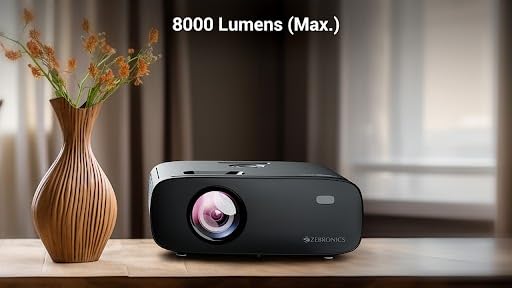
Image: The projector positioned on a table, illustrating typical placement.
Power Connection
- Connect the power cable to the projector's power input port.
- Plug the other end of the power cable into a suitable electrical outlet (240 Volts).
- Press the power button on the projector or remote control to turn it on.
Focus Adjustment
Once the projector is powered on and displaying an image, rotate the focus ring on the lens until the image appears sharp and clear on your projection surface.
Operating Instructions
Basic Operation
- Power On/Off: Use the power button on the projector or the remote control.
- Navigation: Use the arrow keys and 'OK' button on the remote control to navigate through menus and select options.
- Source Selection: Press the 'Source' button on the remote to choose input sources like HDMI, USB, or internal apps.

Image: Details of the remote control and the projector's lens area.
Connectivity
The ZEB-PIXAPLAY 55 offers multiple connectivity options for various devices.

Image: The rear panel of the projector displaying AUX OUT, AV IN, MicroSD, HDMI (x2), and USB ports.
Wired Connections
- HDMI: Connect Blu-ray players, gaming consoles, laptops, or streaming devices using the two HDMI ports.
- USB: Insert USB drives to play media files directly.
- MicroSD: Insert a microSD card to access media files.
- AV IN: Connect older devices using the AV input.
- AUX OUT: Connect external speakers or headphones for enhanced audio.
Wireless Connections
- Wi-Fi: Connect to your home network using dual-band Wi-Fi (2.4GHz & 5GHz) for online streaming and app access.
- Bluetooth v5.0: Pair with Bluetooth-enabled audio devices like speakers or headphones.
- Screen Mirroring (Miracast/iOS):
Effortlessly mirror content from your Android or iOS devices to the projector. Navigate to the Miracast or iOS Cast application on the projector and follow the on-screen instructions to connect your device.

Image: An illustration of a smartphone screen being mirrored wirelessly to the projector.
Maintenance
Cleaning the Lens
Use a soft, lint-free cloth specifically designed for optical lenses to gently clean the projector lens. Avoid using abrasive cleaners or excessive force, as this can scratch the lens.
Ventilation
Ensure that the projector's ventilation openings are not blocked. Proper airflow is crucial for maintaining optimal operating temperature and extending the life of the LED lamp.
Troubleshooting
| Problem | Possible Cause | Solution |
|---|---|---|
| No image displayed |
|
|
| Image is blurry |
|
|
| No sound |
|
|
| Wi-Fi/Bluetooth connection issues |
|
|
Specifications
| Feature | Detail |
|---|---|
| Brand | ZEBRONICS |
| Model Name | Zeb- Pixaplay 55 |
| Item Model Number | ZEB-PIXAPLAY 55 |
| Product Dimensions | 10.6 x 32.5 x 10.6 cm |
| Item Weight | 2 kg |
| Hardware Interface | HDMI, MicroSD, USB |
| Compatible Devices | Smartphones, Tablets, Laptops, Gaming Consoles, Streaming Devices, Blu-ray Players, USB drives, microSD cards |
| Special Features | Built-In Speaker |
| Display Technology | LCD |
| Display Type | LED |
| Image Contrast Ratio | 1000:1 |
| Aspect Ratio | 16:9 |
| Screen Resolution | 1920 x 1080 Pixels (Full HD Native) |
| Voltage | 240 Volts |
| Refresh Rate | 60 Hz |
| Connector Type | Wi-Fi |
| Form Factor | Portable |
| Mounting Type | Tabletop Mount |
| Recommended Uses | Office & Home Entertainment |

Image: Projector dimensions (Length: 25.5cm, Width: 20.5cm, Height: 10.5cm).
Warranty and Support
For technical queries, support, or warranty information, please contact ZEBRONICS customer service.
- Phone/WhatsApp: +91 - 9363453681
- Email: support@zebronics.com

Image: Contact details for technical support via phone/WhatsApp and email.


