
Introduction
This manual provides instructions for the setup, operation, and basic maintenance of your new Generic replacement infrared remote control. This remote is designed to be compatible with specific Thermal-Zone air conditioner models, including ZHF/LW-17-1, MSC424HP13230EB, MSC424HP13230EA, MSC418HP14230B, MSC424HP13230B, and MSC424HP13230E. Please ensure your air conditioner model is listed for proper compatibility. This replacement remote may not offer all functions present on your original remote control.
Setup
Battery Installation
The remote control requires two (2) AAA batteries (not included) for operation. Follow these steps to install the batteries:
- Locate the battery compartment cover on the back of the remote control.
- Press down on the tab and slide the cover downwards to open the compartment.
- Insert two AAA batteries, ensuring the positive (+) and negative (-) terminals align correctly with the markings inside the compartment.
- Slide the battery compartment cover back into place until it clicks securely.
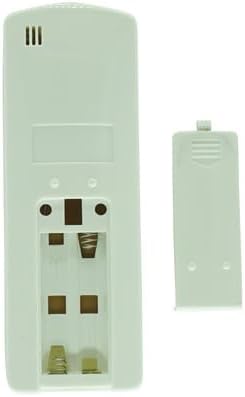
After battery installation, the remote control is ready for use. No programming is typically required for this infrared replacement remote.
Operating Instructions
Point the remote control directly at the infrared receiver on your air conditioner unit. Ensure there are no obstructions between the remote and the unit.

Button Functions
- ON/OFF: Powers the air conditioner unit on or off.
- Temperature Up/Down (▲/▼): Adjusts the desired temperature setting. This remote supports Celsius only.
- MODE: Cycles through available operating modes such as Cool, Heat, Fan, Dry, or Auto.
- FAN SPEED: Adjusts the fan speed (e.g., Low, Medium, High, Auto).
- SLEEP: Activates or deactivates the sleep mode, which typically adjusts temperature and fan speed for comfortable sleep.
- OUT FLAP / IN FLAP: Controls the horizontal or vertical louver movement for air direction.
- AUTOSTART: Sets a timer for the air conditioner to automatically turn on.
- AUTOSTOP: Sets a timer for the air conditioner to automatically turn off.
- HOUR / MIN: Used to set the hour and minute for timer functions (AUTOSTART/AUTOSTOP).
Maintenance
Cleaning
To clean the remote control, wipe it gently with a soft, dry cloth. Do not use liquid cleaners, abrasive materials, or chemical solvents, as these can damage the remote's surface or internal components.
Battery Replacement
Replace batteries when the remote's range decreases or if the air conditioner does not respond to commands. Always replace both batteries at the same time with new AAA batteries. Do not mix old and new batteries or different types of batteries.
Troubleshooting
- Remote not responding to air conditioner:
- Check if the batteries are inserted correctly and are not depleted. Replace if necessary.
- Ensure there is a clear line of sight between the remote control and the air conditioner's infrared receiver.
- Verify that the remote is within the maximum operating range of 8 meters.
- Confirm that your air conditioner model is listed as compatible with this remote.
- Some functions do not work:
- As a replacement remote, it may not support all advanced or specific functions of your original air conditioner remote. Refer to your air conditioner's original manual for specific function requirements.
Specifications
| Brand | Generic |
| Manufacturer | Easytry |
| Model Number | Easytry22995 |
| Item Type | Remote controller |
| Compatible Devices | Air Conditioner |
| Connectivity Technology | Infrared |
| Maximum Range | 8 meters |
| Number of Supported Devices | 1 |
| Battery Type | 2 AAA batteries required |
| Special Features | Celsius Only, Cooling & Heating |
| Color | Grey |
Warranty and Support
Warranty Information
This product comes with a 90-day warranty. This warranty covers manufacturing defects and ensures hassle-free returns within the specified period.
Customer Support
For any questions, troubleshooting assistance, or warranty claims, please contact the seller directly through your purchase platform. Provide your order details and a clear description of the issue for prompt support.