BAOFENG K5 Plus Portable Ham Radio User Manual
Model: K5PLUS
1. Introduction
The BAOFENG K5 Plus is an advanced tri-band portable ham radio designed for reliable long-range communication. It supports VHF 2M (144-148 MHz), VHF 1.25M (222-225 MHz), and UHF 70CM (420-450 MHz) bands, offering versatility for various amateur radio applications. Featuring a 1.77-inch color large screen display, robust build quality, and clear audio, the K5 Plus is equipped with functionalities such as AM Airband reception, Broadcast FM radio, One-Touch Frequency Search, and pre-programmed NOAA weather channels. Its 2500mAh battery with USB-C charging capability ensures extended operation and convenient recharging.

Figure 1: Front view of the BAOFENG K5 Plus Portable Ham Radio.
2. What's in the Box
Upon unboxing your BAOFENG K5 Plus, please verify that all components listed below are present and in good condition:
- BAOFENG K5PLUS Radio Unit
- Tri-band Antenna
- Original Antenna
- 2500mAh Lithium-Ion Battery
- Charging Stand
- USB-C Charging Cable
- Belt Clip
- Lanyard
- User's Manual

Figure 2: All components included in the BAOFENG K5 Plus package.
3. Setup
3.1 Battery Installation
- Align the battery pack with the grooves on the back of the radio.
- Slide the battery upwards until it clicks securely into place.
- To remove, press the battery release latch (located at the bottom of the battery) and slide the battery downwards.
3.2 Antenna Attachment
- Screw the desired antenna (tri-band or original) clockwise onto the antenna connector at the top of the radio until it is finger-tight. Do not overtighten.

Figure 3: Attaching the high-performance tri-band antenna.
3.3 Charging the Battery
The K5 Plus battery can be charged using two methods:
- Using the Charging Stand: Place the radio with the battery installed into the charging stand. Ensure the charging contacts align. The indicator light on the stand will show charging status.
- Using USB-C: Connect the USB-C charging cable directly to the USB-C port located on the back of the battery pack. This allows for convenient charging from various USB power sources (e.g., power bank, car charger, computer USB port).
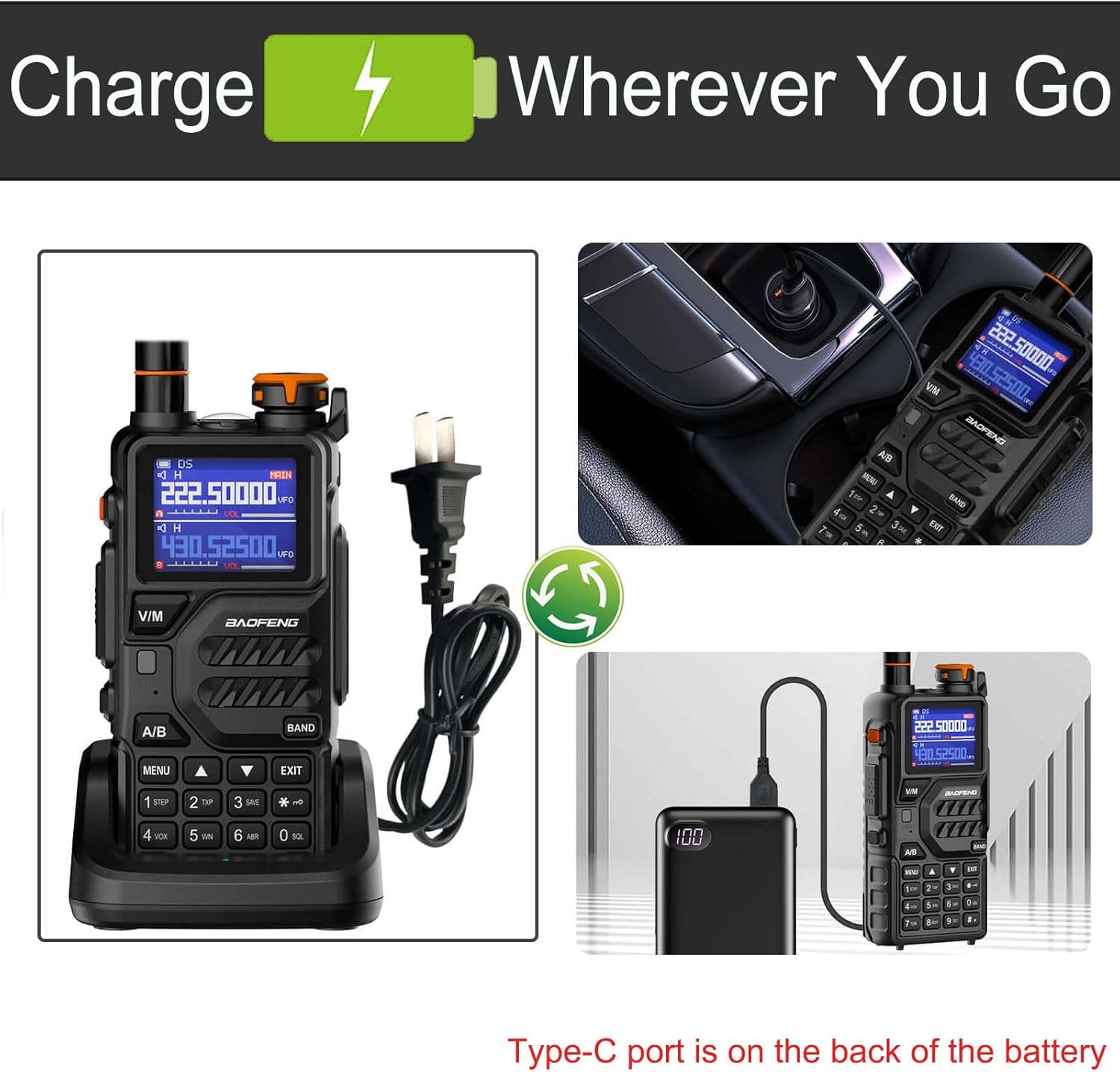
Figure 4: Charging options for the K5 Plus battery.
4. Operating Instructions
4.1 Power On/Off and Volume
- Power On: Rotate the power/volume knob clockwise until you hear a click. The display will light up.
- Power Off: Rotate the power/volume knob counter-clockwise until you hear a click.
- Volume Adjustment: Rotate the power/volume knob to increase (clockwise) or decrease (counter-clockwise) the audio output.
4.2 Mode Switching (VFO/Channel)
Press the V/M button to switch between Frequency Mode (VFO) and Channel Mode. In VFO mode, you can manually input frequencies. In Channel Mode, you can select pre-programmed channels.
4.3 Band Selection
The K5 Plus supports tri-band operation. Press the BAND button to cycle through the available frequency bands: VHF 2M, VHF 1.25M, and UHF 70CM. The display will indicate the currently active band.
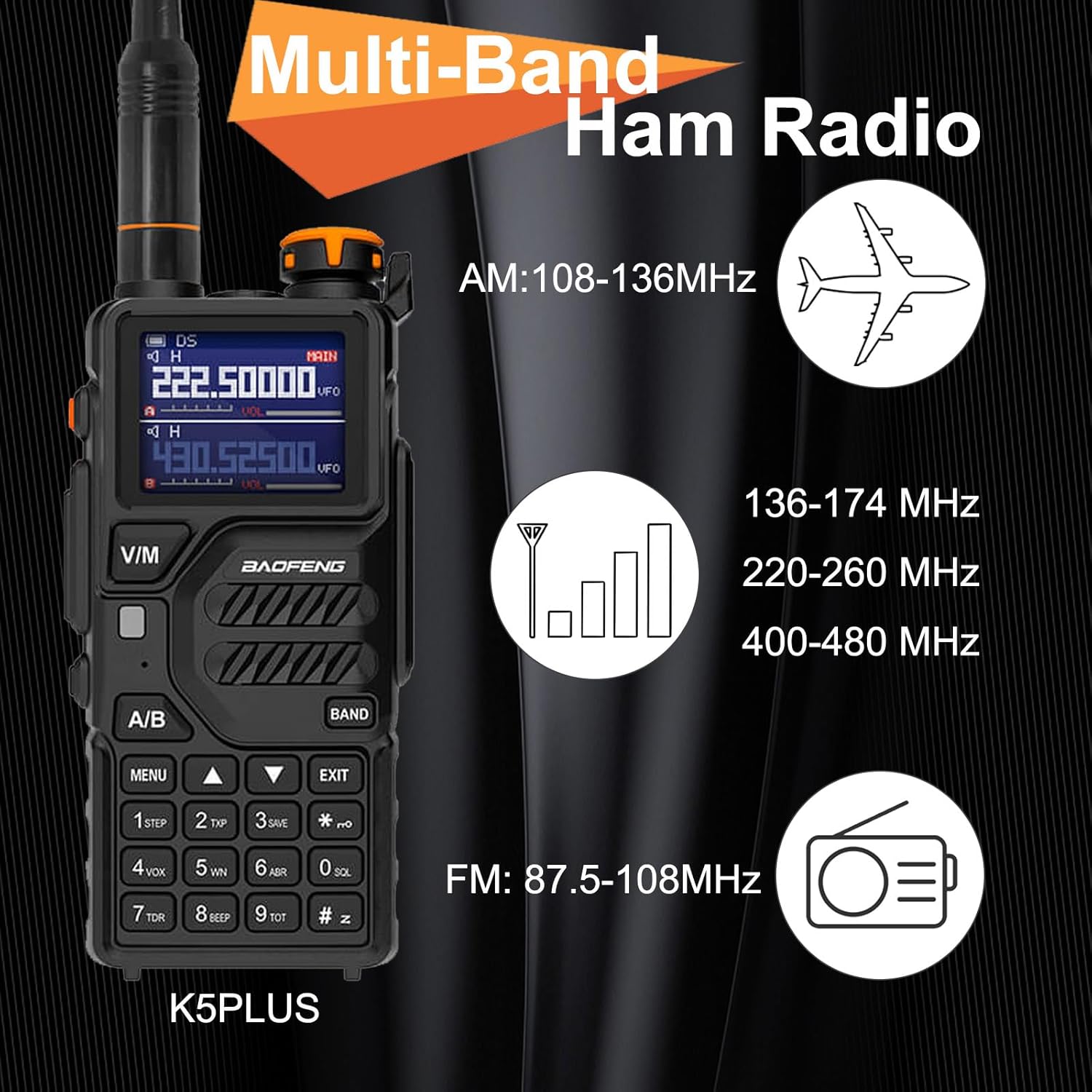
Figure 5: Multi-band operation overview.
4.4 One-Touch Frequency Search
To initiate a one-touch frequency search, press and hold the BAND button. The radio will scan for active frequencies. Once a signal is detected, it will display the frequency and CTCSS tone. Use the up/down arrow keys to resume scanning.
4.5 NOAA Weather Channels
The K5 Plus comes with pre-programmed NOAA weather channels. To access these, navigate through the menu or use a dedicated shortcut if available (refer to the full user manual for specific key combinations).

Figure 6: NOAA Weather Channels feature.
4.6 VOX Function
The Voice Operated Exchange (VOX) function allows for hands-free transmission. When VOX is enabled, the radio will automatically transmit when it detects your voice. Adjust the VOX sensitivity level in the menu to prevent accidental transmissions.
4.7 Flashlight Operation
The K5 Plus includes a built-in LED flashlight. To activate or deactivate the flashlight, refer to the specific button or menu option in the full user manual.

Figure 7: Built-in LED flashlight feature.
4.8 Programming with CHIRP
The BAOFENG K5 Plus is compatible with CHIRP programming software. This allows for easy management of memory channels, frequencies, and other settings via a computer. Ensure you use the latest version of CHIRP and a compatible programming cable. The K5 Plus model is available in the CHIRP pull-down menu.
5. Features Overview
The BAOFENG K5 Plus offers a comprehensive set of features for amateur radio enthusiasts:
- Tri-Band Operation: Supports VHF 2M (144-148 MHz), VHF 1.25M (222-225 MHz), and UHF 70CM (420-450 MHz).
- High/Middle/Low Power Output: Selectable power levels to optimize battery life and transmission range.
- AM Airband Receiver: Listen to aircraft communications (108-136 MHz).

AM Airband Receiver
- Broadcast FM Radio Receiver: Enjoy local FM radio stations (87.5-108 MHz).

Broadcast FM Radio Receiver
- One-Touch Frequency Search: Quickly find active frequencies.
- Pre-programmed NOAA Weather Channels: Access essential weather alerts.
- VOX Function: Hands-free voice-activated transmission.
- LED Flashlight: Integrated light for convenience in low-light conditions.
- Up to 999 Memory Channels: Ample storage for your favorite frequencies.
- 2500mAh Rechargeable Battery: Long-lasting power for extended use.
- USB-C Charging: Modern and versatile charging option.

Figure 8: Key features of the K5 Plus.
6. Maintenance
Proper maintenance ensures the longevity and optimal performance of your BAOFENG K5 Plus radio.
6.1 Cleaning
- Wipe the radio's surface with a soft, damp cloth. Do not use harsh chemicals or abrasive cleaners.
- Ensure the charging contacts on the radio and battery are clean and free of debris.
6.2 Battery Care
- Avoid fully discharging the battery frequently.
- Charge the battery in a cool, dry environment.
- If storing the radio for an extended period, charge the battery to about 50% capacity and remove it from the radio. Recharge every few months to prevent deep discharge.
6.3 Storage
- Store the radio in a cool, dry place away from direct sunlight and extreme temperatures.
- Keep the radio away from dust and moisture. Note that the radio is not water resistant.
7. Troubleshooting
If you encounter issues with your BAOFENG K5 Plus, refer to the following common problems and solutions:
| Problem | Possible Cause | Solution |
|---|---|---|
| Radio does not power on. | Low or dead battery; improperly installed battery. | Charge the battery fully. Ensure the battery is correctly installed and clicked into place. |
| No audio from speaker. | Volume too low; squelch level too high; faulty speaker. | Increase volume. Adjust squelch level (SQL) in the menu. Test with headphones if available. |
| Cannot transmit or receive. | Incorrect frequency/channel; antenna not connected; power level too low; repeater offset/CTCSS incorrect. | Verify frequency and channel settings. Ensure antenna is securely attached. Increase power output. Check repeater settings and CTCSS/DCS tones. |
| Battery drains quickly. | High power usage; frequent transmission; old battery. | Use lower power settings when possible. Reduce transmission time. Consider replacing the battery if it's old. |
| Programming issues with CHIRP. | Incorrect cable; outdated CHIRP version; driver issues. | Ensure you are using a genuine BAOFENG programming cable. Update CHIRP to the latest version. Install correct USB drivers for the cable. |
8. Specifications
| Feature | Specification |
|---|---|
| Model Number | K5PLUS |
| Item Weight | 1.41 pounds |
| Product Dimensions | 2.1 x 1.3 x 4.1 inches |
| Country of Origin | China |
| Batteries | 1 Lithium Ion battery required (included) |
| Color | Black |
| Number of Channels | 999 |
| Special Feature | USB-C charging |
| Frequency Range | VHF 2M (144-148 MHz), VHF 1.25M (222-225 MHz), UHF 70CM (420-450 MHz) |
| Talking Range Maximum | 10 Kilometer |
| Tuner Technology | FM |
| Voltage | 5 Volts (DC) |
| Water Resistance Level | Not Water Resistant |
9. Warranty and Support
9.1 Warranty Information
The BAOFENG K5 Plus comes with a 180-day warranty from the date of purchase. This warranty covers manufacturing defects and malfunctions under normal use. It does not cover damage caused by misuse, accidents, unauthorized modifications, or natural disasters.
9.2 Customer Support
For technical assistance, troubleshooting, or warranty claims, please contact BAOFENG customer support through their official website or the retailer from whom you purchased the product. Please have your model number and purchase date ready when contacting support.


