1. Introduction
The DREAME H12S Wet Dry Vacuum Cleaner is designed for efficient floor cleaning, combining powerful suction with wet mopping capabilities. This manual provides essential information for safe operation, maintenance, and optimal performance of your device. Please read it thoroughly before first use and keep it for future reference.

Image: The DREAME H12S Wet Dry Vacuum Cleaner, a sleek black and grey device, standing on a clean floor.
2. Product Overview
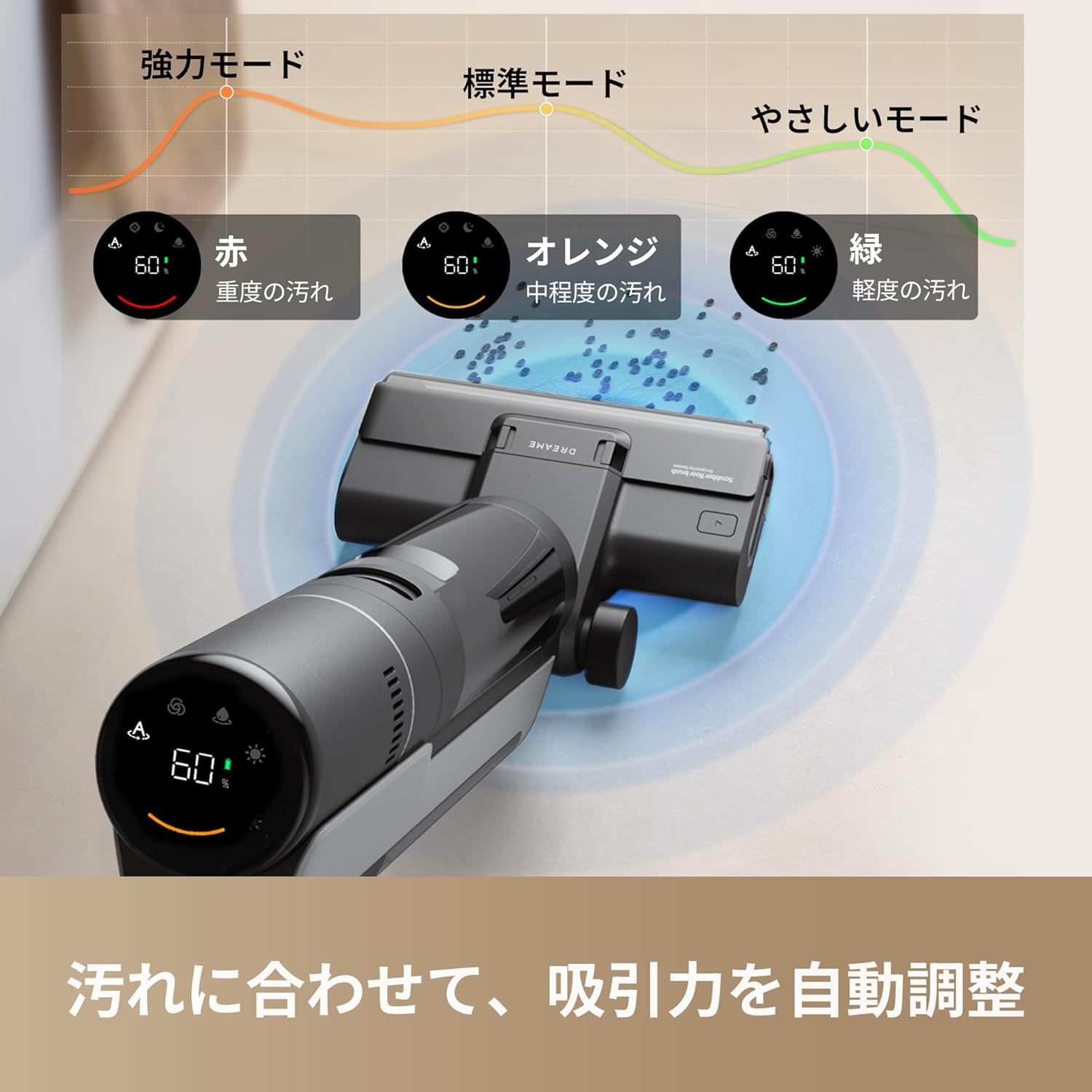
The DREAME H12S features a 2-in-1 design for simultaneous vacuuming and mopping. It includes a self-cleaning system for the brush roller and warm air drying to prevent odors. Its intelligent dirt detection automatically adjusts suction power, and the edge-cleaning brush head reaches close to walls.
- Powerful Suction & Wet Mopping: Combines 16,000 Pa suction with wet mopping for comprehensive cleaning.
- Edge-to-Edge Cleaning: Improved brush head design cleans within 6mm of walls.
- Automatic Brush Cleaning & Drying: Self-cleaning function with electrolyzed water and 55°C warm air drying prevents bacterial growth and odors.
- Intelligent Dirt Detection: Smart sensors detect dirt type and quantity, automatically adjusting suction power for optimal cleaning efficiency and energy saving.
- Multiple Cleaning Modes: Offers Auto, Sterilization, and Suction modes for various cleaning needs.
- Long Runtime: Up to 35 minutes of continuous operation with large capacity clean (900ml) and dirty (700ml) water tanks.


3. Setup
- Unpacking: Carefully remove all components from the packaging. Ensure all parts are present according to the packing list.
- Assembly:
- Attach the handle to the main body until it clicks securely into place.
- Ensure the clean water tank and dirty water tank are correctly installed in their designated slots.
- Charging: Place the vacuum cleaner on its charging dock. The LED display will illuminate to indicate charging status. Ensure the device is fully charged before first use.
- Filling the Clean Water Tank:
- Remove the clean water tank from the device.
- Fill it with clean water up to the MAX line.
- Add a small amount of the provided DREAME floor cleaner solution (if desired) to the clean water tank.
- Reinstall the clean water tank securely into the device.
4. Operating Instructions
The DREAME H12S is designed for ease of use with intelligent features to simplify your cleaning routine.
- Power On: Press the power button located on the handle to turn on the device.
- Mode Selection: Use the mode selection button to cycle through the available cleaning modes:
- Auto Cleaning Mode: Ideal for daily cleaning of both wet and dry messes. The device's smart sensor automatically detects the level of dirt and adjusts suction power accordingly.
- Sterilization Mode: Activates a deep cleaning function using electrolyzed water to disinfect surfaces.
- Suction Mode: Specifically for vacuuming liquids, leaving the floor dry without mopping. Suitable for carpets or rugs where wet cleaning is not desired.
- Cleaning: Guide the vacuum cleaner across the floor. The self-propelled brush head provides assistance, making operation effortless.
- Voice Prompts & LED Display: The device provides voice prompts for operational guidance. Monitor the battery level, current cleaning mode, and dirt detection status on the intuitive LED display.

5. Maintenance
Regular maintenance ensures the longevity and optimal performance of your DREAME H12S.
- Automatic Self-Cleaning: After each cleaning session, return the vacuum to the charging dock and press the dedicated self-clean button. The device will automatically clean the brush roller and internal pipes using electrolyzed water.
- Warm Air Drying: Following the self-cleaning cycle, the brush roller will undergo a warm air drying process at 55°C. This prevents the growth of mold and eliminates unpleasant odors.
- Emptying the Dirty Water Tank:
- Remove the dirty water tank from the device.
- Dispose of the dirty water responsibly.
- Rinse the tank thoroughly with clean water to remove any residue.
- Reinstall the dirty water tank securely.
- Brush Roller Cleaning: Periodically inspect the brush roller. If heavily soiled, remove it and rinse under running water. Ensure it is completely dry before reinserting.
- Filter Maintenance: The HEPA filter should be cleaned regularly. Tap off loose debris and rinse if necessary. Allow it to air dry completely before reinstallation. Replace the filter as recommended in the full user manual.

6. Troubleshooting
If you encounter issues with your DREAME H12S, refer to the following common troubleshooting steps:
- No Power: Ensure the device is fully charged and correctly placed on the charging dock. Check the power adapter connection.
- Weak Suction: Verify that the dirty water tank is not full and the clean water tank is not empty. Inspect the brush roller and HEPA filter for any clogs or blockages.
- Water Leaks: Confirm that both the clean and dirty water tanks are correctly installed and their seals are intact.
- Unusual Noise: Turn off the device and inspect the brush roller area for any foreign objects or obstructions.
- Odor from Brush: Ensure that the automatic self-cleaning and warm air drying functions are performed regularly after each use. Promptly empty and clean the dirty water tank.
For more detailed troubleshooting or persistent issues, please contact DREAME customer support.
7. Specifications
| Manufacturer | DREAME |
| Model Number | HHR30B (H12S) |
| Package Dimensions | 73.6 x 36 x 32.1 cm |
| Color | Black |
| Other Features | Wet/Dry Functionality |
| Battery Type | Lithium-ion (built-in) |
| Package Weight | 8.7 kg |
| Power Source | Battery Powered |
| Filter Type | HEPA Filter |
| Recommended Use | Hard Floors |
8. Warranty and Support
DREAME is committed to providing excellent customer service and support for its products.

Warranty Coverage: Products are covered by a warranty period of 1 to 3 years, depending on the specific product. This ensures long-term peace of mind for your purchase.

Customer Support: Our experienced support staff are available to assist you via phone and email for any inquiries or issues.

Domestic Repair Centers: We have established after-sales service centers in key locations for prompt and thorough repair and inspection services.
DREAME Official Support Center:
Phone: 050-5050-8170 (Reception hours: 9:00-18:00, year-round)
Email: support.jp@dreame.tech


