
Product Overview
This 10.1-inch Android car stereo is a universal head unit designed for 2-DIN car center consoles. It features a high-resolution 1024x600 IPS touchscreen, Android 12 system with 2GB RAM and 32GB ROM, providing smooth performance and ample storage for applications. Key functionalities include wireless Apple CarPlay and Android Auto, GPS navigation (offline/online), Wi-Fi connectivity, FM radio, MirrorLink, Split Screen, Dual Zone Video Out, Bluetooth hands-free calling, and AHD rear camera support.

Figure 1: Leadfan 10.1 Inch Android Car Stereo Main Unit
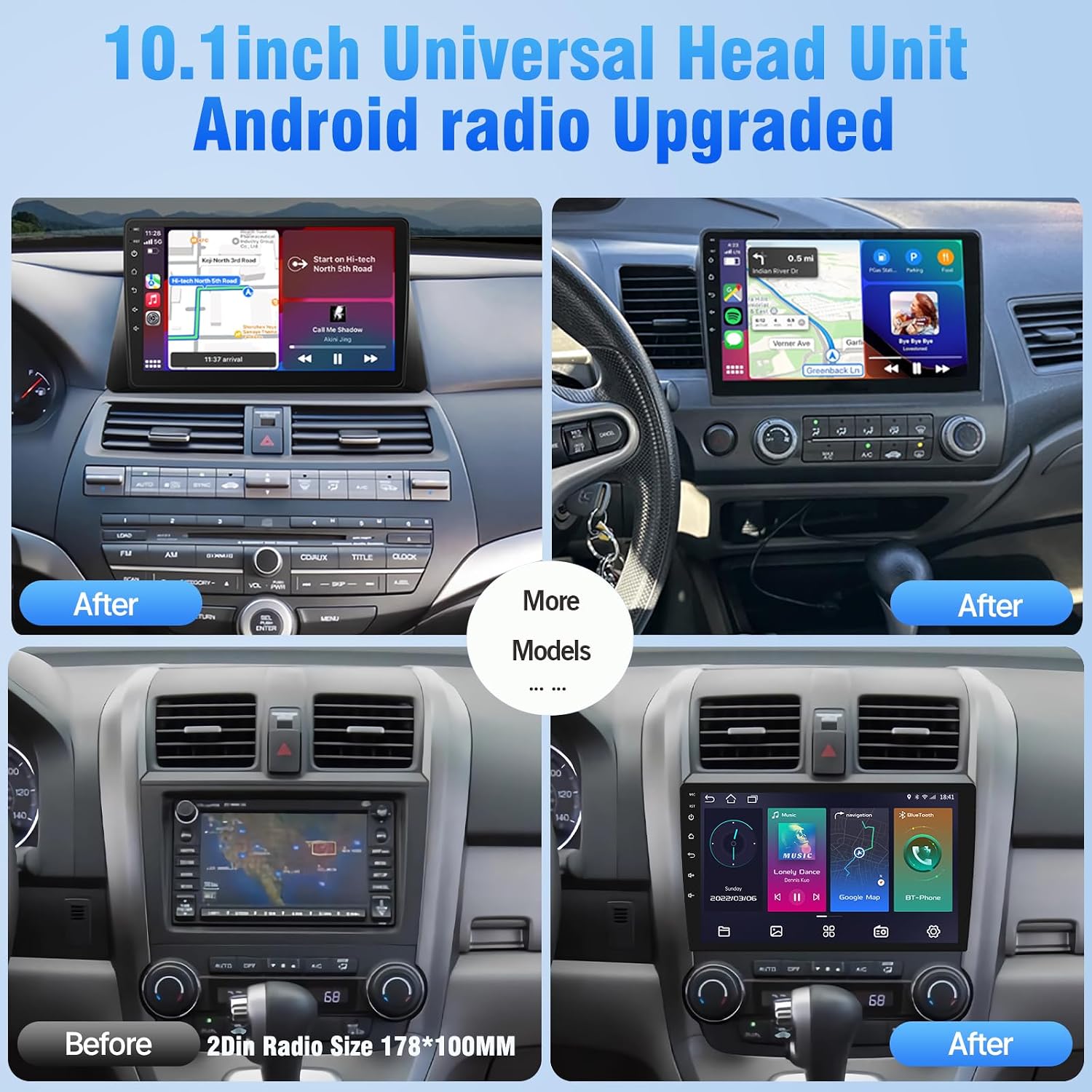
Figure 2: Comparison of car dashboard before and after installing the 10.1-inch universal head unit.
Setup and Installation
The installation size of the unit is approximately 7.01" (L) x 1.89" (W) x 2.76" (H). This universal unit is designed to fit most 2-DIN car center consoles. It is recommended to use an aftermarket car stereo wire harness adapter that fits your specific car model for easier and safer installation.
Package Contents
Before beginning installation, ensure all components are present:
- Power Cable
- RCA Cable
- 2 USB Cables
- GPS Module
- User Manual
- 2 Iron Sheets
- 4 Screws
- AHD Rear View Camera & Cable

Figure 3: Product dimensions and included accessories for installation.

Figure 4: Detailed view of the car stereo unit, its dimensions, and various connection ports.
Wiring Instructions
Proper wiring is essential for the correct functioning of the car stereo. Refer to the detailed wiring diagram below and the provided video for step-by-step guidance. Ensure all connections are secure and match the corresponding functions.

Figure 5: Detailed wiring harness definition for the car stereo, showing connections for power, speakers, and other functions.

Figure 6: Diagram illustrating two choices for connecting the rear-view camera: roof wiring or under-seat wiring.
Wiring Method Video Guide
Video 1: This video demonstrates the wiring method for the Leadfan car stereo using the included wiring harness. It provides a visual guide for connecting the various wires to ensure proper functionality and safe installation.
Operating Instructions
The Leadfan car stereo offers a range of features designed to enhance your driving experience. Below are instructions for common operations.
Wireless Apple CarPlay & Android Auto
The unit is compatible with Wireless CarPlay and wireless Android Auto. This allows for hands-free calls, easy access to phone contacts, emails, notifications, map navigation, music, and videos. Connect wirelessly via Bluetooth and Wi-Fi; the unit will automatically connect on subsequent uses. GPS navigation can be run directly within CarPlay/Android Auto.

Figure 7: Visual representation of the wireless Apple CarPlay and Android Auto interfaces on the car stereo screen.

Figure 8: Overview of wireless CarPlay and Android Auto features, including voice commands and app integration.
Bluetooth & Steering Wheel Control (SWC)
Equipped with Bluetooth 5.1 and a built-in microphone, the stereo allows for clear hands-free calls. You can also use your steering wheel buttons to control the car audio, providing convenient and safe operation while driving.

Figure 9: Demonstrates Bluetooth call functionality and steering wheel control integration for the car stereo.
Mirror Link & AHD Backup Camera Input
MirrorLink allows you to mirror your phone's display onto the 10.1-inch screen, enabling playback of movies, navigation, and more. Android phones support two-way operation, while iOS phones support one-way mirroring. When connected to the included AHD backup camera, the screen automatically displays the rear view upon engaging reverse gear. The camera features a 170° viewing angle and waterproof design.

Figure 10: Illustrates the built-in Wi-Fi capabilities for app installation and the features of the AHD camera image, including HD, Night Vision, Wide Angle, and Waterproof design.

Figure 11: Shows the wireless mirror link feature, allowing content from iOS and Android phones to be displayed on the car stereo.
GPS Navigation & WiFi Connectivity
The 10.1-inch head unit includes a built-in GPS module and an external GPS antenna for both online and offline map navigation. Offline map data is preloaded for immediate use after installation, offering voice and visual turn-by-turn directions. The unit also supports Wi-Fi hotspot connection, allowing you to easily access and download online navigation apps, social media, and other applications from the Play Store.

Figure 12: Illustrates the GPS navigation feature with a global map display, indicating connectivity for navigation.

Figure 13: Represents the Wi-Fi connection capability, allowing users to download and install over 1000 apps.
Split Screen Function & Sound Settings
The split-screen function allows you to view two applications simultaneously, such as GPS navigation and music playback. The Android 12 radio also supports unlimited preset stations for your favorite radio channels. Additionally, it offers customized EQ settings and subwoofer audio output for an enhanced audio experience.

Figure 14: Displays the interface for the stable FM radio function, showing frequency tuning and preset options.
Maintenance
To ensure the longevity and optimal performance of your Leadfan car stereo, regular maintenance is recommended. Keep the screen clean using a soft, lint-free cloth. Avoid using harsh chemicals or abrasive materials that could damage the display. Ensure all cables are securely connected and free from damage. Periodically check for software updates to benefit from the latest features and improvements.
Troubleshooting
If you encounter issues with your Leadfan car stereo, consider the following common troubleshooting steps:
- No Power: Check all power connections (ACC, GND, BATTERY) to ensure they are securely connected and receiving appropriate voltage. Verify the car's fuse box for any blown fuses related to the stereo.
- No Sound: Confirm that speaker wires are correctly connected to the unit and are not short-circuited. Check the volume level and audio settings (EQ, balance, fader).
- Screen Not Responding: Try restarting the unit by turning off your car's ignition and turning it back on. Ensure the screen is clean and free from debris.
- Bluetooth/Wi-Fi Connectivity Issues: Ensure Bluetooth and Wi-Fi are enabled on both the stereo and your mobile device. Try forgetting and re-pairing devices. Check for interference from other electronic devices.
- GPS Signal Loss: Ensure the GPS antenna is properly installed and has a clear line of sight to the sky.
- Slow Performance: Close unnecessary background applications. If the issue persists, a factory reset might be necessary (note: this will erase all user data and settings).
For more complex issues or persistent problems, please refer to the Warranty and Support section for contact information.
Product Specifications
Detailed technical specifications for the Leadfan 10.1 Inch Android Car Radio Stereo Screen:
| Feature | Specification |
|---|---|
| Model Number | 10.1in-Android stereo-2+32g |
| Operating System | Android 12 |
| RAM + ROM | 2GB RAM + 32GB ROM |
| CPU | Quad 4-Core |
| Screen Size | 10.1 Inches |
| Resolution | 1024 x 600 IPS Touch Screen |
| Bluetooth Version | 5.1 |
| Connectivity Technology | Bluetooth, WiFi, USB |
| Audio Output Mode | Stereo |
| Item Weight | 1.8 pounds |
| Product Dimensions | 9.8 x 1.97 x 5.97 inches |
| Special Features | Android Auto, Built-In Bluetooth, Apple CarPlay, Navigation, WiFi, EQ, FM, SWC, Backup Camera, Voice Control, Mirror Link, USB, Split Screen |

Figure 15: Highlights the internal specifications including Android 12, 2GB RAM, 32GB ROM, and 4-Core CPU.
Warranty and Support
Leadfan is committed to providing excellent customer support for your product. If you have any questions regarding installation, operation, or require technical assistance, please do not hesitate to contact us.
- Technical Support: 24 hours after-sales technical support is available to assist with any installation or operation problems.
- Money Back Service: Enjoy a 30-day money-back guarantee.
- After-Sales Support: The product comes with 12 months of after-sales support.
For inquiries, click "sold by Leadfan" and then "ask a question" on the product page. Please do not return the product directly without contacting support first, as most problems can be resolved with technical assistance.
Protection Plans
Additional protection plans are available for extended coverage:
- 2-Year Protection Plan: Available for purchase.
- 3-Year Protection Plan: Available for purchase.
- Complete Protect: A monthly plan covering all eligible past and future purchases.

Figure 16: Information on how to contact Leadfan for 24-hour technical support and after-sales service.