1. Important Safety Instructions
Please read all instructions carefully before using this appliance and retain for future reference. Always follow basic safety precautions to reduce the risk of fire, electric shock, or injury.
- Ensure the power supply matches the voltage specified on the rating label.
- Do not operate the unit with a damaged cord or plug.
- Do not insert fingers or objects into the air inlet or outlet.
- Keep the unit away from flammable gases or combustible materials.
- Always unplug the unit before cleaning or servicing.
- This appliance is not intended for use by persons (including children) with reduced physical, sensory or mental capabilities, or lack of experience and knowledge, unless they have been given supervision or instruction concerning use of the appliance by a person responsible for their safety.
- Children should be supervised to ensure that they do not play with the appliance.
2. Product Overview
The DORTALA 10000 BTU Portable Air Conditioner is a versatile 3-in-1 unit designed to provide cooling, fan, and dehumidification functions for rooms up to 350 square feet. It features an LED touch panel, remote control, and easy mobility.
Components Included:
- 1 x Portable Air Conditioner Unit
- 1 x Air Exhaust Duct
- 1 x Air Exhaust Duct Connector
- 1 x Window Exhaust Adapter
- 1 x Baffle Plate (Window Seal Plate Kit)
- 1 x Drain Hose
- 1 x Remote Control
- 1 x User Guide (This Manual)


3. Setup and Installation
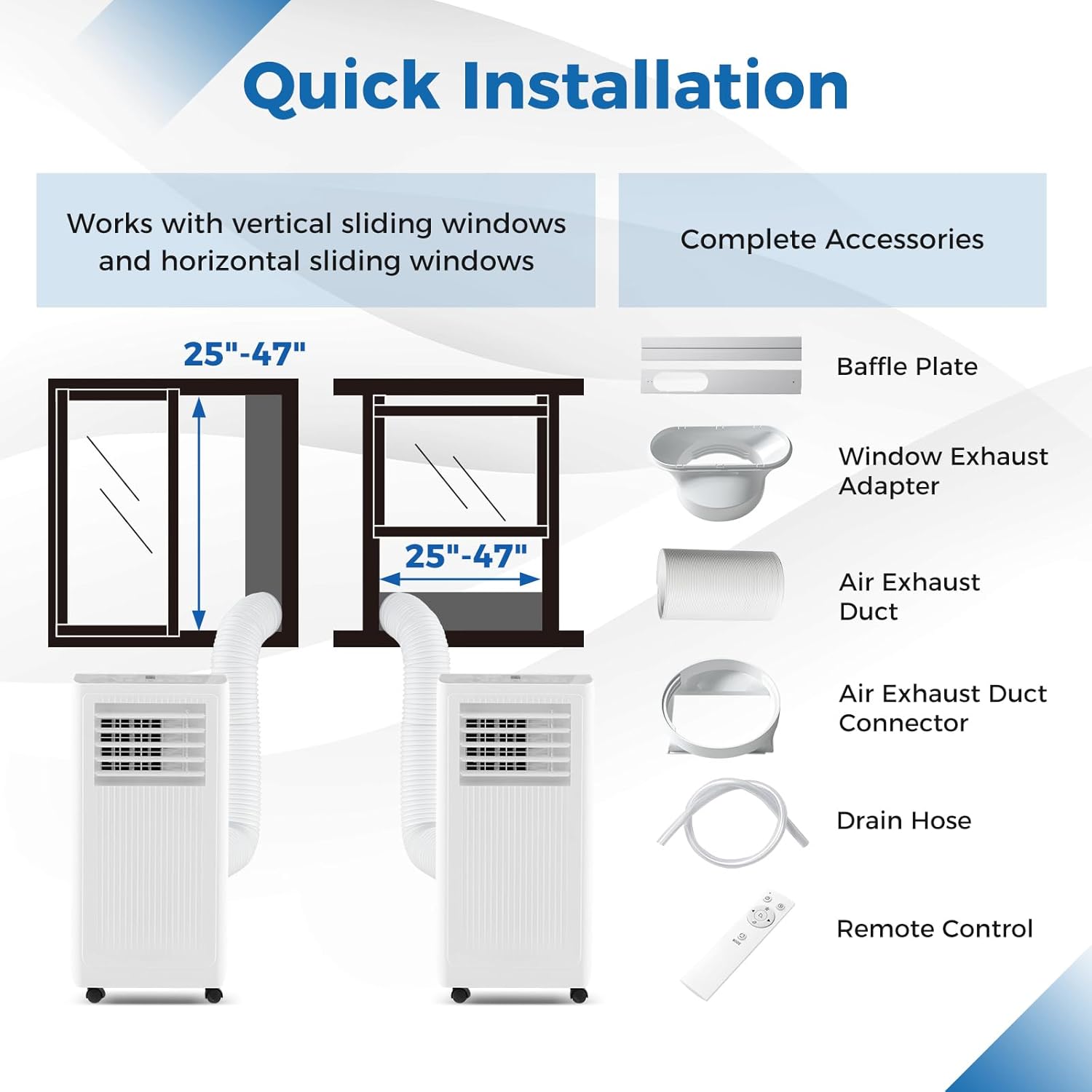
This portable air conditioner is designed for easy installation in both vertical and horizontal sliding windows. Follow these steps for proper setup.
Window Kit Installation:
- Prepare the Window: Open the window to the desired width/height. The window kit is suitable for openings between 25 and 47 inches.
- Assemble the Window Seal Plate: Adjust the baffle plate (window seal plate) to fit your window opening. Secure it in place if necessary.
- Attach Exhaust Duct to Adapter: Connect one end of the air exhaust duct to the window exhaust adapter.
- Attach Exhaust Duct to Unit: Connect the other end of the air exhaust duct to the air exhaust duct connector on the back of the portable AC unit.
- Install Window Adapter: Insert the window exhaust adapter into the opening of the window seal plate. Ensure a secure fit to prevent air leakage.
- Position the Unit: Place the portable air conditioner on a flat, stable surface near the window, ensuring the exhaust duct is not kinked or obstructed.

Placement Considerations:
- Ensure adequate clearance around the unit for proper airflow.
- Avoid placing the unit in direct sunlight or near heat sources.
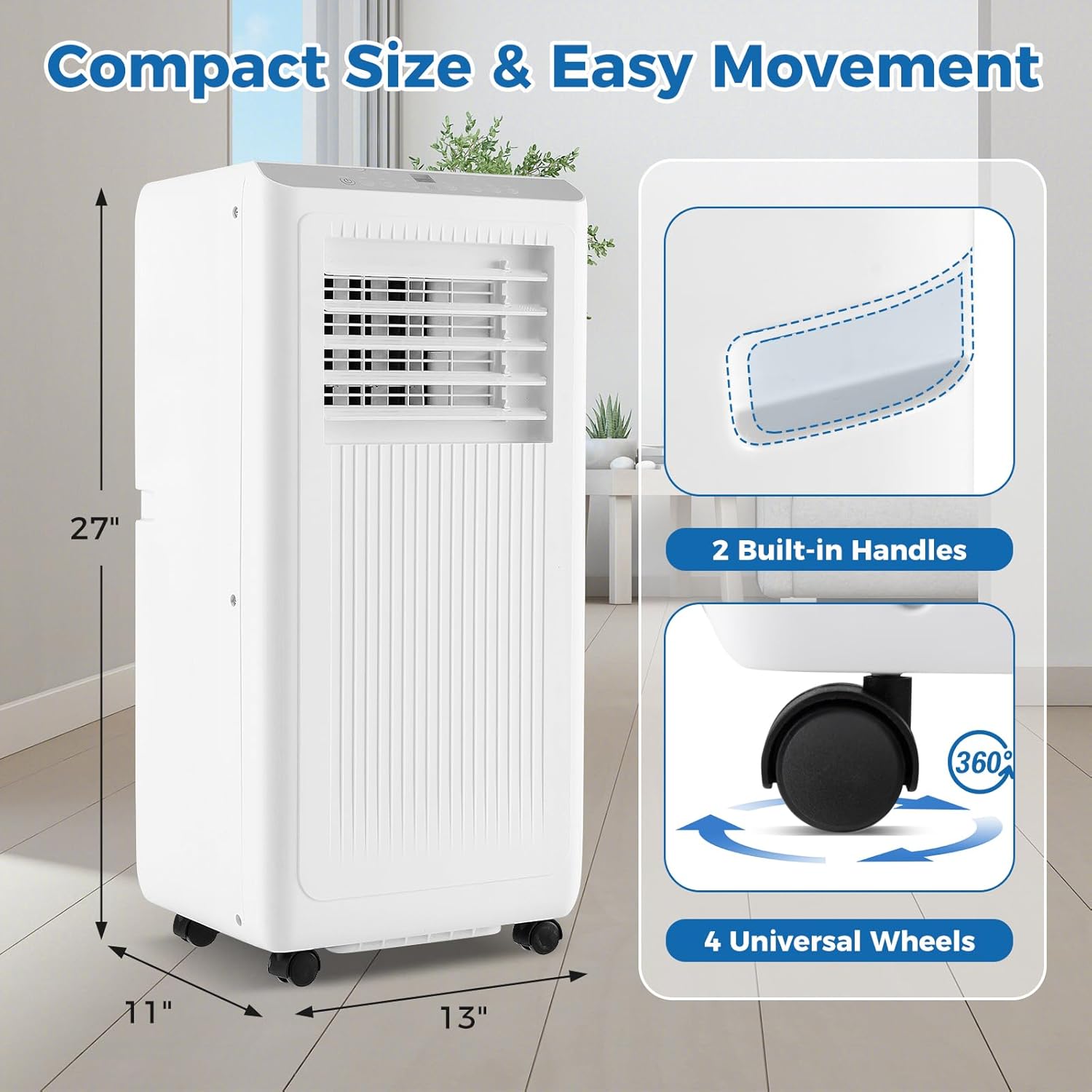
- The unit is equipped with 4 universal wheels and 2 built-in handles for easy movement between rooms.
4. Operating Instructions
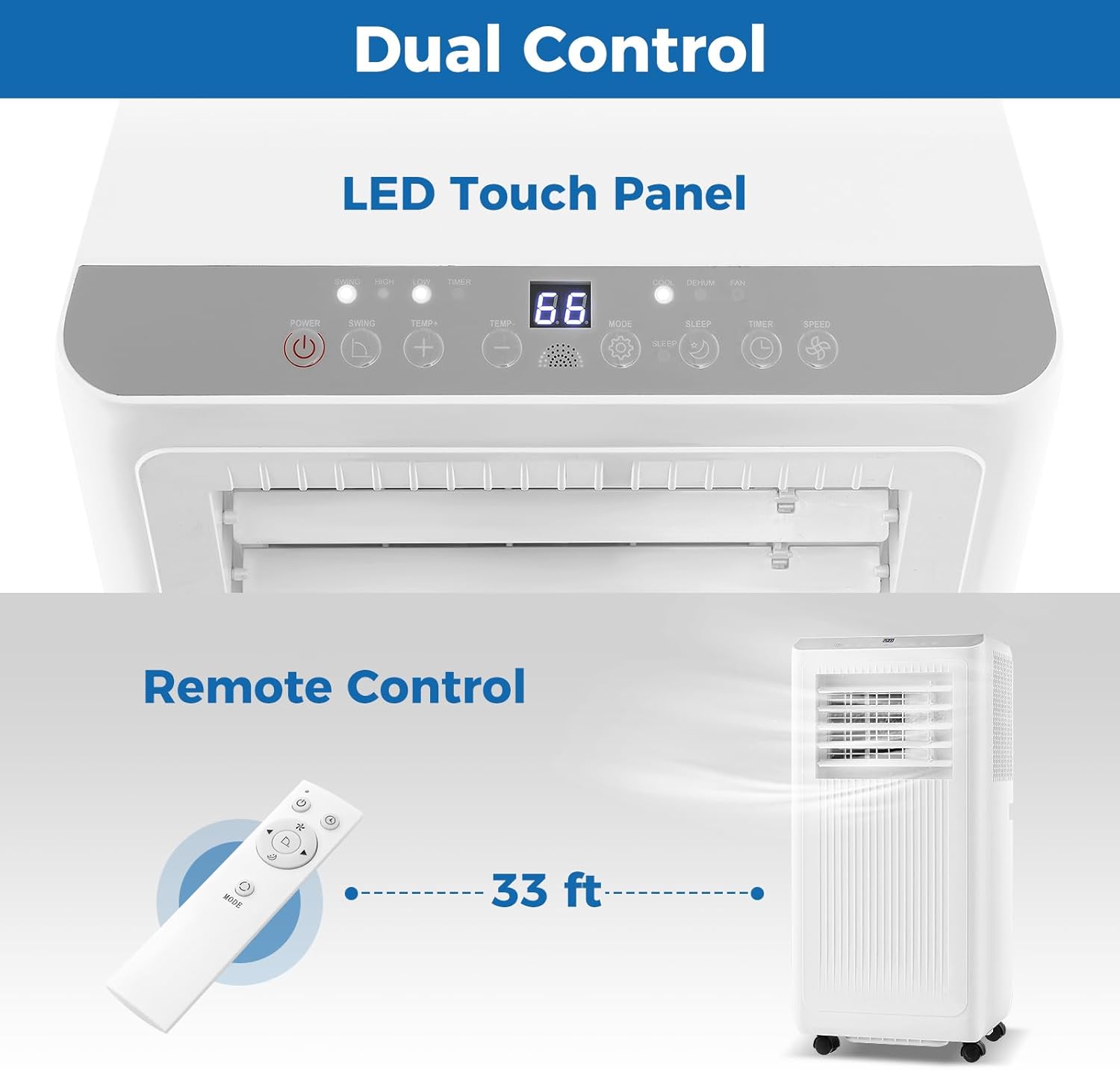
The unit can be controlled via the LED touch panel on top of the unit or the included remote control.
Control Panel and Remote Control:
Operating Modes:

- Cool Mode: Provides powerful cooling. Set the desired temperature between 61°F (16°C) and 88°F (31°C).
- Fan Mode: Circulates air without cooling. Choose between 2 fan speeds (High/Low).
- Dehumidify Mode: Removes excess moisture from the air, with a capacity of up to 56 pints per day.
Additional Functions:
- 24-Hour Timer: Program the unit to turn on or off automatically within a 24-hour period.
- Sleep Mode: Operates quietly for undisturbed rest. The fan speed will automatically adjust to low, and the temperature may gradually increase to maintain comfort while conserving energy.
- Oscillation: Activate wide oscillation for broader air distribution and increased cooling coverage.


5. Maintenance
Regular maintenance ensures optimal performance and extends the lifespan of your portable air conditioner.
Filter Cleaning:
The unit features a removable and washable filter. Clean the filter regularly (every two weeks or more often depending on usage) to maintain air quality and cooling efficiency.
- Unplug the air conditioner from the power outlet.
- Locate and remove the air filter from the back of the unit.
- Wash the filter under running water with a mild detergent.
- Allow the filter to air dry completely before reinstalling.
- Reinsert the dry filter into the unit.
Water Drainage:
During dehumidification or in high humidity environments, water will collect inside the unit. The drain plug at the bottom allows for easy drainage.
- Unplug the air conditioner.
- Place a shallow pan or container under the drain plug located at the bottom rear of the unit.
- Remove the drain plug to allow water to flow out.
- For continuous drainage, attach the included drain hose to the drain outlet and direct it to a suitable drain.
- Once drained, replace the drain plug securely.

6. Troubleshooting
Before contacting customer support, please refer to the following table for common issues and solutions.
| Problem | Possible Cause | Solution |
|---|---|---|
| Unit does not turn on | No power supply Power cord not plugged in Circuit breaker tripped | Check power outlet Ensure cord is securely plugged in Reset circuit breaker |
| Insufficient cooling | Air filter dirty Window kit not properly sealed Room size too large Doors/windows open | Clean air filter Ensure window kit is sealed Verify room size is within 350 sq.ft. Close all doors and windows |
| Unit is noisy | Unit not on a level surface Obstruction in fan | Place unit on a flat, stable surface Check for and remove any obstructions |
| Water leakage | Drain plug not secured Drain hose clogged | Ensure drain plug is tightly closed Clear any blockages in the drain hose |
| Remote control not working | Batteries dead Obstruction between remote and unit | Replace batteries Remove any obstructions |
7. Technical Specifications
Detailed specifications for the DORTALA 10000 BTU Portable Air Conditioner.
| Feature | Specification |
|---|---|
| Model Number | FP10346US-BK |
| Cooling Capacity (ASHRAE) | 10000 BTU |
| Cooling Capacity (SACC) | 6500 BTU |
| Coverage Area | Up to 350 sq.ft. |
| Voltage | 115 Volts |
| Wattage | 1000 Watts |
| Amperage | 7.7 Amps |
| Dehumidification Capacity | 56 Pints/Day |
| Noise Level | 54 Decibels |
| Product Dimensions (D x W x H) | 12.6 x 11.02 x 27.17 inches (approx. 13"D x 11"W x 27"H) |
| Item Weight | 44 pounds |
| Material | Acrylonitrile Butadiene Styrene (ABS) |
| Refrigerant Type | R32 (Green Refrigerant) |
| Power Cord Length | 6 ft |
| Drain Hose Length | 3.3 ft |
| Max Remote Control Distance | 33 ft |

8. Warranty and Customer Support
For warranty information, technical assistance, or any questions regarding your DORTALA Portable Air Conditioner, please contact DORTALA customer support. Refer to the product packaging or the official DORTALA website for the most current contact details.


