1. Product Overview
The Bafang C010 Display is an advanced eBike computer designed to provide essential riding data and control for compatible Bafang mid-drive motors. Featuring a clear 4.0-inch HD screen and intuitive controls, it enhances your eBike experience with real-time information and customizable settings.

Figure 1: Bafang C010 Display on an eBike handlebar.
2. Compatibility
This display is specifically designed for Bafang M620, M600, M560, M510, and M420 mid-drive motors. It operates using the CAN protocol and requires a 5-pin male triangular connector. It is not compatible with other motor types, including Bafang hub motors, Bafang BBS series motors, or any other brand's motors. It is also not compatible with the UART protocol or 5-pin female round connectors.

Figure 2: Bafang C010 Display compatibility overview.
3. Key Features
- 4.0-inch HD LCD Display: Provides clear and easy-to-read data while riding.
- Automatic Backlight: Adjusts brightness automatically based on ambient light conditions.
- USB Output: Features a USB port for convenient phone charging.
- IPX7 Waterproof Rating: Ensures reliable operation in light to moderate rain.
- Multiple UI Themes: Choose from Sporty, Technology, or Fashion display themes.
- Multi-language Support: Supports 6 different languages.
- Tempered Glass: Durable screen for enhanced protection.
- 480x800 Pixel Resolution: High-resolution display for crisp visuals.
- Walk Assist Function: Aids in pushing the eBike at low speeds.
- Auto Headlamp: Automatically controls the eBike's headlamp.
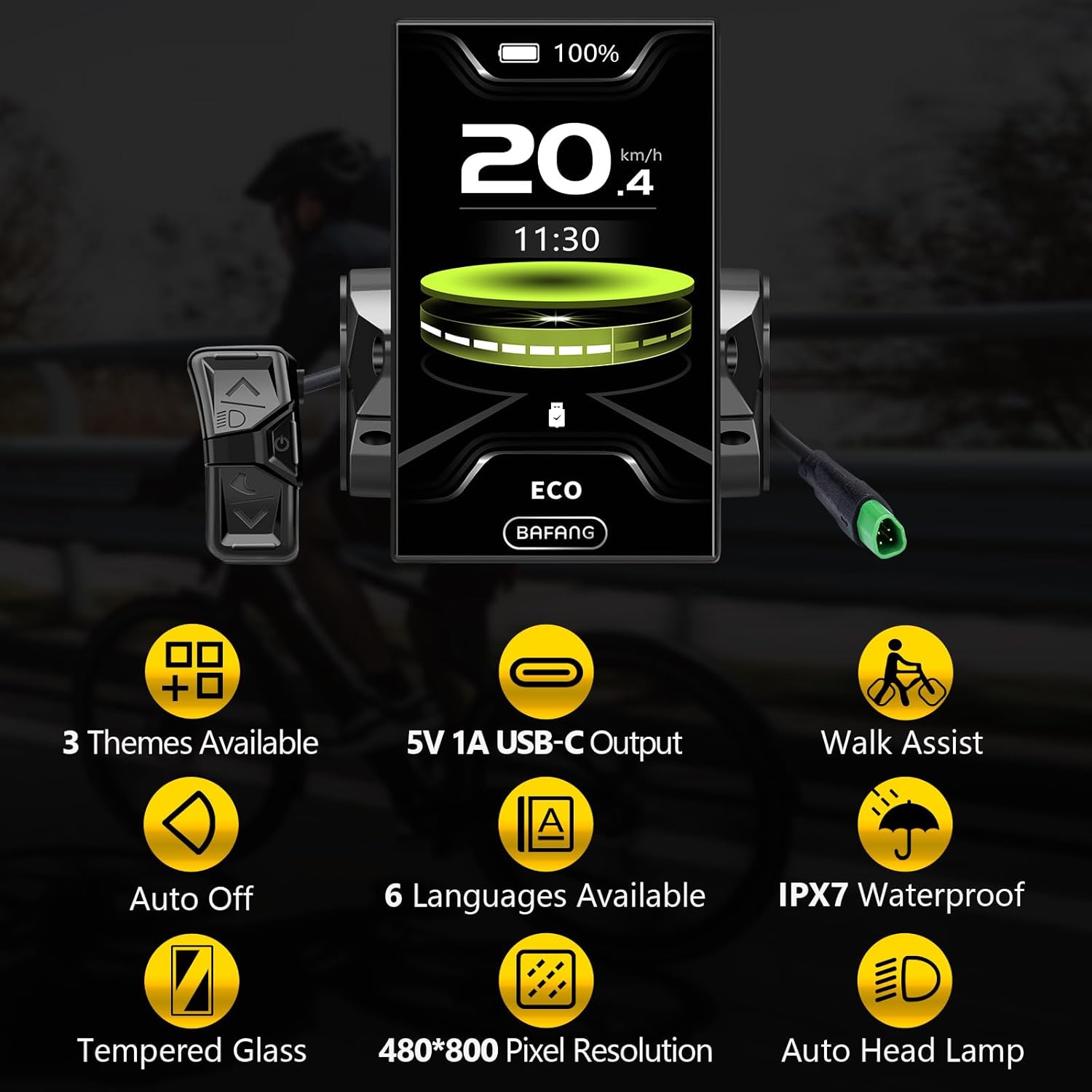
Figure 3: Key features of the C010 Display.
4. Setup and Operation
4.1 Power On/Off
To power on or off the display, press and hold the power button located on the control pad. The display will show a startup animation and then the main riding interface.
4.2 Switching Assistance Modes
Use the "+" or "-" buttons on the control pad to switch between different pedal assistance modes. The display supports various levels, including OFF, ECO, TOUR, SPORT, SPORT+, and BOOST, or a simplified 4-level system (OFF, COMFORT, TOUR+, BOOST) depending on your configuration.
4.3 Toggling Display Parameters
Briefly press the power button to cycle through different display parameters such as Odometer (ODO), Maximum Speed (MAX), Average Speed (AVG), Range, Calories (CAL), Cadence, Cycling Time, and Trip Distance.
4.4 Accessing Main Menu and Advanced Settings
To access the main menu and advanced settings, press the "+" and "-" buttons simultaneously. From this menu, you can adjust various settings:
- Brightness: Adjust screen brightness (e.g., 100%, 80%, 60%, 95%).
- Auto Shutdown: Set the time after which the display automatically turns off due to inactivity (e.g., 8 min, 7 min, 5 min).
- Clock Setting: Set the current time and choose between 12h or 24h format.
- Themes: Select from Sporty, Technology, or Fashion display themes.
- Max PAS: Configure the maximum pedal assist levels (e.g., 4 or 6 levels).
- Trip Reset: Reset trip data (Yes/No).
- Unit: Change measurement units between kilometers (km) and miles (mile).
- Service Tip: Toggle service tip display (ON/OFF).
- AL Sensitivity: Adjust alarm sensitivity (e.g., 3).
- Boot Password: Set or disable a boot password (OFF).
- Reset Password: Reset the boot password.
- Language: Select display language (English, Deutsch, Nederlands, Français, Italiano, Čeština).
Video 1: Bafang Display C010 Setting Guide. This video demonstrates how to power on/off, switch assistance modes, toggle parameters, and navigate the main menu to adjust various settings like brightness, auto shutdown, clock, themes, and units.
5. Maintenance
To ensure the longevity and optimal performance of your Bafang C010 Display, follow these maintenance guidelines:
- Cleaning: Wipe the display screen and body with a soft, damp cloth. Avoid using abrasive cleaners or solvents that could damage the screen or casing.
- Protection: Despite its IPX7 waterproof rating, avoid submerging the display in water. Protect it from extreme temperatures and direct prolonged sunlight when not in use.
- Connections: Periodically check all cable connections to ensure they are secure and free from corrosion.

Figure 4: The C010 Display's IPX7 waterproof feature.
6. Troubleshooting
If you encounter issues with your Bafang C010 Display, consider the following common troubleshooting steps:
- Display Not Turning On: Ensure the eBike battery is charged and properly connected. Check the display's power cable connection.
- No Speed/Cadence Reading: Verify that the speed sensor and cadence sensor (if applicable) are correctly installed and aligned. Check their connections to the motor.
- Incorrect Readings: Ensure the wheel circumference setting in the display's advanced settings is accurate for your eBike.
- Buttons Unresponsive: Check for any physical obstructions or damage to the control pad.
- Error Codes: If an error code appears on the display, consult the Bafang motor manual or contact customer support for specific interpretations and solutions.
7. Specifications
| Attribute | Value |
|---|---|
| Brand | BAFANG |
| Model Name | C010 |
| Screen Size | 4 Inches |
| Display Type | LCD |
| Connectivity Technology | USB |
| Waterproof Rating | IPX7 |
| Material | Acrylic |
| Mounting Type | Handlebar Mount |
| Human Interface Input | Buttons |
| Item Package Dimensions | 4.76 x 3.82 x 3.62 inches |
| Package Weight | 0.19 Kilograms |
8. Warranty and Support
The Bafang C010 Display comes with a 1-year warranty. For technical support, warranty claims, or further assistance, please contact the seller, Brose Free Direct, through the Amazon platform or their official support channels.
For additional information and resources, you may visit the official BAFANG Store on Amazon: BAFANG Store.


