
Introduction
This manual provides detailed instructions for the Citizen Perpetual Alarm Chronograph Quartz Watch, model AT9127-80E. This timepiece features Eco-Drive technology, a perpetual calendar, alarm, chronograph, and world time functions. Please read this manual thoroughly to ensure proper use and care of your watch.
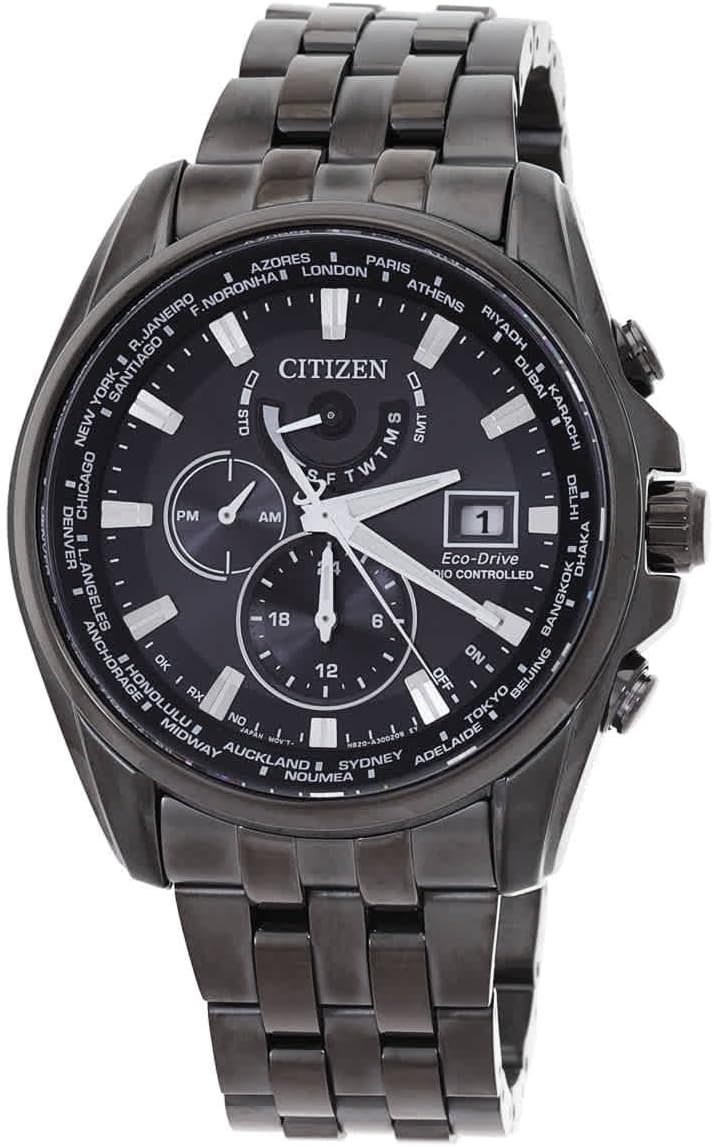
Image 1: Front view of the Citizen AT9127-80E watch, showcasing its black dial, silver-tone hands, multiple sub-dials, and world city indicators on the bezel. The watch features a black stainless steel case and band.
Setup
1. Initial Charge
Your Citizen Eco-Drive watch is powered by light. Before initial use, expose the watch dial to bright light (natural or artificial) for several hours to ensure a full charge. The watch will not operate correctly if insufficiently charged.
2. Setting the Time and Date
- Pull the crown out to the time setting position.
- Rotate the crown to set the hour and minute hands. Ensure the AM/PM indicator is correct.
- Push the crown back in to the normal position. The perpetual calendar will automatically adjust the date.
3. Setting World Time
The watch features a world time function with city indicators on the bezel. Refer to the specific model's detailed instructions for adjusting the world time zone, typically involving rotating the inner bezel or using specific pushers to align with your desired city.
Operating Instructions
1. Chronograph Function
- Press the upper pusher to start the chronograph.
- Press the upper pusher again to stop the chronograph.
- Press the lower pusher to reset the chronograph to zero.
2. Alarm Function
To set the alarm, typically a dedicated sub-dial or mode is used. Consult the full manual for precise steps, which usually involve pulling the crown to an alarm setting position and using pushers to adjust the alarm time.
3. Eco-Drive Power Reserve
The Eco-Drive movement converts any light source into electrical energy, storing it in a power cell. When fully charged, the watch can operate for an extended period in darkness. If the watch stops, expose it to light to recharge.
Maintenance
- Cleaning: Wipe the watch regularly with a soft, dry cloth. For stubborn dirt, use a slightly damp cloth and then dry thoroughly.
- Water Resistance: This watch is water resistant to 100 meters (330 feet). It is suitable for swimming and snorkeling, but not for scuba diving. Do not operate the crown or pushers while the watch is wet.
- Temperature: Avoid exposing the watch to extreme temperatures or sudden temperature changes.
- Chemicals: Keep the watch away from chemicals, solvents, and detergents, which can damage the case, band, or seals.
Troubleshooting
| Problem | Possible Cause | Solution |
|---|---|---|
| Watch has stopped or is running intermittently. | Insufficient charge. | Expose the watch to bright light for several hours to recharge. |
| Time is incorrect. | Time not set correctly or watch needs synchronization. | Refer to "Setting the Time and Date" section. For radio-controlled models, ensure it's receiving signals. |
| Date is incorrect. | Perpetual calendar needs adjustment or initial setup. | Ensure the time is set correctly, as the perpetual calendar adjusts automatically. If issues persist, consult the full manual for calendar adjustment procedures. |
Specifications
- Model Number: AT9127-80E
- Movement: Quartz (Eco-Drive)
- Case Material: Black Stainless Steel
- Band Material: Black Stainless Steel
- Dial Color: Black
- Crystal: Scratch Resistant Sapphire
- Water Resistance: 100 meters / 330 feet
- Case Size: 44.3 mm (diameter) x 11.8 mm (thickness)
- Functions: Perpetual Calendar, Alarm, Chronograph, World Time, Date
Warranty and Support
Your Citizen watch is covered by a manufacturer's warranty. Please refer to the warranty card included with your purchase for specific terms and conditions, including warranty period and coverage details. For technical support, service, or to locate an authorized service center, please visit the official Citizen website or contact their customer service department.
Note: Always ensure repairs are performed by authorized Citizen service centers to maintain warranty validity and ensure proper functioning.


