
1. Introduction
This manual provides instructions for the CHESONA Detachable Keyboard Case, designed for the iPad Pro 13-inch (M4) 2024 and iPad Pro 13-inch (M5) 2025 models. Please read this manual thoroughly before use to ensure proper operation and maintenance of your device.
1.1 Compatibility
This keyboard case is specifically designed for the following iPad models:
- iPad Pro 13-inch (M4) 2024 (Model: A2925 / A2926 / A3007)
- iPad Pro 13-inch (M5) 2025
Note: The tablet and Apple Pencil are not included. Please verify your iPad model number on the back of your device before use.
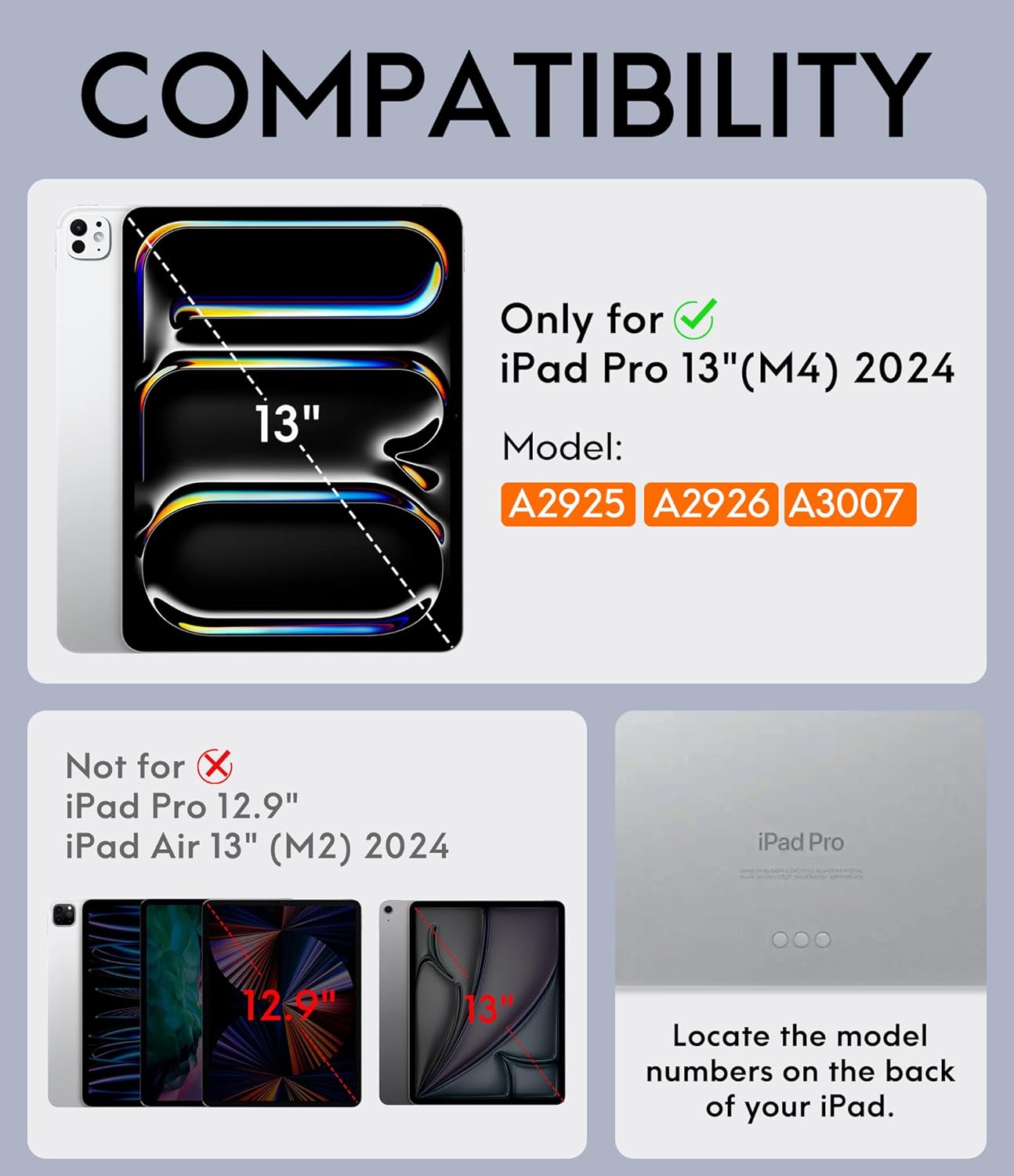
Image 1.1: Compatibility chart for the CHESONA keyboard case, highlighting compatible iPad Pro 13-inch models and incompatible models.
1.2 Key Features
- Magnetically Detachable Keyboard: Allows seamless switching between a lightweight laptop and tablet experience. The strong magnetic connection ensures stable attachment.
- Multiple Viewing Angles: Offers various stand angles for typing, viewing, or reading by adjusting the tablet's position along the case cover.
- Precision Cutouts & Comprehensive Protection: Provides accurate cutouts for camera, speakers, and ports. The case offers full-edge protection against bumps, scratches, and daily wear.
- Built-In Pencil Holder: Integrates a pen holder to save space and prevent pen loss. Features a lower slot for placing and an upper flat area for direct charging.
2. Package Contents
Please check the package for the following items:
- 1 x Keyboard and Case for iPad Pro 13
- 1 x User Guide (this document)
- 1 x Charging Cable (USB-C)
3. Setup Instructions
3.1 Attaching the iPad to the Case
- Align your iPad Pro 13-inch with the case's cutouts for the camera and ports.
- Gently press the iPad into the case, ensuring all edges are securely fitted.
3.2 Charging the Keyboard
Before initial use, fully charge the keyboard.
- Locate the USB-C charging port on the side of the keyboard.
- Connect the provided USB-C charging cable to the keyboard and a power source.
- The charging indicator light will illuminate. A full charge typically takes approximately 2 hours and provides up to 80 hours of usage.

Image 3.2: The keyboard's USB-C charging port and estimated charging/battery life.
3.3 Pairing the Keyboard via Bluetooth
- Turn on the keyboard by sliding the power switch to the 'ON' position. The indicator light will flash.
- On your iPad, go to Settings > Bluetooth.
- Ensure Bluetooth is enabled.
- In the 'Other Devices' list, select the keyboard (usually named 'Bluetooth Keyboard' or similar).
- Follow any on-screen prompts to complete the pairing process. The indicator light on the keyboard will turn off once successfully paired.
4. Operating Instructions
4.1 Using the Detachable Keyboard
The keyboard is magnetically attached to the case. You can easily remove it for flexible use or reattach it when needed.

Image 4.1: Demonstrating the magnetic detachment of the keyboard from the case.
4.2 Adjusting Viewing Angles
The case allows for multiple viewing angles to suit various activities like typing, watching videos, or reading.
- Position the iPad within the case.
- Adjust the angle by sliding the bottom edge of the iPad along the grooves in the case cover. Available angles include approximately 110°, 115°, and 120°.

Image 4.2: The case supporting the iPad at various adjustable viewing angles.
4.3 Using the Built-In Pencil Holder
The case features a dedicated holder for your Apple Pencil.
- Storage: Place your Apple Pencil in the lower slot for secure storage.
- Charging: For direct charging, place the Apple Pencil on the upper flat area of the case, which aligns with the iPad's magnetic charging strip.
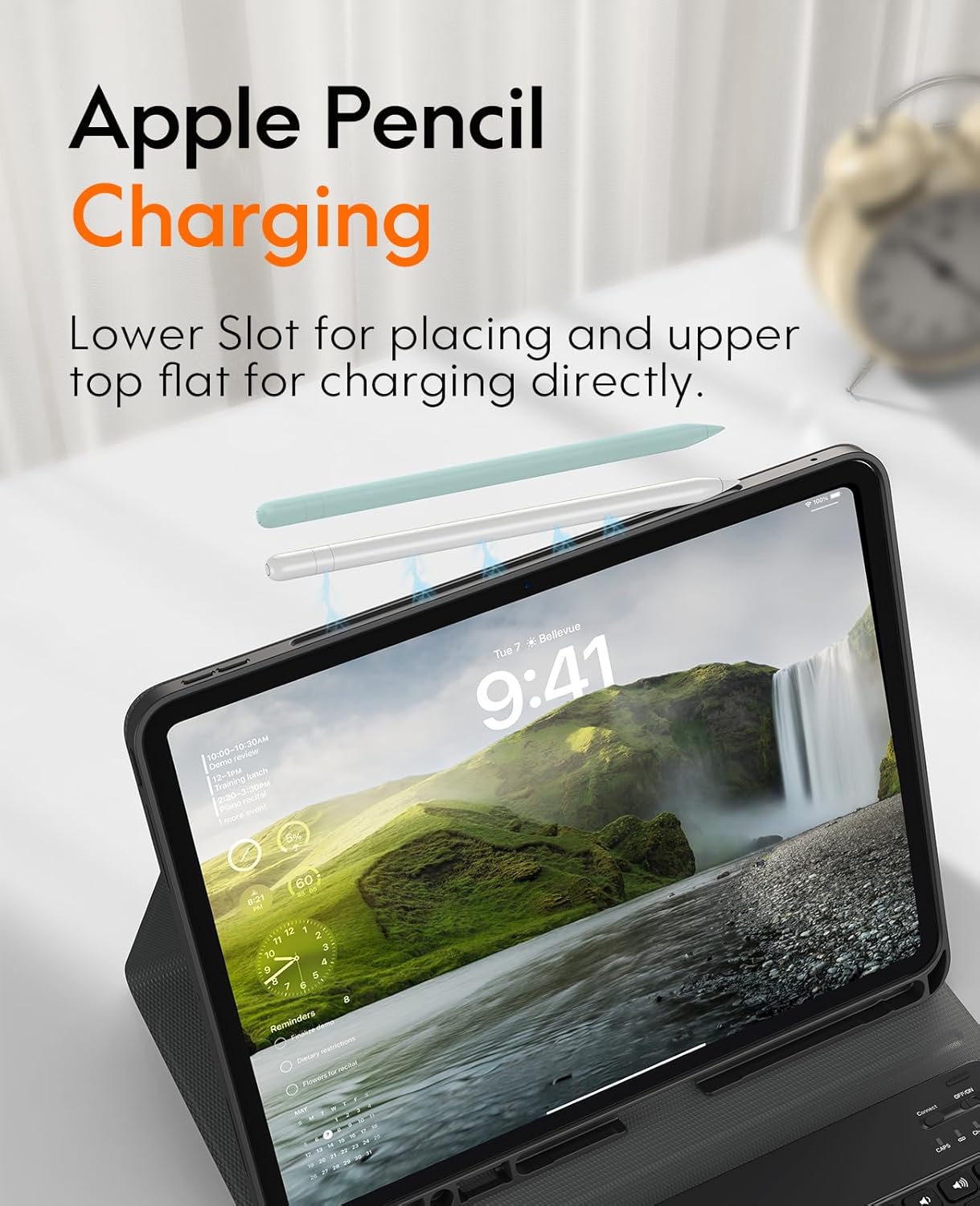
Image 4.3: Apple Pencil charging via the integrated holder.
4.4 Keyboard Functions
The keyboard provides a comfortable typing experience with silent keys. It includes various function keys for quick access to iPad features.

Image 4.4: Detailed view of the keyboard layout and function keys.
4.5 Product Overview Video
For a visual guide on the features and usage of the CHESONA iPad Pro 13-inch M4 2024 Case with Keyboard, please watch the video below.
Video 4.5: An overview of the CHESONA iPad Pro 13-inch M4 2024 Case with Keyboard, demonstrating its features and functionality.
5. Maintenance
To ensure the longevity and optimal performance of your CHESONA keyboard case, follow these maintenance guidelines:
- Cleaning the Case: Wipe the case with a soft, damp cloth. Avoid using harsh chemicals or abrasive cleaners, as they may damage the material.
- Cleaning the Keyboard: Use a soft, dry cloth to clean the keyboard keys. For dust or debris between keys, use compressed air. Do not spray liquid directly onto the keyboard.
- Storage: When not in use for extended periods, store the keyboard case in a cool, dry place. Ensure the keyboard is turned off to conserve battery life.
- Avoid Extreme Temperatures: Do not expose the product to extreme heat or cold, as this can affect battery performance and material integrity.
6. Troubleshooting
If you encounter issues with your CHESONA keyboard case, refer to the following common solutions:
6.1 Keyboard Not Connecting to iPad
- Check Power: Ensure the keyboard is turned on and has sufficient battery charge.
- Bluetooth On: Verify that Bluetooth is enabled on your iPad (Settings > Bluetooth).
- Re-pair Device: Go to iPad's Bluetooth settings, forget the keyboard device if previously paired, and then attempt to re-pair it.
- Restart Devices: Restart both your iPad and the keyboard, then try pairing again.
6.2 Keys Not Responding
- Battery Level: The keyboard battery might be low. Charge the keyboard fully.
- Connection: Ensure the keyboard is properly connected via Bluetooth. Refer to section 3.3 for pairing instructions.
- Clean Keys: Check for any debris under the keys that might be preventing them from functioning.
6.3 iPad Not Fitting Securely in Case
- Verify Model: Double-check that your iPad model number matches the compatible models listed in section 1.1.
- Proper Installation: Ensure the iPad is aligned correctly and gently pressed into all corners of the case.
7. Specifications
| Feature | Specification |
|---|---|
| Product Dimensions | 11.22 x 9.57 x 0.76 inches |
| Item Weight | 2.18 pounds |
| Manufacturer | CHESONA |
| Compatible Devices | iPad Pro 13-inch (M4) 2024, iPad Pro 13-inch (M5) 2025 |
| Connectivity Technology | Bluetooth, USB-C |
| Keyboard Description | Flexible |
| Special Feature | Lightweight, Portable |
| Color | Black |
| Material | ABS keyboard, TPU Case |
| Batteries | 1 Lithium Polymer battery (included) |
8. Warranty and Support
8.1 Warranty Information
CHESONA products typically come with a standard manufacturer's warranty. Please refer to the product packaging or the official CHESONA website for specific warranty terms and conditions.
8.2 Customer Support
For further assistance, technical support, or inquiries regarding your CHESONA product, please contact CHESONA customer service through their official website or the retailer where the product was purchased.
You can visit the CHESONA Store on Amazon for more information and contact options.


