
1. Product Overview
The YIDOFENG GRBL 1.1f 3-Axis CNC Control Board with Offline Controller is designed for precise control of DIY CNC engraving and milling machines. This system offers both computer-connected (GRBL Control/Candle, Laser Grbl) and standalone offline operation, enhancing flexibility for various projects. It features an upgraded design for improved functionality and ease of use.
Key Features:
- GRBL 1.1F firmware for stable and reliable control.
- 3-Axis control for X, Y, and Z axes, supporting both stepper and spindle motors.
- Integrated offline controller with SD/TF card support for standalone operation.
- Dedicated ports for emergency stop, probe, and XYZ limit switches.
- Compatible with a range of CNC machines including 1310, 1610-PRO, 3018, 3018-PRO, and 3018-PRO MAX.
- Supports laser modules up to 12V 5Amax with PWM/TTL signal control.
2. Package Contents
Verify that all items listed below are included in your package:
- GRBL 1.1F 3 Axis Control Board V3.4
- GRBL Offline Controller
- USB Cable
- Cooling Fan (pre-installed or separate)
- Power Button Switch
- Connection Cables for motors and switches

Image: The GRBL 1.1F 3-Axis Control Board with its accompanying USB cable.

Image: The CNC GRBL Offline Controller, connected via a ribbon cable.

Video: An overview of the YIDOFENG CNC Engraving Machine Control Board, showcasing its various parts and features.
3. Setup Instructions
Follow these steps to set up your YIDOFENG GRBL 1.1f Control Board and Offline Controller.
3.1 Control Board Connections
Identify the various ports on the control board for proper connection.

Image: A close-up of the GRBL control board, highlighting connection points for laser, spindle, stepper motors (X, Y, Z), USB, power, reset, offline controller, probe, and limit switches.
- Stepper Motors: Connect your Nema17 or Nema23 stepper motors to the X-MOTOR, Y-MOTOR, and Z-MOTOR ports. Ensure correct polarity.
- Spindle Motor: Connect your 24VDC spindle motor to the SPINDLE port. This port supports PWM speed control (0%-100%).
- Laser Module: If using a laser, connect it to the 3-pin PWM/TTL signal control module port. Ensure the laser is 12V 5Amax.
- Limit Switches: Connect X, Y, and Z limit switches to their respective ports (X-limit, Y-limit, Z-limit).
- Probe: Connect your probe to the designated probe port.
- Emergency Stop: Connect a 2-pin emergency stop button to the emergency stop port.
- Power Button: Connect the power button switch to its dedicated port.
3.2 Offline Controller Connection
Connect the offline controller to the control board using the provided ribbon cable. The offline controller allows for direct control without a computer.

Image: The Offline Controller, showing the SD card slot for loading G-code files.
3.3 Power Supply
Connect a 12-24VDC power supply (24VDC recommended) to the control board's power input port. Ensure the power supply meets the current requirements of your motors and laser.

Video: A demonstration of the upgraded GRBL control board, highlighting its various connection points and functionalities.
4. Operating Instructions
This section details how to operate your CNC machine using both the offline controller and computer software.
4.1 Using the Offline Controller
The offline controller provides a convenient way to operate your CNC machine without a computer connection.

Image: A visual guide to the offline controller's user interface, detailing the main menu, file selection, and control functions.
- Load G-code: Save your G-code files to an SD or TF card (standard capacity 1G). Insert the card into the offline controller.
- Navigate Menus: Use the directional buttons (X+, X-, Y+, Y-, Z+, Z-) to navigate through the menus.
- Select File: From the main menu, select 'File' to browse and choose your G-code file. Press 'OK' to confirm.
- Start Operation: Once a file is selected, press 'OK' to begin the engraving or milling process.
- Spindle Control: Use the 'OK/Spindle' button to turn the spindle on/off.
- Emergency Stop: In case of an emergency, press the dedicated emergency stop button or the 'Exit/Stop' button on the offline controller.

Video: A practical demonstration of operating a CNC machine using the 3-Axis Offline Controller.
4.2 Using Computer Software
For computer-controlled operation, install compatible software such as GRBL Control/Candle or Laser Grbl on your Windows XP/7/8/10 system. Connect the control board to your computer via the USB port.
- Software Configuration: Refer to the specific software's documentation for detailed setup and configuration.
- G-code Loading: Load your G-code files directly through the software interface.
- Machine Control: Use the software interface to control machine movements, spindle speed, and laser power.

Video: A demonstration of the 3018 Pro CNC machine performing a test operation with the offline controller.

Video: A demonstration of a 10W laser module effectively cutting through 8mm basswood plywood, showcasing its capabilities.
5. Maintenance
Regular maintenance ensures the longevity and optimal performance of your control board and offline controller.
- Cleaning: Keep the control board and offline controller free from dust and debris. Use a soft, dry cloth for cleaning. Avoid liquid cleaners.
- Cooling Fan: Ensure the cooling fan on the control board is clear of obstructions and functioning properly to prevent overheating.
- Connections: Periodically check all electrical connections for tightness and ensure no wires are frayed or damaged.
- Storage: When not in use, store the components in a dry, dust-free environment.
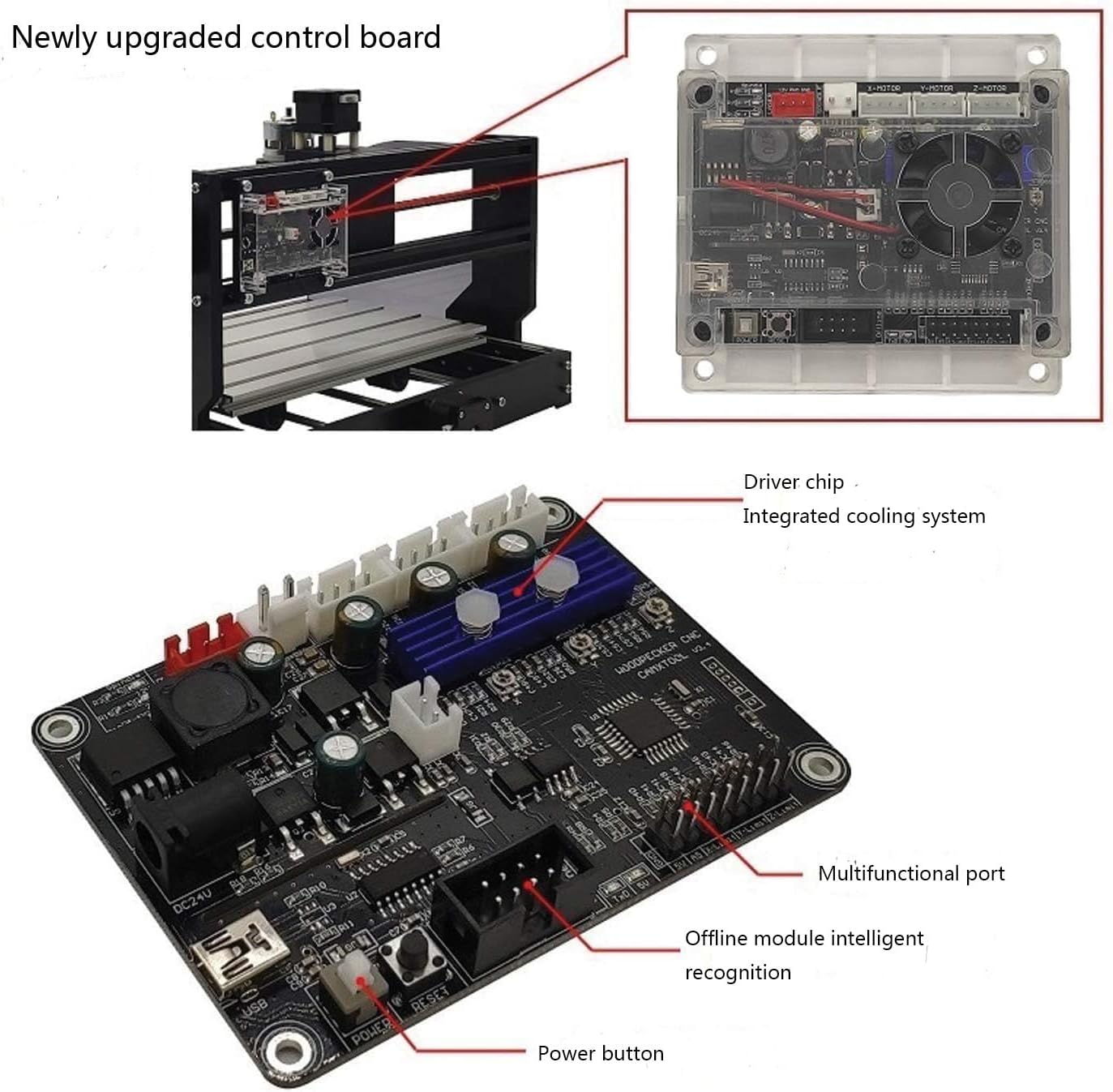
Image: The control board installed, showing the cooling fan and various connections to a CNC machine, emphasizing the importance of proper airflow.
6. Troubleshooting
If you encounter issues, refer to the following common troubleshooting tips:
- No Power: Check the power supply connection and ensure the power button is switched on. Verify the input voltage is within the 12-24VDC range.
- Motors Not Moving: Ensure all motor connections are secure. Check motor current settings if adjustable. Verify G-code commands are correct.
- Offline Controller Not Responding: Ensure the ribbon cable is properly connected. Try restarting the control board. Check if the SD/TF card is correctly inserted and readable.
- Software Connection Issues: Verify USB cable connection. Reinstall drivers if necessary. Ensure correct COM port is selected in the software.
- Inaccurate Engraving/Milling: Check for loose belts or mechanical components on your CNC machine. Verify G-code accuracy and toolpath settings.
For persistent issues, please contact customer support.
7. Specifications
| Feature | Specification |
|---|---|
| Model Number | Model C (GRBL 1.1F 3 Axis Control Board V3.4 + Offline Controller) |
| Input Voltage | 12-24VDC (24VDC Recommended) |
| Adapted Stepper Motor | 12V, max 2A (recommended within 1.5A with additional heat), Nema17, Nema23 |
| Adapted Spindle Motor | 24VDC Spindle PWM speed (0%-100%), 3-pin PWM/TTL signal control module |
| Supported Software | GRBL Control/Candle (3 axis), Laser Grbl |
| Supported Operating Systems | Windows XP/7/8/10 |
| Supported Laser | 12V 5Amax |
| Offline Control Storage | SD card and TF card (standard capacity 1G) |
| Display Type (Offline Controller) | LCD |
| Material | Polycarbonate (PC) |
| Item Weight | 8.2 ounces (232.47 Grams) |
| Package Dimensions | 5.91 x 4.57 x 3.39 inches |
8. Warranty and Support
YIDOFENG is committed to providing high-quality products and customer satisfaction. If you have any questions, require technical assistance, or encounter any issues with your GRBL 1.1f 3-Axis CNC Control Board and Offline Controller, please do not hesitate to contact our customer service team. We are always ready to assist you.
For support, please refer to the contact information provided with your purchase or visit the official YIDOFENG store on Amazon: YIDOFENG Store.