
ODK ZJZ-SBWJDD
ODK Gaming Desk with LED - User Manual
Model: ZJZ-SBWJDD
1. Introduction
Welcome to your new ODK L-shaped gaming desk. This premium furniture piece is designed to elevate your workspace, offering a versatile and productive environment. Its reversible design allows for individual customization, whether used as a standalone desk or positioned against a wall for increased privacy. The desk provides generous storage with spacious shelves and an integrated power hub for convenient device charging.

Image 1.1: The ODK L-shaped gaming desk, showcasing its spacious design and integrated LED lighting.
2. Safety Warnings
Please read and adhere to the following safety guidelines to ensure safe use and prevent damage:
- Wall Anchoring: Ensure the desk is securely fastened to the wall using appropriate anchors to prevent tipping, especially if heavy items are placed on shelves or the desk is in an area with potential for accidental bumps.
- Electrical Safety: Exercise extreme caution when connecting electrical devices to the integrated power outlets and USB ports. Do not overload the outlets. Disconnect power before cleaning or if any electrical issues arise.
- Weight Capacity: Do not exceed the recommended weight capacity for the desktop and shelves. Distribute weight evenly to maintain stability.
- Assembly: Follow all assembly instructions carefully. Do not skip steps or use incorrect hardware. Ensure all screws and fasteners are tightened securely before use.
3. Product Features
The ODK Gaming Desk is designed with user convenience and functionality in mind:
- Reversible L-Shaped Design: The desk can be configured to suit your space, allowing the longer section to be on either the left or right side.
- Integrated Power Hub: Equipped with 2 power outlets (220-250V/15A) and 2 USB ports (5V/2.1A) for convenient charging of electronic devices directly on the desktop.
- Adjustable Storage Shelves: Features generous shelving with adjustable heights, perfect for storing gaming accessories, books, and office supplies.
- Spacious Work Surface: An extra-large desktop provides ample room for multiple monitors, keyboards, and other peripherals, enhancing productivity and comfort.
- LED Lighting: Integrated LED lighting enhances the gaming or work ambiance.

Image 3.1: A gaming setup on the ODK desk, highlighting the ample space for multiple monitors and peripherals.

Image 3.2: Visual comparison demonstrating the larger legroom and desktop space provided by the ODK desk compared to standard desks.
4. Assembly Instructions
The ODK Gaming Desk requires assembly. Please follow the included detailed assembly manual for step-by-step instructions. Below are general guidelines:
- Unpack Components: Carefully unpack all parts and hardware. Verify that all components listed in the parts list are present and undamaged.
- Identify Orientation: Decide on the desired L-shape orientation (left or right) before beginning assembly, as the desk is reversible.
- Follow Steps Sequentially: Assemble the desk by following the numbered steps in the provided manual. Do not overtighten screws until instructed.
- Secure Connections: Ensure all connections are firm and stable before placing items on the desk.

Image 4.1: Diagram illustrating the reversible nature of the L-shaped desk and its key dimensions for assembly planning.
5. Operating Instructions
5.1. Integrated Power Hub
The desk features a built-in power strip for convenient access to electricity:
- Connecting Devices: Plug your electronic devices (e.g., monitors, laptops, phone chargers) into the 2 AC outlets or the 2 USB ports.
- Power Cable: Ensure the desk's main power cable (150cm) is securely plugged into a wall outlet.
- Usage: Use the outlets and USB ports for charging and powering your devices directly from your workspace.
5.2. LED Lighting
The integrated LED lighting system provides ambient illumination:
- Activation: Refer to the specific instructions provided with the LED lighting kit for power and control. Typically, this involves a remote control or a button on the desk.
- Color and Mode Selection: The LED system offers multiple lighting modes and color variations (e.g., blue, green, red, purple, white, yellow, cyan). Select your preferred setting using the controls.
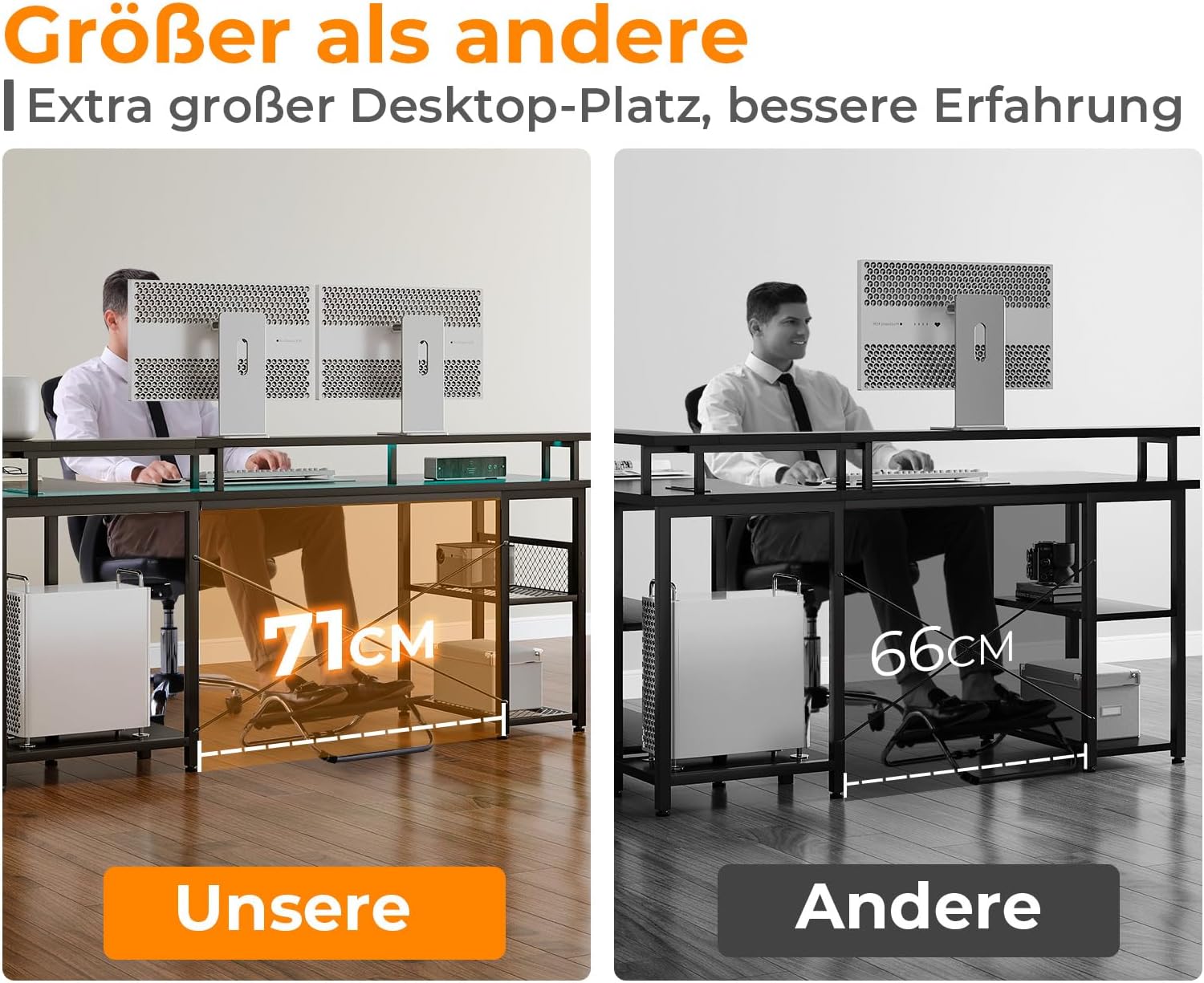
Image 5.1: Detail of the built-in power outlets and USB ports, along with examples of LED lighting colors.
5.3. Adjustable Storage Shelves
The desk features multi-functional two-tier shelves:
- Height Adjustment: The height of the shelves can be adjusted to accommodate various items such as binders, books, or gaming accessories. Consult the assembly manual for specific instructions on how to reposition the shelves.
- Organization: Utilize the shelves to keep your workspace tidy and organized, providing dedicated space for your essentials.

Image 5.2: Diagram illustrating the adjustable and multi-functional storage compartments of the desk.
6. Maintenance
To ensure the longevity and appearance of your ODK Gaming Desk, follow these maintenance tips:
- Cleaning: Wipe the desk surface with a soft, damp cloth. Avoid abrasive cleaners or harsh chemicals that could damage the finish. For stubborn marks, use a mild soap solution.
- Spills: Immediately wipe up any spills to prevent staining or damage to the wood material.
- Heat Protection: Use coasters or protective pads under hot items to prevent heat damage to the desktop.
- Regular Checks: Periodically check all screws and fasteners to ensure they remain tight. Retighten if necessary.
7. Troubleshooting
If you encounter any issues with your ODK Gaming Desk, consider the following common solutions:
- Desk Wobbles: Ensure all assembly screws are fully tightened. Check that the desk is on a level surface; adjust leveling feet if present. Verify wall anchoring is secure.
- Power Outlets/USB Ports Not Working: Check if the desk's main power cable is securely plugged into a functional wall outlet. Ensure the wall outlet itself is receiving power. Avoid overloading the power strip.
- LED Lights Not Functioning: Check the power connection to the LED strip. If a remote control is used, ensure batteries are functional and the remote is pointed correctly.
- Missing Parts During Assembly: Double-check all packaging materials. If parts are genuinely missing, contact customer support with your purchase details.
8. Specifications
| Attribute | Detail |
|---|---|
| Brand | ODK |
| Model Number | ZJZ-SBWJDD |
| Color | Black |
| Product Dimensions (L x W x H) | 150 x 102 x 88.7 cm |
| Item Weight | 24.8 Kilograms |
| Material | Wood (Base & Top) |
| Finish Type | Lacquered |
| Desk Design | Computer Desk (L-Shape) |
| Power Outlets | 2 (220-250V/15A) |
| USB Ports | 2 (5V/2.1A) |
| Country of Origin | China |
9. Warranty and Support
ODK is committed to providing excellent customer support and a reliable warranty for your product. If you have any questions regarding your ODK Gaming Desk, including assembly, operation, or any other concerns, please do not hesitate to contact us. Our customer service team aims to respond to all inquiries within 24 hours.
For support, please refer to the contact information provided in your purchase documentation or visit the official ODK website.
Related documentsZJZ-SBWJDD


Ask a question about this manual
Ask about setup, troubleshooting, compatibility, parts, safety, or missing instructions. Manuals+ will review the question and use this page’s manual context to help answer it.