
QXMH 1 Pack
QXMH Solar Motion Sensor Outdoor Alarm
Instruction Manual
1. Product Overview
The QXMH Solar Motion Sensor Outdoor Alarm is designed to deter unwanted intruders and animals from your property using sound and light. It features solar charging, motion detection, and customizable alarm sounds.

This image shows the main components of the QXMH Solar Motion Sensor Outdoor Alarm, including the alarm unit with its solar panel, motion sensors, and siren, along with the remote control, USB charging cable, and two mounting options: a ground stake and a wall-mount bracket.
Key Features:
- 129 dB High-Volume Siren: Emits loud alarms to effectively deter intruders.
- 13 Built-in Alarm Sounds & Recording Function: Choose from pre-set sounds or record your own custom messages/sounds.
- 360° Motion Detection: Equipped with multiple motion detectors for comprehensive coverage.
- Solar Powered with USB Charging: Efficient solar charging and an option for USB charging during cloudy days.
- Two Working Modes: 24-hour motion sensor with sound/flash, or night-only motion sensor with sound/flash.
- Versatile Installation: Can be mounted on a wall or staked into the ground.
2. Package Contents
Please verify that all items are present in the package:
- QXMH Solar Motion Sensor Outdoor Alarm Unit
- Remote Control
- USB Charging Cable
- Ground Stake (for pole mounting)
- Wall Mount Bracket (with screws and anchors)
- Instruction Manual (this document)
3. Setup and Installation
3.1 Charging the Device
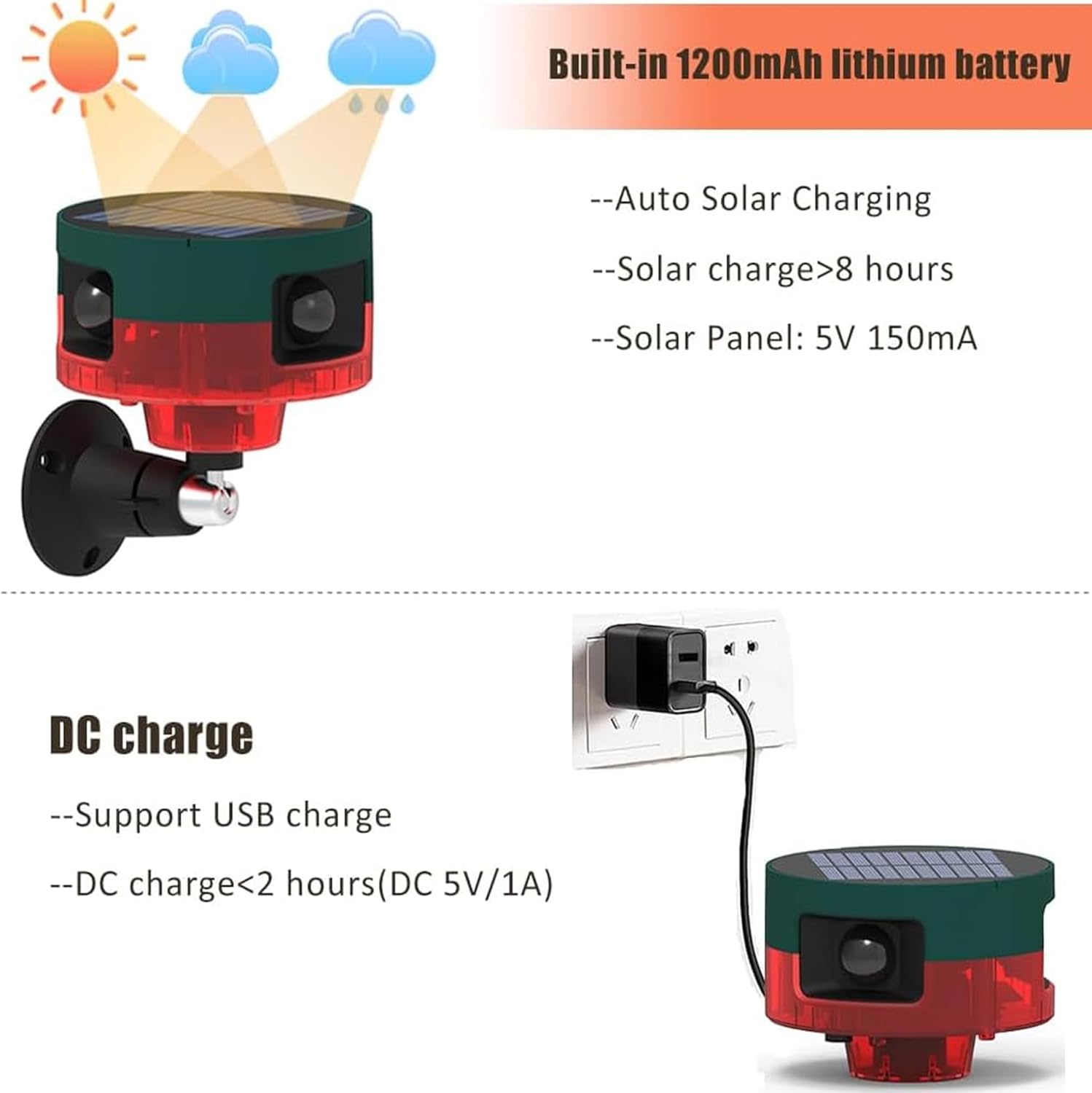
Before first use, it is recommended to fully charge the device. The alarm unit features both solar charging and USB charging capabilities.
- Solar Charging: Place the device in direct sunlight for at least 8 hours. The solar panel is located on the top of the unit.
- USB Charging: For faster charging or during prolonged cloudy periods, connect the provided USB cable to the DC charge port on the device and a 5V/1A USB power adapter (not included). DC charging typically takes less than 2 hours.

This image illustrates the two charging methods for the alarm: solar charging via the top panel and DC charging via a USB cable connected to a power adapter.
3.2 Mounting Options
The alarm can be installed using two primary methods:
- Ground Stake Mounting:
- Attach the alarm unit to the top of the ground stake.
- Insert the pointed end of the stake firmly into the ground in your desired location. Ensure the solar panel faces upwards to receive maximum sunlight.
- Wall Mounting:
- Secure the wall mount bracket to a suitable surface (e.g., wall, fence post) using the provided screws and anchors.
- Attach the alarm unit to the bracket, adjusting the angle as needed for optimal motion detection and solar exposure.
This image demonstrates the two installation methods: mounting the alarm on a wall or staking it into the ground. It also shows the alarm in action, deterring animals.
For optimal performance, position the alarm where it can detect motion within an 8-meter range and where the solar panel receives ample sunlight.
4. Operating Instructions
4.1 Power On/Off and Mode Selection
The device has a switch and can be controlled via the remote.

This image displays the bottom of the alarm unit, highlighting the switch, DC charge port, and microphone. It also includes a table of specifications and details on mounting methods and detection range.
- Using the Device Switch:
- Press the switch once for Mode 1 (24-hour motion sensor flash & alarm).
- Press the switch a second time for Mode 2 (Night-only motion sensor flash & alarm).
- Press the switch a third time to turn the device OFF.
- Using the Remote Control:
The remote control allows for convenient operation from a distance (up to 10 meters, or over 200 meters in open areas).
- Button A: Activates Mode 1 (24-hour motion sensor with sound/flash).
- Button B: Activates Mode 2 (Night-only motion sensor with sound/flash).
- Button C: Changes the type of alarm sound/siren.
- Button D: Turns the device OFF.

This image illustrates the two working modes: Mode 1 for 24-hour motion detection with flash and alarm, and Mode 2 for night-only motion detection with flash and alarm.
4.2 Recording Custom Sounds
The alarm supports recording custom sounds up to 20 seconds, which can be repeated twice.
- Locate the microphone on the bottom of the alarm unit.
- Press and hold the recording button (long press on the switch, as indicated in the diagram) to begin recording.
- Speak clearly into the microphone. If recording from a phone, hold the phone 0.4-1.9 inches (1-5 cm) away from the microphone to ensure good audio quality.
- Release the button to stop recording. The recorded sound will now be part of the alarm sound options.
Note: Avoid touching the alarm light during recording to prevent interference with sound quality.

This image highlights the 360° detection capability of the alarm, showing various animals being detected from different directions.
5. Maintenance
- Cleaning: Regularly wipe the solar panel and motion sensor lenses with a soft, damp cloth to ensure optimal performance. Do not use abrasive cleaners.
- Battery: The device uses a built-in 1200mAh lithium battery. While solar charging is primary, occasional USB charging may be necessary during extended periods of low sunlight.
- Storage: If storing the device for an extended period, ensure it is fully charged and store it in a cool, dry place.
6. Troubleshooting
| Problem | Possible Cause | Solution |
|---|---|---|
| Alarm not activating. | Low battery, incorrect mode, sensor obstruction, out of range. | Ensure device is charged. Check mode setting (Mode 1 or 2). Clear any obstructions from sensors. Verify motion is within 8-meter detection range. |
| Alarm sounds distorted or too quiet. | Microphone obstruction, recording issue. | Ensure microphone is clear. Re-record custom sound, ensuring proper distance from sound source. |
| Solar charging not effective. | Insufficient sunlight, dirty solar panel. | Relocate device to an area with direct sunlight. Clean the solar panel. Use USB charging if necessary. |
| Remote control not working. | Remote battery low, out of range, interference. | Replace remote battery. Move closer to the alarm unit. Reduce potential sources of interference. |
7. Specifications
| Feature | Detail |
|---|---|
| Brand | QXMH |
| Model Number | 1 Pack (KS-SL-001) |
| Dimensions | 4.6 x 2.5 x 2 cm (Unit only); 181.44 grams |
| Power Source | Solar powered, USB DC 5V/1A |
| Battery | Built-in 3.7V 1200mAh Lithium Battery (1 AAA alkaline battery included for remote) |
| Solar Panel | 5V 150mA |
| Sound Level | 129 Decibels |
| Motion Sensor Range | 5-8 meters |
| Remote Control Distance | 10 meters (up to 200 meters in open areas) |
| LED | 6 pcs red flashing light |
| Materials | ABS |
| Water Resistance | IP55 (implied from A+ content, "WATHERTIGHT" image) |
8. Warranty and Support
For warranty information and technical support, please refer to the seller's policy on the purchase platform or contact QXMH customer service directly. Contact details may be available on the product packaging or the QXMH brand store page on Amazon.
QXMH Brand Store: Visit QXMH Store on Amazon
Related Documents - 1 Pack
 |
U-PROX Siren Outdoor Wireless Security Siren User Manual User manual for the U-PROX Siren Outdoor wireless security siren. Provides detailed information on product features, technical specifications, installation, setup, safety precautions, and warranty. Designed for alarm notification and intruder deterrence in U-PROX security systems. |
 |
BS 5839 Part 1:2025 - Fire Detection and Fire Alarm Systems for Buildings Guide Comprehensive guide to BS 5839 Part 1:2025, covering fire detection and fire alarm systems for buildings, including regulatory context, system categories, detector positioning, and installation requirements, from Kentec. |
 |
PARKSIDE PTUS360 1 B1 Solar Powered Animal Repeller User Manual The PARKSIDE PTUS360 1 B1 Solar Powered Animal Repeller is designed for private outdoor use to deter animals using high-frequency sounds and/or flashing light. It features a motion sensor with an approximate 8m range and 360° coverage, emitting sound frequencies between 13.5-45.5 kHz. The device is hose-proof (IP65) and includes a rechargeable Ni-MH battery that can be charged via its integrated solar panel or a USB-C cable. This product is not intended for commercial use. |
 |
JA-110P PET PIR Motion Detector: Installation, Specs, and Overview Detailed technical specifications, installation guide, and product overview for the JABLOTRON JA-110P PET PIR motion detector with basic animal immunity for bus systems. Includes compliance information and usage guidelines. |
 |
Yale Smart Home Alarm System Manual - Installation and User Guide Comprehensive guide for the Yale Smart Home Alarm system (MZ-1, MZ-8). Covers location planning, device unpacking, initial setup, mounting, system usage, default settings, adding devices, battery replacement, and troubleshooting. Includes detailed instructions and specifications. |
 |
Solar Ultrasonic Animal Repeller PRO User Manual Comprehensive user manual for the SWISSINNO Solar Ultrasonic Animal Repeller PRO, detailing its operation, installation, safety precautions, and technical specifications in multiple languages. |
Ask a question about this manual
Ask about setup, troubleshooting, compatibility, parts, safety, or missing instructions. Manuals+ will review the question and use this page’s manual context to help answer it.