
Zeblaze ZEBB3PRO
Zeblaze Beyond 3 Pro GPS Smartwatch User Manual
Model: ZEBB3PRO
Introduction
This manual provides comprehensive instructions for the setup, operation, and maintenance of your Zeblaze Beyond 3 Pro GPS Smartwatch. Please read this manual thoroughly before using the device to ensure proper functionality and to maximize your user experience.
The Zeblaze Beyond 3 Pro is an advanced GPS smartwatch featuring a vibrant 2.15-inch AMOLED display, robust health monitoring capabilities, and extensive sports tracking modes. Its durable design, including Corning Gorilla Glass and a zinc metal frame, ensures longevity and reliability.
Product Overview

Figure 1: Front view of the Zeblaze Beyond 3 Pro Smartwatch, showing the AMOLED display with time, date, heart rate, calories, and steps.
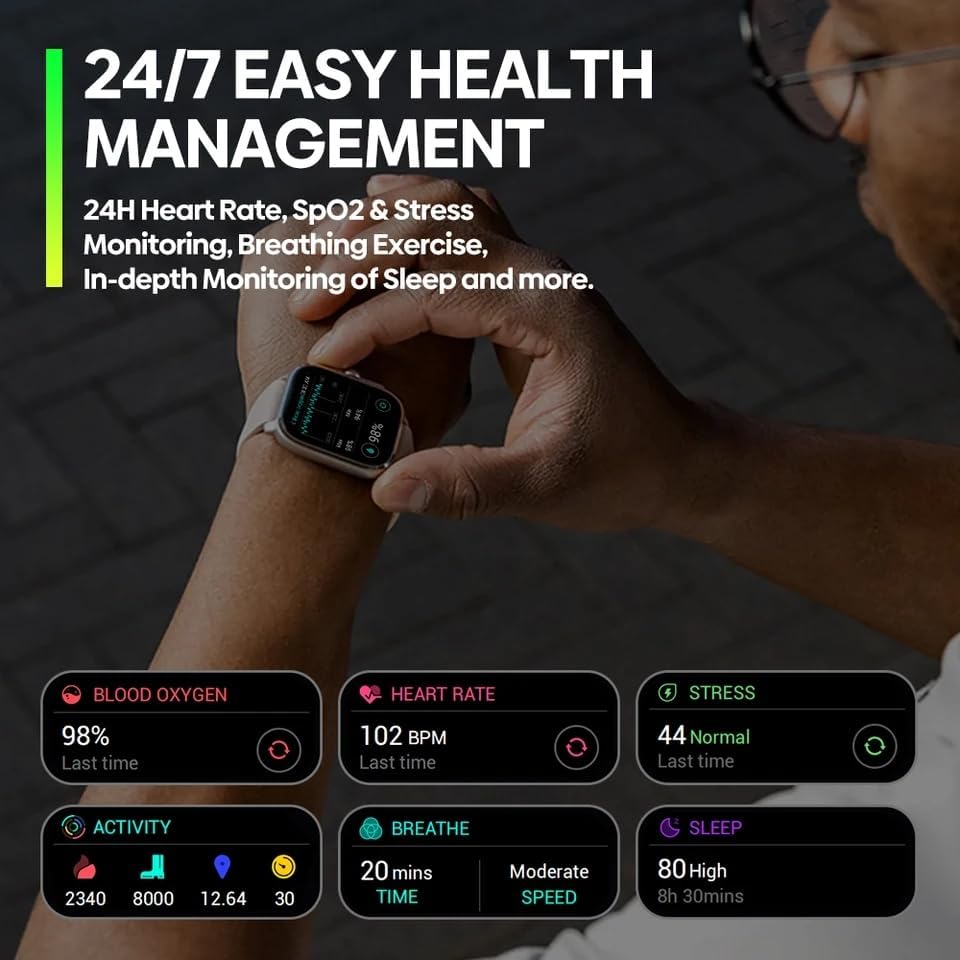
Figure 2: Various customizable watch faces available on the Zeblaze Beyond 3 Pro, demonstrating the versatility of the display.

Figure 3: The smartwatch displaying a list of workout modes, including indoor running, outdoor cycling, and yoga, highlighting its sports detection capabilities.

Figure 4: Health management screen showing blood oxygen, heart rate, stress, activity, breathing, and sleep data, indicating 24/7 health monitoring.

Figure 5: GPS tracking interface on the smartwatch, showing a route map and outdoor cycling activity, emphasizing its strong and precise GPS capabilities.

Figure 6: Close-up of the smartwatch display, detailing its 2.15" screen size, 94% screen-to-body ratio, up to 1000 nit brightness, and 330 PPI.
Setup Guide
1. Charging the Device
Before initial use, fully charge your Zeblaze Beyond 3 Pro smartwatch.
- Connect the magnetic charging cable to the charging contacts on the back of the watch.
- Plug the USB end of the cable into a standard USB power adapter (5V/1A recommended) or a computer's USB port.
- The watch display will show a charging indicator. A full charge typically takes approximately 2 hours.
2. Powering On/Off
- Power On: Press and hold the side power button for a few seconds until the Zeblaze logo appears.
- Power Off: From the watch face, swipe down to access quick settings, or navigate to "Settings" > "System" > "Power Off". Confirm your selection.
3. Pairing with Your Smartphone
To unlock the full potential of your smartwatch, pair it with the companion application on your smartphone.
- Download the official Zeblaze companion app from the App Store (iOS) or Google Play Store (Android). Search for "Zeblaze Fit" or refer to the QR code in the watch's initial setup screen.
- Ensure Bluetooth is enabled on your smartphone.
- Open the Zeblaze Fit app, create an account or log in.
- Follow the in-app instructions to add a new device. Select "Zeblaze Beyond 3 Pro" from the list of available devices.
- Confirm the pairing request on both your smartphone and the smartwatch.
Note: Maintain your smartphone within Bluetooth range for continuous data synchronization and notification delivery.
Operating Instructions
1. Basic Navigation
- Touchscreen: Swipe up, down, left, or right to navigate through menus and screens. Tap to select an item.
- Side Buttons: The smartwatch features 3 physical buttons.
- Top Button: Typically acts as a back button or a shortcut to the app list.
- Middle Button (Crown): Rotates for scrolling, press to return to watch face or open app list.
- Bottom Button: Customizable shortcut, often for sports modes.
2. Watch Faces and Always-On Display
Customize your watch face by long-pressing the current watch face on the home screen. Swipe left/right to browse available faces and tap to select. The Always-On Display (AOD) feature can be enabled or disabled in the watch settings under "Display".
3. Health Monitoring
The Zeblaze Beyond 3 Pro continuously monitors various health metrics.
- Heart Rate: Access the Heart Rate app on the watch to view real-time heart rate and historical data.
- Blood Oxygen (SpO2): Use the SpO2 app to measure your blood oxygen saturation. Ensure the watch is snug on your wrist for accurate readings.
- Stress Monitoring: The watch estimates stress levels throughout the day.
- Sleep Tracking: Wear the watch to bed for automatic sleep analysis, including sleep stages and duration.
- Breathing Exercise: Guided breathing exercises are available to help manage stress.
All health data is synchronized with the Zeblaze Fit app for detailed analysis and trend tracking.
4. Sports Modes and GPS Tracking
The smartwatch supports over 100 professional workout modes and features integrated GPS.
- Starting a Workout: Navigate to the "Workout" or "Sports" app on your watch. Select your desired activity (e.g., Outdoor Running, Cycling).
- GPS Acquisition: For outdoor activities, wait for the GPS signal to be acquired before starting your workout. This ensures accurate distance and route tracking.
- During Workout: The watch displays real-time metrics such as duration, distance, heart rate, and calories burned.
- Ending a Workout: Press the side button or swipe to pause/end the workout. Save the data to view summaries on the watch and in the app.
5. Notifications and Calls
Once paired with your smartphone, the watch can receive notifications for calls, messages, and app alerts.
- Enabling Notifications: Configure notification permissions within the Zeblaze Fit app on your smartphone.
- Viewing Notifications: Swipe down from the watch face to view recent notifications.
- Call Management: You can see incoming call alerts and choose to accept or reject calls directly from the watch.
Maintenance
1. Cleaning Your Smartwatch
- Regularly clean the watch body and strap with a soft, damp cloth.
- For the charging contacts and heart rate sensor, use a dry cotton swab to gently remove any dust or debris.
- Avoid using harsh chemicals, abrasive cleaners, or solvents.
2. Strap Care
The silicone strap can be cleaned with mild soap and water. Ensure the strap is completely dry before reattaching it to the watch or wearing it.
3. Water Resistance
The Zeblaze Beyond 3 Pro is designed with water resistance. However, it is not suitable for deep diving or high-pressure water activities. Avoid prolonged exposure to hot water or steam. After exposure to water, especially saltwater, rinse the watch with fresh water and dry it thoroughly.
4. Software Updates
Periodically check for software updates via the Zeblaze Fit app. Updates often include performance improvements, bug fixes, and new features.
Troubleshooting
| Problem | Possible Solution |
|---|---|
| Watch does not power on. | Ensure the watch is fully charged. Connect it to the charger for at least 30 minutes. |
| Cannot pair with smartphone. |
|
| Inaccurate heart rate/SpO2 readings. | Ensure the watch is worn snugly on your wrist, about one finger's width above the wrist bone. Avoid excessive movement during measurement. Clean the sensor on the back of the watch. |
| GPS signal acquisition is slow or fails. | Ensure you are in an open outdoor area with a clear view of the sky. Avoid tall buildings or dense foliage. Wait patiently for the GPS icon to stabilize before starting your activity. |
| Notifications are not received. |
|
Specifications
| Feature | Detail |
|---|---|
| Model Name | Zeblaze Beyond 3 Pro |
| Model Number | ZEBB3PRO |
| Display | 2.15-inch AMOLED, 415 x 505 pixels resolution, 330 PPI, up to 1000 nits brightness, Always-On Display |
| Protection | Corning Gorilla Glass, Zinc Metal Frame with Perforated Carbon Coating |
| Battery Capacity | 300 mAh Li-pol |
| Connectivity | Bluetooth 5.3 |
| GPS | Integrated GPS (4 Satellite Positioning Systems) |
| Health Monitoring | 24H Heart Rate, SpO2, Stress Monitoring, Breathing Exercise, Sleep Monitoring |
| Sports Modes | 100+ Professional Workout Modes, Smart Sports Recognition |
| Strap Material | Silicone (22mm) |
| Compatible Devices | Smartphone |
| Operating System | Tizen 4.0 |
Warranty and Support
Warranty Information
Your Zeblaze Beyond 3 Pro smartwatch comes with a standard manufacturer's warranty. Please refer to the warranty card included in your product packaging for specific terms and conditions, including warranty duration and coverage details. Keep your proof of purchase for warranty claims.
Customer Support
For technical assistance, troubleshooting beyond this manual, or warranty inquiries, please contact Zeblaze customer support through their official website or the contact information provided in your product packaging.
You may also visit the product page on Amazon for additional resources or to contact the seller, MiniTechno, for purchase-related support.
Product Page Link
Related documentsZEBB3PRO


Ask a question about this manual
Ask about setup, troubleshooting, compatibility, parts, safety, or missing instructions. Manuals+ will review the question and use this page’s manual context to help answer it.