
1. Introduction
This manual provides detailed instructions for the safe and efficient operation of your JORLAI T316 Portable Suitcase Turntable. Please read this manual thoroughly before using the product and retain it for future reference.
2. Safety Information
- Do not expose the unit to rain or moisture.
- Do not disassemble the unit. Refer servicing to qualified personnel.
- Keep the unit away from direct sunlight, heat sources, and strong magnetic fields.
- Ensure proper ventilation; do not block ventilation openings.
- Use only the power adapter supplied with the unit.
- Avoid placing heavy objects on the unit.
3. Product Overview
Familiarize yourself with the components of your JORLAI T316 turntable.

Figure 3.1: Product Details. This image highlights key components including the 45 RPM Adaptor, Tone Arm, Ruby Stylus, Tone Arm Lifter, Auto Stop Switch, Speed Selector, 3.5mm Headphone Jack, Bluetooth Switch, Battery Indicator, Bluetooth Indicator, Power Indicator, and Volume Control.
- 45 RPM Adaptor: Used for playing 7-inch records with a large center hole.
- Tone Arm: Holds the stylus and tracks the grooves of the record.
- Ruby Stylus: The needle that reads the record's grooves.
- Tone Arm Lifter: Raises and lowers the tone arm gently onto the record.
- Auto Stop Switch: Enables or disables automatic stopping of the turntable when a record finishes.
- Speed Selector: Allows selection of 33⅓, 45, or 78 RPM playback speeds.
- 3.5mm Headphone Jack: For private listening with headphones.
- Bluetooth Switch: Activates Bluetooth pairing mode.
- Battery Indicator: Shows the current battery status.
- Bluetooth Indicator: Lights up when Bluetooth is active and paired.
- Power Indicator: Shows if the unit is powered on.
- Volume Control: Adjusts the audio output level.

Figure 3.2: Rear Panel Connections. This image displays the Aux In, Power Interface, and RCA Line Out ports.
- Aux In: Connect external audio devices via a 3.5mm cable.
- Power Interface: Connect the power adapter for charging and operation.
- RCA Line Out: Connect to external speakers or an amplifier for enhanced audio output.
4. Setup
- Unpacking: Carefully remove the turntable from its packaging. Retain all packaging materials for future transport or storage.
- Power Connection: Connect the supplied power adapter to the "Power Interface" port on the rear of the turntable and plug it into a wall outlet. The unit has a built-in rechargeable battery, allowing for portable use once charged.
- Placement: Place the turntable on a stable, level surface away from direct sunlight, heat, and excessive dust.
- Tone Arm Preparation: Gently unlock the tone arm clip. Remove the protective stylus cap from the stylus.
5. Operating Instructions
5.1 Playing a Vinyl Record
- Power On: Turn the "Volume Control" knob clockwise to power on the unit. The Power Indicator light will illuminate.
- Select Speed: Set the "Speed Selector" to the appropriate speed (33⅓, 45, or 78 RPM) for your record. Use the 45 RPM adaptor for 7-inch singles if needed.
- Place Record: Carefully place your vinyl record on the turntable platter.
- Auto Stop (Optional): If you want the turntable to stop automatically at the end of the record, ensure the "Auto Stop Switch" is in the ON position.
- Position Tone Arm: Gently lift the tone arm using the "Tone Arm Lifter". Move the tone arm over the desired track of the record.
- Lower Tone Arm: Slowly lower the tone arm onto the record using the "Tone Arm Lifter". The record will begin to play.
- Adjust Volume: Adjust the volume using the "Volume Control" knob.
- End Playback: When the record finishes (or manually), lift the tone arm, return it to its rest, and secure it with the tone arm clip. Turn the "Volume Control" knob counter-clockwise to power off the unit.
Video 5.1: JORLAI 3 Speed Vinyl Record Player with BT Built in Battery. This video demonstrates the basic operation of the turntable, including placing a record, adjusting the tone arm, and controlling playback.
Video 5.2: Record Player with Bluetooth Built in Battery. This video provides a quick overview of the record player's features, including its Bluetooth connectivity and built-in battery for portability.
5.2 Bluetooth Operation
- Activate Bluetooth: Turn the "Volume Control" knob clockwise to power on the unit. Slide the "Bluetooth Switch" to the BT position. The Bluetooth Indicator light will flash, indicating pairing mode.
- Pair Device: On your Bluetooth-enabled device (smartphone, tablet, etc.), search for "JORLAI" in the Bluetooth settings and select it to pair. Once connected, the Bluetooth Indicator light will stop flashing and remain solid.
- Play Audio: You can now play audio from your device through the turntable's built-in speakers. Adjust volume using both your device's volume control and the turntable's "Volume Control" knob.

Figure 5.1: Bluetooth Input. This image illustrates how the turntable can connect wirelessly to a Bluetooth device to play music.
5.3 External Audio Connection (AUX IN / RCA OUT)
- AUX IN: Connect external audio sources (e.g., MP3 player) to the "Aux In" port using a 3.5mm audio cable.
- RCA Line Out: For enhanced sound, connect the "RCA Line Out" ports to external speakers or an amplifier using RCA cables. Ensure correct left (white) and right (red) channel connections.
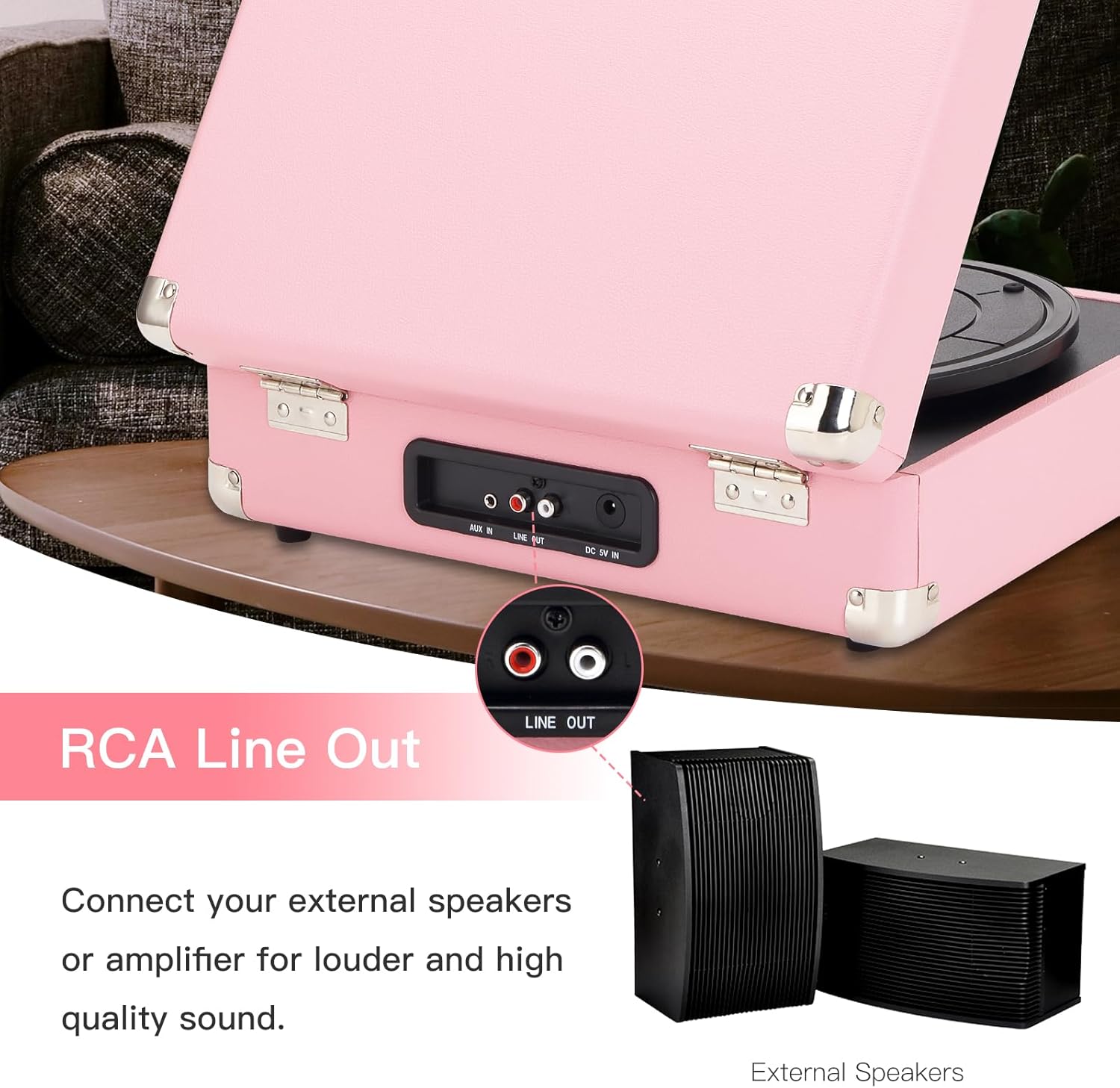
Figure 5.2: RCA Line Out. This image shows the RCA Line Out ports and how to connect external speakers for louder and higher quality sound.
6. Maintenance
- Cleaning the Stylus: Use a soft brush to gently clean the stylus, brushing from back to front.
- Cleaning the Unit: Wipe the turntable's surface with a soft, dry cloth. Do not use abrasive cleaners or solvents.
- Record Care: Keep records clean and free of dust. Store them vertically in their sleeves to prevent warping.
- Storage: When not in use, close the lid and secure the tone arm clip. Store in a cool, dry place.
7. Troubleshooting
| Problem | Possible Cause | Solution |
|---|---|---|
| No power | Power adapter not connected; Battery drained. | Ensure power adapter is securely connected. Charge the battery. |
| No sound from speakers | Volume too low; Incorrect mode selected; External speakers not connected properly. | Increase volume. Ensure correct mode (PH for vinyl, BT for Bluetooth). Check external speaker connections if applicable. |
| Record skips or sounds distorted | Record is dirty or scratched; Stylus is worn or dirty; Turntable not level. | Clean the record. Clean or replace the stylus. Ensure turntable is on a stable, level surface. |
| Bluetooth not pairing | Bluetooth switch not in BT position; Device too far; Interference. | Ensure Bluetooth switch is in BT position. Move device closer to turntable. Avoid other wireless devices. |
8. Specifications
| Brand | JORLAI |
| Model Name | T316 |
| Maximum Rotational Speed | 78 RPM |
| Material | Plastic |
| Item Weight | 6.55 Pounds |
| Color | Pink Silver |
| Compatible Devices | Headphone, Speaker |
| Motor Type | Belt-Driven |
| Power Source | Battery Powered |
| Item Dimensions (L x W x H) | 14"L x 11"W x 5"H |
9. Warranty and Support
JORLAI is committed to providing excellent quality products. If you have any questions or encounter issues with your T316 turntable, please contact JORLAI customer support for assistance. Refer to the product packaging or the official JORLAI website for specific warranty details and contact information.
For further support, visit the JORLAI Store on Amazon.