
1. Product Overview
The BAOFENG GT-5R PRO is an advanced dual-band two-way radio, serving as an upgraded version of the classic UV-5R. It is designed for versatile communication across multiple frequency bands, including UHF, VHF, FM, NOAA weather, and Airband. This model offers enhanced functionality while maintaining compatibility with existing UV-5R accessories.

Figure 1: The BAOFENG GT-5R PRO Multi-Band Radio, showcasing its upgraded multi-band reception capabilities.
Key features include 5W output power, 128 channel capacity, and an 1800mAh battery for extended use. It supports both manual programming via the keypad and PC programming using BAOFENG CPS or CHIRP software (select 5RX model). The radio also incorporates advanced functions such as VOX for hands-free operation and dual frequency/dual standby for comprehensive signal monitoring.
2. Setup Guide
2.1 Unboxing and Initial Assembly
Upon opening the package, verify all components are present. The standard package typically includes the radio unit, 1800mAh battery, antenna, belt clip, lanyard, charger base, and power adapter.

Figure 2: Contents of the BAOFENG GT-5R PRO package, showing the radio, battery, antenna, and charging accessories.
2.2 Battery Installation and Charging
- Align the battery pack with the back of the radio unit.
- Slide the battery upwards until it clicks securely into place.
- To charge, place the radio (with battery installed) into the charging base.
- Connect the power adapter to the charging base and a power outlet. The indicator light on the charger will show charging status.
2.3 Antenna Attachment
Screw the provided antenna clockwise onto the antenna connector at the top of the radio until it is finger-tight. Do not overtighten.
2.4 Belt Clip and Lanyard Installation
- Attach the belt clip to the designated slot on the back of the radio using the provided screws.
- Thread the lanyard through the small loop located on the top-side of the radio for secure carrying.
2.5 Programming the Radio
The GT-5R PRO can be programmed in two ways:
- Manual Programming: Frequencies and settings can be entered directly using the radio's keypad. Refer to the detailed user manual for specific key sequences.
- PC Programming: For advanced users, the radio supports programming via a computer using either BAOFENG CPS software or CHIRP software. When using CHIRP, select the "5RX" model for compatibility. A programming cable (sold separately) is required for PC programming.

Figure 3: Illustration of PC programming for the BAOFENG GT-5R PRO using CHIRP software.
2.6 Unboxing and Setup Video
Video 1: A detailed unboxing and initial setup guide for the BAOFENG GT-5R PRO, demonstrating battery, antenna, and accessory installation.
3. Operating Instructions
3.1 Power On/Off and Volume Control
To power on the radio, rotate the top-right knob clockwise. Continue rotating to adjust the volume. Rotate counter-clockwise until a click is heard to power off.
3.2 Mode Selection (VFO/MR)
Press the VFO/MR button to switch between Frequency Mode (VFO) for direct frequency input and Channel Mode (MR) for accessing pre-programmed channels.
3.3 Transmitting and Receiving
- To transmit, press and hold the PTT (Push-To-Talk) button on the left side of the radio. Speak clearly into the microphone.
- Release the PTT button to receive.
- The radio supports dual frequency display and dual standby, allowing monitoring of two frequencies simultaneously.
3.4 Multi-Band Reception
The GT-5R PRO is capable of receiving a wide range of frequencies, including UHF, VHF, FM broadcast, NOAA weather alerts, and Airband communications. Use the BAND button to cycle through available bands.

Figure 4: Visual representation of the multi-band reception capabilities of the GT-5R PRO, showing various frequency ranges.
3.5 Advanced Functions
- VOX (Voice Operated Exchange): Enables hands-free transmission when voice is detected. Activate and adjust sensitivity via the menu.
- Flashlight: The radio includes an integrated flashlight. Refer to the user manual for activation.
- NOAA Weather Alerts: Stay informed with critical weather updates by tuning into NOAA weather radio bands.
- Channel Scan: Scan through programmed channels or a defined frequency range to find active transmissions.
3.6 Communication Range
The effective communication range of the GT-5R PRO varies based on terrain and obstructions:
- Open Area: Up to 7 miles
- Suburban Area: 2-4 miles
- Urban Area: 1-2 miles
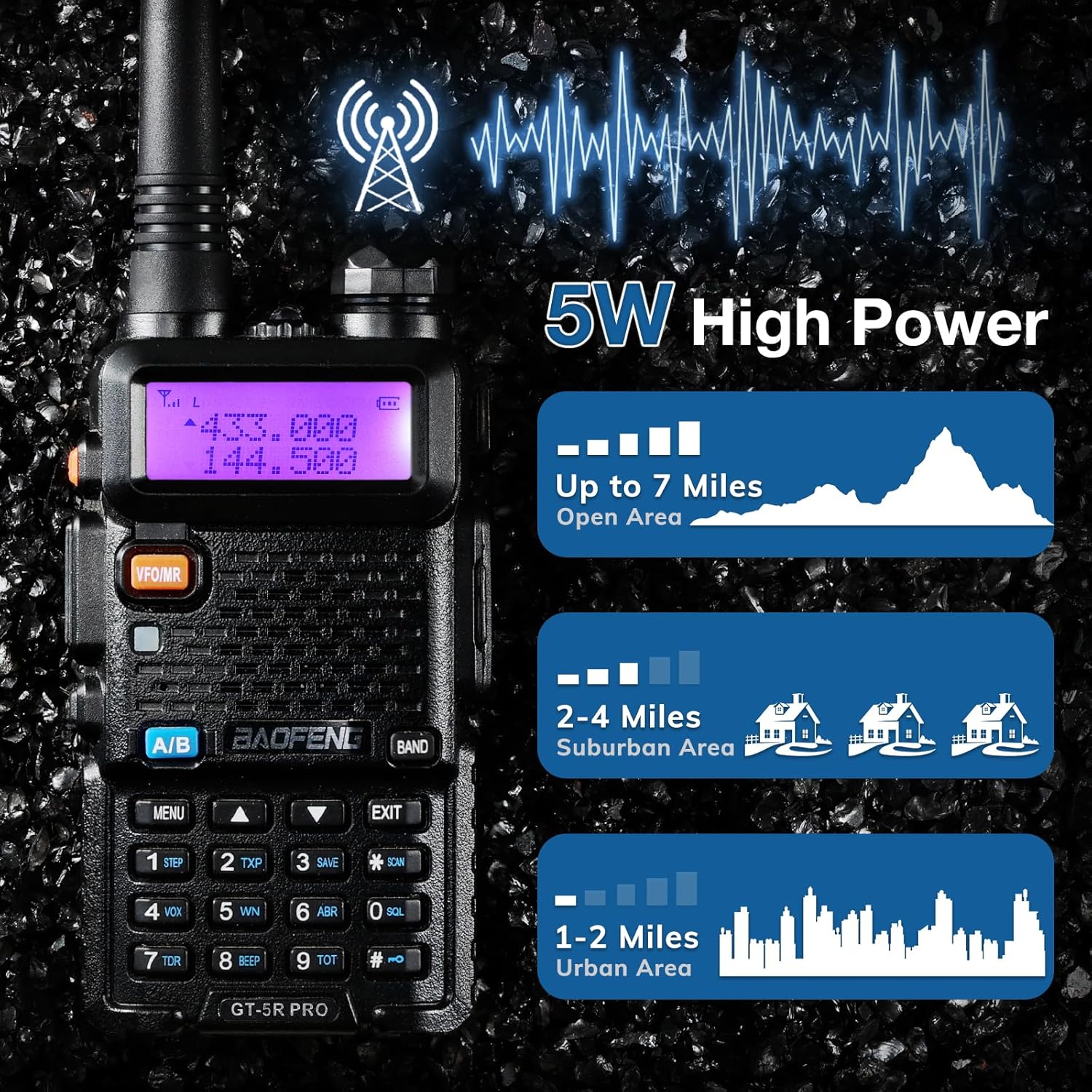
Figure 5: Illustration of the 5W high power output and typical communication ranges in different environments.
4. Maintenance
- Cleaning: Use a soft, damp cloth to clean the radio's exterior. Avoid harsh chemicals or abrasive cleaners.
- Battery Care:
- Charge the battery fully before first use.
- Avoid overcharging or completely draining the battery to prolong its lifespan.
- Store the radio and battery in a cool, dry place when not in use for extended periods.
- Antenna: Ensure the antenna is securely attached. Avoid bending or stressing the antenna excessively.
- Storage: Keep the radio away from extreme temperatures, direct sunlight, and moisture.
5. Troubleshooting
| Problem | Possible Cause | Solution |
|---|---|---|
| Radio does not power on. | Low or dead battery; improperly installed battery. | Charge the battery; ensure battery is correctly installed. |
| Cannot transmit or receive. | Incorrect frequency/channel; antenna not attached; low power setting. | Verify frequency/channel; attach antenna securely; check power settings. |
| Poor audio quality. | Weak signal; incorrect squelch setting; damaged speaker/microphone. | Move to an area with better signal; adjust squelch level; contact support if hardware issue. |
| Programming issues. | Incorrect software/driver; faulty programming cable. | Ensure correct software (BAOFENG CPS or CHIRP 5RX) and drivers are installed; try a different cable. |
6. Specifications
| Feature | Detail |
|---|---|
| Model Number | GT-5R Pro |
| Brand | BAOFENG |
| Frequency Range | UHF, VHF, FM, NOAA, Airband, 1.25M, 1M |
| Talking Range Maximum | 5 Miles (up to 7 miles in open areas) |
| Power Output | 5W |
| Battery Capacity | 1800mAh (standard) |
| Channels | 128CH |
| Display Type | LCD |
| Special Features | Digital Display, Integrated Flashlight, Long Range, Rechargeable, Voice Operated Transmission (VOX) |
| Item Weight | 1.03 pounds |
| Package Dimensions | 7.13 x 4.13 x 3.82 inches |
| Water Resistance Level | Not Water Resistant |
| FCC ID | 2AJGM-5RX |
7. Warranty and Support
The BAOFENG GT-5R PRO comes with an 18-month warranty. Lifetime technical support is available directly from baofeng.com. For assistance, please visit the official BAOFENG website or contact their customer service.
FCC Compliance: This device complies with FCC regulations, with FCC ID: 2AJGM-5RX.


