
YORK YHQE18XT2CHS-R4
YORK Iceberg Split Inverter Air Conditioner 18,000 BTU with Wi-Fi
Model: YHQE18XT2CHS-R4

Introduction
This manual provides essential information for the safe and efficient operation, installation, and maintenance of your YORK Iceberg Split Inverter Air Conditioner. Please read it thoroughly before using the appliance and keep it for future reference.

Image: YORK Iceberg Inverter Air Conditioner indoor unit installed in a living room setting.
Safety Information
Always follow basic safety precautions when using electrical appliances to reduce the risk of fire, electric shock, and injury. This appliance is not intended for use by persons (including children) with reduced physical, sensory, or mental capabilities, or lack of experience and knowledge, unless they have been given supervision or instruction concerning use of the appliance by a person responsible for their safety.
- Ensure the power supply matches the specifications of the unit.
- Do not insert fingers or objects into the air inlet/outlet.
- Do not attempt to repair the unit yourself. Contact qualified service personnel.
- Keep the remote control out of reach of small children.
- Ensure proper grounding to prevent electric shock.
Product Components
Your YORK Iceberg Split Inverter Air Conditioner system includes the following main components:
- Indoor Unit
- Outdoor Unit
- Remote Control
- Air Filters
- Installation Kit (pipes, cables, etc.)

Image: The outdoor unit of the YORK Iceberg Split Inverter Air Conditioner.

Image: The remote control for the YORK Iceberg Split Inverter Air Conditioner.
Setup
Professional installation is recommended for split air conditioning systems. Ensure the following steps are completed by a qualified technician:
- Indoor Unit Placement: Install the indoor unit on a wall, ensuring proper clearance from ceilings and adjacent walls for optimal airflow.
- Outdoor Unit Placement: Position the outdoor unit on a stable, level surface, away from direct sunlight and obstructions, allowing for adequate ventilation.
- Refrigerant Piping: Connect the refrigerant lines between the indoor and outdoor units, ensuring no leaks. This unit uses R-32 refrigerant.
- Electrical Wiring: Connect the power supply and communication cables according to the wiring diagram provided in the full installation manual. Ensure the unit is properly grounded.
- Drainage System: Install the condensate drain pipe to ensure proper water removal from the indoor unit.
- Initial Power-Up: After installation, power on the unit and perform a test run to verify all functions are operating correctly.
Wi-Fi Setup
Your air conditioner features integrated Wi-Fi for remote control via a smartphone application. Follow these general steps to connect:
- Download the "MY YORK" application from your smartphone's app store.
- Register an account and log in.
- Follow the in-app instructions to add your air conditioner. This typically involves putting the unit into pairing mode (refer to the remote control section for specific button combinations) and connecting to its temporary Wi-Fi network before linking it to your home Wi-Fi.
- Once connected, you can control the unit from anywhere using the app.

Image: A person using a smartphone to control the air conditioner, illustrating the Wi-Fi control feature.
Operating Instructions
Operate your YORK air conditioner using the provided remote control or the MY YORK smartphone application.
Remote Control Functions
The remote control allows you to adjust various settings:
- Power On/Off: Press the POWER button.
- Mode Selection: Use the MODE button to cycle through Cooling, Heating, Fan, and Dry modes.
- Temperature Adjustment: Use the TEMP + and TEMP - buttons to set your desired temperature.
- Fan Speed: Press FAN SPEED to adjust the fan intensity (Auto, Low, Medium, High).
- Swing Function: Activate the SWING button for automatic vertical airflow direction. This model features 4-way airflow swing.
- Sleep Mode: Press SLEEP for energy-efficient and quiet operation during sleep.
- Timer: Set the unit to turn on or off automatically using the TIMER buttons.
Key Features
The YORK Iceberg Split Inverter Air Conditioner is equipped with several advanced features for enhanced comfort and efficiency:

Inverter Technology
Ensures high energy efficiency and reduced electricity consumption.

4-Way Airflow Swing
Distributes conditioned air evenly throughout the room for consistent comfort.

Quiet Operation
Designed to operate with minimal noise for a peaceful environment.

Fast Cooling
Achieves desired cooling temperatures rapidly.

Auto Restart
Automatically resumes operation with previous settings after a power interruption.

Golden Fins
Provides enhanced corrosion resistance for improved durability and lifespan.
Maintenance
Regular maintenance ensures optimal performance and extends the lifespan of your air conditioner. Always disconnect power before performing any maintenance.
- Air Filter Cleaning: Clean the air filters every two weeks or more frequently depending on usage. Remove filters, wash with mild detergent and water, rinse thoroughly, and dry completely before reinstalling. This model features a Nano Aqua filter.
- Indoor Unit Cleaning: Wipe the indoor unit's surface with a soft, dry cloth. Do not use harsh chemicals or abrasive cleaners.
- Outdoor Unit Cleaning: Periodically clear any debris (leaves, dust) from around the outdoor unit to ensure proper airflow. Do not spray water directly onto electrical components.
- Drainage Check: Ensure the condensate drain pipe is clear and free of blockages.
- Professional Service: Schedule annual professional maintenance to check refrigerant levels, electrical connections, and overall system health.
Troubleshooting
Before contacting service, check the following common issues:
| Problem | Possible Cause | Solution |
|---|---|---|
| Unit does not turn on | No power, circuit breaker tripped, remote control batteries low. | Check power supply, reset breaker, replace remote batteries. |
| Insufficient cooling/heating | Dirty air filters, blocked outdoor unit, wrong mode selected, temperature setting too high/low. | Clean filters, clear outdoor unit, select correct mode, adjust temperature. |
| Unusual noise | Loose parts, foreign objects, unit not level. | Check for loose parts, remove obstructions, ensure unit is level. If noise persists, contact service. |
| Water leakage from indoor unit | Blocked drain pipe, improper installation. | Clear drain pipe. If issue persists, contact a professional for inspection. |
| Wi-Fi connection issues | Router issues, incorrect Wi-Fi password, unit not in pairing mode. | Restart router, re-enter password, re-attempt Wi-Fi setup process. |
Specifications
| Feature | Detail |
|---|---|
| Brand | YORK |
| Model Name | YORK Iceberg Split Inverter High Wall 18000 BTU |
| Model Number | YHQE18XT2CHS-R4 |
| Product Type | Air Conditioner |
| Cooling Capacity | 18,000 BTU |
| Heating Capacity | 5.1 kW |
| Capacity (Tons) | 1.5 Ton |
| Recommended Floor Area | 20 square meters |
| Installation Type | Split System |
| Inverter Type | Inverter Present |
| Compressor Type | Rotary Scroll |
| Refrigerant | R-32 |
| Voltage | 220 Volts |
| Power Source | Corded Electric |
| Special Features | 4-way Airflow Swing |
| Filter Type | Nano Aqua Filter |
| Control Method | Remote Control, App Control |
| Efficiency | High Efficiency (BEE Star Rating: High Efficiency) |
| Color | White |
| Manufacturing Country | China |
| Item Weight | 62.5 kilograms |
| Package Dimensions | 106 x 39 x 31 cm |
| Included Components | Filters, Remote Control |
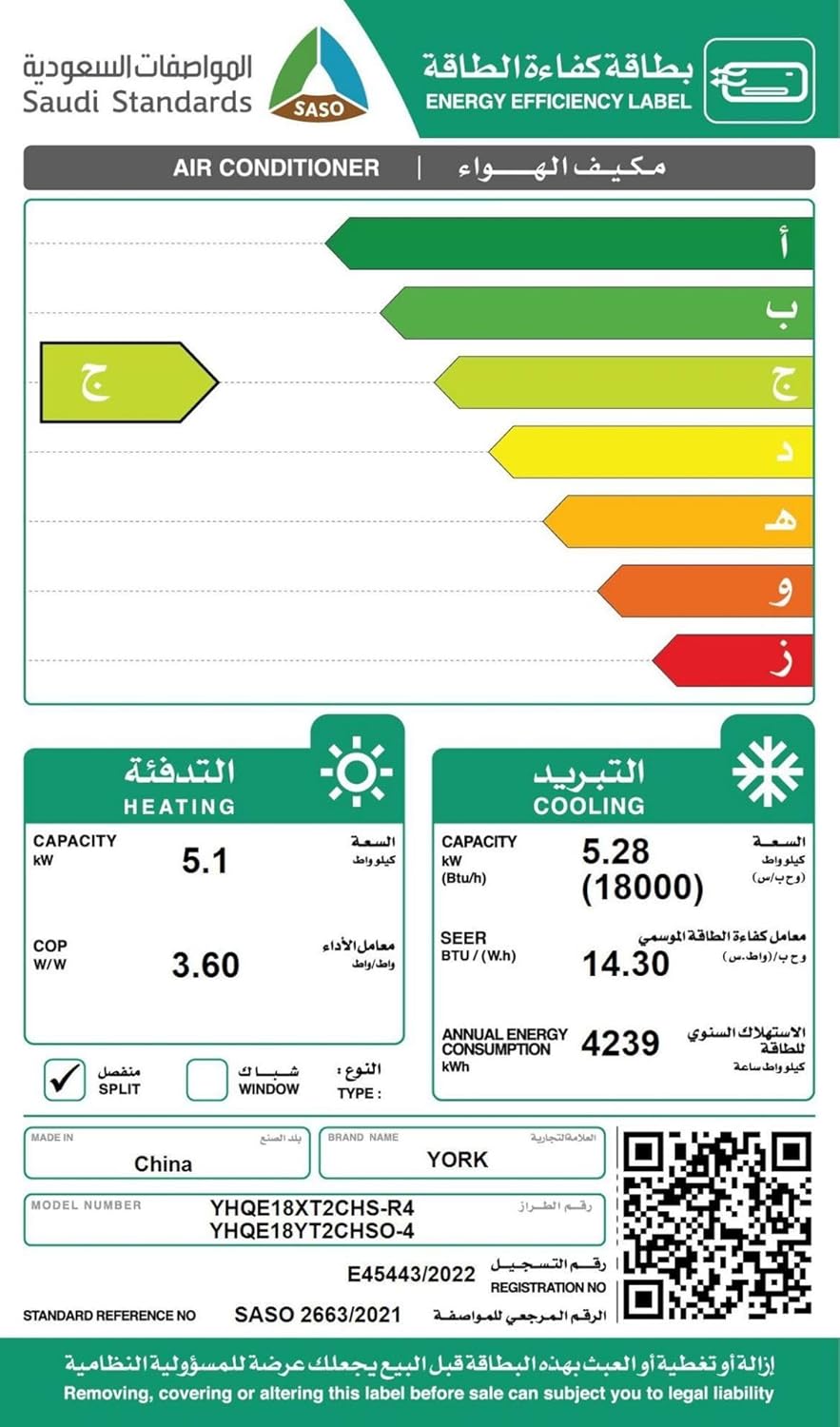
Image: Saudi Energy Efficiency Label for the YORK Iceberg Air Conditioner, showing high efficiency ratings. For more details, visit sls.gov.sa.
Warranty Information
Your YORK Iceberg Split Inverter Air Conditioner comes with the following warranty:
- Compressor Warranty: 7 years
- General Warranty: 2 years
- Warranty Type: Limited Warranty
Please retain your purchase receipt for warranty claims. The warranty covers manufacturing defects under normal use conditions. For detailed terms and conditions, refer to the warranty card included with your product or contact customer support.
Support
For technical assistance, service requests, or further inquiries, please contact YORK customer support. Refer to the contact information provided in your product packaging or visit the official YORK website for your region.
Manufacturer: YORK
Website: YORK Official Store on Amazon.sa
Related documentsYHQE18XT2CHS-R4


Ask a question about this manual
Ask about setup, troubleshooting, compatibility, parts, safety, or missing instructions. Manuals+ will review the question and use this page’s manual context to help answer it.