
1. Product Overview
The WORKPRO 24-in-1 Small Screwdriver Set is a versatile and essential tool kit designed for precision repairs of various electronic devices and small household items. This comprehensive set includes a durable handle with an extendable pole, a magnetizer, and 24 high-quality S2 steel bits, making it suitable for intricate tasks on phones, computers, watches, laptops, and more. Its compact design ensures portability and easy storage, providing a reliable solution for all your delicate repair needs.

Image 1: The WORKPRO 24-in-1 Small Screwdriver Set, showcasing the compact case and the main screwdriver handle.
2. Key Features
- Comprehensive 26-Piece Set: Includes one aluminum alloy handle, one magnetizer/demagnetizer, and 24 precision S2 steel bits, offering a wide range of options for various tasks.
- Premium S2 Alloy Steel Bits: Bits are crafted from tough S2 alloy steel, providing superior strength and durability compared to chrome vanadium steel and carbon steel. Each bit features magnetic properties to securely hold small screws.
- Extendable Pole Design: The screwdriver handle features a built-in extension rod, allowing the entire screwdriver to extend up to 6.9 inches. This is ideal for reaching screws in narrow and hard-to-access areas. Simply pull the triangle-marked area to extend.
- Ergonomic and Anti-Slip Handle: The lightweight and sturdy aluminum alloy body ensures enhanced grip and rust resistance. The non-slip silicone handle and swivel end cap facilitate easy one-handed operation and precise control during use.
- Magnetic Storage Box: All components are neatly organized within a small, portable storage box. The magnetically designed cover ensures secure closure and easy access to bits.
- Versatile Application: This magnetic screwdriver set is an ideal repair kit for a wide array of devices, including tablets, laptops, PCs, smartphones, watches, glasses, cameras, and other electronic devices.
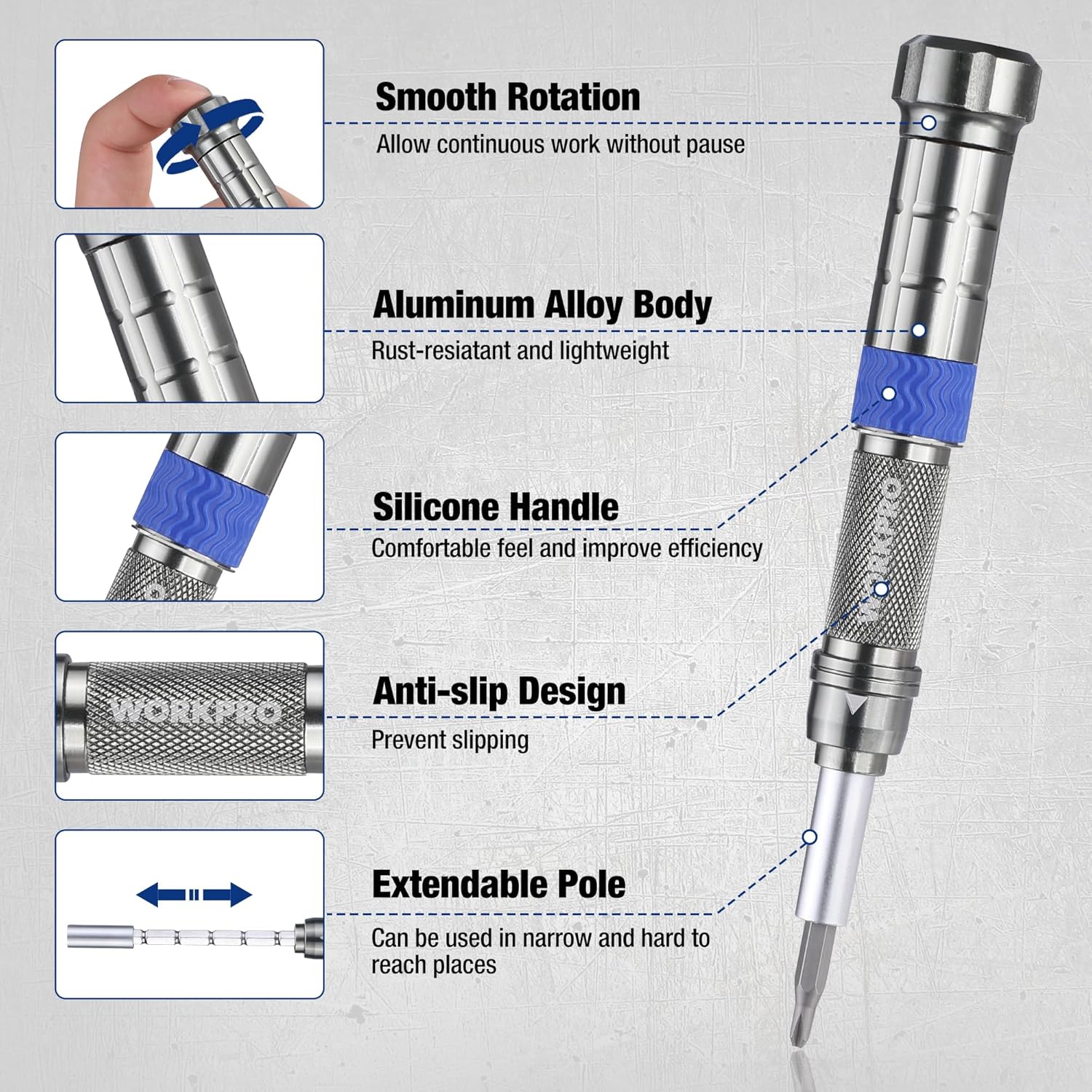
Image 2: Detailed view of the screwdriver handle highlighting its ergonomic design, silicone grip, anti-slip texture, and extendable pole feature.
3. Setup Guide
- Unpack the Kit: Carefully open the magnetic storage box. Ensure all 24 bits, the screwdriver handle, and the magnetizer/demagnetizer are present.
- Familiarize with Components: Identify the various types of bits (Phillips, Flat, Torx, etc.) and their corresponding sizes. The handle is designed for comfortable grip and features an extendable shaft.
- Select the Correct Bit: Based on the screw you need to work with, choose the appropriate bit from the organized slots in the case.
- Insert the Bit: Gently insert the selected bit into the hexagonal opening at the tip of the screwdriver handle. The magnetic tip will hold the bit securely in place.

Image 3: The magnetic storage box, designed for stable and easy transport, keeping all bits in place.
4. Operating Instructions
- Using the Extendable Pole: For screws in deep or hard-to-reach areas, pull the triangle-marked section of the handle upwards to extend the pole. This will increase the screwdriver's length, providing better access.
- Magnetizing/Demagnetizing Bits: The included magnetizer/demagnetizer allows you to adjust the magnetic strength of the bits. Pass the bit through the '+' side to magnetize it for easier screw pickup, or through the '-' side to demagnetize if needed.
- Applying Torque: Hold the screwdriver handle firmly with the non-slip grip. Place the bit squarely into the screw head. Apply steady, downward pressure while rotating the handle to tighten or loosen the screw. The swivel end cap allows for continuous rotation without repositioning your hand.
- Typical Applications: This set is ideal for tasks such as replacing batteries in small electronics, tightening loose screws on eyeglasses, repairing laptops or smartphones, and assembling small toys.

Image 4: The extendable pole in action, demonstrating its utility for reaching screws in confined spaces.

Image 5: Illustration of the strong magnetism feature, showing a bit attracting small screws and the magnetizer tool.
5. Maintenance and Care
- Cleaning: After each use, wipe down the screwdriver handle and bits with a clean, dry cloth to remove any dirt, oil, or debris.
- Storage: Always store the bits and handle in their designated slots within the magnetic storage box. This prevents loss, keeps them organized, and protects them from damage.
- Rust Prevention: While the aluminum alloy body is rust-resistant, avoid exposing the steel bits to excessive moisture or corrosive substances. If they get wet, dry them thoroughly before storing.
- Inspection: Periodically inspect the bits for any signs of wear, bending, or damage. Replace any worn-out bits to ensure optimal performance and prevent damage to screws.
6. Troubleshooting
- Bit Not Holding Screws: If a bit loses its magnetic property, use the magnetizer tool (the '+' side) to re-magnetize it.
- Screws Stripping: Ensure you are using the correct size and type of bit for the screw. Apply firm, consistent downward pressure while turning to prevent the bit from slipping and stripping the screw head.
- Handle Slipping: If the handle feels slippery, ensure your hands are clean and dry. The silicone grip is designed to provide a secure hold even during prolonged use.
- Difficulty Extending Pole: Ensure the locking mechanism (triangle-marked area) is fully disengaged before attempting to extend or retract the pole. Clean any debris that might be obstructing its movement.
7. Specifications
| Attribute | Value |
|---|---|
| Brand | WORKPRO |
| Number of Items | 26 |
| Head Style | Phillips, Flat |
| Item Dimensions (L x W x H) | 8.07 x 3.62 x 1.38 inches |
| UPC | 820909607052 |
| Head Size | Small |
| Manufacturer | HANGZHOU GREAT STAR INDUSTRIAL CO.,LTD |
| Part Number | W000751A |
| Item Weight | 10.6 ounces |
| Batteries Included? | No |
| Batteries Required? | No |
8. Warranty and Support
WORKPRO products are manufactured to high-quality standards. For information regarding warranty coverage, product support, or to purchase replacement parts, please visit the official WORKPRO website or contact their customer service department. Keep your purchase receipt as proof of purchase for any warranty claims.
For further assistance, please refer to the contact information provided on the product packaging or the official WORKPRO brand store online.