
1. Introduction
Thank you for choosing the TRIUMPHKEY Electric Standing Desk. This manual provides detailed instructions for the safe assembly, operation, and maintenance of your new desk. Please read this manual thoroughly before installation and use, and retain it for future reference. This desk is designed to provide a versatile and ergonomic workspace, allowing you to easily switch between sitting and standing positions.

Image 1: The TRIUMPHKEY Electric Standing Desk, showcasing its sleek design and functionality in a typical workspace.
2. Safety Instructions
- Ensure all components are securely fastened before use.
- Keep children and pets away from the desk during operation to prevent injury.
- Do not overload the desk. The maximum weight capacity is 60 kg (132 lbs).
- Avoid placing liquids directly on the control panel or motor components.
- Do not attempt to disassemble or repair the motor or control system yourself. Contact qualified service personnel if issues arise.
- Ensure the power cord is not pinched or damaged.
- Operate the desk on a level surface to ensure stability.
3. Package Contents
Please check that all parts are present and undamaged before beginning assembly. If any parts are missing or damaged, please contact customer support.
- Desktop (120x60cm)
- Desk Legs (2 units)
- Foot Pads (4 units)
- Control Panel
- Motor and Power Adapter
- Headphone Hanger
- Cable Hole Cover
- Assembly Hardware (screws, Allen keys, etc.)
- Instruction Manual
4. Assembly Instructions
Follow these steps carefully for proper assembly. All screws are coded for easy identification. It is recommended to assemble the desk on a soft, clean surface to prevent scratches.
- Unpack Components: Carefully remove all parts from the packaging and lay them out on a protected surface. Verify all parts are present against the package contents list.
- Attach Desk Legs: Secure the desk legs to the desktop using the provided screws. Ensure the T-shaped structure of the legs is correctly oriented.
- Install Foot Pads: Attach the foot pads to the bottom of the desk legs for stability and floor protection.
- Mount Control Panel: Secure the control panel to the underside of the desktop in the desired location, typically on the front edge.
- Connect Motor and Power: Connect the motor cable to the control panel and the power adapter. Plug the power adapter into a suitable power outlet.
- Install Accessories: Attach the headphone hanger to the side of the desk and insert the cable hole cover into the designated opening on the desktop.
- Cable Management: Route all cables neatly using the integrated cable holes to maintain a tidy workspace.
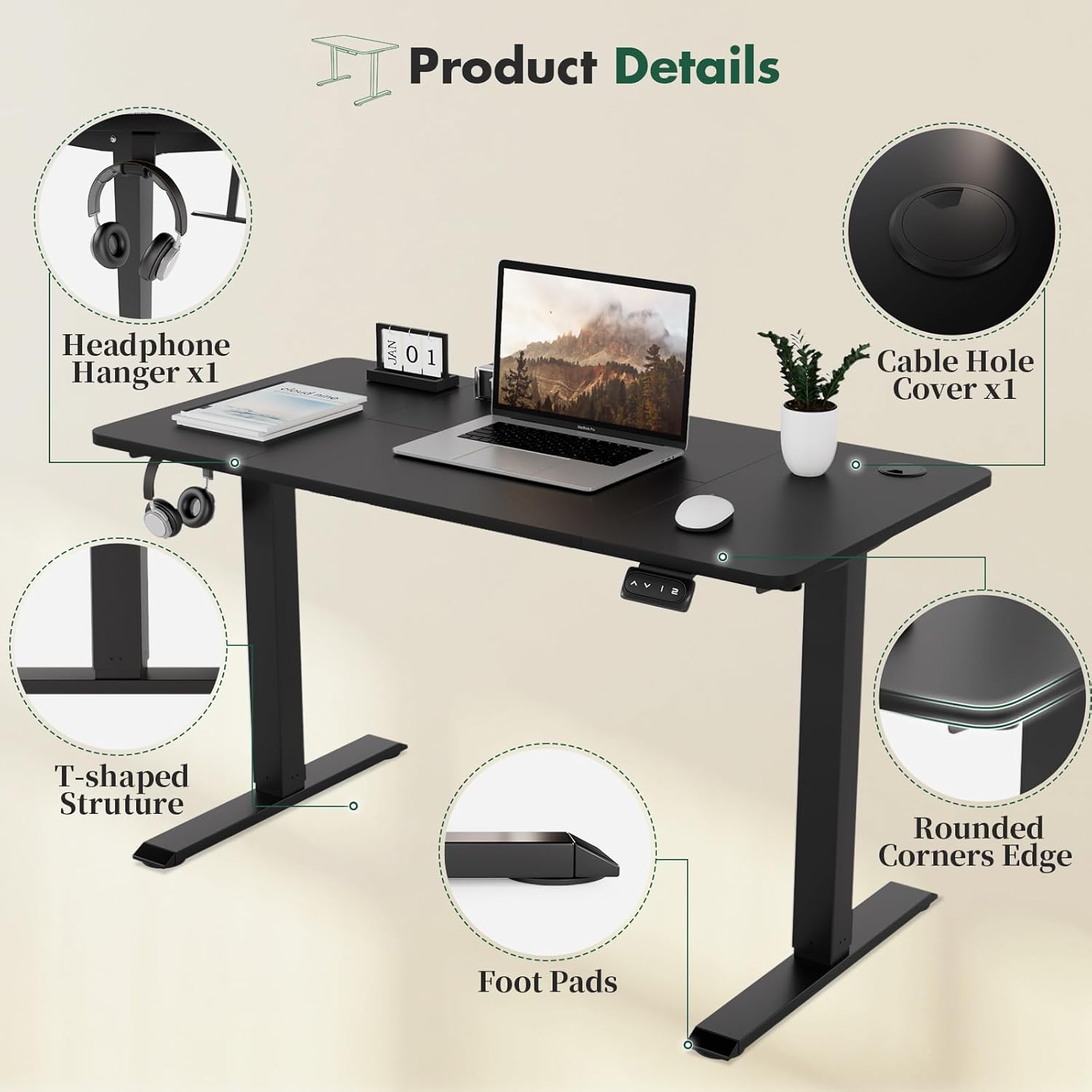
Image 2: Key product details, illustrating the headphone hanger, cable management hole, rounded corners, stable T-shaped leg structure, and protective foot pads.
5. Operating Instructions
The TRIUMPHKEY Electric Standing Desk features an intuitive control panel for height adjustment and memory presets.
5.1. Basic Height Adjustment
- To Raise: Press and hold the UP (▲) button. The desk will move upwards. Release the button at your desired height.
- To Lower: Press and hold the DOWN (▼) button. The desk will move downwards. Release the button at your desired height.
5.2. Memory Presets
The desk includes two memory modes (1 and 2) to store your preferred sitting and standing heights.
- Set a Memory Height:
a. Adjust the desk to your desired height using the UP or DOWN buttons.
b. Press and hold the desired memory button (1 or 2) until you hear a beep or the display flashes, indicating the height has been saved. - Recall a Memory Height:
a. Simply press the corresponding memory button (1 or 2). The desk will automatically move to the saved height.

Image 3: The intelligent keypad, showing the Up, Down, and two Memory Height buttons for easy desk adjustment.
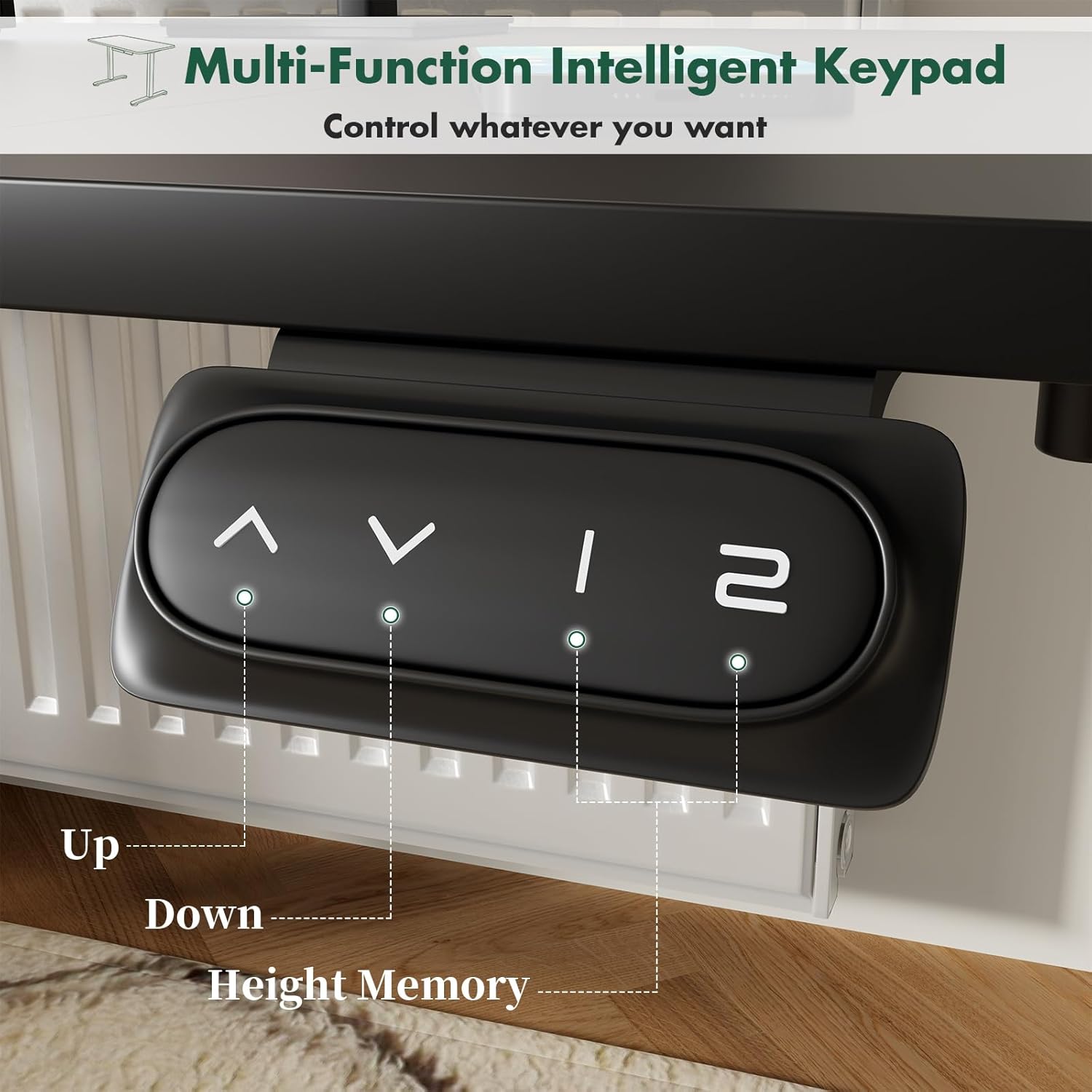
Image 4: Visual representation of the desk's height adjustment capabilities, accommodating various user heights and postures.
6. Maintenance
- Cleaning: Wipe the desk surface and legs with a soft, damp cloth. Avoid abrasive cleaners or harsh chemicals that could damage the finish.
- Cable Check: Periodically inspect the power cord and motor cables for any signs of wear or damage.
- Fastener Check: Occasionally check all screws and fasteners to ensure they remain tight. Retighten if necessary.
- Environmental Conditions: Keep the desk in a dry environment. Avoid extreme temperatures or high humidity.
7. Troubleshooting
If you encounter any issues with your TRIUMPHKEY Electric Standing Desk, please refer to the following common problems and solutions:
| Problem | Possible Cause | Solution |
|---|---|---|
| Desk does not move | Power cord disconnected; Motor cable loose; Overload protection activated. | Check power connection; Reconnect motor cable; Remove excess weight. |
| Desk moves unevenly | Uneven weight distribution; Loose fasteners. | Distribute weight evenly; Tighten all assembly screws. |
| Memory presets not working | Presets not properly saved. | Re-save memory presets by holding the button until confirmed. |
| Unusual noise during operation | Loose components; Obstruction. | Check for loose screws; Ensure no objects are obstructing the lifting mechanism. |
If the problem persists after attempting these solutions, please contact TRIUMPHKEY customer support for further assistance.
8. Specifications
- Brand: TRIUMPHKEY
- Model Number: TRIUMPHKEY-NA
- Desktop Dimensions: 120cm (L) x 60cm (W)
- Height Adjustment Range: 71cm - 119cm (27.95" - 46.85")
- Lifting Mechanism: Electric
- Memory Presets: 2
- Maximum Weight Capacity: 60 kg (132 lbs)
- Color: Black/White
- Special Features: Height Adjustable, Memory Mode, Cable Holes, Headphone Hanger, Rounded Corners

Image 5: Dimensional overview and weight capacity of the TRIUMPHKEY Electric Standing Desk.
9. Warranty and Support
For warranty information or technical support, please refer to the warranty card included with your product or visit the official TRIUMPHKEY website. If you have any questions or require assistance, please do not hesitate to contact our customer service team.
