
BLACK+DECKER BDW100MW
BLACK+DECKER 24" Built-In Dishwasher Instruction Manual
Model: BDW100MW
Introduction
Thank you for choosing the BLACK+DECKER 24" Built-In Dishwasher. This manual provides essential information for the safe and efficient operation, maintenance, and troubleshooting of your appliance. Please read it thoroughly before installation and use, and keep it for future reference.
Important Safety Information
Always follow basic safety precautions when using electrical appliances to reduce the risk of fire, electric shock, or injury to persons. This appliance is intended for household use only.
- Read all instructions before using the dishwasher.
- Connect to properly grounded outlet only.
- Do not operate a damaged dishwasher.
- Keep children away from the dishwasher, especially when the door is open.
- Use only detergents and rinse aids recommended for dishwashers.
- Do not wash plastic items unless marked "dishwasher safe".
- Load sharp items so they are not likely to damage the door seal or tub.
- Do not touch the heating element during or immediately after use.
- Exercise caution when opening the door during operation, as hot water may spray out.
- Do not tamper with controls.
- Ensure proper installation by a qualified technician.
Product Overview
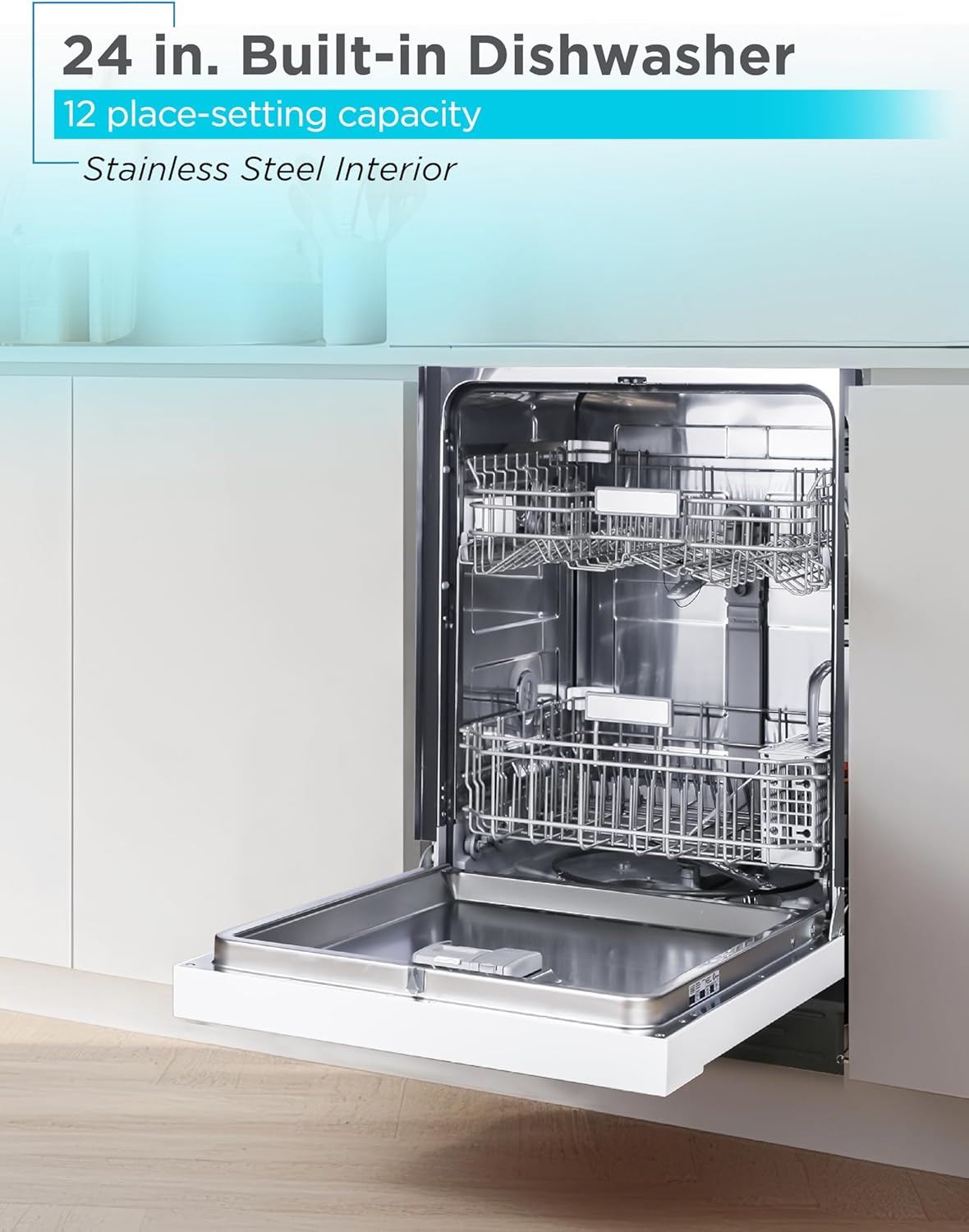
The BLACK+DECKER 24" Built-In Dishwasher is designed for efficient and thorough cleaning of your dishware. Key features include:
- Spacious Capacity: 12-place setting capacity with a tall tub design.
- Versatile Interior: Adjustable top rack and fold-down tines in the lower rack for flexible loading.
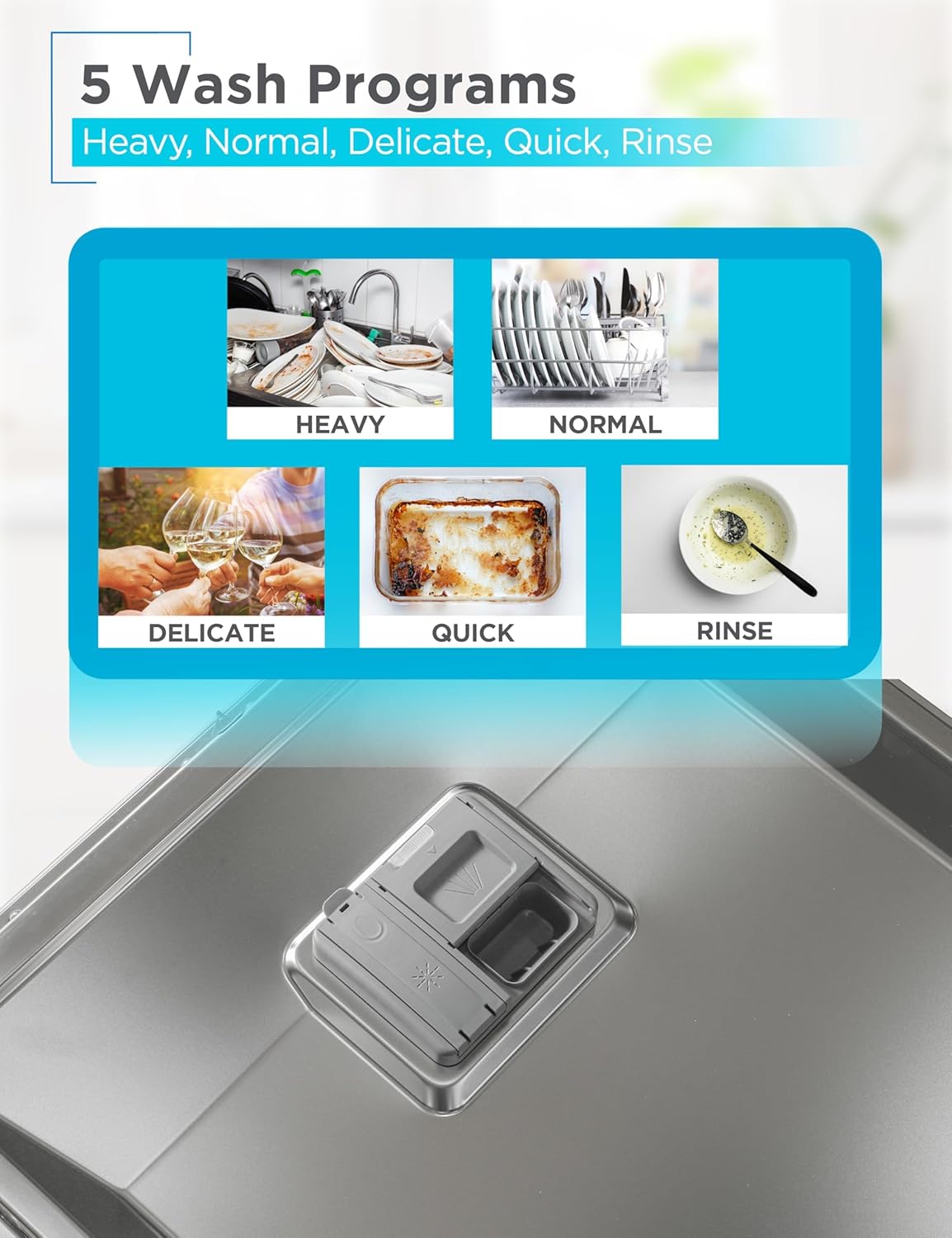
- Advanced Wash Programs: 5 wash programs (Heavy, Normal, Delicate, Quick, Rinse) and a Smart Wash system.
- Energy Efficient: ENERGY STAR Certified with soil sensors, 3-layer filtration, and efficient spray arms.
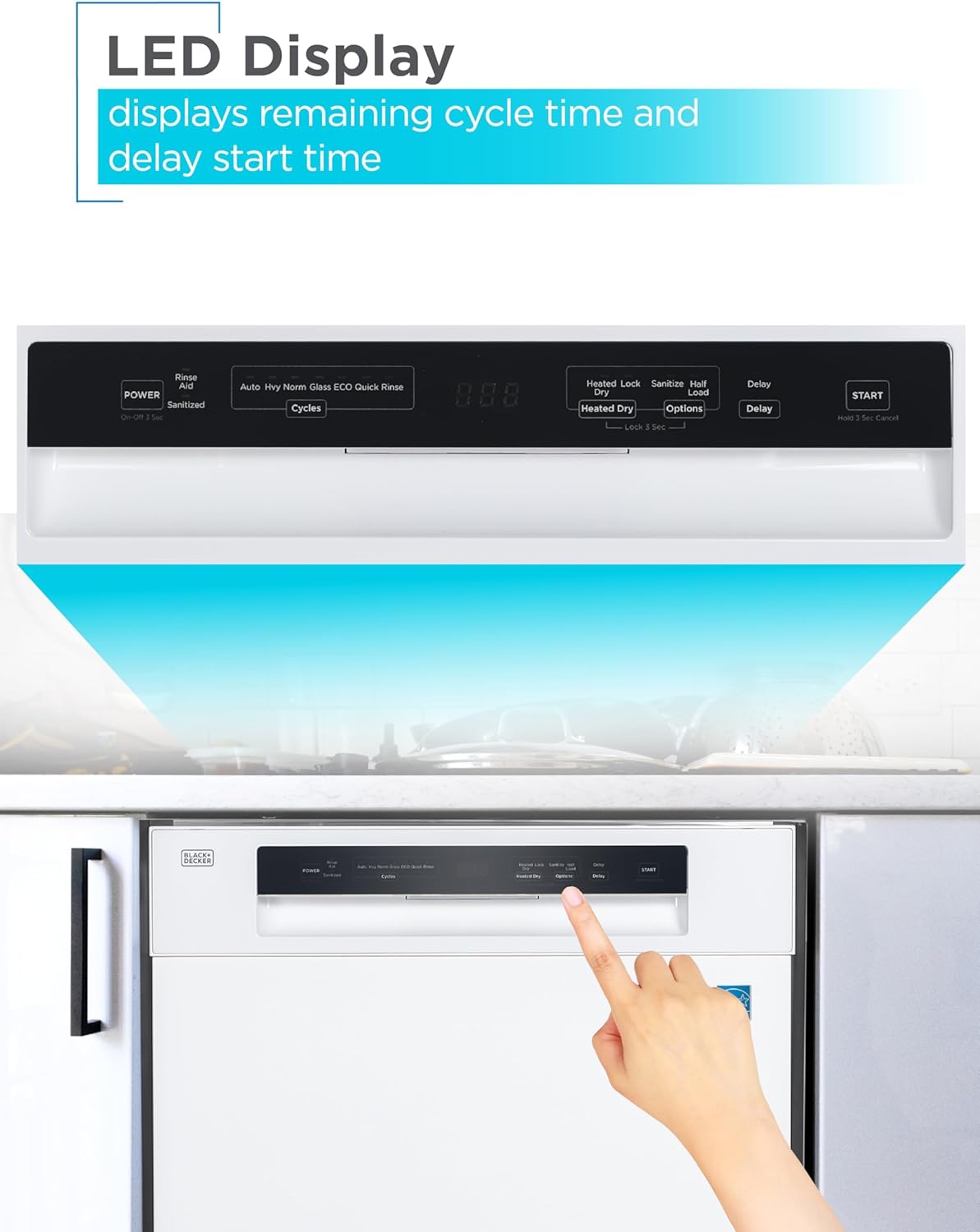
- User-Friendly Controls: LED display showing cycle time and delay start.
- Additional Features: Sanitize mode, LED Interior Light, Delay Start, Heated Dry, Child Lock.



Setup and Installation
Proper installation is crucial for the performance and safety of your dishwasher. It is recommended that installation be performed by a qualified technician.
Pre-Installation Checklist:
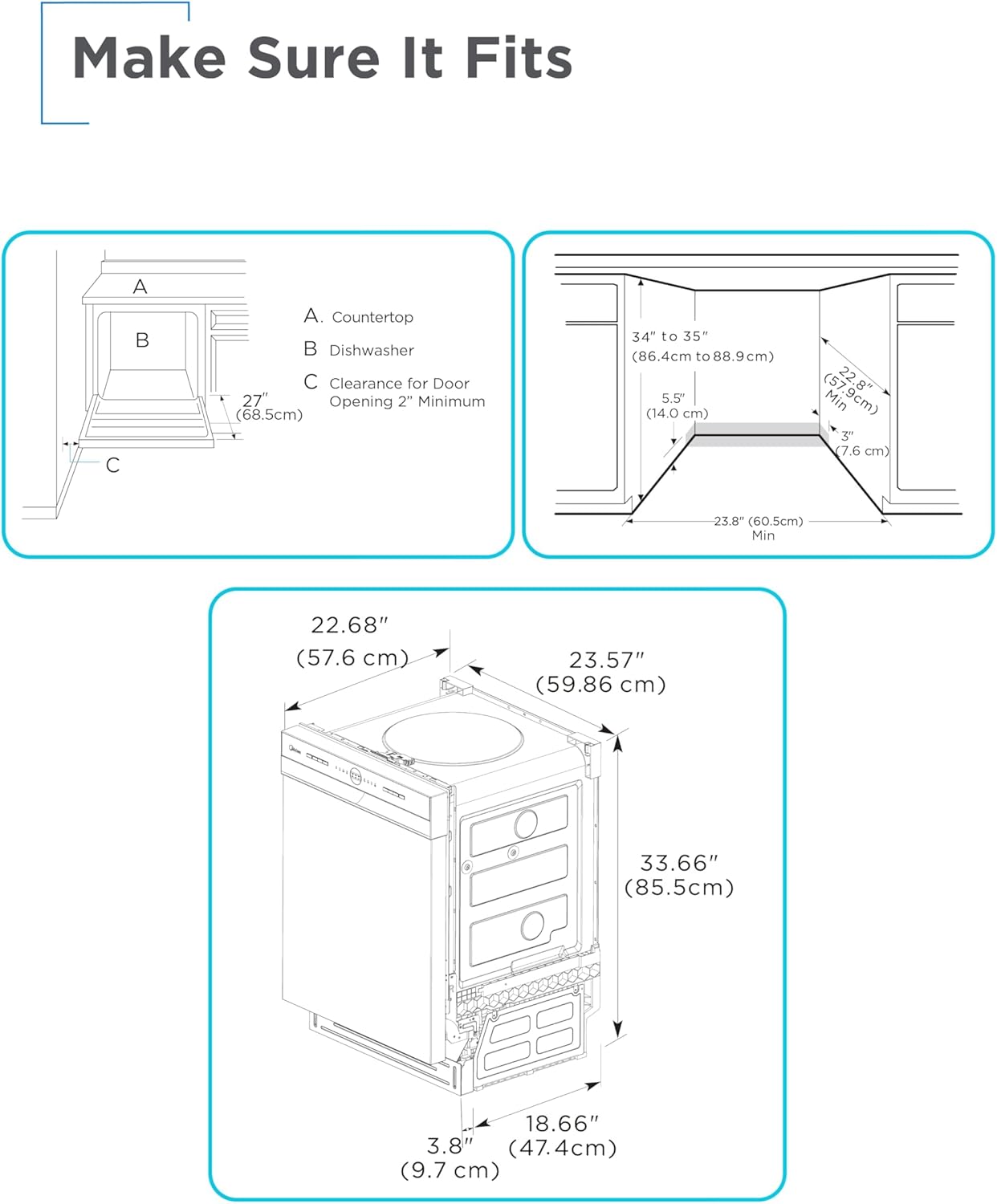
- Ensure the installation area meets the required dimensions (refer to Figure 7).
- Verify electrical, water supply, and drain connections are accessible and meet local codes.
- Gather necessary tools and additional parts (e.g., 90° fitting, Teflon tape, wire nuts, hand shut-off valve, waste tee, hose clamps, coupler, air gap).

Installation Steps (Summary):
- Prepare the cabinet opening according to the dimensions.
- Connect the water supply line to the dishwasher.
- Connect the drain hose to the sink drain or garbage disposal.
- Make electrical connections.
- Slide the dishwasher into the cabinet opening and secure it.
- Level the dishwasher.
- Test for leaks and proper operation.
For detailed installation instructions, please refer to the full user manual provided with your appliance or download the PDF from the manufacturer's website.
Operating Instructions
Loading the Dishwasher:
Proper loading ensures optimal cleaning performance. Scrape off large food particles before loading. Do not pre-rinse dishes excessively, as the soil sensor needs some food residue to determine the appropriate wash cycle.
- Place larger items and pots/pans in the lower rack.
- Load glasses, cups, and smaller bowls in the upper rack.
- Ensure items do not block the spray arms.
- Place silverware in the cutlery basket with handles down for forks and spoons, and handles up for knives.

Adding Detergent and Rinse Aid:
Use only automatic dishwasher detergent. Fill the main detergent dispenser according to the soil level of your dishes. Fill the rinse aid dispenser to the indicated level; this helps with drying and prevents spots.
Selecting a Wash Program:
Your dishwasher offers 5 wash programs and a Smart Wash system:
| Program | Description |
|---|---|
| Heavy | For pots, pans, casseroles, and dinnerware with dried-on or baked-on soil and stains. |
| Normal | Recommended for completely washing and drying a full load of normally soiled dishes. |
| Delicate | For items that need special care such as stemware or porcelain. |
| Quick | For lightly soiled and well-rinsed dish loads. |
| Rinse | Use for pre-rinsing dishes or glasses. Keeps food from drying on your dishes and reduces odor buildup. |
| Smart Wash | Automatically detects soil level and adjusts wash cycle for optimal cleaning. |

Starting a Cycle:
- Load dishes and add detergent/rinse aid.
- Close the dishwasher door securely.
- Press the POWER button.
- Select your desired wash program using the Cycles button.
- Select any desired options (e.g., Heated Dry, Sanitize, Half Load) using the Options button.
- If using Delay Start, press the Delay button repeatedly to set the desired delay time.
- Press the START button to begin the cycle.
The LED display will show the remaining cycle time. To activate Child Lock, press and hold the "Lock 3 Sec" button (usually associated with Heated Dry/Options) for 3 seconds.

Official Product Video: 24 in. Built In Dishwasher
This video provides a visual overview of the BLACK+DECKER 24-inch Built-In Dishwasher, highlighting its features and operation. (Duration: 0:42)
Maintenance
Regular maintenance helps ensure the longevity and optimal performance of your dishwasher.
Cleaning the Filters:
The dishwasher has a 3-layer filtration system that should be cleaned periodically to prevent odors and ensure efficient cleaning. Refer to your full manual for detailed instructions on how to remove and clean the filters.
Cleaning the Interior and Exterior:
- Wipe down the interior and door seal regularly with a damp cloth to remove food residue.
- Clean the exterior with a soft, damp cloth. For stainless steel finishes, use a stainless steel cleaner.
Winterizing (if applicable):
If your dishwasher is in an unheated location and subject to freezing temperatures, it must be winterized to prevent damage. Consult your full user manual for specific winterization procedures.
Troubleshooting
Before contacting customer service, please refer to the following common issues and their solutions:
| Problem | Possible Cause | Solution |
|---|---|---|
| Dishwasher does not start | Door not closed properly; Power not connected; Fuse blown/circuit breaker tripped. | Ensure door is latched; Check power cord; Reset breaker or replace fuse. |
| Dishes not clean | Improper loading; Clogged spray arms; Insufficient detergent; Clogged filters. | Reload dishes correctly; Clean spray arm nozzles; Use correct amount of detergent; Clean filters. |
| Water not draining | Clogged drain hose; Clogged air gap; Drain pump malfunction. | Check and clear drain hose/air gap; Contact service if pump is faulty. |
| Excessive noise | Items interfering with spray arm; Motor noise; Improper installation. | Adjust loading; Normal operating noise; Ensure dishwasher is level and secured. |
| Leaking | Improperly seated door seal; Loose hose connections; Too much detergent. | Check door seal; Tighten hose connections; Reduce detergent amount. |
For more detailed troubleshooting or issues not listed here, please consult the comprehensive troubleshooting guide in your full user manual.
Specifications
| Feature | Detail |
|---|---|
| Brand | BLACK+DECKER |
| Model Number | BDW100MW |
| Form Factor | Built-In |
| Capacity | 12 Place Settings |
| Tub Material | Stainless Steel |
| Dimensions (D x W x H) | 22.67" x 23.6" x 33.7" (57.6 x 59.86 x 85.5 cm) |
| Item Weight | 66.1 Pounds (30 kg) |
| Voltage | 120 Volts |
| Wash Programs | Heavy, Normal, Delicate, Quick, Rinse, Smart Wash |
| Noise Level | 54 dB |
| Certifications | ENERGY STAR, UL |
| Special Features | Sanitize mode, LED Interior Light, Delay Start, Heated Dry |
| Included Components | Dishwasher, User Manual |
Warranty and Support
For warranty information, please refer to the warranty card included with your product or visit the official BLACK+DECKER website. For technical support or service inquiries, please contact BLACK+DECKER customer service.
You can also find additional resources and frequently asked questions on the BLACK+DECKER Store on Amazon.
A digital copy of the User Manual is available at: User Manual (PDF).
Related documentsBDW100MW


Ask a question about this manual
Ask about setup, troubleshooting, compatibility, parts, safety, or missing instructions. Manuals+ will review the question and use this page’s manual context to help answer it.