
1. Introduction and Overview
Welcome to the iBooMas P03 4D Zero Gravity Massage Chair user manual. This guide provides comprehensive instructions for setting up, operating, maintaining, and troubleshooting your new massage chair. Designed for full-body relaxation and therapeutic benefits, the iBooMas P03 combines advanced 4D massage technology with an SL track, zero gravity recline, and smart controls to deliver a personalized massage experience.

Figure 1: iBooMas P03 4D Zero Gravity Massage Chair (Beige)
2. Key Features
- 4D Massage Technology: Deeper, smarter, and more human-like massage with adjustable intensity and speed.
- Multiple Control Methods: Touchscreen remote, built-in voice control, smartphone APP, and manual buttons for seamless operation.
- Smart Electric Legrest: Auto-scans and extends leg length (up to 7.09 inches) for a perfect fit, ensuring zero pressure on legs unlike traditional spring-loaded footrests.
- Advanced Leg & Foot Therapy: Features dual rollers and kneading massagers for calves, plus a 3-section ergonomic foot massager targeting heel, arch, and toes to relieve plantar fasciitis and fatigue.
- Targeted Heat Therapy: 3-temperature heating pads for the back, waist, and feet (low/mid/high settings) to loosen stiff muscles and improve circulation.
- 24 Auto Programs & Customization: Includes 24 auto programs and 6 manual techniques (kneading, tapping, Shiatsu), with adjustable airbag pressure and the ability to save favorite settings via the APP.
- Zero Gravity Recliner: Offers 3-stage floating positions with a 180° lie-flat option for ultimate relaxation.
- Space-Saving Design: Requires only 1.97 inches from the wall for compact spaces.
- Future-Proof Upgrades: Free software upgrades including new auto programs and features, ensuring your chair gets smarter over time.
- Dual-Layer Airbag System: 30 total airbags in shoulders, arms, waist, legs, feet, and ankles for alternating kneading pressure.
- Premium Extras: Mood lighting (on/off adjustable), Hi-Fi Bluetooth Speakers for immersive therapy, built-in Negative Ion Generator to refresh your space, and a Wireless Charger for phones.
3. Setup
Follow these steps to properly set up your iBooMas P03 massage chair. It is recommended to have at least two people for assembly due to the chair's weight and size.
- Unbox the Chair: Carefully cut the packaging tape and lift the cardboard box to reveal the chair.
- Remove Protective Wrapping: Gently remove all plastic and foam protective wrapping from the chair and its components.
- Check All Accessories: Verify that all accessories are present: Foot Cushions, Screen Bracket, Power Cable, User Manual, Clips, L-shaped Screwdriver, Screws, and Touch Screen.
- Install the Screen Bracket: Securely attach the screen bracket to the designated slot on the armrest using the provided screws and L-shaped screwdriver.
- Connect Air Pipes and Interfaces: Insert the air pipe and interface cables from the legrest into their corresponding counterparts located under the seat. Ensure a secure connection for proper airbag function.
- Attach Legrest Bracket: Put the legrest bracket into the fixed axis on the main chair body.
- Insert Clips: Insert the provided clips to lock the legrest securely in place.
- Connect Cables: Connect the cable of the touchscreen to the cable under the seat. Also, connect the pipes of the waist airbag under the seat.
- Zip Up Zippers: Zip up the zippers under the backrest pad to secure internal components.
- Plug In Power Cord: Connect the power cord to the chair's power input at the rear base.
- Turn On the Switch: Flip the main power switch located near the power input to the 'ON' position.
Setup Video Guide
Video: IBM-P03 4D massage chair assembly video. This video demonstrates the step-by-step assembly process of the massage chair, including unboxing, connecting components, and preparing for first use.
Video: iBooMas P03 4D Massage Chair Unboxing Guide. This video provides a detailed guide on unboxing the iBooMas P03 massage chair and identifying all included components.
4. Operating Instructions
Your iBooMas P03 massage chair offers multiple intuitive ways to control your massage experience.
4.1 Control Methods Overview
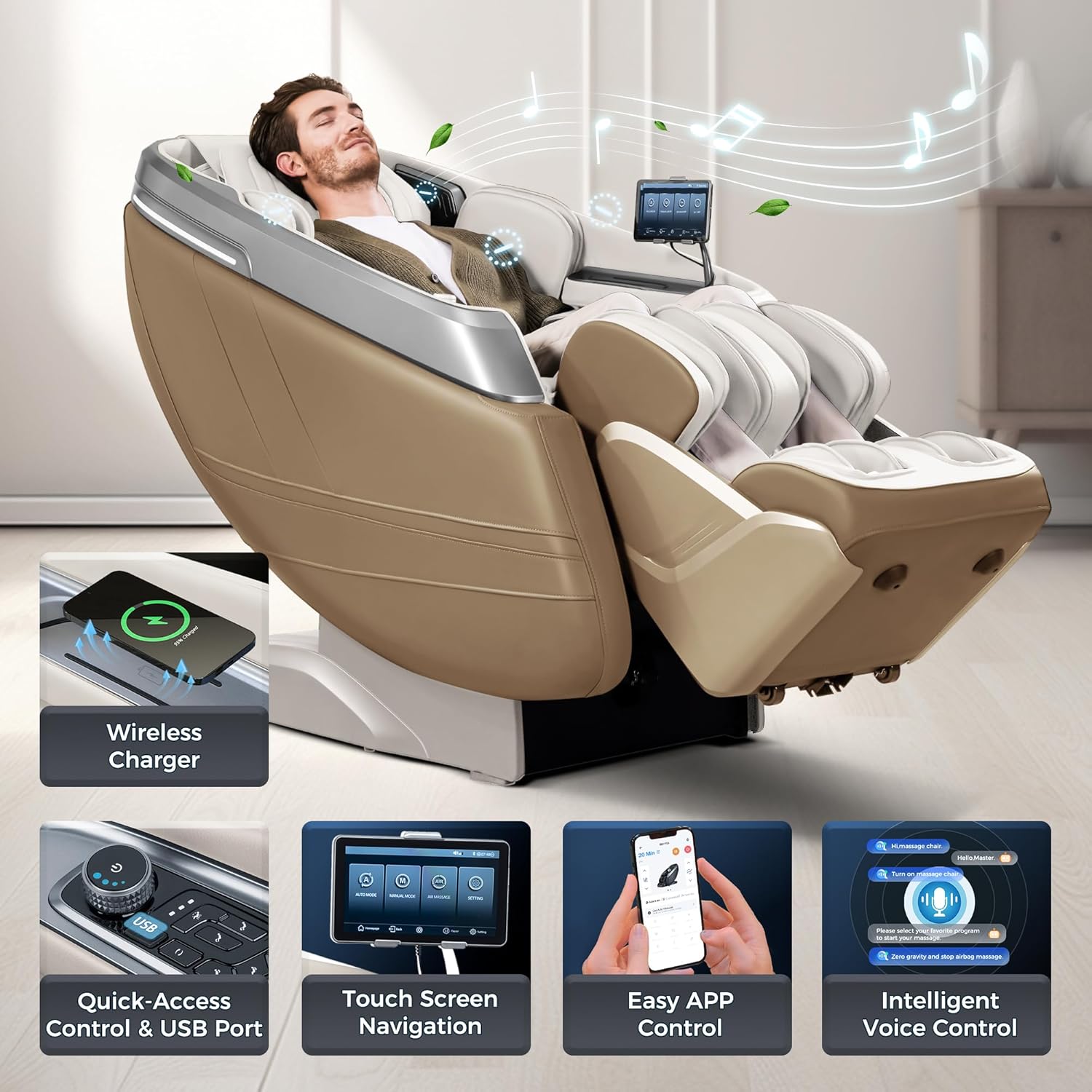
Figure 2: Multiple Control Methods
4.1.1 Touch Screen Navigation
The integrated touchscreen remote provides a comprehensive interface for all chair functions. From the main page, you can select Auto Mode, Manual Mode, Air Massage, or access Settings.
4.1.2 APP Control
Download the iBooMas app to control your massage chair directly from your smartphone. The app allows for activation, setting massage duration, selecting automatic modes, and customizing massage parameters.
Video: iBooMas IBM-P03 Massage Chair with APP Control. This video demonstrates how to control the massage chair using the dedicated smartphone application, including selecting massage modes and adjusting settings.
4.1.3 Intelligent Voice Control
Use voice commands for convenient hands-free operation. Simply speak commands to activate programs or adjust settings.
4.2 Massage Programs and Customization
The iBooMas P03 offers a wide array of pre-programmed massages and extensive customization options.
4.2.1 Automatic Modes
Choose from 24 automatic massage programs designed for various needs, such as Master, Relaxing, Deep Shiatsu, Refreshing, Wake Up, Noon Rest, Partial Focusing (Neck & Shoulder, Waist & Back, Slim, Sole Relieving, Spine Care, Calf Care), Body Care (Soft, Lumbar Care, Gentle Care, Sport Care, Golf, Deep Sleep, Lady Care), and Customization (Deep Stretch, Gentleman Care, Yoga, Space, Spa, TCM Recuperating).
4.2.2 Manual Techniques
Select from 6 manual massage techniques including Kneading, Clapping, Knocking, Tapping, Shiatsu, and Scraping. You can also adjust massage strength, width, and 4D massage depth.
Video: iBooMas IBM-P03 4D Massage Chair Full Body. This video highlights the 4D massage capabilities and full-body coverage of the chair's massage techniques.
4.3 Specialized Functions
4.3.1 Zero Gravity Recline
Experience weightlessness with 3 adjustable zero gravity positions, allowing your body to fully relax and reduce burden on the spine. The chair can recline up to 180°.

Figure 3: Zero Gravity Positions
Video: IBM-P03 shiatsu massage chair zero gravity full body. This video showcases the zero gravity recline feature and its benefits for full-body relaxation.
Video: iBooMas 4D Massage Chair Zero Gravity Full Body (P03). This video demonstrates the 4D massage and zero gravity features of the P03 massage chair.
Video: iBooMas IBM-P03 real relax zero gravity massage chair. This video provides a detailed look at the real zero gravity relaxation experience offered by the iBooMas IBM-P03.
4.3.2 Full Body Airbags & Heat
The chair features a dual-layer airbag system with 30 airbags covering shoulders, arms, waist, legs, feet, and ankles, providing alternating kneading pressure. Deep-penetrating heat is available in 3 areas (shoulder, waist, instep) with 3 gear settings.
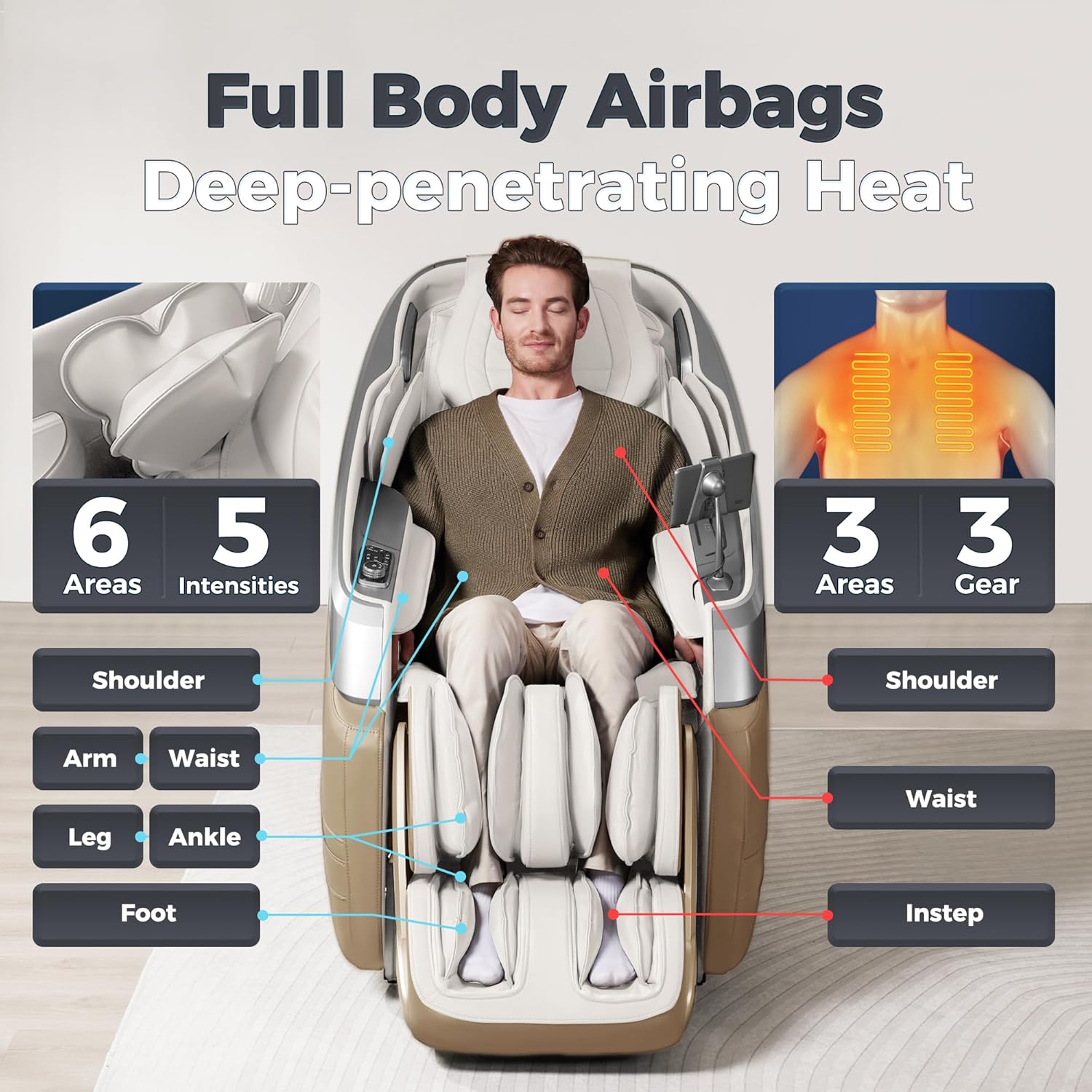
Figure 4: Full Body Airbags and Heat Zones
4.3.3 Leg & Foot Massage
Enjoy comprehensive leg and foot therapy with dual rollers and kneading massagers for calves, and a 3-section ergonomic foot massager that targets specific areas of the foot.
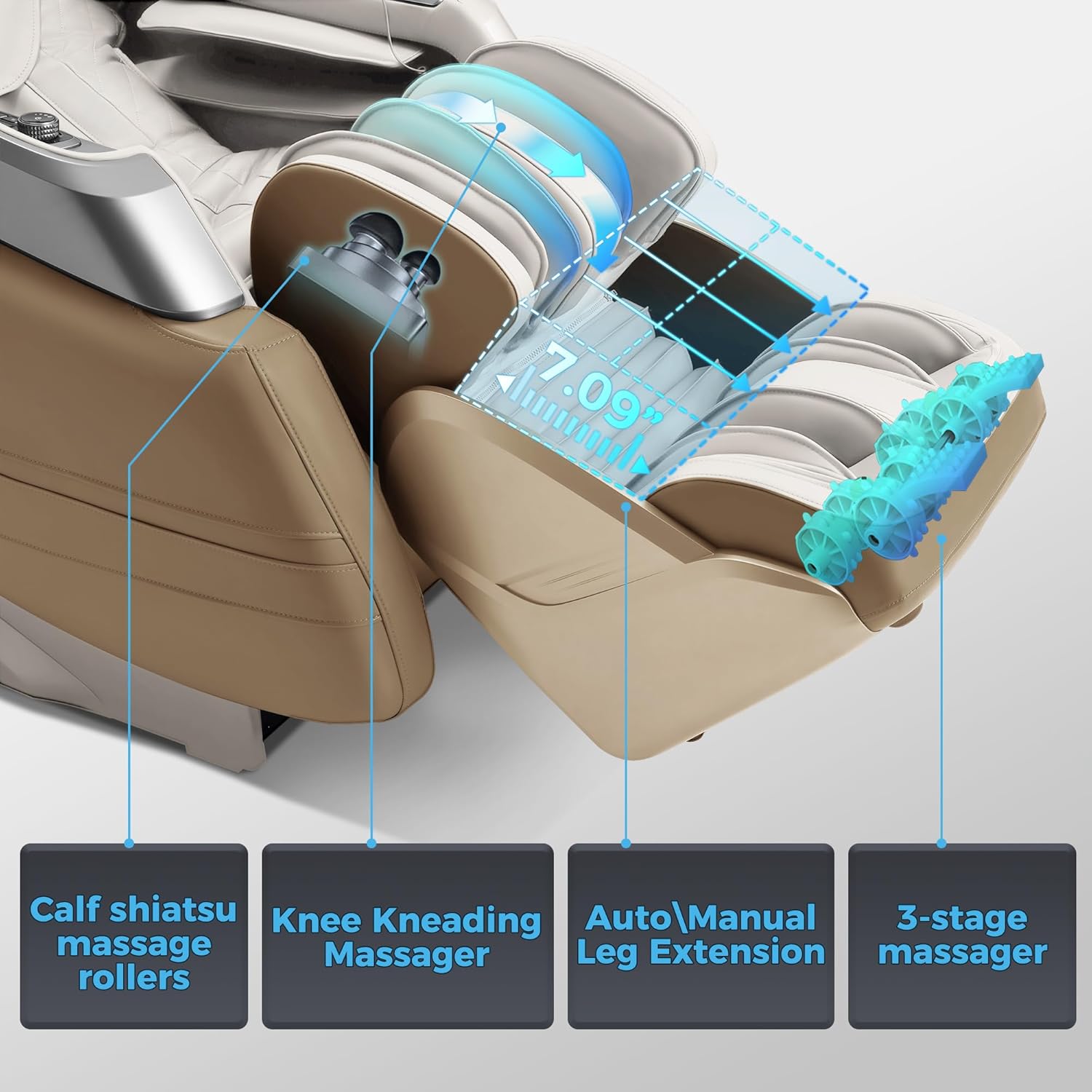
Figure 5: Advanced Leg & Foot Therapy
4.4 Additional Features
4.4.1 Wireless Charger
A built-in wireless charging pad allows you to conveniently charge your compatible smartphone while enjoying your massage.
4.4.2 Hi-Fi Bluetooth Speakers
Connect your device via Bluetooth to the integrated Hi-Fi speakers for an immersive audio experience during your massage.
4.4.3 Negative Ion Generator
The built-in negative ion generator helps to refresh the air in your space, enhancing your relaxation experience.
4.4.4 Mood Lighting
Adjustable mood lighting adds to the ambiance and relaxation of your massage session.
5. Maintenance
To ensure the longevity and optimal performance of your iBooMas P03 massage chair, follow these maintenance guidelines:
- Cleaning: For general cleaning, use a dry cloth. Avoid harsh chemicals or abrasive cleaners.
- Regular Inspection: Periodically check all connections and moving parts for any signs of wear or looseness.
- Storage: If storing for an extended period, unplug the chair and cover it to protect from dust and direct sunlight.
6. Troubleshooting
If you encounter any issues with your massage chair, please refer to the following basic troubleshooting steps:
- No Power: Ensure the power cord is securely plugged into both the chair and a working electrical outlet. Check the main power switch on the chair's base.
- Massage Not Starting: Verify that the chair is powered on and you have selected a massage program from the touchscreen or app.
- Unusual Noises: If you hear unusual noises, immediately stop the massage and unplug the chair. Contact customer support for assistance.
- App Connectivity Issues: Ensure your smartphone's Bluetooth is enabled and the chair is within range. Try restarting both the app and the chair.
For more complex issues or if troubleshooting steps do not resolve the problem, please contact iBooMas Customer Support.
7. Specifications
| Feature | Specification |
|---|---|
| Brand | iBooMas |
| Model Name | P03 Beige |
| Color | Beige |
| Product Dimensions | 60"D x 31"W x 46"H |
| Item Weight | 261 pounds |
| Maximum Weight Recommendation | 330 Pounds |
| Fill Material | Memory Foam |
| Reclining Position Count | 3 |
| Space Saving Design | 1.97 inches from wall |
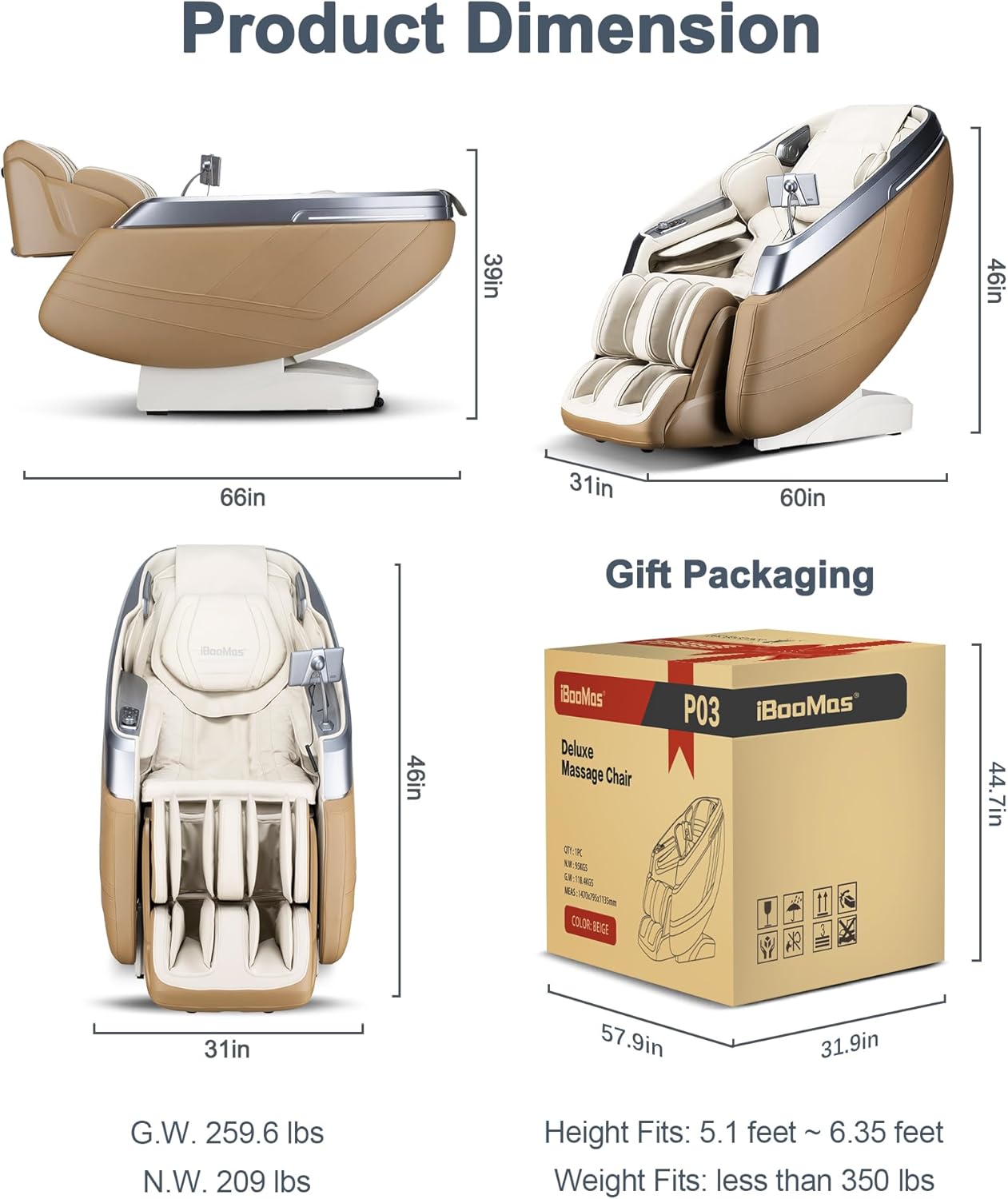
Figure 6: Product Dimensions and Weight
8. Important Safety Information
Please read and adhere to all safety warnings and instructions to prevent injury or damage to the product.
- Always follow the assembly instructions carefully.
- Do not exceed the maximum weight capacity of 330 pounds.
- Be aware of potential issues that the warranty covers.
- Keep children and pets away from the chair's moving parts.
- Do not use the chair if you have any medical conditions that may be aggravated by massage. Consult a physician before use if you have concerns.
9. Warranty and Support
Your iBooMas P03 massage chair comes with comprehensive protection plans and dedicated customer support.
9.1 Protection Plans
- 2-Year Protection Plan: Available for extended coverage.
- 3-Year Protection Plan: Available for extended coverage.
These plans cover potential issues and provide peace of mind for your investment.
9.2 Customer Support
iBooMas Wellness offers dedicated customer support for any inquiries or assistance you may need. Enjoy a 30-day easy return policy for your convenience.
For support, please refer to the contact information provided with your purchase or visit the official iBooMas website.

