
1. Introduction
This manual provides detailed instructions for the proper use and maintenance of your BOBLOV KJ25 Body Camera. Please read this manual thoroughly before operating the device to ensure optimal performance and longevity.
Package Contents: What's in the Box
- 1 x BOBLOV KJ25 Body Camera
- 1 x Short 360° Back Clip
- 1 x Long 180° Shoulder Clip
- 1 x Charging Plug
- 1 x USB Cable
- 1 x User Manual (this document)
- 1 x 128GB Micro SD Card (pre-installed or included separately)

Image: The BOBLOV KJ25 Body Camera and its included accessories.
2. Product Overview
The BOBLOV KJ25 is a compact and versatile body camera designed for various recording needs. It features a durable casing, a clear display, and intuitive controls.
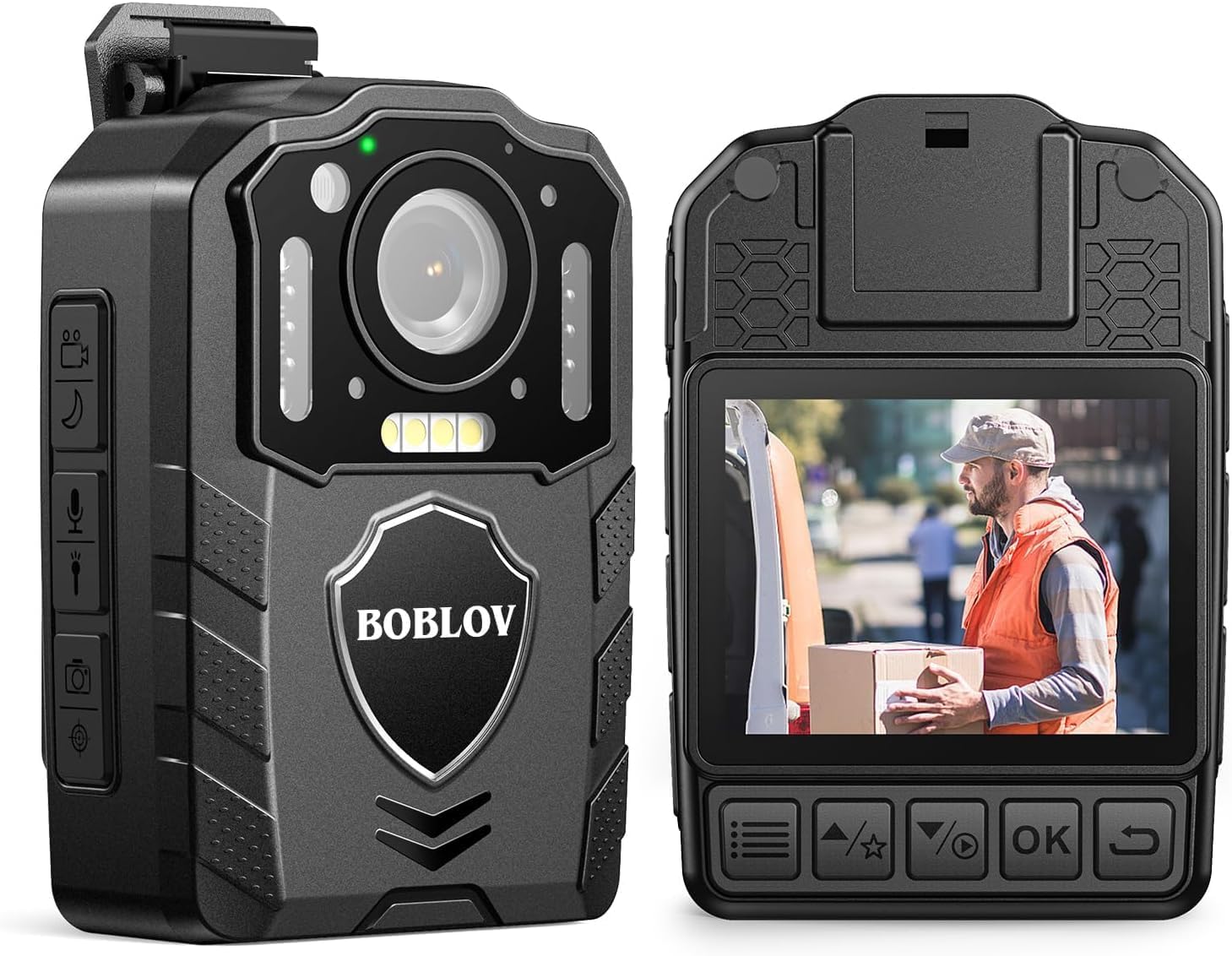
Image: Front and rear views of the BOBLOV KJ25 Body Camera, highlighting its design and interface.
Key Features:
- Video Resolution: 1080P at 30fps for clear footage.
- Photo Resolution: Up to 48 Megapixels.
- Battery Life: Built-in 3000mAh battery provides up to 13 hours of continuous recording.
- Night Vision: Equipped with 10 IR lights for clear recording in low-light conditions.
- External Memory: Supports Micro SD cards from 64GB to 512GB (128GB card included).
- Loop Recording: Automatically overwrites oldest files when storage is full.
- Pre/Post-recording: Captures events before and after the main recording trigger.
- Red Laser: For quick aiming and location identification.
- White Filling Lights: Provides additional illumination when needed.
- Wearable Design: Easily attaches to clothing using included clips.
3. Setup
3.1 Charging the Battery
Before first use, fully charge the camera's internal 3000mAh battery. Connect the camera to the charging plug using the provided USB cable. The charging indicator light will show the charging status. A full charge typically takes approximately 5 hours.

Image: The BOBLOV KJ25 Body Camera being charged, illustrating its size and battery specifications.
3.2 Inserting the Micro SD Card
The BOBLOV KJ25 supports Micro SD cards from 64GB to 512GB. A 128GB card is included. Locate the Micro SD card slot on the side of the camera. Gently insert the card with the gold contacts facing down until it clicks into place. To remove, push the card in slightly until it springs out.

Image: Inserting a Micro SD card into the camera's dedicated slot.
3.3 Attaching the Clips
The camera comes with a short 360° back clip and a long 180° shoulder clip. Choose the appropriate clip for your intended use. Attach the clip to the camera's mounting point and secure it. The clips allow for hands-free operation by attaching the camera to your uniform, belt, or backpack strap.

Image: The BOBLOV KJ25 Body Camera worn on a uniform, illustrating its hands-free application.
4. Operating Instructions
4.1 Power On/Off
- To Power On: Press and hold the Power button until the screen illuminates.
- To Power Off: Press and hold the Power button until the device shuts down.
4.2 Video Recording
The camera records video in 1080P resolution at 30 frames per second, ensuring clear and detailed footage.
- Start Recording: In standby mode, press the Video Record button once to begin recording.
- Stop Recording: Press the Video Record button again to stop and save the current video file.

Image: Visual comparison highlighting the clear 1080P video quality of the camera.
Video: An official product video demonstrating the BOBLOV KJ25 Body Camera's 1080P video recording capabilities and features.
4.3 Taking Photos
Capture high-resolution still images up to 48MP.
- Take Photo: In standby mode, press the Photo button once to capture an image.

Image: The camera's 48MP photo and 1080P video resolution in a practical setting.
4.4 Night Vision
The KJ25 features automatic and manual night vision capabilities, utilizing 10 IR lights to ensure clear recordings in dark environments.
- Activate Night Vision: Refer to the camera's on-screen menu or dedicated button for night vision activation. It can be set to automatic or manual mode.

Image: Demonstration of the camera's auto/manual night vision feature in a dark setting.
4.5 Loop Recording
When enabled, loop recording allows the camera to continuously record by overwriting the oldest files when the memory card is full. This ensures that you always have the most recent footage.
- Setting Loop Recording: Access the camera's settings menu to adjust loop recording duration (e.g., 3, 5, 10, 15, 20, 30 minutes) or to enable/disable the feature. The default setting is typically 10 minutes.

Image: Explanation of loop recording functionality and customizable video segment lengths.
4.6 Red Laser Quick Locate
The integrated red laser assists in quickly identifying the camera's aiming point, useful for precise recording.
- Activate Laser: Refer to the camera's controls for the dedicated laser activation button.

Image: The red laser quick locate feature in use by an officer.
4.7 White Filling Lights
For additional illumination in dark areas, the camera includes white filling lights.
- Activate White Lights: Refer to the camera's controls for the dedicated white light activation button.

Image: The white filling lights feature providing illumination for a delivery person.
4.8 Playback
Review recorded videos and photos directly on the camera's screen or by connecting it to a computer.
- On-Camera Playback: Use the navigation buttons to access the playback menu and select files.
- Computer Playback: Connect the camera to a computer using the USB cable. The camera will appear as a removable disk, allowing you to access and transfer files.
5. Maintenance
5.1 Cleaning
- Use a soft, dry cloth to clean the camera body.
- For the lens, use a specialized lens cleaning cloth and solution to avoid scratches.
- Do not use harsh chemicals or abrasive cleaners.
5.2 Storage
- Store the camera in a cool, dry place away from direct sunlight and extreme temperatures.
- Ensure the battery is partially charged (around 50%) before long-term storage to preserve battery health.
6. Troubleshooting
Common Issues and Solutions:
- Camera not turning on: Ensure the battery is charged. Connect to a power source and try again.
- Recording issues (e.g., freezing, errors): Check if the Micro SD card is properly inserted and has sufficient free space. Format the SD card if issues persist (this will erase all data).
- Poor video/photo quality: Ensure the lens is clean and free from smudges. Check lighting conditions; use night vision or white lights if necessary.
- Computer not recognizing camera: Try a different USB port or cable. Ensure the camera is powered on when connected.
7. Specifications
| Feature | Detail |
|---|---|
| Brand | BOBLOV |
| Model Number | KJ25 |
| Video Capture Resolution | 1080p |
| Effective Still Resolution | 48 MP |
| Photo Sensor Technology | CMOS |
| Flash Memory Type | Micro SD (Supports 64GB to 512GB) |
| Flash Memory Installed Size | 128 GB (Included) |
| Video Capture Format | MOV |
| Supported Audio Format | MP3 |
| Screen Size | 2 Inches |
| Connectivity Technology | USB |
| Color | Black |
| Features | Night Vision, Red Laser, White Filling Lights, Loop Recording |
| Water Resistance Level | Not Water Resistant |
| Image Stabilization | No |
| Form Factor | Compact |
| Operating System Compatibility | Windows |
| Item Dimensions (D x W x H) | 2.1"D x 1.1"W x 2.9"H |
| Number of Batteries | 1 Lithium Polymer (Included) |
| Lens Type | Wide Angle |
| Focus Type | Manual Focus |
| Display Resolution Maximum | 240×320 Pixels |
| Shooting Modes | Night |
| Image Aspect Ratio | 16:9 |
| Supported Image Format | JPG |
| Exposure Control Type | Manual |
| Compatible Devices | Smartphone (for data transfer) |
8. Warranty & Support
8.1 Warranty Information
The BOBLOV KJ25 Body Camera comes with a 2-year warranty from the date of purchase. This warranty covers manufacturing defects and ensures reliable operation under normal use. Please retain your proof of purchase for warranty claims.
8.2 Customer Support
For further assistance, technical support, or warranty inquiries, please refer to the official BOBLOV website or contact their customer service directly. You can find more information and support resources on the BOBLOV Store on Amazon.


