
1. Introduction and Overview
Thank you for choosing the Healthkeep Smart Connected Body Composition Scale, Model FG2211LB. This advanced scale is designed to provide a comprehensive analysis of your body composition using 8 electrodes and dual-frequency Bioelectrical Impedance Analysis (BIA) technology. It measures 21 different body metrics and integrates seamlessly with the Fitdays app for detailed tracking and insights.
The scale features a large, stable tempered glass surface and an auto-retractable handle for precise measurements. It supports up to 24 user profiles, making it ideal for family use, and offers a voice announcement function for convenience.
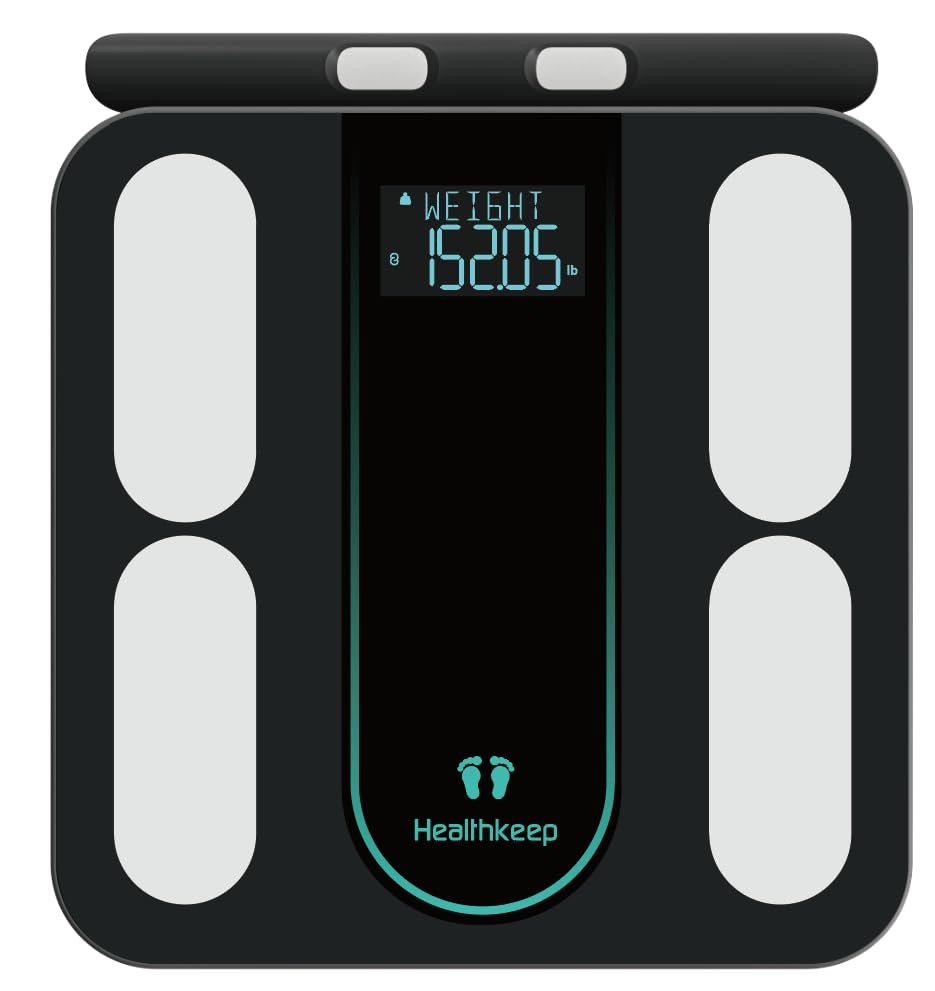
Image: Top-down view of the Healthkeep Smart Connected Body Composition Scale, displaying weight and the brand logo.
2. Safety Information
- Individuals with pacemakers or other implanted medical devices should not use this scale due to the electrical impulses used for BIA measurement.
- Pregnant women should consult their doctor before using this scale, as BIA measurements may not be accurate or recommended.
- Do not use the scale on wet or slippery surfaces. Ensure the scale is placed on a hard, flat surface for accurate readings.
- The maximum weight capacity for this scale is 180 kg (400 lb / 28 st). Do not exceed this limit.
- Keep the scale away from extreme temperatures, direct sunlight, and high humidity.
- This scale is intended for household use only and should not be used for medical diagnosis or treatment.
3. Package Contents
Please check the package to ensure all components are present:
- 1 x Healthkeep Smart Connected Body Composition Scale with 8 Electrodes
- 4 x AAA Batteries
- 1 x Multilingual User Manual
4. Setup
4.1. Battery Installation
- Open the battery compartment on the underside of the scale.
- Insert the 4 AAA batteries, ensuring correct polarity (+/-).
- Close the battery compartment securely.
4.2. App Download and Installation
The Healthkeep scale works with the Fitdays app, available for both Android and iOS devices.
- Scan the QR code in the included manual or search for "Fitdays" in the Apple App Store or Google Play Store.
- Download and install the app on your smartphone or tablet.

Image: The Fitdays app can sync with various fitness applications and smartwatches.
4.3. Initial Pairing and User Profile Creation
- Enable Bluetooth on your smartphone.
- Open the Fitdays app and follow the on-screen instructions to create your user profile (gender, age, height, activity level).
- Step onto the scale briefly to turn it on and activate Bluetooth. The app should automatically detect and pair with the scale.
- Once paired, the app will guide you through your first measurement.
5. Operating Instructions
5.1. Taking a Measurement
- Place the scale on a hard, flat surface.
- Ensure your feet are clean and dry. Step onto the scale barefoot.
- Pull out the retractable handle and hold it firmly with both hands. Ensure your hands are in contact with the electrodes on the handle.
- Stand still until the measurement is complete. The scale will display your weight, body fat, and BMI directly on its screen.
- The voice announcement function will confirm the completion of the measurement and may provide posture guidance.

Image: The scale's display shows Weight, Body Fat, and BMI directly after measurement.
5.2. Understanding 8-Electrode and Dual-Frequency BIA
The Healthkeep scale utilizes 8 electrodes (4 on the platform, 4 on the retractable handle) and dual-frequency BIA technology for enhanced accuracy. This method measures bioelectrical impedance across different body segments (arms, legs, trunk) and at both low and high frequencies.
- Low Frequency (25kHz): Primarily measures extracellular fluid, including blood and interstitial fluid.
- High Frequency (100kHz): Measures intracellular fluid, including muscle, fat, bone, and organs.
This comprehensive approach provides a more precise and detailed body composition analysis compared to traditional 4-electrode scales.

Image: Dual-Frequency BIA Measurement for Enhanced Accuracy, showing how different frequencies measure intra- and extracellular fluids.
5.3. Unit Switching
The scale supports switching between kilograms (kg), pounds (lb), and stones (st). This setting can typically be adjusted within the Fitdays app or via a button on the underside of the scale, if available.
6. App Integration and Features
The Fitdays app is your central hub for all body composition data and tracking.
6.1. Comprehensive Body Metrics
The app provides a detailed analysis of 21 body metrics, including:
- Weight, BMI, Body Fat, Fat-free Body Weight
- Muscle Mass, Muscle Rate, Skeletal Muscle, Bone Mass, Protein Mass
- Protein, Water Weight, Body Water, Subcutaneous Fat, Visceral Fat
- BMR (Basal Metabolic Rate), Body Age, WHR (Waist-to-Hip Ratio), Ideal Body Weight
- Obesity Level, Body Type

Image: The Fitdays app provides 21 comprehensive health metrics for a complete body composition picture.
6.2. Progress Tracking and Synchronization
The Fitdays app records every measurement and generates weekly, monthly, and yearly graphs, allowing you to monitor your progress over time. You can easily access this data anytime, anywhere, by opening the app on your phone.
The app also supports synchronization with popular fitness applications such as Apple Health, Google Fit, and Fitbit, consolidating your health data in one place.

Image: Track Your Progress with detailed graphs and comparisons within the Fitdays app.
6.3. Multi-User Support and Sharing
The Healthkeep scale and Fitdays app can accommodate up to 24 user profiles, making it suitable for families or fitness groups. Each user's data is stored separately within their profile.
You can also share your progress and data with loved ones or on social media platforms directly from the Fitdays app to stay motivated together.

Image: The Fitdays app supports up to 24 user profiles and allows sharing on social media.
7. Maintenance
- Cleaning: Wipe the scale surface with a slightly damp cloth. Do not use abrasive cleaners or immerse the scale in water.
- Storage: Store the scale in a cool, dry place. Avoid placing heavy objects on the scale when not in use.
- Battery Replacement: When the battery indicator appears on the display or in the app, replace all 4 AAA batteries with new ones.
- Retractable Handle: Ensure the retractable data cable for the handle is not obstructed and retracts smoothly. Avoid forcing it.
8. Troubleshooting
- Scale Not Turning On: Check if the batteries are correctly installed and not depleted. Replace batteries if necessary.
- Inaccurate Readings: Ensure the scale is on a hard, flat surface. Avoid carpets or uneven floors. Make sure your feet are clean and dry, and you are standing still. Ensure the handle electrodes are properly gripped.
- App Not Connecting: Ensure Bluetooth is enabled on your smartphone and the Fitdays app is open. Try restarting both the scale (by removing and reinserting batteries) and the app.
- No Body Composition Data (Only Weight): Ensure you are stepping on the scale barefoot and holding the retractable handle with both hands, making full contact with all 8 electrodes. The app must be open and connected during the measurement.
- Error Messages: Refer to the Fitdays app for specific error code explanations or consult the manufacturer's support.
- Retractable Cable Issues: If the retractable cable for the handle does not retract properly, do not force it. Contact customer support for assistance.
9. Specifications
| Model Number | FG2211LB |
| Dimensions (L x W x H) | 33 x 30 x 3.2 cm (13 x 11.8 x 1.26 inches) |
| Weight Capacity | 180 kg / 400 lb / 28 st |
| Measurement Precision | 50 g / 0.1 lb |
| Electrodes | 8 (4 on platform, 4 on handle) |
| Measurement Technology | Dual-Frequency BIA |
| Display Type | Digital LCD |
| Material | Tempered Glass, PVC |
| Power Source | 4 x AAA Batteries |
| App Compatibility | Fitdays (Android & iOS) |

Image: Detailed dimensions and key features like durable tempered glass and auto-retractable handle.
10. Warranty and Support
Healthkeep products are manufactured to high-quality standards. For information regarding warranty coverage, please refer to the warranty card included in your package or visit the official Healthkeep website.
For technical support, troubleshooting assistance, or any questions regarding your Healthkeep Smart Connected Body Composition Scale, please contact Healthkeep customer service through the contact information provided in your product documentation or on the official Healthkeep website.


