
Introduction
Thank you for choosing the AODK 61-inch L-Shaped Desk. This manual provides detailed instructions for the assembly, operation, and maintenance of your new desk. Please read this manual thoroughly before assembly and use to ensure proper function and longevity of the product.
Safety Information
- Ensure all parts are present and undamaged before assembly.
- Follow assembly instructions carefully to prevent injury or damage to the product.
- Do not overtighten screws during assembly.
- Place the desk on a level surface to ensure stability.
- Do not exceed the weight capacity of the desk or shelves.
- Keep liquids away from the power outlet and LED light strip to prevent electrical hazards.
Package Contents
Before beginning assembly, verify that all components listed in the packing list (usually found in the product box) are present. All necessary assembly tools are included with the product.
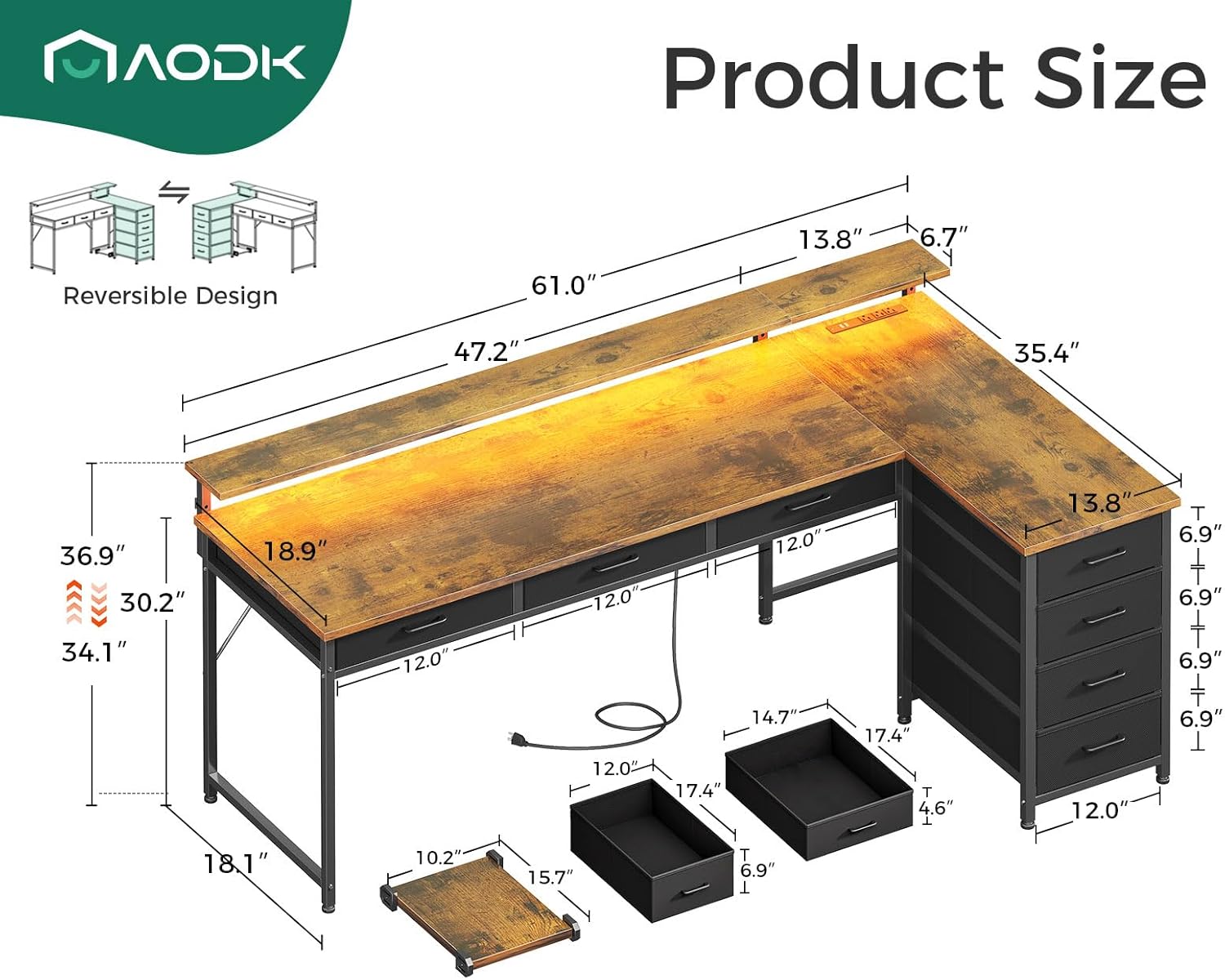
Image: A detailed diagram illustrating the dimensions of the AODK L-Shaped Desk, including overall length, width, height, and specific measurements for the monitor shelf, desk sections, and drawer units.
Setup and Assembly
The AODK L-Shaped Desk features a reversible design, allowing you to configure the longer section on either the left or right side to best suit your space. Follow the step-by-step instructions provided in the separate assembly guide included in your package. Ensure all connections are secure before use.
Key Assembly Features:
- Reversible Design: The desk can be assembled with the longer section on either the left or right side.
- Sturdy Construction: Features a strong steel frame for durability and stability.
- Adjustable Leg Pads: Steel legs are equipped with adjustable leg pads to maintain stability on uneven floors.

Image: An overhead view of the fully assembled AODK L-Shaped Desk, showcasing its spacious layout, integrated LED lighting, and multiple storage drawers. The image also highlights the reversible design and movable CPU stand.
Operating Instructions
1. Power Outlet and USB Charging Ports
The desk includes a built-in power strip with 3 AC outlets (125V/12A) and 2 USB ports (5V/2A). To use, simply plug the desk's power cord into a wall outlet. You can then connect your laptops, smartphones, tablets, and other devices directly to the integrated power strip for convenient charging.
2. LED Light Strip
The gaming desk is equipped with an LED light strip offering 10 colors and 10 lighting modes. Use the inline controller to adjust brightness and color settings. This feature enhances your workspace ambiance and can reduce eye strain during extended use.

Image: The AODK L-Shaped Desk illuminated by its integrated RGB LED light strip, showcasing a range of vibrant colors and lighting effects that enhance the workspace ambiance.
3. Adjustable Monitor Stand and Movable CPU Stand
The monitor stand can be adjusted to 3 different height modes (3.9", 5.2", 6.6") to accommodate various monitor sizes and user sitting positions. Adjust the stand to an ergonomic height to promote better posture and reduce neck and eye strain. The movable CPU stand on wheels protects your computer tower from moisture and dust and allows for flexible placement.

Image: A composite image demonstrating three key features of the AODK desk: the adjustable monitor shelf with height options, the movable CPU stand on wheels, and the recessed power outlet with AC and USB ports.
4. Storage Drawers
The desk includes 7 file drawers (3 under-desk fabric drawers and 4 fabric dresser drawers) for organizing office supplies, documents, and personal items. Utilize these drawers to maintain a tidy and organized workspace.

Image: A view of the AODK desk highlighting the three fabric drawers located directly under the main desk surface, shown partially open and filled with office supplies, demonstrating their convenient storage.

Image: A close-up image of the four-tier fabric dresser unit integrated into the L-shaped desk, with drawers partially open to display various items, emphasizing the ample storage capacity.
Maintenance
- Cleaning: The desk board is waterproof and dust-resistant. Wipe surfaces with a soft, damp cloth. Avoid harsh chemicals that may damage the finish.
- Hardware: Periodically check all screws and fasteners to ensure they remain tight. Retighten as necessary to maintain stability.
- LED Lights: If the LED strip malfunctions, check the power connection. Do not attempt to repair the LED strip yourself; contact customer support.
Troubleshooting
- Desk Wobbles: Ensure all screws are tightened. Adjust the leg pads on the bottom of the steel legs to stabilize the desk on uneven floors.
- LED Lights Not Working: Check if the power cord for the LED strip is securely plugged into the power outlet and the strip itself. Verify the power outlet is functional.
- Power Outlets Not Working: Ensure the desk's main power cord is securely plugged into a functional wall outlet. Check if the wall outlet itself is receiving power.
- Drawers Stick: Ensure drawers are not overloaded. Check for any obstructions in the drawer slides.
Specifications
| Feature | Detail |
|---|---|
| Brand | AODK |
| Model Number | B02022001007UUKHADDC56447 |
| Product Dimensions (D x W x H) | 35.4"D x 61"W x 37"H |
| Color | Vintage |
| Base Material | Alloy Steel |
| Top Material Type | Engineered Wood |
| Special Features | Reversible, LED Light, Power Outlet, Adjustable Monitor Stand, Movable CPU Stand |
| Number of Drawers | 7 (Multi-drawer, File Drawer) |
| Power Outlet | 3 AC Outlets (125V/12A), 2 USB Ports (5V/2A) |
| LED Light | 10 Colors, 10 Lighting Modes |
| Monitor Stand Height Adjustment | 3 positions (3.9", 5.2", 6.6") |
| Item Weight | 54.7 Pounds |
| Assembly Required | Yes (Tools Included) |
Warranty Information
This product comes with a Limited Warranty. For specific details regarding warranty coverage, terms, and conditions, please refer to the warranty card included with your product packaging or visit the official AODK website. Keep your proof of purchase for warranty claims.
Customer Support
If you have any questions, require assistance with assembly, or encounter any issues with your AODK L-Shaped Desk, please contact AODK customer support. Refer to the contact information provided in your product packaging or on the official AODK website for the most up-to-date support channels.
You can often find support resources and FAQs on the AODK Brand Store on Amazon.
